


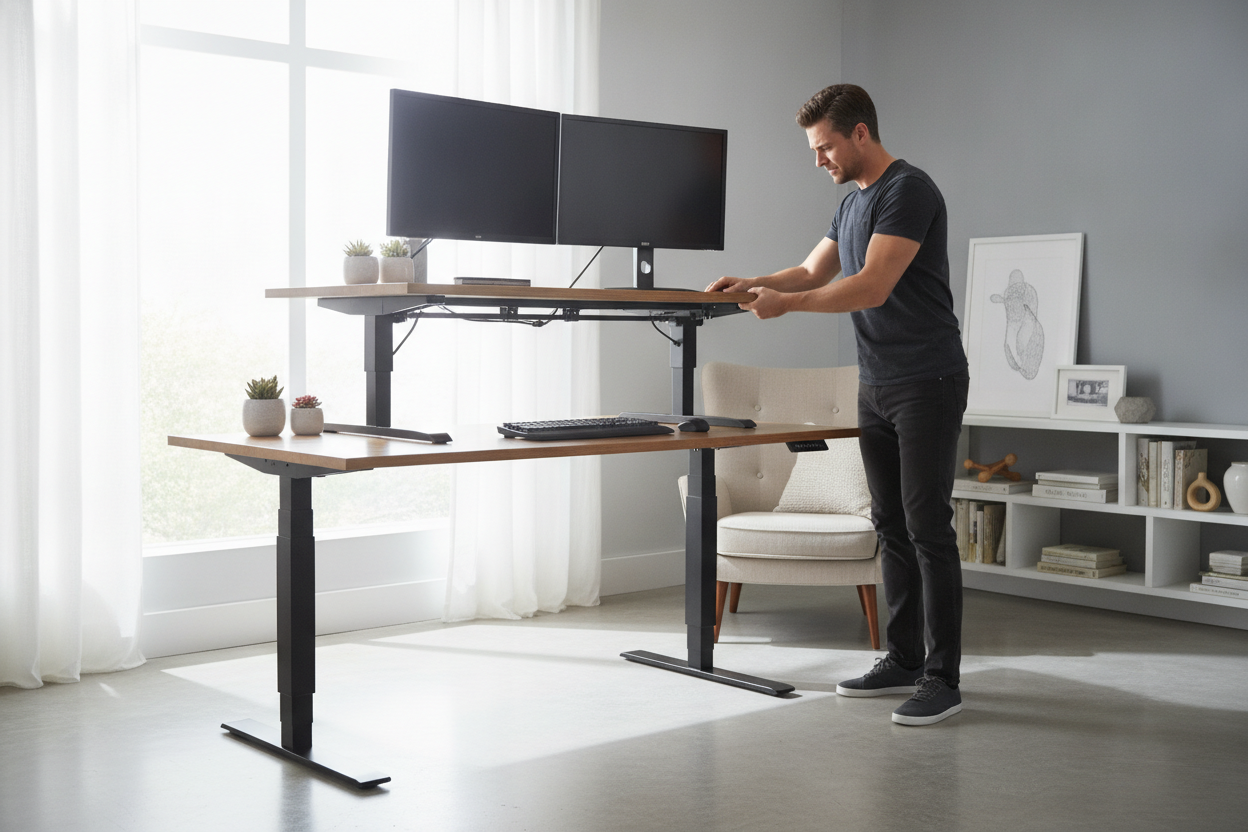
I was fifteen minutes into a high-stakes Zoom presentation when the lower back tightness started. I decided to transition to standing to keep my energy up, reached for the handles of my standing desk riser, and pulled. Nothing happened. I pulled harder, my face turning a vibrant shade of beet-red in front of twelve colleagues, until the entire unit finally jerked upward, nearly sending my coffee flying across the room.
The marketing photos for stand up desk risers always show a smiling person effortlessly gliding their workspace upward with one hand. They don't show the reality of a 5-foot-4 person trying to generate enough vertical leverage to lift 40 pounds of hardware from a seated position. It’s not just a furniture choice; it’s an accidental CrossFit workout.
Quick Takeaways
- Check the lift-assist capacity, not just the static weight limit.
- Dual monitor setups often exceed the tension strength of cheap spring-loaded risers.
- Pneumatic or gas-spring cylinders are non-negotiable for anyone without serious upper-body strength.
- If your gear weighs more than 35 lbs, a manual desktop riser for standing is probably a mistake.
The Day I Realized I Couldn't Lift My Own Workspace
I thought I was being smart. Instead of replacing my favorite standard writing computer desk, I bought a massive steel converter to sit on top of it. I figured the mechanics of the standing desktop riser would do all the heavy lifting. I was wrong.
The physics of these things are tricky. When you are sitting down, your arms are at a mechanical disadvantage. You aren't using your legs or your core; you’re using your biceps and shoulders to yank a heavy adjustable desk riser toward your face. If you have two monitors and a heavy keyboard tray, that 'easy-lift' mechanism is suddenly fighting against gravity and your own awkward posture.
I spent three months avoiding the 'stand' part of my sit-stand desk riser because I dreaded the physical struggle of the transition. That’s the opposite of ergonomic. If it's hard to move, you won't move it. You'll just stay seated, staring at the expensive desk lifter that has become a permanent, bulky monument to your failed health goals.
The Hidden Math Behind Manual Desk Lifters
Most people buy a desk stand riser based on the surface area. You want enough room for your mouse and your oversized desk mat. But the real number you need to hunt for in the spec sheet is the 'spring tension' or 'lift capacity.' There is a massive difference between a riser that can *hold* 50 pounds and one that can help you *lift* 50 pounds.
Cheap sit/stand desktop risers use simple coil springs. These are often 'one size fits all,' meaning they are tuned for a medium-weight load. If your setup is too light, the adjustable desktop riser will fly up and hit you in the chin. If it's too heavy—which is the case for 90% of us with dual monitors—the springs won't provide enough counter-tension. You end up doing a deadlift with your wrists.
You also have to consider the 'starting height.' Some standing desk risers sit three or four inches above your desk even at their lowest setting. This ruins your typing ergonomics while sitting, forcing your shoulders into a permanent shrug. It’s a cascading failure of comfort all because of a few poorly calculated inches.
Dual Monitors Weigh Way More Than You Think
We tend to think of modern tech as light, but a computer riser for standing has to deal with the cumulative weight of everything you own. A standard 27-inch monitor weighs about 12 pounds. Two of those, plus a dual-monitor mount (another 8-10 pounds), and you're already at 34 pounds. Add a heavy mechanical keyboard and your leaning forearms, and you've exceeded the lift-assist of almost every table top desk riser under $200.
When you hit that weight ceiling, the raising desktop mechanism becomes a liability. I’ve seen people strain their rotator cuffs trying to force a stuck stand desk riser into the locked position. If you can't lift it with two fingers, the payload is too high.
Why Pneumatic and Hydraulic Assist Are Mandatory
If you are committed to a stand steady desk riser, do not settle for basic springs. You need a pneumatic desk riser or one with a high-quality gas-spring cylinder. These work like the struts on a car's trunk—they provide a smooth, consistent assist throughout the entire range of motion.
I eventually realized that while a heavy-duty converter is a beast to move, a high-quality standing computer stand for desk is still a better solution than drilling holes into a vintage table or buying a whole new desk. The gas-spring versions allow for infinite height adjustment, rather than the 5 or 6 preset 'notches' found on cheaper desktop standing riser models.
When to Cut Your Losses and Go Electric
There comes a point where a tabletop desk riser just isn't the right tool. If you find yourself needing a raise desk stand that supports three monitors, a laptop, and a heavy microphone arm, you are asking too much of a manual converter. The footprint alone will take up your entire desk, leaving you with zero room for a notebook or a cup of coffee.
At this stage, I usually tell my friends to stop looking at a sit-stand riser and just buy an electric sit stand up desk. A motorized frame handles the weight of your entire life with the push of a button. It eliminates the physical barrier to standing. If the transition is effortless, you’ll actually do it five times a day like the experts suggest.
Desktop sit stand riser units are great for renters or people with built-in cabinetry, but they are a compromise. Don't let that compromise result in a trip to the physical therapist because you tried to manhandle a pneumatic desk riser that wasn't rated for your gear.
How to Avoid Buying a Sit-Stand Trap
Before you hit 'buy' on that standing desk riser adjustable, do a weight audit. Weigh your monitors. Weigh your monitor arm. If the total is within 5 pounds of the riser’s max capacity, keep looking. You want a buffer so the lift-assist actually feels like an assist, not a struggle.
Look for a sit to stand computer riser with a recessed keyboard tray. This keeps your wrists at a neutral angle when you're in sitting mode. And please, check the footprint. A standing riser for desk use can be surprisingly deep; if your desk is only 24 inches deep, a 22-inch riser will leave you staring at your monitors from two inches away.
If you're just a laptop user, don't buy a 40-pound steel monster. A simple desk with laptop stand is often all you need to get the height you want without the bulk. Keep it light, keep it simple, and make sure you can actually lift the thing before you're halfway through a meeting.
FAQ
Do I need a special desk for a standing riser?
Not necessarily, but you need a sturdy one. A standing riser desk adds significant weight to the center of your table. If you have a cheap honeycomb-core desk, it might bow or sag under the concentrated weight of a heavy metal converter.
Are manual risers better than electric ones?
Manual ones are faster—you can 'zip' them up in two seconds. Electric ones are slower but can handle much heavier loads without you breaking a sweat. For most people with two monitors, electric is the safer bet for your back.
Will a riser wobble when I type?
Most tabletop desk riser models have some 'bounce' when fully extended. To minimize this, look for a model with a heavy base and a Z-shaped frame rather than an X-shaped frame. The Z-frame tends to be more stable at max height.


Laisser un commentaire
Ce site est protégé par hCaptcha, et la Politique de confidentialité et les Conditions de service de hCaptcha s’appliquent.