


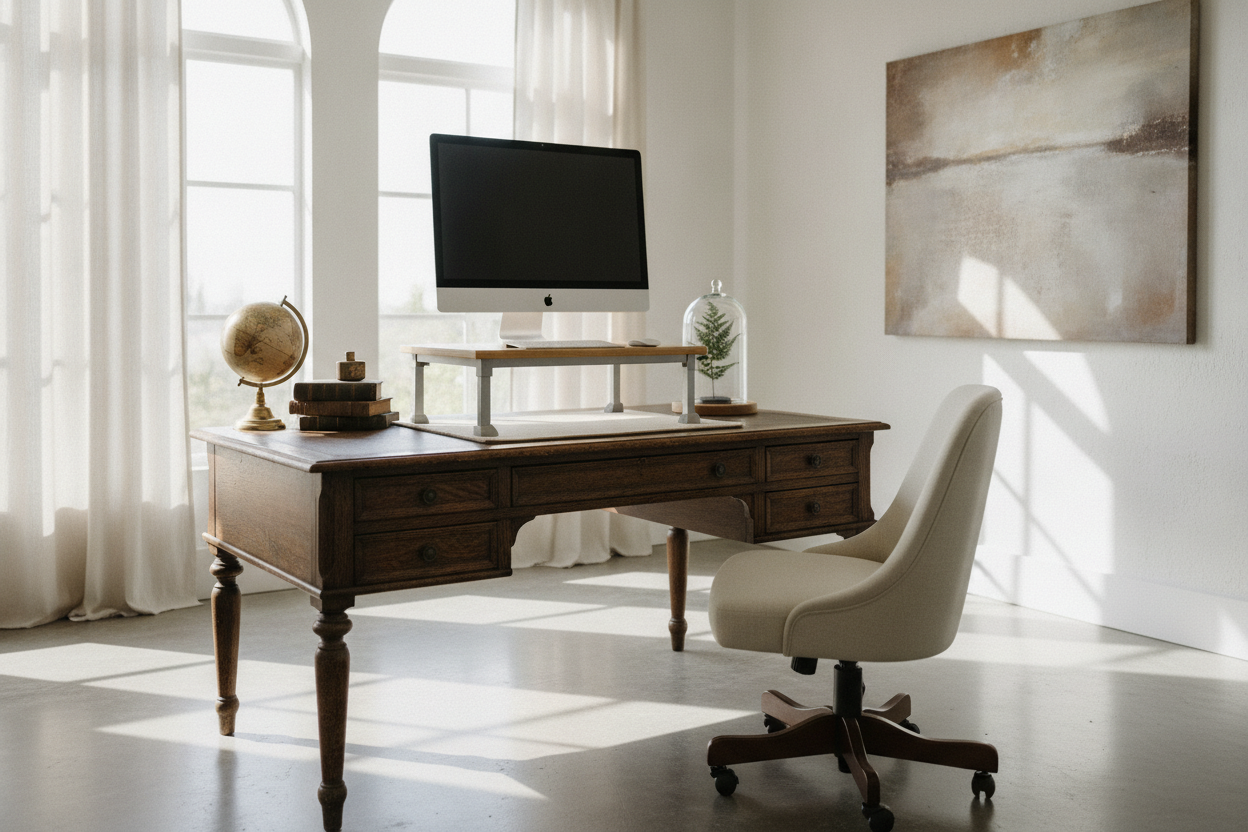
I spent three months scouring every estate sale in the tri-state area before I found it: a 1920s oak library table with legs so perfectly turned they belonged in a museum. I hauled it home, polished the grain, and set up my dual monitors. By Thursday afternoon, my lower back felt like it had been through a car compactor. I was faced with a choice: sell the table I loved or continue paying my chiropractor for his third vacation home.
The problem is that vintage furniture was never designed for the 40-hour digital grind. These tables are often too low, lacking any ergonomic consideration for someone staring at a screen. I needed a standing computer stand for desk setup that wouldn't make my office look like a sterile corporate cubicle.
Quick Takeaways
- Keep your heirloom furniture by using a converter instead of replacing the whole desk.
- Always add adhesive felt pads to the base to prevent scratching old wood finishes.
- Look for gas-spring mechanisms to avoid the 'clunky' manual adjustment struggle.
- Matte black or bamboo finishes blend better with vintage decor than shiny plastic.
- A converter saves roughly $400-$600 compared to a high-end motorized standing desk.
The Heartbreak of the Beautiful, Uncomfortable Desk
We’ve all been there. You find that stunning solid wood piece at a flea market, envisioning yourself as a sophisticated writer from a bygone era. Then reality hits. Three hours into a Tuesday morning, you're hunched over like a gargoyle. My antique table is only 29 inches high—fine for writing a letter with a quill, maybe, but a total disaster for a 6-foot-tall person with a 27-inch iMac.
I tried the 'book stack' method for a week. It looked hideous and felt unstable. I realized that if I wanted to keep the soul of my home office, I had to find a way to bring the tech to my level without drilling holes into 100-year-old oak.
Why I Refused to Buy a Standard Motorized Frame
I looked at those sleek, motorized standing desks everyone on YouTube seems to have. They’re impressive, sure, but they have all the personality of a hospital waiting room. Putting a set of cold, white metal telescopic legs in a room filled with warm wood and velvet curtains felt like a design crime. I didn't want a 'workspace'—I wanted a room that felt like home.
A full replacement also felt wasteful. Why junk a perfectly good piece of craftsmanship just because it doesn't have a motor? I needed a middle ground that allowed for movement without sacrificing the aesthetic I'd spent years curated.
Enter the Standing Computer Stand for Desk
The solution was a desktop converter. This allows you to keep your existing surface while gaining the ability to move between sitting and standing. When I first started looking, I actually cheaped out on a stand for standing desk that was basically a folding metal tray. It wobbled every time I hit the 'enter' key. It was a mistake.
I eventually upgraded to a heavy-duty standing computer stand for desk with a gas-spring lift. You want something with a wide base. If the base is too narrow, the whole thing becomes top-heavy when extended, which is a recipe for a shattered monitor. Look for a model that offers at least 15 inches of vertical travel.
The 'Scratch Factor' (Protecting the Wood)
Antique wood is notoriously soft. Most modern stand up computer stand for desk models come with cheap rubber feet that can actually react with old lacquer and leave permanent rings. I learned this the hard way on a side table. Now, I buy a pack of heavy-duty adhesive felt pads and cover every single contact point on the bottom of the stand.
Also, watch the weight distribution. If you have a heavy monitor on one side, it can put uneven pressure on your table's top. I usually center the converter over the strongest part of the desk—typically right above where the legs meet the frame—to prevent any bowing or structural stress over time.
Finding One That Actually Looks Good
Most converters look like medical equipment. To avoid the 'clinic' vibe, skip the shiny grey plastics. I found that a matte black finish disappears into the shadows of a dark wood room, while a bamboo or wood-grain tier can actually complement the existing furniture. It’s about minimizing the visual footprint so the computer stand for standing up doesn't become the only thing you see when you walk into the room.
The Financial Bonus of Keeping Your Old Table
Let’s talk money. A decent solid-wood motorized desk will easily run you $800 to $1,200. A high-quality converter usually sits in the $150 to $250 range. By choosing a desktop solution, I kept my $50 estate sale find and spent the savings on a much better ergonomic chair. I actually found that I saved 500 by buying a laptop stand for standing at desk compared to the custom-built furniture route I was originally considering.
It’s a win-win. You get the health benefits of standing without the financial sting of a total office overhaul. Plus, if you ever move or change your style, the converter can move to a different table, while a motorized desk is a commitment you're stuck with.
When to Finally Let the Old Desk Go
I’m a romantic about old furniture, but I’m also a realist. If your antique table is less than 24 inches deep, a converter is going to feel cramped. You’ll have your face three inches from the screen. Likewise, if the table is already 'the wobbler,' adding a 30-pound stand up computer stand for desk on top is just asking for a disaster.
If your current piece is truly beyond saving, don't force it. You can find a modern writing computer desk that mimics those classic lines but is built at the correct height for modern technology. Sometimes, the best ergonomic choice is starting fresh with a piece that respects your back as much as your eyes.
FAQ
Will a standing desk converter tip over?
Only if you exceed the weight limit or buy a bottom-tier model with a tiny base. Stick to converters that weigh at least 25-30 lbs themselves; that weight provides the ballast needed to keep your gear stable when fully extended.
How do I hide the cables on a desktop stand?
This is the tricky part. Since the stand moves up and down, you need 'slack.' I use braided cable sleeves and adhesive clips tucked behind the back edge of the antique table. It keeps the wires from dangling like spaghetti when you’re in standing mode.
Can I use two monitors on a desk converter?
Yes, but check the surface width. Most standard converters are 32 to 36 inches wide, which fits two 24-inch monitors comfortably. If you have 27-inch screens, you’ll need a 'pro' wide version, usually around 42 inches.

Laisser un commentaire
Ce site est protégé par hCaptcha, et la Politique de confidentialité et les Conditions de service de hCaptcha s’appliquent.