


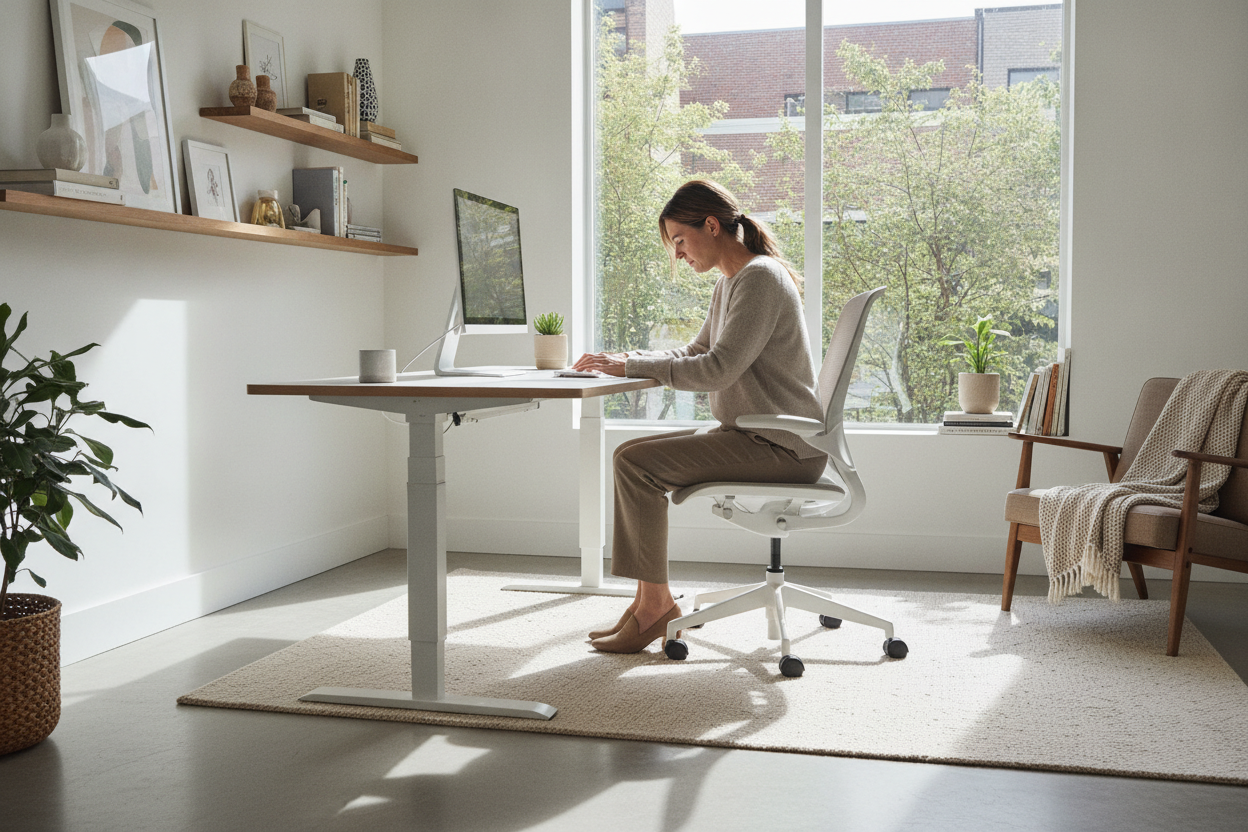
I spent my first week with a sit-stand desk doing what I call the 'inch-up, inch-down' dance. I would sit, feel a slight twinge in my shoulder, tap the button twice, then stand up, feel a pull in my hamstrings, and tap it back down. I was not actually getting any work done; I was just playing with a 150-pound motorized toy. Most of us treat our adjustable height office desk like a fidget spinner rather than a tool, and that is exactly why your back still hurts.
- The 90-Degree Rule: Your elbows should always be at a right angle, whether sitting or standing.
- Eye Level is Key: If you are looking down at your monitor, your height adjustable desk is not doing its job.
- Memory Presets: If you have to manually hold the button, you will eventually stop using the standing feature entirely.
- Movement over Standing: The goal is to change positions every 45-60 minutes, not to stand for eight hours straight.
The 'Fidget Spinner' Phase of Getting a New Desk
We have all been there. You finally upgrade from that cramped, static writing computer desk you bought in college, and suddenly you have the power of flight—or at least, the power of vertical movement. The first few days are pure novelty. You spend half your morning adjusting the height by a quarter-inch because you are convinced you haven't found the 'perfect' spot yet. The truth is, we are so used to slouching at fixed-height furniture that proper ergonomic alignment feels incredibly unnatural at first.
When you use a moveable desk for the first time, your muscles do not know where to settle. You might find yourself constantly shifting because your body is trying to revert to the C-shape curve it perfected over years of bad habits. This 'fidget spinner' phase is normal, but it is also a trap. If you do not lock in your actual ergonomic heights early on, you will end up using the desk at a height that is 'just okay,' which defeats the entire purpose of having an office desk height adjustable to your frame.
How to Find Your Actual 'Sit' and 'Stand' Sweet Spots
Finding the right height for your height adjustable workstation is a science, not a feeling. Start with your chair. Adjust it so your feet are flat on the floor and your knees are at a 90-degree angle. Now, bring the desk surface down until your forearms rest naturally on the top while your shoulders are completely relaxed. If your shoulders are shrugging, the desk is too high. If you are leaning forward, it is too low. This is your 'sit' baseline.
For standing, the rules are identical but the physics change. When you raise your height adjustable computer table, you want that same 90-degree elbow bend. A common mistake is raising the desk high enough to lean on it. Do not do that. If you are leaning, you are putting unnecessary pressure on your wrists and lower back. Your monitor should also be positioned so the top third of the screen is at eye level. If you are using a laptop, you will likely need a riser or an external monitor to make a large desk adjustable height setup actually work. Otherwise, you are just standing up to look down, which is a fast track to 'tech neck.'
Why Memory Presets Are Non-Negotiable for Me
I once owned a manual height adjustable working table with a hand crank. It took about 40 rotations to go from sitting to standing. Guess how many times I stood up? Zero. Then I upgraded to a motor, but it didn't have presets. I had to stand there, holding the button, waiting for the 'right' number to appear on the tiny LED screen. It broke my focus every single time. If you want to actually improve your health, you need an electric lift system with memory presets.
With memory buttons, the transition becomes a background task. I hit 'Button 2' while I am finishing an email, and by the time I have stood up and stretched, the work surface adjustable range has hit my exact 42.5-inch standing sweet spot. It removes the friction. If there is friction in your workflow, you will revert to the path of least resistance—which is usually sitting until your legs go numb. Investing in a home office desk adjustable height model with a smart controller is the difference between a health tool and a piece of furniture that just collects dust at one height.
Can Desks That Change Height Handle Multi-Monitor Setups?
One of my biggest fears when switching to a large adjustable height desk was 'the wobble.' There is nothing more nerve-wracking than watching two expensive 27-inch monitors sway like palm trees in a hurricane every time you type. Most cheap adjustable office tables use thin, single-stage legs that get incredibly unstable once they pass the 40-inch mark. If you have a heavy PC tower, multiple screens, and maybe a heavy desk mat, you need a frame with a high weight capacity—ideally 250 lbs or more.
Stability is why I lean toward a modern electric height adjustable desk that features a dual-motor system. Dual motors distribute the weight more evenly and provide a smoother, quieter lift. You also have to consider cable management. When the desk moves, your cables move. If they are too short or poorly routed, you will rip your PC right off the extendable work table. Look for models with built-in cable trays or pegboards to keep your gear secure while in motion.
You Still Need to Move Your Feet
Here is the hard truth: standing is not exercise. If you stand perfectly still for four hours on a hard floor, you are going to end up with sore heels and a different kind of back ache. The magic of a height changing desk is not the standing—it is the movement. I tell people to think of it as a dynamic workstation. Use the standing phase to shift your weight, do some calf raises, or even use a small under-desk treadmill if you have the coordination.
If your work is mostly analog—like sketching, packing boxes, or building models—you might actually be better off with a static tall work desk that doesn't move. But for those of us glued to a screen, the ability to oscillate between heights is what keeps the blood flowing. Don't just stand there like a statue; use the desk to create a workflow that keeps your body as active as your brain.
How high should a standing desk be?
It should be level with your elbows when they are bent at a 90-degree angle. For most people between 5'10' and 6'0', this is usually between 40 and 44 inches. Always measure from the floor to the underside of your forearm while standing in the shoes you plan to wear at work.
Is a single motor or dual motor desk better?
Always go dual motor if your budget allows. Dual motors are faster, quieter, and can handle much heavier loads (like triple monitor setups) without straining. They also tend to last longer because the workload is split between two points of contact.
Do I need an anti-fatigue mat?
Yes. Standing on a hard floor for hours is brutal on your joints. A good mat or even a pair of supportive indoor sneakers will extend the amount of time you can comfortably stand by 50% or more.

Laisser un commentaire
Ce site est protégé par hCaptcha, et la Politique de confidentialité et les Conditions de service de hCaptcha s’appliquent.