


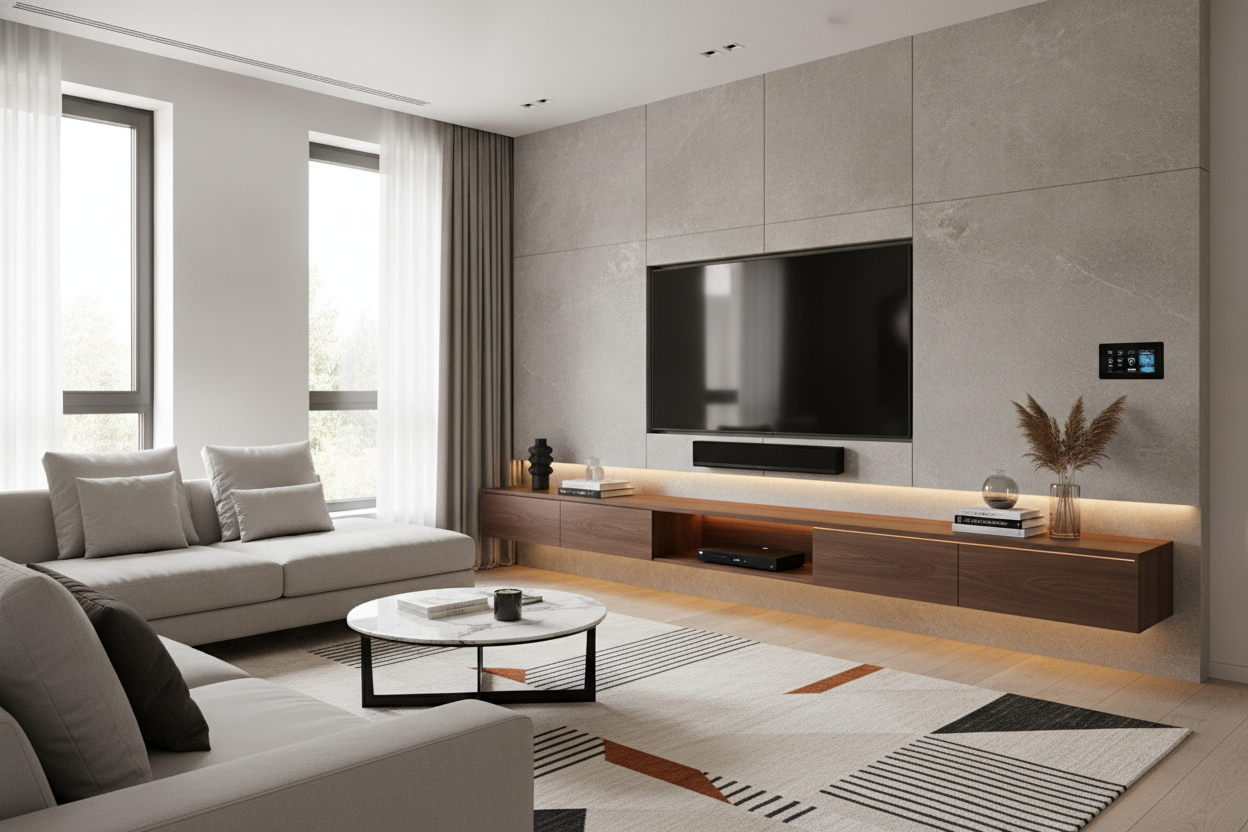
I remember the first time I sat in front of an 80-inch screen. I felt less like a movie buff and more like a security guard staring at a massive monitor. It is a lot of glass. When you bring that much tech into a room, the immediate panic is how to keep it from looking like a giant black void has swallowed your entire wall. I spent three weeks staring at 47 browser tabs of consoles, trying to figure out if a floating entertainment center for 80 inch tv would actually look good or just like a shelf hanging on for dear life.
- Negative space is key: Seeing the floor underneath the console makes the room feel larger, not smaller.
- Size up: Your console must be wider than the TV to avoid the 'mushroom' look.
- Weight matters: Check your wall studs; an 80-inch TV and a massive console require serious support.
- Contrast: Light wood or white finishes help break up the visual weight of the black screen.
The 'Black Hole' Effect of Massive Screens
An 80-inch TV is a beast. It’s roughly 70 inches wide, and when it’s turned off, it is a massive, dark rectangle that sucks the light out of the room. Most people try to 'ground' this by putting a heavy, traditional floor cabinet underneath it. The logic seems sound: a big TV needs a big base. But in reality, this just creates a monolithic block of furniture that makes your living room feel like a cramped basement.
When you use a chunky, floor-sitting cabinet, you’re basically building a wall of wood and glass. It stops the eye. It creates a 'black hole' effect where the TV and the stand merge into one giant, oppressive shape. I’ve seen beautiful rooms ruined by this because the scale is just too aggressive for a standard 12x14 living space.
The goal isn't to match the 'heaviness' of the TV. It’s to counteract it. You want the screen to feel like it’s part of the architecture, not a piece of equipment that’s crushing your floorboards. This is where the floating concept saves the day.
Why Negative Space is Your Best Friend
The secret to high-end interior design isn't the furniture itself—it’s the space between the furniture. By choosing a floating TV stand wall mounted media console, you’re introducing a gap of 8 to 12 inches between the bottom of the unit and the floor. This gap is a visual 'breather.'
When you can see the floor extend all the way to the baseboard, your brain perceives the room as being larger. It’s an optical illusion that works every single time. Even if the console is 90 inches wide, the fact that it’s 'hovering' makes it feel half as heavy as a floor-standing model. It turns the media center into a sleek architectural feature rather than a bulky storage box.
I’ve installed these in tight apartments and sprawling suburban dens. In both cases, the lifted look kept the tech from dominating the conversation. You want people to notice your rug and your floors, not just the massive screen you’re using to binge-watch Netflix.
Getting the Proportions Right for an 80-Inch Screen
If you get the width wrong, the whole thing falls apart. This is where most people fail. An 80-inch TV (diagonal) is about 70 inches wide. If you buy a 70-inch console, the edges will line up perfectly, and your setup will look like a mushroom. It’s top-heavy and awkward.
When shopping for TV stands, the rule of thumb is to have at least 6 to 10 inches of overhang on each side. For an 80-inch TV, you are looking for a console that is at least 85 to 90 inches wide. This creates a balanced 'pedestal' look. It makes the TV look intentional, like it was designed for the space, rather than just slapped on the wall.
What About a Wall Mount TV Stand 80 Inch Alternative?
I get it—drilling six-inch lag bolts into your drywall is terrifying, especially if you’re renting or your DIY skills are questionable. If you aren't ready to commit to a permanent wall-mounted unit, you might be looking for a wall mount tv stand 80 inch alternative that offers a similar vibe without the structural anxiety.
A minimalist floor stand TV mount is a great middle ground. These units often have a very thin base that slides under other furniture or sits flush against the wall, giving you that 'floating' screen height without the need to find studs. However, you lose the storage and the clean horizontal lines that a floating console provides.
If you do go the floating route, please, for the love of your security deposit, use a stud finder. Don't trust drywall anchors for a unit this size. I’ve seen a 100-inch console rip a sheet of rock right off the studs because the owner thought 'heavy-duty toggles' were enough. They aren't.
Finishes That Soften the Tech-Heavy Look
The color of your console is your last line of defense against the 'tech-cave' vibe. If you put a black floating console under a black 80-inch TV, you haven't solved the monolith problem. You’ve just made it taller.
I’m a huge fan of using wood tones—think white oak or walnut—to add some organic warmth to the setup. If your walls are white or light gray, a white TV stand for 80 inch TV can practically disappear into the wall, leaving only the dark screen as a focal point. This 'disappearing act' is perfect for keeping a room feeling bright and airy despite having a theater-sized screen.
My Personal Lesson in Scale
A few years back, I helped a friend mount a massive unit in his condo. We went with a dark espresso finish because he wanted it to look 'masculine.' Three days later, he called me to help him take it down. It looked like a coffin hanging on the wall. We swapped it for a light blonde oak floating unit that was 10 inches wider, and the difference was night and day. The room finally felt like a living room again, not a Best Buy showroom.
FAQ
How high should I mount a floating console?
Aim for the bottom of the console to be about 8 to 12 inches off the floor. The center of your TV should be at eye level when you are sitting on your sofa—usually about 42 inches from the floor.
Can a floating console really hold an 80-inch TV?
Most floating consoles are designed to hold the components (cables, consoles, soundbars), while the TV itself is mounted to the wall studs separately. Never sit an 80-inch TV directly on a floating shelf unless it’s specifically rated for that weight.
How do I hide the cables?
The best way is to run them behind the drywall. If you can't do that, choose a console with a built-in cable management channel or use a paintable cord cover that matches your wall color.

Laisser un commentaire
Ce site est protégé par hCaptcha, et la Politique de confidentialité et les Conditions de service de hCaptcha s’appliquent.