


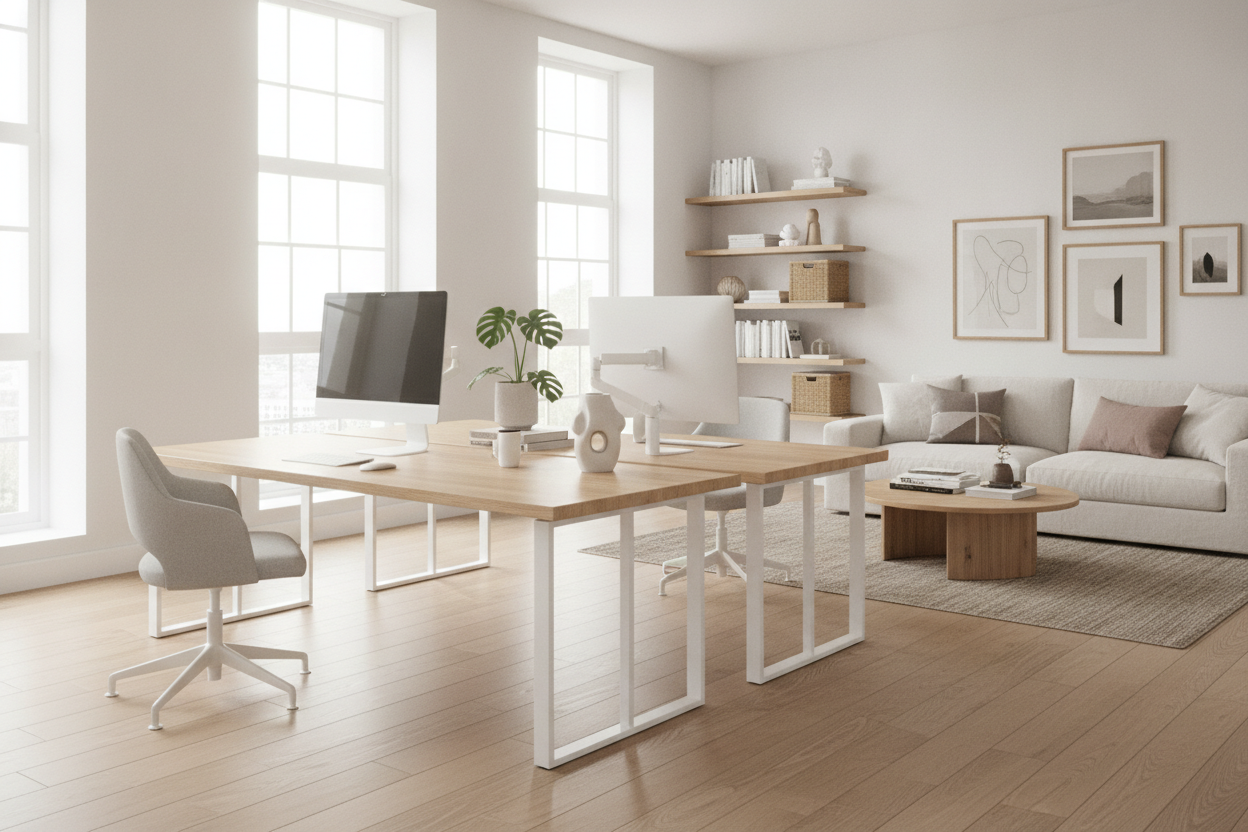
My husband and I spent six months trying to share a 10x12 spare room with a 'make it work' attitude that nearly led to a divorce. I had a vintage mid-century writing desk that was beautiful but functionally useless, and he had a giant gaming table that looked like a landing strip. Every time one of us pushed back our chair, we’d smack into the other person. It wasn't just a space issue; it was a visual nightmare of clashing wood grains and tangled power strips.
We finally admitted defeat and realized that if we were both going to work from home permanently, we needed a unified setup. Switching to team desks wasn't just about matching aesthetics; it was about reclaiming the three feet of floor space we were losing to redundant desk legs and awkward gaps.
Quick Takeaways
- Unified frames eliminate 'leg clutter' and open up floor space.
- Integrated cable management is the only way to survive two sets of monitors and laptops.
- Side-by-side configurations usually work better than facing each other for video call privacy.
- Mobile pedestals offer more flexibility than fixed desk drawers.
The Two Separate Desks Layout Almost Ruined Our Spare Room
When we first started building our home office, we thought individual desks would give us 'autonomy.' In reality, it gave us a room that felt like a storage unit. We had his-and-hers desks pushed against opposite walls, which left a narrow, cramped alleyway in the middle of the room. Every time I had to get up for coffee, I felt like I was navigating a submarine corridor.
The mismatched heights were the worst part. My 29-inch high desk sat right next to his 31-inch table, creating this jagged horizontal line that made the whole room look cluttered, no matter how much I tidied. We were losing square footage to the 'dead zones' between the furniture where dust bunnies and lost pens went to die. It was clear that two separate pieces of furniture weren't designed to live in such close quarters.
Wait, What Actually Is a Desking System?
I used to think a desking system was just corporate-speak for 'expensive office furniture.' I was wrong. The difference between two tables and a true office desking system is the engineering. A system uses a shared central frame or a continuous beam. Instead of eight legs for two people, you might only have three or four. That structural shift is a massive win for your legs and your vacuum cleaner.
When you buy a modular office desking system, you’re getting a surface that is perfectly flush. There’s no awkward gap for your mousepad to fall into. We opted for a 60-inch per-person setup, which gave us a five-foot-wide workspace each without the bulk of two independent frames. It makes the room feel intentional and architectural rather than a collection of random Facebook Marketplace finds.
Double the Laptops, Double the Cords
The 'spaghetti monster' is real. Between two 27-inch monitors, two laptops, two sets of speakers, and a shared printer, we had enough cables to power a small village. In our old setup, those cables just dangled off the back of the desks in a dusty heap. Finding a specific office desk solution with built-in cable management changed everything.
Most high-quality team setups include a central cable trough or a flip-top grommet system. Now, our power strips live inside the desk frame itself. Only one single 'umbilical' cord runs down to the wall outlet. It’s a small detail, but not seeing a tangled web of black plastic every time I walk into the room has significantly lowered my baseline stress levels. If you're choosing between a desk with a tray and one without, buy the one with the tray. Always.
Storage Wars: Dividing Space Without Drawing a Line
One fear I had about sharing a single long surface was the loss of my 'stuff' zone. I’m a post-it note maximalist; he’s a minimalist. In a shared setup, his clutter-free vibe can make my organized chaos look like a mess. Instead of buying a massive office desk with drawers and shelves that would have felt too heavy for the room, we went with slim, under-mount storage.
We used mobile filing cabinets that slide right under the desk surface. It creates a physical boundary without needing a literal wall between us. I get my three drawers for planners and pens, and he gets his empty space. The beauty of the team desk is that the surface remains a clean, continuous line, while the 'business' of storage happens underneath where nobody has to look at it. It’s about creating zones of privacy within a shared footprint.
The Layout Trap We Almost Fell Into
We initially thought about facing each other—the classic 'partner desk' look you see in movies. Big mistake. Unless you want to stare at the back of your partner’s monitors or make awkward eye contact while you’re both on separate Zoom calls, don't do it. Plus, facing into the room often meant one of us was blocking the window, which is a classic office desk and shelving layout mistake that kills the vibe of a small space.
We settled on a side-by-side layout along the longest wall. It keeps the center of the room open, which makes the 120-square-foot space feel twice as large. We have plenty of natural light hitting both of our monitors from the side—no glare, no shadows. It turns out that sometimes the best way to work 'together' is to just give each other enough breathing room to actually breathe.
FAQ
Is a team desk harder to assemble than two separate desks?
Usually, no. Because they share components like center legs or support beams, you actually have fewer parts to screw together than you would with two entirely independent desks. Just make sure you have a second person to help flip the long desktop once it's built.
Can we still use monitor arms on a shared desking system?
Yes, as long as the desk has a standard edge or a grommet hole. In fact, monitor arms are better for team setups because they clear up even more surface area, making the shared desk feel even more spacious.
What happens if we move and need separate offices?
This is the downside: some systems are 'daisy-chained' and can't stand alone. If you think you might split up your workspaces later, look for a modular system that allows for 'starter' and 'adder' units so they can be de-coupled into individual desks down the road.

Laisser un commentaire
Ce site est protégé par hCaptcha, et la Politique de confidentialité et les Conditions de service de hCaptcha s’appliquent.