


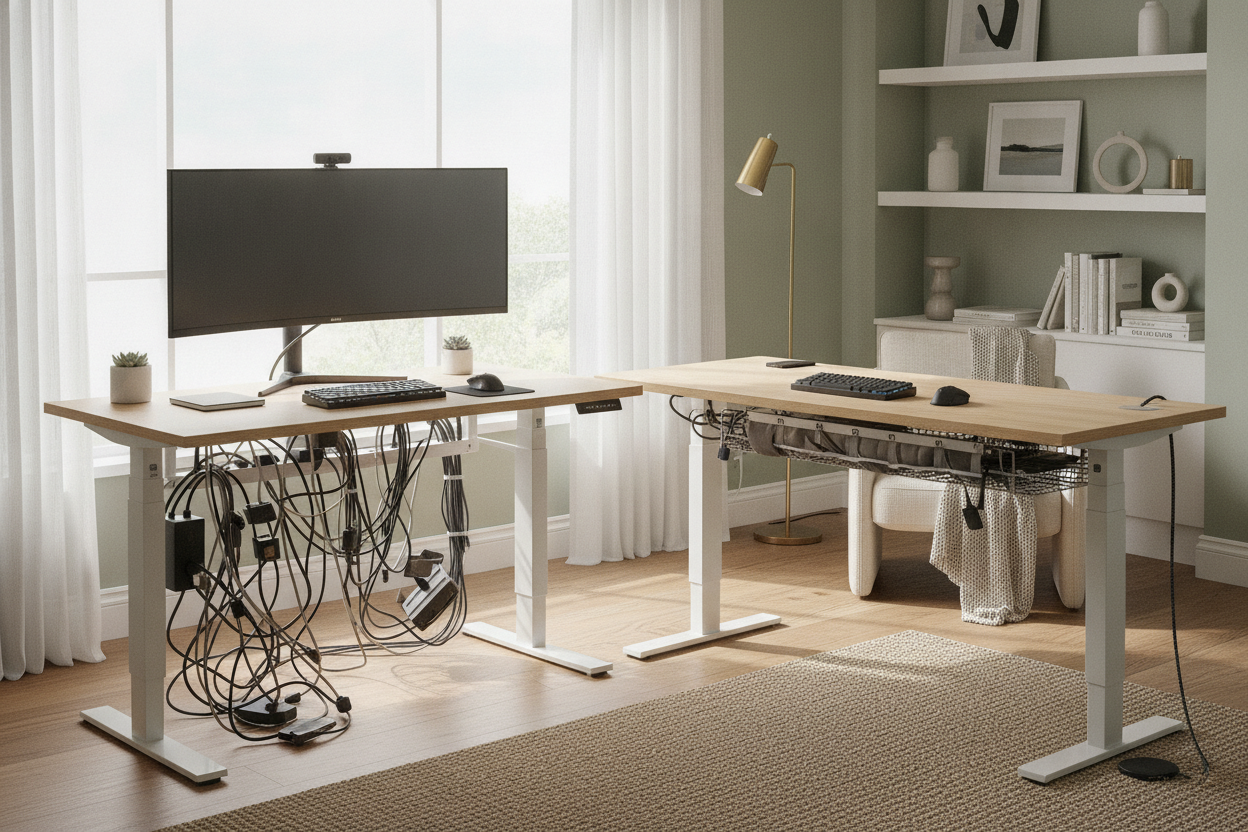
I spent three hours assembling my first motorized desk, obsessing over the screw alignment and the leg stability. I finally plugged everything in, hit the memory preset for 'Standing,' and watched in slow-motion horror as my $600 ultrawide monitor began to tilt precariously. The culprit? A three-foot DisplayPort cable that didn't have four feet of slack.
Switching to adjustable-height desks isn't just about picking a motor speed or a wood finish. It's an engineering challenge for your gear. If you don't plan for the vertical travel, you're just building a very expensive catapult for your electronics.
- Buy longer cables than you think you need—6 feet is the bare minimum.
- Mount your power strip to the underside of the desk, not the wall.
- Create a single 'umbilical cord' for everything going to the floor.
- Always test the full range of motion slowly before walking away.
The Day My Dual Monitors Almost Crashed to the Floor
There is a specific, gut-wrenching sound a monitor makes when its stand starts to lift off the desk surface because a cable has gone taut. It's a mix of plastic creaking and the sound of money leaving your bank account. I learned this the hard way after setting up my first adjustable desk for computer work.
I had everything looking 'clean' at sitting height. I tucked the wires behind the legs, zipped them tight, and felt like a productivity guru. Then I stood up. As the motor whirred, I realized I hadn't accounted for the extra 20 inches of travel. My PC, sitting on the floor, became an anchor, and my monitors were the bait. I hit the 'stop' button just as the base of my left screen cleared the desktop by an inch.
This is the hidden tax of height adjustable computer tables. You can't just plug things in; you have to map the journey from 28 inches to 48 inches. If you are a dual-monitor user, that tension is doubled. One snagged wire can pull your entire workstation out of alignment, or worse, snap a port right off your GPU.
Why Standard Cable Management Fails on Moving Tables
When you are dealing with a static writing computer desk, gravity is your friend. You let the cables drop behind the back edge, maybe shove them into a tray, and forget they exist. But an adjustable pc desk is a dynamic machine. It's constantly expanding and contracting the distance between your hardware and your power source.
Most people try to manage cables by anchoring them to the wall or the baseboards. This is a recipe for disaster. On computer tables adjustable height, your cable management needs to be 'on-board.' If your wires are tethered to something that doesn't move while the desk does, you are creating a literal tug-of-war every time you want to stand up.
I've seen people try to use those sticky plastic clips to hold wires against the desk legs. Within a week, the friction of the desk moving up and down peels those clips right off. You need a system that moves with the desk, not against it. Think of it like a suspension bridge—it needs enough 'give' to handle the movement without collapsing.
The 'Umbilical Cord' Method for an Adjustable PC Desk
The smartest way to handle adjustable height computer stands is to consolidate. Instead of having twelve different wires hanging down like a willow tree, you want one single bundle. I call this the umbilical cord. You gather every wire that must go to the floor—usually just one main power cable and maybe an ethernet line—and wrap them in a braided sleeve.
This bundle should have enough slack to reach the floor comfortably when the desk is at its maximum height. Some high-end models, like the modern electric height adjustable desk with dual storage modules and pegboard organizer, actually give you a head start with built-in channels or pegboards. These features allow you to anchor that 'umbilical' point so it doesn't get caught in the desk's lifting mechanism.
Use hook-and-loop straps instead of plastic zip ties. You will inevitably add a new peripheral or swap a mouse, and cutting zip ties near expensive power cords at 11 PM is a high-stress activity you don't need. The goal is a clean, singular line that gracefully loops as the desk lowers, rather than a spiderweb of individual hazards.
Where Should the Power Strip Actually Go?
If your power strip is on the floor, you've already lost. Every single monitor, laptop brick, and lamp plugged into that strip becomes a potential breaking point as the desk rises. The only correct way to set up a desktop adjustable height desk is to mount the power strip directly to the underside of the desktop.
By mounting the strip to the desk, the distance between your monitors and their power source never changes. They move together. This reduces the number of cables traveling to the floor from a dozen down to exactly one: the main cord for the power strip itself. I use heavy-duty 3M Dual Lock or a dedicated under-desk cable tray to keep the 'brick' out of sight but firmly attached to the moving surface.
It feels counter-intuitive to have a heavy power strip hanging upside down, but modern adhesives and screw-in trays are more than capable. It is the difference between a clean, professional setup and a chaotic mess that eventually ends in a blown port or a cracked screen.
A Quick Checklist Before You Press the 'Up' Button
Before you get too excited about your new ergonomic lifestyle, do a 'dry run.' Clear everything from under the desk—trash cans and swivel chairs are notorious for getting crushed under adjustable height computer desks. Then, slowly raise the desk while watching every single wire. If one looks even slightly tight, stop immediately.
Check your monitor clearance against the wall. If you have your monitors on arms, they might shift backward as they rise, potentially scraping your paint or hitting a window sill. Also, ensure your adjustable height office desk is set to the wrong height accidentally by double-checking your memory presets. You want the desk to stop exactly where your elbows are at a 90-degree angle, not three inches higher where it starts yanking on your mouse cord.
Can I use my existing cables?
Probably not. Most standard cables are 3 or 5 feet. For a sit-stand setup, you almost always need 6-foot or 10-foot versions to account for the routing path and the desk's height travel.
Do I need a cable spine?
They look cool, but a simple braided sleeve or even some well-placed Velcro straps usually work better and cost way less. Spines can sometimes be noisy or take up too much legroom depending on the desk frame.
What if my PC is too heavy for the desk?
Check the weight capacity of your motors. Most dual-motor desks handle 200-300 lbs easily. If you have a massive liquid-cooled tower, consider a CPU mount that hangs the PC under the desk so it moves with you and doesn't require long floor-run cables.


Laisser un commentaire
Ce site est protégé par hCaptcha, et la Politique de confidentialité et les Conditions de service de hCaptcha s’appliquent.