


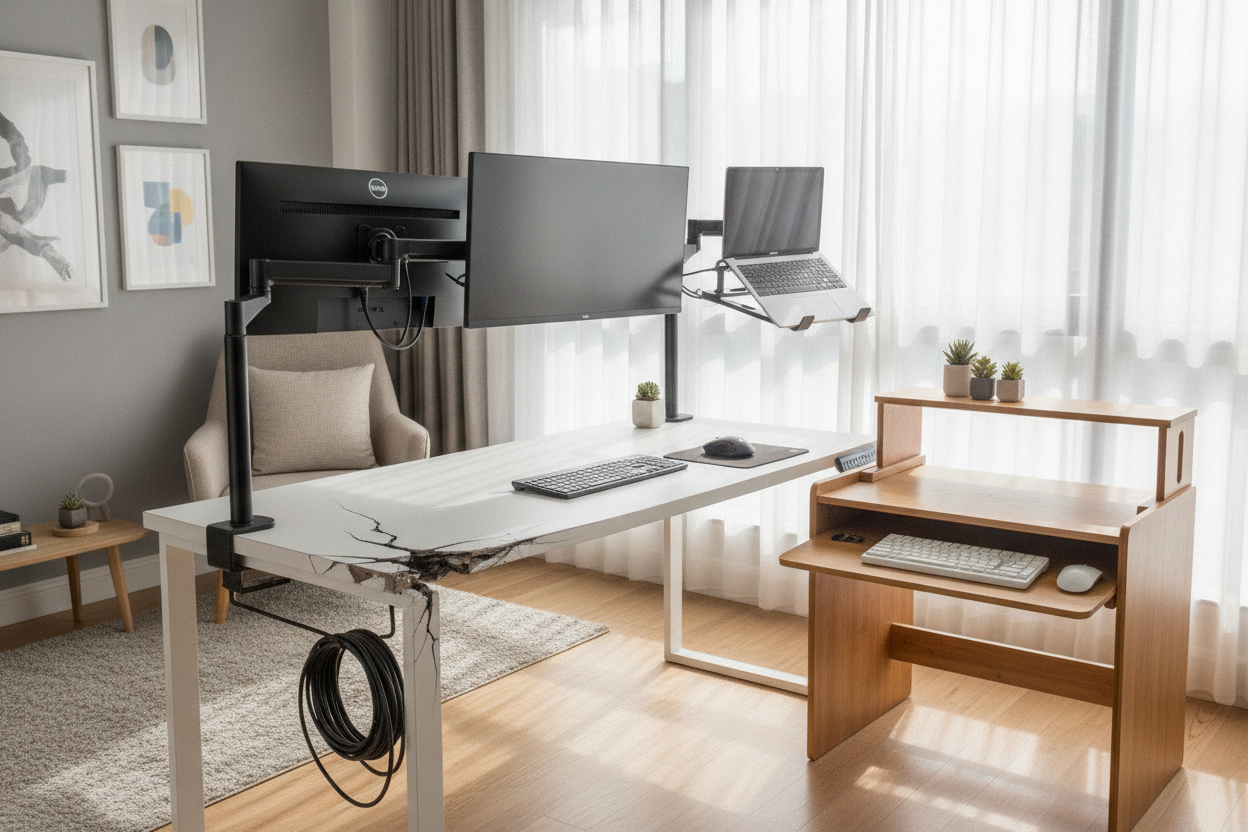
I still remember the sound of my first IKEA Linnmon top cracking. It was a slow, sickening crunch at 2 PM on a Tuesday because I thought a heavy-duty dual-monitor arm was a great idea for a $30 piece of furniture. If you are currently browsing for standing desk attachments, you need to know what your desktop is actually made of before you turn your workspace into a pile of splinters.
- Hollow-core tops are basically cardboard honeycombs and will collapse under heavy clamps.
- Reinforcement plates are mandatory if you are using monitor arms on particleboard.
- Adhesive accessories are often safer than screws for thin laminate surfaces.
- Always subtract your tabletop weight from your frame's lift capacity to find your true weight limit.
Why Your Budget Tabletop Hates Clamp-On Accessories
Most entry-level desks use particleboard or, even worse, a hollow-core 'paper' interior. When you tighten a heavy metal clamp, you are focusing hundreds of pounds of pressure onto a single square inch. It is like trying to balance a bowling ball on a cracker. Eventually, that cracker is going to snap.
On a budget standing motorized desk, the vibration of the motor during height transitions adds dynamic stress. Every time the desk moves, those heavy metal clamps wiggle just a fraction of a millimeter. Over months, that wiggle turns into a gouge, and that gouge turns into a structural failure. I have seen desks where the monitor arm literally punched a hole straight through the laminate because the owner kept tightening the clamp to stop the 'wobble.'
The Heavy Standing Desk Additions You Should Avoid (Or Reinforce)
Dual-monitor mounts are the biggest culprits in the world of standing desk additions. If you have two 27-inch monitors hanging off one central pole, you are creating a massive amount of leverage pulling on the back edge of your desk. It is not just the weight; it is the torque. If your desk is less than an inch thick, you are playing a dangerous game.
The same goes for heavy CPU holders that bolt underneath. I once tried to mount a mid-tower PC to a laminate top using the included wood screws. Within a week, the vibration from the PC fans and the desk movement stripped the holes, and my tower nearly met the floor. If you must use these, buy a steel reinforcement plate. These plates sandwich the desktop and spread the pressure across a wider surface area so you are not just crushing the 'wood' fibers in one spot.
Safe Sit Stand Desk Attachments for Flimsy Desks
If your desk feels light enough to lift with one hand, you need to stick to lightweight sit stand desk attachments. I am a huge fan of adhesive cable management trays. Instead of drilling into the desk, these use high-bond tape to distribute the weight of your power strips and bricks across a large surface area. It is much safer for the integrity of the board.
Lightweight pegboards that clamp on with wide-base feet are also a solid choice for headphones and cables. If you are using a sturdier setup like the Ergonomic Home Office Sit Stand Up Desk, you have a bit more structural integrity to play with, but I still suggest being mindful. Just because a desk can lift 200 pounds doesn't mean the top can handle 50 pounds concentrated on a single corner.
Can You Just Transfer Your Old Gear?
Transitioning from a standard writing computer desk to a motorized one feels like a massive upgrade, but your old gear might be a liability. Static desks don't move, so they don't have to deal with the 'bounce' factor. A clamp-on keyboard tray that felt rock-solid on a stationary table will likely rattle and shake the moment your desk starts rising.
I learned the hard way that a clamp-on tray that worked on a solid oak table will absolutely gouge a laminate top the second the desk starts moving. The physics are different when your furniture is in motion. If your old gear doesn't have rubber padding or a wide enough clamp base, it is time to retire it or upgrade the mounting hardware before you move it to your new standing setup.
The Golden Rule of Desk Weight Limits
Don't ignore the weight limit printed in your manual. If your frame is rated for 150 lbs, that includes the weight of the tabletop itself. If your wood top weighs 40 lbs, you only have 110 lbs of 'real' capacity left for your monitors, computer, and coffee. I once cheaped out on a stand for standing desk and overloaded it with a heavy ultrawide and a desktop tower. The motor started screaming within a month.
Do the math before you buy more gadgets: Frame Limit minus Tabletop Weight equals your Gadget Budget. If you're pushing the limit, your desk will move slower, wobble more, and likely die years before it should. Respect the motor, and respect the laminate.
How do I know if my desk is hollow?
Give it the 'knock' test. Tap the center of the desk with your knuckles. If it sounds like a drum or has a high-pitched echo, it is likely a hollow-core door style or thin particleboard. Solid wood or high-density MDF will sound like a dull, heavy thud.
Are reinforcement plates really necessary?
Yes. They cost about $20 and can save a $300 desktop. They are essentially two steel plates that widen the 'grip' of your monitor arm, preventing the metal from biting into the soft wood or laminate.
Can I drill into a laminate standing desk?
You can, but you must pre-drill your holes with a bit slightly smaller than your screw. If you just drive a screw in, the laminate will crack and the internal particleboard will crumble, leaving you with a hole that won't hold any weight.


Laisser un commentaire
Ce site est protégé par hCaptcha, et la Politique de confidentialité et les Conditions de service de hCaptcha s’appliquent.