


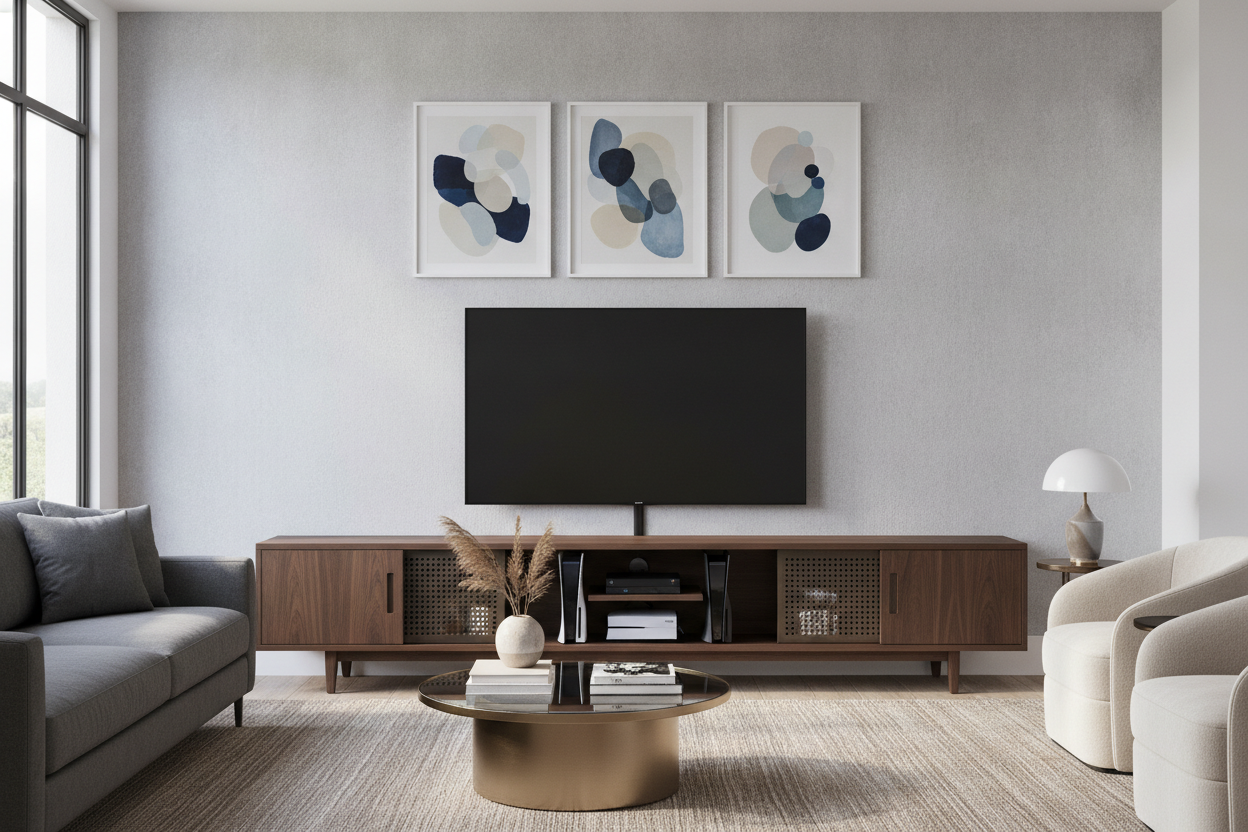
I remember unboxing my PS5 and staring at it in genuine horror. It looked like a piece of alien architecture that had no business sitting next to my walnut credenza. I spent three weeks scouring the internet for a tv stand for consoles that didn't look like it belonged in a basement filled with neon energy drink signs and beanbag chairs.
The struggle is real: you want a grown-up living room, but you also want to play Elden Ring on a screen that isn't sitting on a cardboard box. Most 'media centers' are either too flimsy for heavy tech or too 'gamer-y' for anyone over the age of nineteen. Here is how I finally balanced my hobby with my aesthetic.
Quick Takeaways
- Airflow is non-negotiable; heat kills consoles faster than spilled soda.
- Depth matters more than width—measure your console with the HDMI cable plugged in.
- Slatted doors are the holy grail for hiding plastic while keeping remotes functional.
- Cable management is a hardware problem, not just a velcro tie problem.
Why Most 'Gamer Furniture' Ruins a Living Room
Most things marketed as an 'entertainment center for gaming' are objectively hideous. They come with carbon fiber textures that feel like cheap contact paper and 'aggressive' angles that look dated the second you assemble them. I wanted a gaming console stand that looked like actual furniture, not a prop from a low-budget sci-fi movie.
The problem is that many standard TV stands are designed for a minimalist era where people only had a slim cable box. They lack the internal depth or the ventilation required for modern hardware. This forces people to buy those metal-and-plastic 'gaming towers' just to keep their systems from overheating, which is a design tragedy.
The 3 Dealbreakers for a TV Stand for Consoles
First, let's talk about depth. A PS5 is massive. If you buy a slim 14-inch deep console, your expensive machine is going to hang off the edge like a diving board. You need at least 16 to 18 inches of clearance to account for the cables sticking out the back. If you force those wires into a 90-degree bend against a back panel, you're begging for a port failure.
Second is heat. Consoles are basically small space heaters. I once swapped my console for a TV stand with mount and shelves because my previous enclosed cabinet reached 110 degrees inside within twenty minutes of play. You need an entertainment gaming center with an open back or breathable doors.
Third is signal. If you use a standard media console with solid wood doors, your controllers or IR remotes might get laggy. This is why I always hunt for tv console gaming setups with mesh, cane, or slatted fronts. It’s the only way to hide the black plastic boxes without losing the ability to actually turn them on.
Hiding the Chaos: Finding a TV Stand With Game Storage
Open shelving is a trap for anyone who isn't a professional organizer. Within a week, your game console and tv stand will be covered in dust, tangled controller wires, and loose game cases. It looks messy because it is messy. The goal is a tv stand with game storage that utilizes drawers or hidden cubbies.
I personally prefer a video game console entertainment center that has a mix of 'show' and 'hide.' Put the pretty console on a ventilated shelf and shove the extra controllers, charging cables, and VR headsets into a deep drawer. If you can't see the tangle of white USB-C cables, it doesn't exist.
Cord Management for a Multiple Gaming Console Setup
If you have a Switch, an Xbox, and a PlayStation, you have at least six bulky cables to manage. A multiple gaming console entertainment center needs to have wide, pre-drilled grommet holes. Those tiny 2-inch circles aren't enough for three power bricks and three HDMI cords.
I recommend choosing a wider entertainment center than you think you need. Spacing out the consoles prevents heat zones from merging and gives you more 'runway' behind the unit to tuck cables into clips. I use adhesive cable clips on the back of the wood frame to keep everything off the floor—it makes vacuuming significantly less annoying.
Weight Limits and Before-You-Buy Checks
Don't assume every shelf can hold a 15-pound console plus a heavy audio receiver. Cheap MDF will sag over time, creating a sad U-shape in the middle of your living room. Before you commit, check the FAQ support center for the specific weight ratings of the internal shelves.
Measure your largest system, add two inches for cable clearance, and ensure the shelf is adjustable. A tv stand for gaming systems is an investment in your hardware's lifespan. If it's too cramped, you're just paying for a very expensive coffin for your Xbox.
FAQ
Can I put my console in a closed cabinet?
Only if the back is completely open or you install cooling fans. Otherwise, you are essentially baking your console. Slatted or mesh doors are a much safer middle ground for a game console center.
How do I stop my TV stand from vibrating when the console fans kick in?
Look for solid wood or heavy-duty composite. Lightweight plastic stands will rattle. You can also add small rubber isolation feet to the bottom of your console to dampen the vibration.
Will my remote work through slatted doors?
Usually, yes. Most modern Bluetooth controllers don't need line-of-sight, but for IR media remotes, the gaps in the slats allow the signal to pass through easily.

Laisser un commentaire
Ce site est protégé par hCaptcha, et la Politique de confidentialité et les Conditions de service de hCaptcha s’appliquent.