


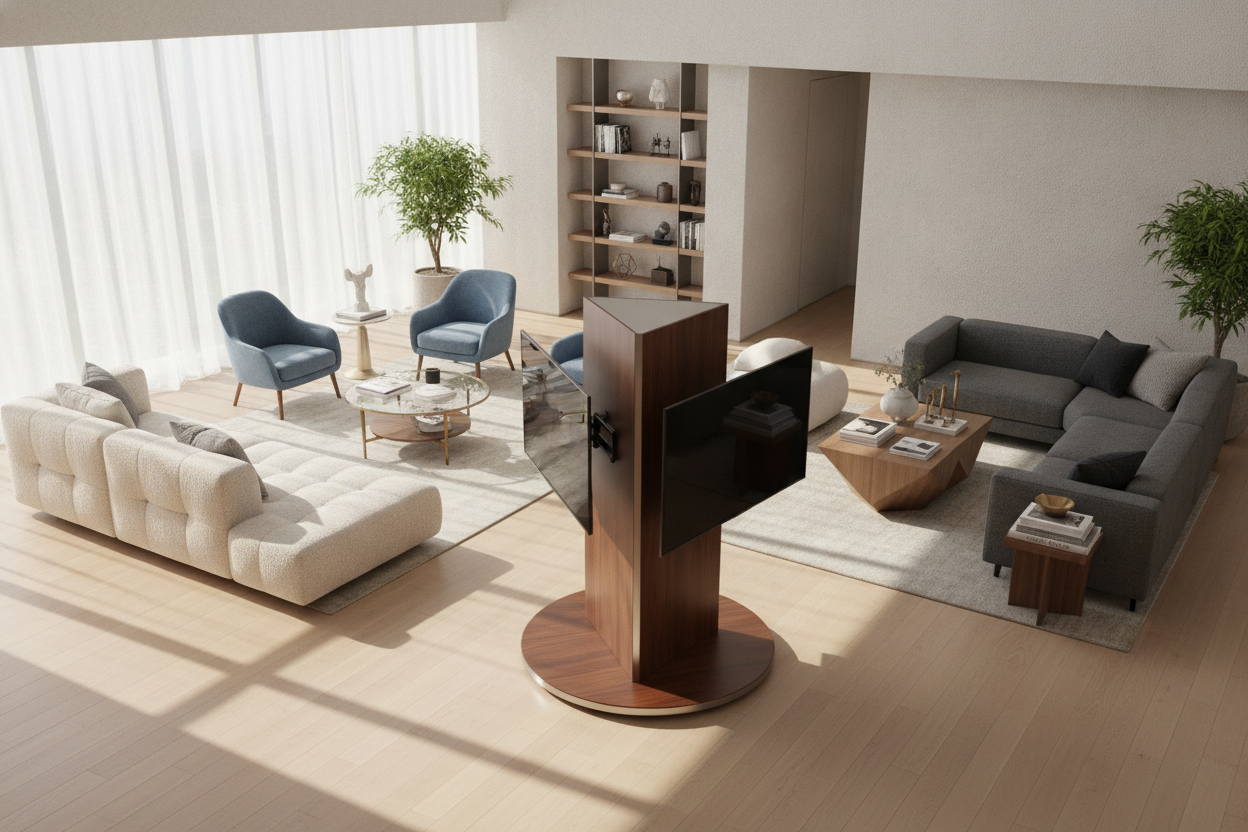
I spent three months sitting at my kitchen island eating cold cereal while staring at the back of my TV. My apartment has that 'modern' open layout that looks great in listing photos but makes zero sense for a human who wants to watch a movie on the sofa and then catch the news while prepping dinner. I tried angling the couch, which just made the room feel like a waiting room, and I briefly considered buying a second TV before realizing how ridiculous that was.
The solution wasn't a bigger screen or a different floor plan. It was revolving tv stands. These simple, often overlooked pieces of hardware are the only thing standing between me and a permanent crick in my neck. They allow the room to function as two separate spaces without needing two separate setups.
- Flexibility: Watch from any angle in an open-concept room.
- Glare Control: Quickly pivot away from that 4 PM sunbeam without closing the blinds.
- Port Access: No more blind-groping for HDMI ports behind a 50-pound screen.
- Space Saving: Avoids the need for multiple screens in one large area.
The Open Concept Curse (And Why I Refused to Buy Two TVs)
Open floor plans are a scam designed by people who don't actually live in their homes. You have one giant 'great room' that is supposed to be a kitchen, a dining room, and a lounge, but your TV is usually stuck against the one solid wall. My 84-inch sofa barely fits in my 12x14 living area, and putting it at an angle meant I couldn't even walk to the bathroom without stubbing a toe on a tapered leg. If you're on the sofa, you're golden. If you're at the dining table? You're squinting at an extreme 45-degree angle that makes everything look like a funhouse mirror.
I refused to be the person with two TVs in one room. It feels cluttered and, frankly, a bit desperate. I needed a way to make my 65-inch screen work for every seat in the house. The geometry of a fixed stand just doesn't cut it when your life happens in 360 degrees. I spent weeks trying to find a 'sweet spot' for my media console, but there isn't one. You either sacrifice the view from the kitchen or the comfort of the couch. That's when I realized the stand itself had to be the one doing the work.
Breaking Down the Options: Base vs. Bracket
When you start looking, you'll realize there are two main paths. The first is a simple tv stand swivel top. This is essentially a heavy-duty lazy susan that sits on your existing furniture. It’s cheap, it’s easy, and it requires zero tools. But—and this is a big but—it adds height. If your console is already tall, your TV might end up at a 'front row of the movie theater' height that kills your neck. I tried a cheap plastic one first, and it groaned every time I moved it.
The second option is a swivel tv stand with mount. This is a pedestal that bolts to the back of your TV using the VESA holes. I prefer this because it looks much cleaner. It’s also a lifesaver for renters. If you can't drill into your walls, using a stand with an integrated mount gives you that floating, wall-mounted look with the added benefit of being able to swing the screen toward the kitchen whenever you're doing dishes. It feels sturdy, like it’s actually part of the architecture rather than an afterthought.
The Hunt for the Best Swivel TV Stand
Finding the best swivel tv stand isn't just about picking the one with the most stars on a product page. You have to look at the weight capacity and the base materials. I judge furniture quality by the specs—I want kiln-dried hardwood frames and 2.0 lb/ft³ HR foam in my sofas that lasts 8-10 years, not the cheap 1.5 stuff that sags. I apply that same scrutiny to TV hardware. Look for solid steel or heavy-duty wood bases. If the base is too light, the whole thing will wobble when you touch it, and that’s a recipe for a shattered screen.
Cord management is the real 'make or break' feature. When a TV rotates, the cables have to go with it. If you don't have a stand with built-in clips or a hollow pillar, you'll end up with a tangled mess of HDMI and power cords that eventually get yanked out of their sockets. I learned this the hard way when I swung my TV 70 degrees and heard the sickening pop of my gaming console hitting the floor. You can also browse standard TV stands and look for wide surfaces that can accommodate a separate rotating base, provided you leave enough slack in your wiring. Just make sure the stand itself is heavy enough to act as an anchor.
Will It Tip Over? (And Other Valid Paranoias)
Safety is the big question, especially if you have a dog that thinks the living room is a racetrack or a toddler who views the TV as a giant touchscreen. A tv stand with rotating top is only as stable as the furniture it sits on. I wouldn't put a swivel base on a spindly, three-legged mid-century knockoff made of flimsy plywood. You want something with a wide footprint and some serious heft.
I eventually paired my swivel mount with a sturdy mid-century credenza. The weight of the credenza keeps everything anchored. Most high-quality swivel stands come with a safety cable that you can anchor to the back of your furniture. Use it. It takes two minutes and prevents a $1,000 mistake. Also, check the 'stop' mechanism. A good stand should have a physical limit on how far it can turn so you don't accidentally spin it 180 degrees and snap your power cord like a twig.
Final Verdict: The End of Screen Glare Wars
Swapping to a revolving setup changed how I use my home. I no longer have to close the blackout curtains at 3 PM just to see the screen, because I can just nudge the TV ten degrees away from the window glare. It’s a small mechanical fix for a massive design headache. My living room finally feels like it was built for a person, not just a floor plan. If you're struggling with an awkward layout, stop moving your furniture and start moving your screen.
Can I use a swivel stand with a curved TV?
Yes, as long as the VESA mounting holes on the back are standard. Most swivel mounts include spacers to help bridge the gap on the back of a curved screen so the bracket sits flush.
How much weight can these stands actually hold?
Most tabletop swivel bases handle up to 80-100 lbs, which covers almost any modern 65-inch LED. Always check the specs, especially if you have an older, heavier plasma TV that weighs as much as a small boulder.
Do I need tools to assemble a swivel base?
For a swivel top (the lazy susan style), usually no—it's ready out of the box. For a pedestal mount, you'll need a screwdriver and the included Allen wrench. It's about a 20-minute job if you don't drop the screws in the rug.

Laisser un commentaire
Ce site est protégé par hCaptcha, et la Politique de confidentialité et les Conditions de service de hCaptcha s’appliquent.