


Setting up an efficient work surface involves more than picking the right tabletop and chair. The physical relationship between the back edge of your workstation and the adjacent wall dictates everything from cable longevity to cosmetic drywall preservation. When a workstation sits flush against painted sheetrock, friction from daily typing, chair bumps, or height adjustments can create unsightly scuffs. Introducing an intentional desk spacer transforms this tight boundary into a purposeful buffer that protects surfaces, clears baseboards, and opens clean pathways for hardware accessories.
The Purpose of a Desk Spacer: Why Wall Clearance Matters
Placing furniture directly against interior walls frequently creates subtle points of tension. Most residential rooms feature baseboards along the floor perimeter. When a desk base or leg contacts a thick baseboard, the desktop above is naturally tilted or held away from the wall at an awkward angle unless accounted for. Without a deliberate standoff, the top edge can rock against the wall surface, grinding into latex paint or wallpaper over time.
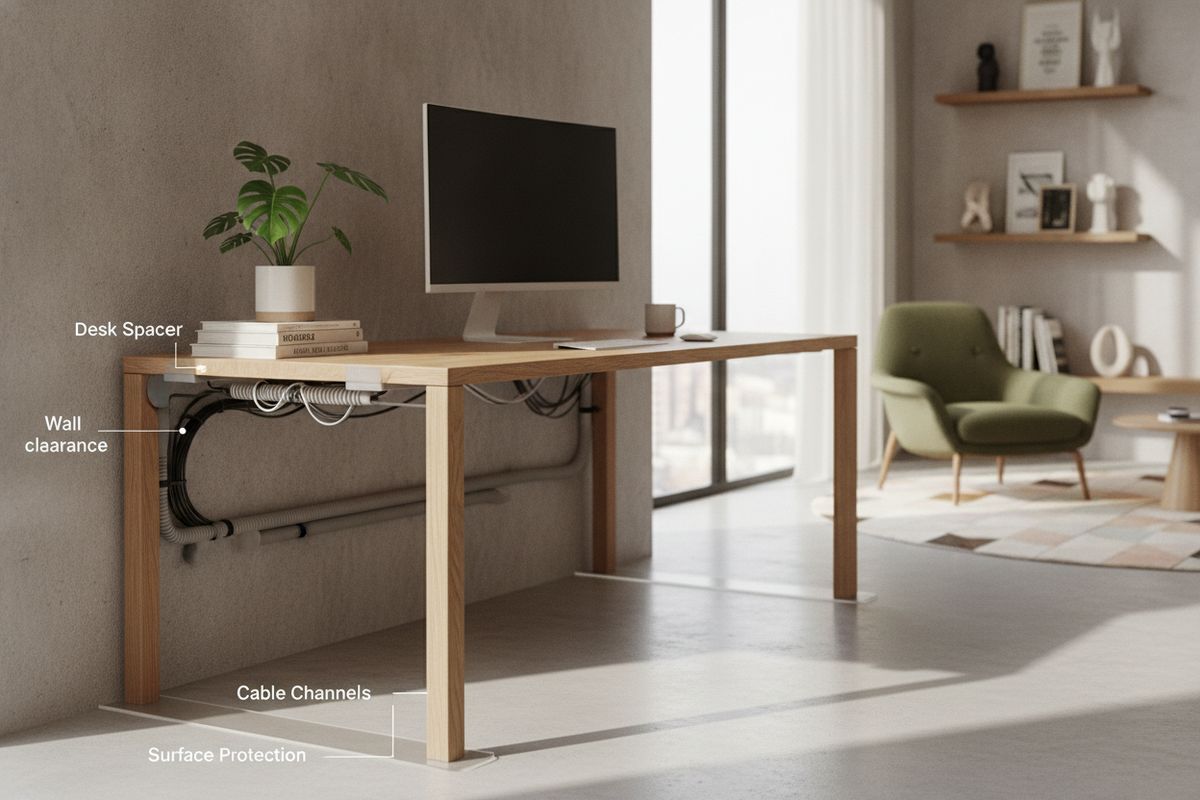
Functional clearance is equally critical for peripheral wiring and equipment clamps. Standard power cords, display cables, and monitor mounts require clearance behind the rear bevel of the desktop. Forcing a desk tight to the wall pinches cords, which can bend connectors or strip outer jacketing. By integrating a dedicated desk spacer, you create an uninterrupted service gap that preserves room finishes while giving desktop accessories the mechanical breathing room they require.
Spacer Depth Categories: Sizing the Wall-to-Desk Standoff
The ideal distance between your desk and the wall depends on your functional priorities. Choosing the correct standoff depth helps maintain room balance without sacrificing utility:
- Micro-Clearance Buffers: Designed primarily to eliminate surface-on-surface friction. These thin buffers rest between the desk frame and the drywall, preventing vibrations from typing or leaning from marking the paint. They are best suited for minimal setups that use integrated grommet holes rather than rear-edge cord drops.
- Cable Channel Offsets: A mid-depth buffer creates sufficient space to let heavy power cables, braided display leads, and surge protector plugs drop smoothly down behind the desk without compression. This depth also absorbs the forward protrusion of standard architectural baseboards, allowing legs and desktops to align evenly.
- Clamp and Articulation Corridors: Larger standoffs accommodate heavy c-clamp brackets used on desktop monitor arms. Deep articulation corridors ensure that multi-jointed monitor poles can flex backward without striking drywall, making this spacing format essential for sit-stand desks and multi-screen workstation frames.
Material Selection: Choosing the Right Spacer Composition
Selecting the right material ensures the spacer cushions contact without degrading or staining your walls under compression.
Soft elastomeric polymers, such as clear silicone bumpers and resilient rubber blocks, offer outstanding grip and vibration damping. Because they deform slightly under pressure, they prevent desks from shifting across slick flooring. When selecting rubber or silicone, choose non-marking formulas that will not leach oils onto light-colored paint.
Dense closed-cell foam pads provide another lightweight alternative. They compress evenly across wider surfaces, distributing structural pressure across a broader surface area. For workstations that require an unyielding mechanical stop, finished hardwood blocks or powder-coated metal bracket standoffs provide rigid stability. When using rigid materials, attaching a thin felt pad to the wall-facing side prevents hard edges from marring plaster or drywall finishes.
Configuring Spacers for Modular and IKEA Desk Layouts
Modular furniture systems present unique standoff requirements. Popular home office designs frequently pair modular storage pedestals with expansive laminate or butcher-block tops. In these configurations, spacers serve dual roles: managing wall distances and fine-tuning vertical proportions.
For wide desk surfaces spanning two separate storage cabinets, vertical spacers or furniture risers placed between the drawer units and the desktop lift the work plane to a comfortable height while opening an auxiliary horizontal shelf for laptop docks and slim accessories. When aligning side-by-side workstations along a shared wall, refer to our ikea desk guide for dual workstations to balance leg spacing, cord drops, and parallel wall buffers across both seating positions.
Built-in installations similarly demand methodical spacing strategies. When securing long desktops across alcoves or framing runs, maintaining a controlled standoff behind the rear edge prevents thermal expansion binding and allows access to hidden wall outlets. Explore our ikea desk guide for custom office perimeters for practical advice on establishing perimeter offsets that keep custom built-ins serviceable over time.
Mounting Methods and Long-Term Stability
How you affix a desk spacer directly impacts maintenance and room flexibility. Consider the following attachment approaches based on your furniture frame:
- Desk-Adhered Mounting: Affixing self-adhesive pads or bumpers directly to the rear edge of the desktop or metal underframe keeps the wall entirely free of tape residues. If the desk is moved for cleaning or rearranging, the wall remains unblemished.
- Wall-Mounted Bumpers: Positioning low-profile stops directly on the wall drywall at the desk's resting height works well in dedicated offices where furniture positions remain permanent. This prevents the spacer from shifting if the desk is bumped during intensive work sessions.
- Frame-Integrated Mechanical Brackets: Heavy-duty commercial desks or motorized sit-stand units benefit from metal standoff arms bolted directly into underside frame channels. These rigid brackets guarantee that the gap remains consistent throughout height cycles.
Floor consistency also plays a role in spacer stability. On plush carpet, desks may gradually settle downward or lean toward the wall as weight shifts onto rear casters or leveling glides. Periodically checking desk alignment ensures that spacers remain centered on their intended contact points rather than slipping out of alignment.
Integrated Workspace Harmony: Storage and Cable Routing
A controlled wall standoff functions best when integrated into an organized workspace ecosystem. Pairing your standoff gap with rear-mounted wire trays keeps dropped cables suspended cleanly beneath the tabletop rather than pooling onto the baseboards. Incorporating slim wire troughs, magnetic channels, or under-desk baskets ensures that the vertical gap remains an intentional design feature rather than a messy catchall for stray cords.
To maintain a unified visual balance across your entire room, coordinate the standoff gap of your primary work surface with surrounding cabinetry, lateral files, and low bookcases. Consulting our desk ikea guide for refined home offices provides additional styling strategies for arranging surrounding accent pieces, balancing functional clearances, and creating a pristine, executive-level layout.

Laisser un commentaire
Ce site est protégé par hCaptcha, et la Politique de confidentialité et les Conditions de service de hCaptcha s’appliquent.