


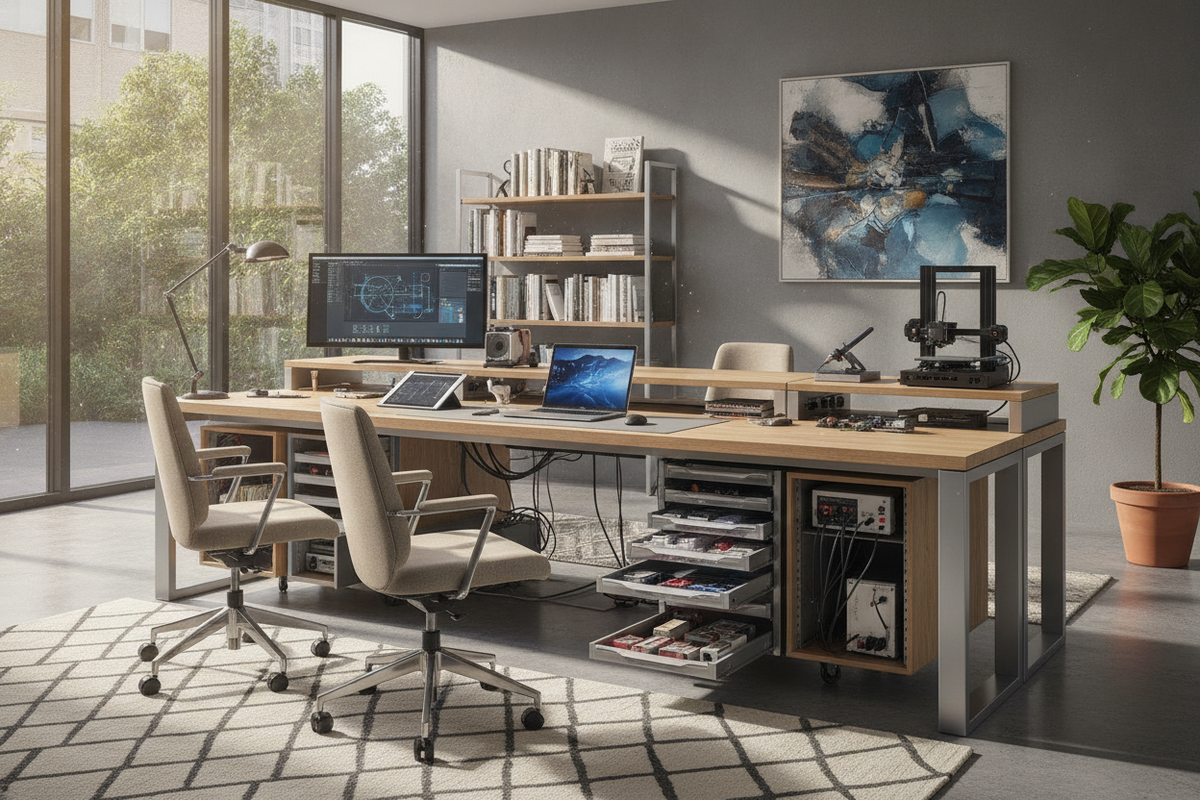
Introduction: Why Technical Workflows Require Specialized Engineering Desks
Engineering disciplines place uncommon physical demands on furniture. Unlike standard computer workstations configured solely for office software and document review, an effective engineering desk must balance screen-intensive computational work alongside hands-on mechanical manipulation, circuit assembly, or architectural drafting. When a desk lacks sufficient area, tools migrate into keyboard zones, displays crowd the user's field of view, and physical hardware encroaches on daily productivity.
Selecting an intentional desk for engineers requires examining how digital computing interacts with physical prototyping. Accommodating both tasks demands strategic planning around desktop depth, frame stability under shifting gear weights, and dedicated storage compartments designed to keep delicate components organized and accessible.
Workstation Zoning: Digital Computing vs. Physical Hardware Benchwork
A dependable engineering desk relies on clear functional zoning. Dividing the work surface into distinct territories prevents delicate circuit boards or test leads from tangling with desktop computing peripherals.
The Computing and Schematic Review Zone
Modern engineering workflows depend heavily on computer-aided design, complex modeling, code compilation, and multi-window schematic analysis. These tasks routinely require expansive dual- or triple-display setups alongside dedicated high-performance desktop towers. Integrating an elevated monitor stand for multiple monitors frees substantial desktop surface beneath screen arrays, giving users open room for graphic tablets, notebooks, and reference materials without moving their input peripherals.
The Hands-On Electrical and Prototyping Zone
An electrical engineer desk or physical development bench requires its own dedicated sector. In this zone, surface clearance must accommodate benchtop instruments such as power supplies, signal generators, multimeter probes, soldering irons, and breadboards. Maintaining this space as an independent surface boundary ensures that physical component adjustments do not force computing gear out of ergonomic alignment.
Dimensional Frameworks: Selecting the Right Scale for Engineering Needs
Standard office desks often feel constrained once diagnostic instruments or bulky project enclosures are placed on the surface. Evaluating dimensional parameters ensures the workstation can hold comprehensive technical toolsets comfortably.
Desktop Depth: Accommodating Test Gear and Display Stacking
Desktop depth serves as the primary barrier between organized productivity and cluttered frustration. Shallow work surfaces force monitor stands directly into the user's immediate typing and writing zones. For an electrical engineering desk, selecting an extra-deep surface permits benchtop instruments and monitor stands to sit along the back perimeter while leaving the front half of the desk entirely open for active soldering, drafting, and forearm support.
Surface Width and Center-Span Support
Expansive width allows concurrent projects to coexist without requiring daily teardowns. However, extended horizontal spans demand careful consideration of structural rigidity. Long work surfaces loaded with test gear, heavy display arms, and component cases can flex over time if unsupported. Desks with reinforced longitudinal under-frame rails, center support legs, or heavy-duty subframes preserve a flat, level working plane across the entire span.
Under-Desk Clearances and Legroom Optimization
Complex engineering setups frequently feature oversized tower cases, backup power supplies, and storage pedestals beneath the tabletop. If structural crossbars or storage units intrude into the center knee pocket, natural movement becomes restricted. Selecting designs with strategic perimeter bracing and clean under-desk channels ensures adequate knee, leg, and foot clearance during long hours of technical analysis.
Integrated Storage Architecture for Components and Instrumentation
Tool and component organization determines how quickly an engineer can move from design review to physical verification. Without modular storage, loose fasteners, test clips, and hand tools quickly consume desktop real estate.
Modular Drawer Pedestals for Hand Tools and Components
An effective engineering workstation integrates a deliberate blend of drawer styles:
- Shallow compartmentalized drawers: Ideal for organizing screwdrivers, wire strippers, crimpers, calipers, tweezers, and compartmentalized sorting boxes for passives and fasteners.
- Medium utility drawers: Well-suited for storing handheld meters, spare breadboards, development kits, and cable harnesses.
- Deep box or file drawers: Designed to house bulky power adapters, protective storage cases, product manuals, and hard-copy schematics.
Overhead Hutches and Risers for Bench Equipment
Vertical shelving systems and desk-mounted hutches leverage overhead volume to keep primary work planes open. Elevating benchtop oscilloscopes, variable power supplies, and reference literature onto a rigid upper shelf maintains immediate visual access to displays and adjustment dials while leaving the desk completely clear for component assembly.
Material Selection and Structural Rigidity for Technical Workloads
Engineering tasks expose furniture to unique mechanical stresses, tool abrasions, and occasional heat exposure that quickly wear down light consumer furnishings.
Desktop Surface Finishes: Scratch and Heat Considerations
Desktop materials should be selected with attention to daily physical abuse. High-pressure laminates, durable melamine coatings, and dense composite surfaces resist scuffs from metal chassis feet, dropped hand tools, and minor abrasive contact. In prototyping environments, pairing these durable surfaces with dedicated heat-resistant silicon mats or anti-static pads protects both the desktop finish and sensitive microelectronics from damage.
Frame Architecture: Triangular Bracing and Heavy Steel Subframes
Precision tasks, such as fine-pitch soldering, micro-probing, or manual component alignment, require a completely stable work surface. Desks built with heavy-gauge steel legs, welded subframes, and corner gusset or triangular bracing prevent wobbling when typing rapidly or adjusting instrument knobs. Wide, adjustable leveling feet further isolate the workstation from uneven flooring.
Layout Typologies and Cable Pathways for Engineering Rooms
Selecting the right desk shape and under-desk cable architecture shapes room flow and minimizes clutter in busy lab or home environments.
Straight Benches vs. L-Shaped Configurations for Hardware Separation
While a straight bench provides a straightforward footprint for long walls, an L-shaped modular desk provides natural separation between distinct task profiles. An engineer can dedicate the primary span to computing, CAD drafting, and programming, while using the secondary return exclusively as an electrical assembly bench. This 90-degree transition allows swift toggling between schematic review and physical probing with a simple chair swivel.
Wire Trays, Power Distribution, and Signal Separation
Between computing peripherals, bench instruments, and external development boards, an engineering desk must route dozens of cables. An integrated modesty panel for desk systems frequently doubles as a concealed mounting backdrop for wire raceways, surge strips, and high-capacity cable baskets. Separating main AC power routing from delicate low-voltage sensor or communication lines inside under-desk channels prevents cable snarls and facilitates quick hardware swaps.
Conclusion: Building a Sustainable, Long-Term Technical Workstation
Investing in a specialized engineering desk transforms how technical professionals navigate demanding workflows. By balancing computing zones with prototyping areas, choosing deep surfaces supported by rigid framing, and incorporating organized modular storage, you create an orderly environment tailored to technical rigor. A thoughtfully organized workspace not only protects expensive instrumentation, but also provides the long-term focus and flexibility required to bring complex projects to life.


Laisser un commentaire
Ce site est protégé par hCaptcha, et la Politique de confidentialité et les Conditions de service de hCaptcha s’appliquent.