


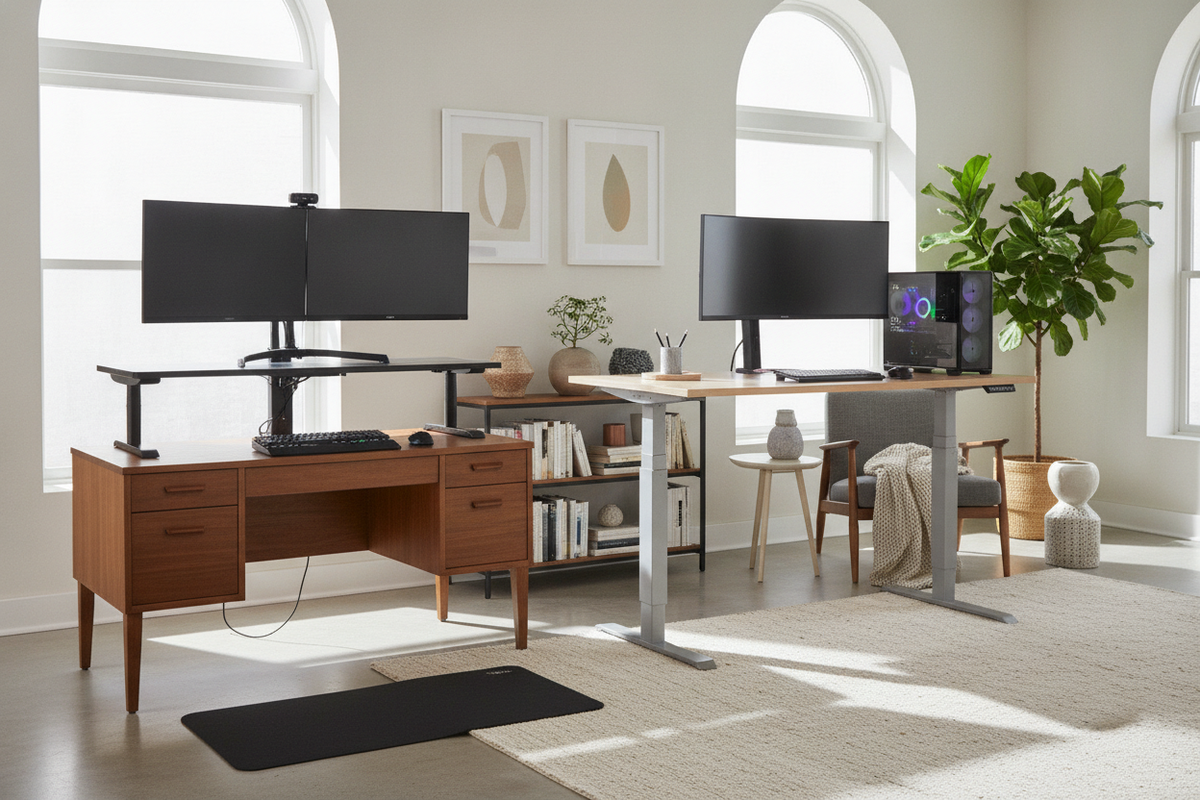
Upgrading to an active workstation does not always require discarding a favored work surface. If you already have a sturdy desktop, a vintage writing table, or a spacious gaming surface, you can adapt your current furniture to support alternating between sitting and standing throughout the day. Deciding how to convert existing desk to standing depends on your available space, equipment weight, aesthetic preferences, and budget.
From simple on-desk risers to full frame retrofits, various conversion methods allow you to balance ergonomic posture with dependable stability. Understanding the mechanical requirements and structural trade-offs of each approach helps ensure your converted setup remains reliable under daily use.
Evaluating Your Current Desk for Standing Conversion
Before selecting a conversion strategy, inspect the physical characteristics of your current furniture. Not every table or desk accommodates every retrofit method smoothly, and evaluating key structural points early prevents unexpected wobbling or material failure.
- Top Material and Core Density: Solid wood, dense engineered wood, and thick laminate tops provide secure anchoring for screws and clamping mechanisms. Honeycomb-core or hollow paperboard tops may crush under heavy monitor arm clamps or crack when drilled.
- Under-Desk Clearance and Aprons: Many traditional dining tables and executive desks feature decorative side aprons or integrated center drawers. These structural aprons can interfere with motorized frame mounting brackets or clamp-on keyboard trays.
- Leg Attachment Style: If you plan to replace static legs with an adjustable base, confirm that the original legs detach cleanly without compromising the integrity of the desktop surface.
- Total Surface Footprint: Assess whether your surface is deep enough to accommodate riser platforms while maintaining a comfortable focal distance to your displays.
Method 1: Desktop Converters and Adjustable Risers
Desktop converters are self-contained mechanical units that sit directly on top of your current workstation. These units typically feature gas-spring or scissor-lift mechanisms that allow you to raise your monitors, keyboard, and mouse without altering the underlying furniture.
This approach provides an accessible option to turn desk into standing desk setups without major structural modifications. Tiered models can help position displays and input devices at distinct elevations to support a neutral posture. When adding a desktop riser to your existing furniture, balance visual proportions with practical accessories by reviewing our guide on standing desk setup styling ideas.
While converters preserve your original furniture intact, they do introduce trade-offs. The base of the unit occupies usable tabletop area, and the elevated platform adds visual mass to the room. In addition, the load threshold of a desktop converter is generally more limited than that of a dedicated lifting frame, making it well suited for streamlined laptop-and-monitor configurations.
Method 2: Replacing the Base with a Motorized Standing Frame
For a seamless, built-in appearance, replacing the existing static legs with an electric standing desk base offers significant advantages. In this retrofit method, you keep your original tabletop, remove the original legs or trestles, and fasten a motorized frame directly to the underside of the wood.
Upgrading to a motorized understructure provides smooth height adjustments similar to an electric lift standing desk while preserving a custom tabletop. Motorized bases allow you to program memory presets for recurring standing and seated heights, creating consistent ergonomic alignment with the press of a button.
For expansive dual-monitor or multi-device layouts, pairing an existing wide desktop with a stable motorized base creates a functional wide standing workstation. When planning this diy standing desk conversion, ensure the width range of the adjustable frame matches your top, allowing proper overhang at the sides for balanced weight distribution.
Method 3: Fixed Elevation Platforms and Tabletop Risers
If full motorized adjustability is not required, creating a fixed-height standing zone is another practical route. Homeowners frequently convert table to standing desk utility by adding solid leg risers, heavy-duty furniture risers, or dedicated platform shelving.
Integrating fixed standing zones into your home office requires deliberate floor planning, as outlined in our advice on ergonomic standing desk layouts. Fixed elevations work especially well when paired with an adjustable drafting stool, allowing you to alternate between perching and standing without moving the work surface itself.
When using leg risers or riser blocks, verify that the base of each leg sits squarely inside the riser cup. Broad, non-slip bases prevent tipping and minimize lateral flex, which is critical when typing vigorously or operating drafting equipment.
Work vs. Gaming: Tailoring the Conversion to Your Setup
Office work and high-performance gaming place distinctly different demands on a converted standing desk. Standard productivity setups usually focus on document placement, conferencing cameras, and lightweight peripherals. Gaming environments, by contrast, introduce dynamic physical forces and heavy hardware configurations.
Gamers often utilize active mouse movements, multi-monitor arrays, audio interfaces, and heavier computer towers. Heavy gaming equipment and multi-display arrangements often benefit from the reinforced structural stability and expansive footprint of a spacious standing desk surface.
When deciding between a desk converter vs frame replacement for gaming, a motorized frame replacement is generally preferred. Desktop converters can exhibit slight vibration during rapid mouse sweeps and restrict the travel space needed for large gaming mousepads.
Cable Routing and Storage Harmony During Conversion
A successful conversion extends beyond lifting mechanisms; it requires careful management of cords and auxiliary storage. As a workstation moves between heights, static cable configurations can become snag hazards or pull hardware off surfaces.
- Provide Sufficient Wire Slack: Route power cables, display connections, and network lines through flexible cable spines or mesh sleeves. Ensure all cables have enough slack to reach full standing elevation without tension.
- Mount Power Strips to the Surface: Fastening an under-desk power distribution block directly beneath the tabletop minimizes the number of cords running to the wall outlet to a single master power cable.
- Maintain Monitor Clamp Clearance: Verify that your conversion brackets leave adequate clearance along the rear edge for monitor arm grommets or C-clamps.
- Coordinate Mobile Storage: Traditional under-desk drawer units may collide with lowering frames or converters. Replace fixed pedestals with low-profile rolling drawer cabinets that slide smoothly beneath the desk at seated heights.
Summary and Next Steps for a Functional Standing Setup
Deciding to convert existing desk to standing allows you to revitalize a tabletop you already love while gaining the ergonomic benefits of an active work posture. Desktop risers offer an accessible, low-impact option for compact office setups. Motorized frame retrofits deliver long-term stability, unrestricted surface area, and clean aesthetics for demanding work and gaming environments.
By assessing the material density of your top, calculating total gear weight, and planning your cable routing in advance, you can create a reliable, posture-friendly workspace tailored precisely to your daily routine.

Laisser un commentaire
Ce site est protégé par hCaptcha, et la Politique de confidentialité et les Conditions de service de hCaptcha s’appliquent.