


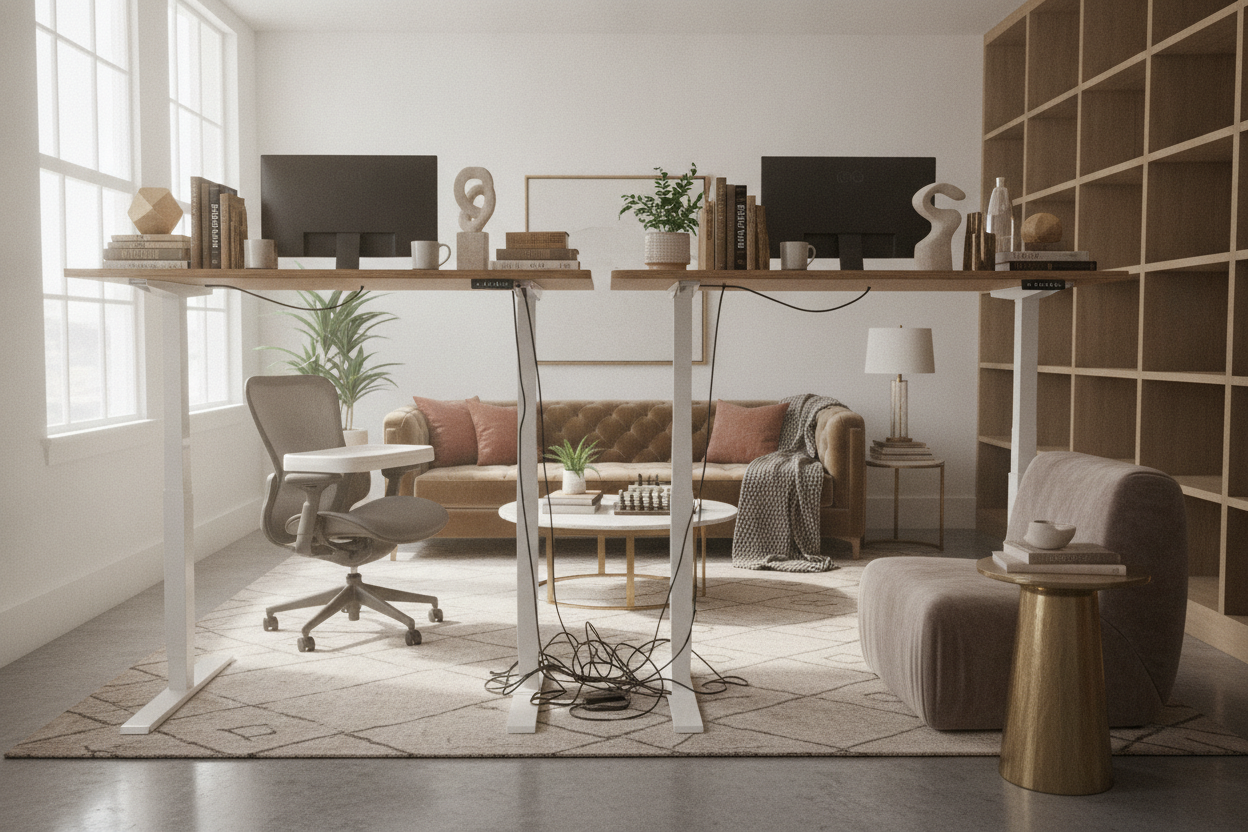
I spent three weeks obsessing over a 60-inch slab of solid birch for my desktop, only to realize my stand desk office looked like a total disaster the second I actually used it. When the desk is down, everything is fine. The moment you raise it to standing height, your carefully curated wall art is suddenly hidden behind your monitors, and a literal waterfall of black plastic cables pours onto the floor.
We’ve all seen the Pinterest photos of a minimalist office desk standing in a sun-drenched room, but those photos are a lie. They never show the desk at 45 inches with a tangled mess of power strips dangling like heavy fruit. If you’re going to commit to a standing desk in office life, you have to design for the movement, not just the static image.
Quick Takeaways
- Vertical gallery walls prevent the 'floating art' look when the desk is raised.
- Cable management requires at least 18 inches of slack for every cord to avoid 'the yank.'
- Your Zoom background shifts when you stand—check your 'high-angle' view for clutter.
- Choose a chair that looks good from the back, as it becomes a focal point when you're standing.
The Pinterest Lie: Desks Are Always Shown Sitting
The biggest issue with standing desks for offices is that they are almost exclusively marketed in their lowest position. It’s easy to make a room look balanced when the desk is 29 inches off the floor. But the reality of a standing table office is that it spends half its life looking like a giant mechanical spider. When that desk moves up, the visual weight of the room shifts upward with it, leaving a massive, awkward void underneath.
I’ve seen dozens of setups where the owner spent thousands on a beautiful office with standing desk functionality, only to have the room’s 'flow' die the second they hit the preset button. You have to account for that negative space. If you don't, your office feels like a temporary workshop rather than a finished room. It's about acknowledging that your furniture is dynamic, and your decor needs to be just as flexible.
The Floating Art Problem (And How to Fix It)
Hanging art behind an adjustable standing desk office is a nightmare. If you hang a single large print at the standard 'eye level' for sitting, your monitors will slice it in half when you stand up. If you hang it for standing height, it looks like it's trying to escape through the ceiling when you're seated. It’s one of the most common errors in a home office setup with standing desk.
The solution is a vertical gallery wall or a tall, narrow bookshelf. Instead of one horizontal piece, use three smaller frames stacked vertically. This way, when the desk is down, the top two frames are visible; when the desk is up, the bottom frame might be covered, but the top ones still anchor the space. It keeps the wall from looking empty or 'disconnected' from the desk surface, regardless of where the motors stop.
Why Your Cables Suddenly Look Like Jungle Vines
Cable management for a sit and stand work desk is not the same as cable management for a fixed desk. You can't just zip-tie everything to the leg and call it a day. I learned this the hard way when I raised my desk and watched my expensive ultra-wide monitor slowly tilt forward because the HDMI cable was too short. It was a slow-motion heart attack.
You need a flexible cable spine or a mesh under-desk tray. Investing in a high-quality sit stand up desk with memory preset controller helps because the movement is smooth, but you still need to 'loop' your cables. Give every cord an extra 18 inches of slack, tucked into a tray, so that when the desk reaches its peak, the cords gently extend rather than snapping taut. Use a single power strip mounted to the underside of the desk so only one main power cord ever has to reach the wall outlet.
The Office Chair Dilemma When You're Standing
When you use office desks sit stand style, your chair becomes an orphan for four hours a day. Most people just push it to the side, where it looks like a lonely gargoyle in the corner. If you have a bulky, high-back ergonomic chair, it can really clutter the room's sightlines when it's not tucked under a desk. It's a major factor in office desk sit and stand aesthetics that people ignore.
I prefer chairs with a lower profile or those that actually look like furniture. When styling an office desk and chair set, think about the back of the chair. Is it ugly plastic and exposed bolts? Because that's what you’ll be looking at all afternoon while you stand. I switched to a chair with a mesh back and a polished aluminum frame—it looks intentional and sleek even when it's just sitting in the middle of the rug while I work on my feet.
Don't Forget Your Zoom Background Shifts, Too
Using a standing desk for office work means your webcam is no longer at a fixed height. When I’m sitting, my camera shows a nicely organized bookshelf. When I stand, the angle changes, and suddenly my coworkers are getting a clear view of the dust on top of my door frame and a weirdly angled ceiling fan. It’s not a great look for professional calls.
If you do a lot of video calls, you need to 'height-proof' your background. This means your art or shelving needs to extend higher than you think. Avoid having a 'horizon line' in your room—like a chair rail or the top of a cabinet—that sits right at neck level when you're standing. It creates a weird visual decapitation effect on camera. Test your 'standing view' before your next meeting to ensure you aren't accidentally showcasing your messy closet shelf.
My Honest Experience
I used to think cable trays were for nerds who had too much time on their hands. Then I bought a motorized frame and realized that without one, my office looked like a server room explosion. My biggest mistake was buying 'standard' 6-foot cables. For a standing desk, you almost always need 10-foot versions of everything—DisplayPort, power, USB—to account for the travel distance. I spent an extra $100 replacing cables I already owned just to get that extra slack. Buy the long ones first.
FAQ
Do I need a special rug for a standing desk?
Not necessarily, but avoid high-pile shags. They make it harder to move your chair back and forth, and they can catch on the desk legs if they have a wide footprint. A low-pile industrial rug or a thin wool flatweave is your best bet.
How do I hide the giant power brick for my monitors?
Don't let it hang. Use heavy-duty double-sided mounting tape (like 3M Dual Lock) to stick the bricks directly to the underside of your desktop. It keeps the weight off the ports and hides the bulk completely.
Is a manual crank desk better than an electric one?
Only if you want a workout. In my experience, if it’s a manual crank, you’ll stop using the standing feature within two weeks. The 'friction' of having to crank it 50 times is enough to keep you sitting forever. Go electric or don't bother.

Laisser un commentaire
Ce site est protégé par hCaptcha, et la Politique de confidentialité et les Conditions de service de hCaptcha s’appliquent.