


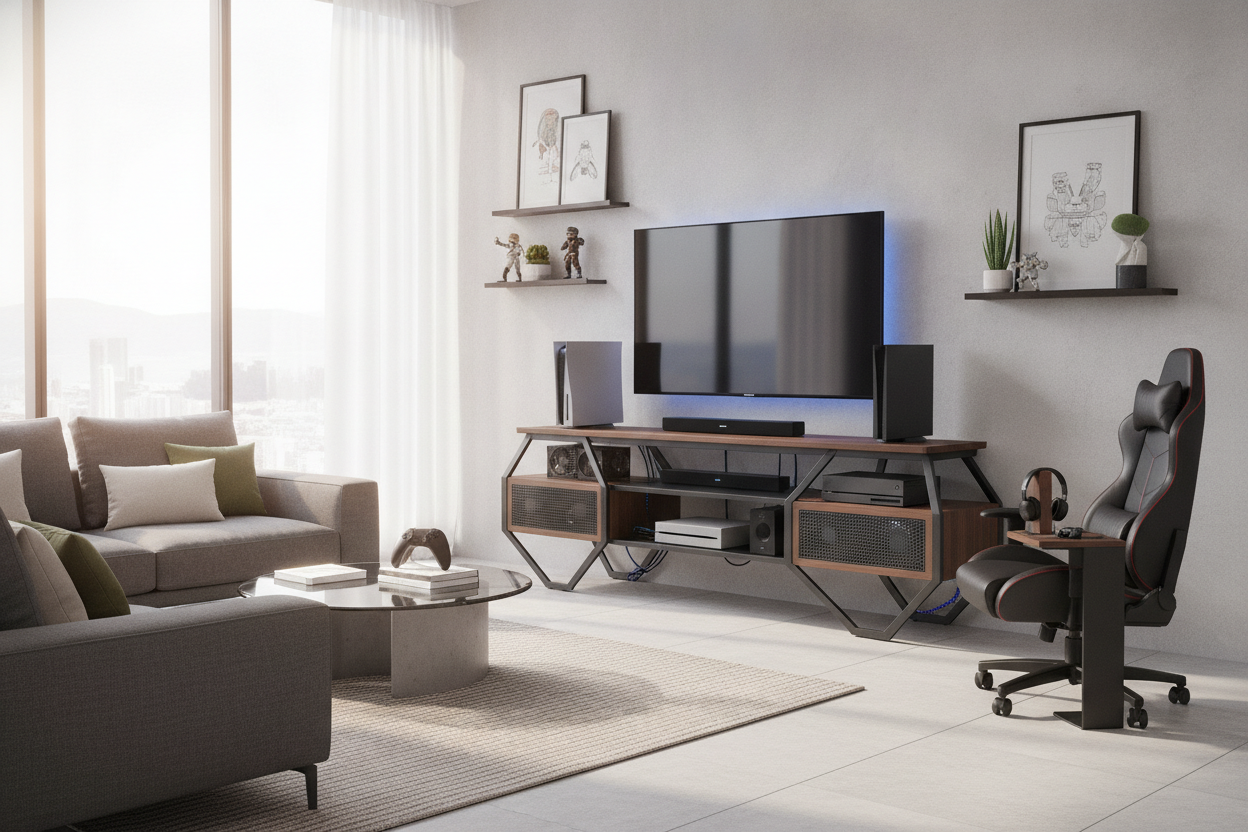
I was halfway through a grueling boss fight when my PS5 started sounding like a 747 preparing for takeoff. Seconds later, the screen went black. No warning, just the smell of hot plastic and a blinking red light. My gorgeous, walnut-veneer mid-century credenza had become a slow cooker for my hardware. I realized then that a gamer tv stand isn't just a 'vibe' for teenagers—it is a functional necessity for anyone who doesn't want to fry a $500 console.
Quick Takeaways
- Airflow is non-negotiable; closed cabinets are console killers.
- Modern consoles are massive; check your shelf depth before buying.
- Standard cable management holes are never large enough for a real setup.
- Slatted fronts or mesh doors offer the best balance of style and cooling.
The Day My Console Sounded Like a Jet Engine
I spent weeks hunting for the perfect media unit. I wanted that clean, minimalist look you see in high-end catalogs. I found it: a solid wood piece with no visible wires and heavy, soft-close doors. It looked like a dream until I actually started playing. Within an hour, the heat trapped inside that cabinet reached 'melting point' levels.
Most people treat their gaming and tv stand like a regular piece of furniture, but your consoles are basically high-performance computers. When you shove a PS5 or an Xbox Series X into a tight wooden box, the hot air it exhausts has nowhere to go. It just loops back into the intake. My 'adult' furniture was actively suffocating my hobby. That shutdown was a wake-up call that my tv gaming console stand needed to prioritize engineering over pure aesthetics.
Why Standard Furniture Fails Modern Gamers
The problem is that standard TV stands were designed for a different era. They were built for DVD players and cable boxes—devices that barely generate enough heat to warm a slice of pizza. Modern gaming entertainment center units have to handle much higher thermal loads.
Traditional furniture also fails the cable test. Most 'media' units come with a single, pathetic two-inch hole in the center of the backboard. Try threading two HDMI 2.1 cables, three power bricks, a LAN cable, and a controller charging dock through that. It’s a physical impossibility. You end up having to leave the backboard off entirely, which makes the whole thing feel flimsy and cheap. A dedicated tv stand for gaming consoles is built with the 'cable octopus' in mind.
The 3 Non-Negotiables for Your Gaming Setup
When you are shopping for a gaming room tv stand, stop looking at the color first and start looking at the specs. I’ve gone through three different setups in four years, and I’ve learned that if it doesn't meet these three criteria, it's going back to the store.
Ventilation Over Aesthetics (Or How to Get Both)
You need a gaming tv console that breathes. If you hate the look of open shelves, look for slatted doors or perforated metal fronts. This allows the hot air to escape while still hiding the clutter of your multi gaming console stand. If you can feel heat radiating from the wood after an hour of play, your ventilation has failed.
Depth: Because Modern Consoles Are Massive
The PS5 is nearly 16 inches deep when you account for the cables sticking out the back. Many trendy, shallow tv stands for gamers are only 12 to 14 inches deep. This leads to the 'overhang' look, which is both ugly and dangerous if you have pets or kids. Always measure from the back of the shelf to the front edge, and add two inches for cable clearance.
Wire Management That Actually Works
The best tv stands for gaming have full-width cable channels or removable back panels. Look for a video game tv stand that includes internal routing hooks. Being able to zip-tie your power strips to the underside of a shelf is the difference between a clean setup and a fire hazard. Don't settle for one tiny hole.
Hiding the Clutter Without Looking Like a Dorm Room
You don't need neon green LEDs to have a 'gamer' setup. I’ve found that a game room entertainment center can look sophisticated if you manage the accessories. I use felt baskets to hide controllers and headsets when they aren't in use. It keeps the surface of the tv console for gaming clear for more 'adult' decor like a lamp or a plant.
If you have a massive collection of physical media or retro consoles, you might need a full-blown entertainment center. This gives you the vertical space to display your gear without it feeling cramped. For those who want to show off their hardware like art, a display cabinet TV stand is a great middle ground—it keeps the dust off while putting your tech on a pedestal. Just make sure the glass isn't airtight, or you're right back to the overheating problem.
FAQ
Do I really need a 'gaming' specific stand?
Not necessarily, but you do need one that meets the airflow and depth requirements. Most 'gaming' branded furniture just adds RGB lights; look for the features, not the label.
Is glass or wood better for cooling?
Metal or mesh is actually best, but between glass and wood, wood is slightly better as it doesn't retain heat quite as intensely. Open-back designs are the real winner here.
How do I hide the giant power bricks?
Look for a tv stand with gaming storage that includes a dedicated 'cable management box' or a hidden shelf specifically for power strips. Mounting them to the back of the unit with heavy-duty Velcro is my favorite pro tip.

Laisser un commentaire
Ce site est protégé par hCaptcha, et la Politique de confidentialité et les Conditions de service de hCaptcha s’appliquent.