


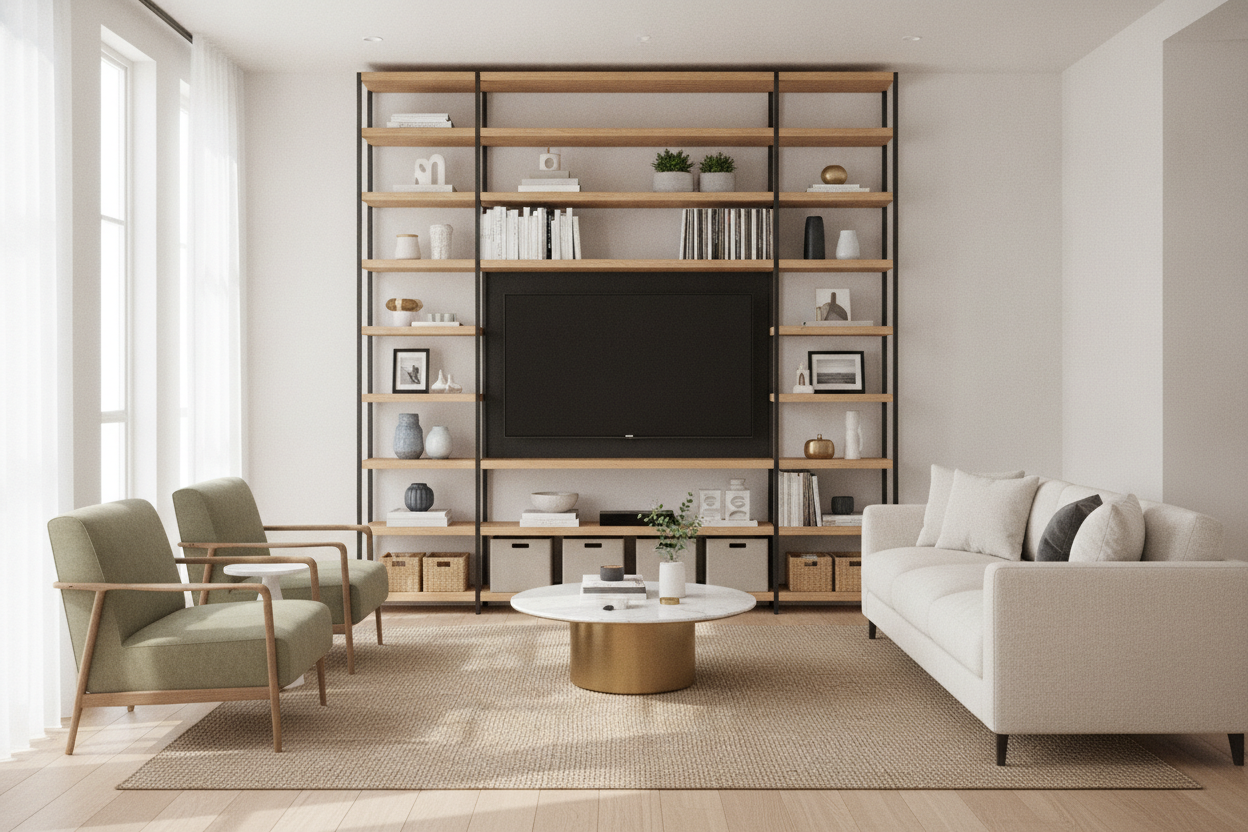
I spent three years staring at a 60-inch walnut console that looked great in a catalog but felt like a boat anchor in my 400-square-foot apartment. It took up six feet of floor space just to hold a TV and a dusty Nintendo Switch. My wall was naked, my floor was gone, and I felt like I was living in a hallway. Switching to a media shelf changed the entire vibe of the room.
Quick Takeaways
- Vertical media shelves reclaim floor space by utilizing height.
- Tall units draw the eye upward, making ceilings feel significantly higher.
- Mixing books and art with tech hides the 'black mirror' effect of a TV.
- Adjustable shelves are non-negotiable for fitting odd-sized electronics.
Why I Finally Ditched the Standard Long TV Console
The standard low-and-wide TV stand is a trap. We buy them because they're the default, but they are incredibly inefficient. In my last place, I had a mid-century style console that sat about 20 inches off the floor. It looked sleek, sure, but it left five feet of empty wall space above it. It was a vacuum for dust and a waste of prime real estate. Every time I looked at it, I just saw a horizontal slab of wood eating my floor.
When you have a small living room, every square inch of floor is a premium. A long console forces your furniture layout to be rigid. You can't put a chair near it, and you can't walk past it without bumping your shins. I realized that by sticking to the 'traditional' look, I was essentially ignoring 80% of my wall. I needed a media shelving unit that worked harder.
The Vertical Magic of a Tall Media Shelving Unit
The moment I swapped the low console for a tall media storage unit, the room opened up. It sounds counterintuitive—adding a bigger piece of furniture to make a room feel larger—but it works. By moving the storage from a horizontal plane to a vertical one, you free up the floor. Suddenly, I could tuck a floor lamp right next to the unit where the old console used to block the way.
A vertical media shelving unit changes the focal point. Instead of your eyes stopping at waist height, they travel all the way to the ceiling. This shift in perspective is what makes a cramped space feel airy. It turns a 'TV area' into a 'library area' that just happens to have a screen in it. I opted for a metal-frame media cabinet rack that had an open back, which kept the wall color visible and prevented the room from feeling closed in.
Faking Higher Ceilings with a Media Bookcase Unit
If you live in a place with standard 8-foot ceilings, you know the struggle of feeling boxed in. A tall media bookcase unit acts like vertical stripes on a suit. It elongates the room. I chose a unit that was about 75 inches tall, leaving just enough gap at the top to keep it from looking cramped. The vertical supports create a strong upward line that tricks your brain into thinking the ceiling is a foot higher than it actually is. It’s a cheap psychological trick that pays off every time you walk into the room.
Creating a Media Display Shelf (Not Just a Tech Dump)
Most TV stands are just a graveyard for tangled HDMI cables and old remotes. A proper media display shelf allows you to integrate your life into your entertainment setup. I use adjustable shelf storage to make sure my oversized coffee table books fit perfectly on the same unit as my soundbar. There is something satisfying about seeing a vintage vase sitting a few inches away from a PlayStation 5.
The goal is to blur the lines between 'electronics' and 'decor.' When you use a large media shelf, the TV becomes just one element of a larger composition. It stops being the only thing to look at. I’ve found that placing a few trailing plants on the higher shelves helps soften the hard edges of the tech, making the whole media shelf unit feel like a part of the home rather than a retail display for Best Buy.
How to Organize a Media and Storage Unit So It Actually Looks Good
The biggest fear with open media shelves is the cord nightmare. If you don't have a plan, your media and storage unit will look like a server room gone wrong. My rule of thumb is the 70/30 rule. 70% of what you see should be 'pretty'—books, art, plants—and 30% should be functional tech. You have to balance display and concealment in your home to keep the chaos at bay.
I use uniform felt or wicker baskets on the bottom shelves of my tv and media storage units to hide the ugly stuff. Routers, power strips, and extra controllers all go into the baskets. For the cables running up to the TV, I use simple adhesive clips on the back of the shelf frame. If you're using a tv media storage cabinet with a solid back, you can even drill a small hole to feed wires through. It takes twenty minutes of effort but saves you years of visual clutter.
Squeezing TV and Media Storage Units Into Awkward Corners
Not every living room has a perfect, wide-open wall. My current place has a weird fireplace bump-out that leaves me with two narrow alcoves. A traditional console would never fit there. Instead, I looked for a large display cabinet corner shelf that could bridge that awkward gap. Corner units are the unsung heroes of small-space design. They turn 'dead' corners into functional tv media storage unit hubs.
If you're working with an L-shaped room, don't be afraid to use a tall media shelf as a room divider. A double-sided unit can hold your TV on one side and books on the other, effectively creating a 'bedroom' and 'living' zone in a studio apartment. It’s a much more sophisticated look than a folding screen or a curtain.
Personal Experience: The Particle Board Disaster
I have to be honest: my first attempt at this was a disaster. I bought a cheap, $80 media cabinet rack made of thin particle board. Within three months, the weight of my books caused the middle shelf to sag like a hammock. It looked terrible and felt dangerous. If you are going vertical, spend the extra money on solid wood or heavy-duty metal frames. Also, anchor it to the wall. I skipped the anchor once, and a particularly heavy cat jump almost ended in a very expensive insurance claim. Learn from my laziness: anchor your tall shelves.
FAQ
Is a tall media shelf too overwhelming for a small room?
Actually, it’s the opposite. Because it has a smaller footprint than a long console, it leaves more floor visible, which makes the room feel less crowded. Just stick to units with thinner profiles or open shelving.
How do I hide the TV wires on an open shelf?
Use cable management clips or velcro ties to run the wires down the back of one of the vertical supports. If the shelf is metal, you can even use magnetic cable ties for a super clean look.
Can I put a large 65-inch TV on a media shelf?
You need to check the interior width of the unit. Most modular media shelves come in widths that can accommodate a 55-inch screen, but for a 65-inch, you'll likely need a unit specifically designed with a wider central opening.

Laisser un commentaire
Ce site est protégé par hCaptcha, et la Politique de confidentialité et les Conditions de service de hCaptcha s’appliquent.