


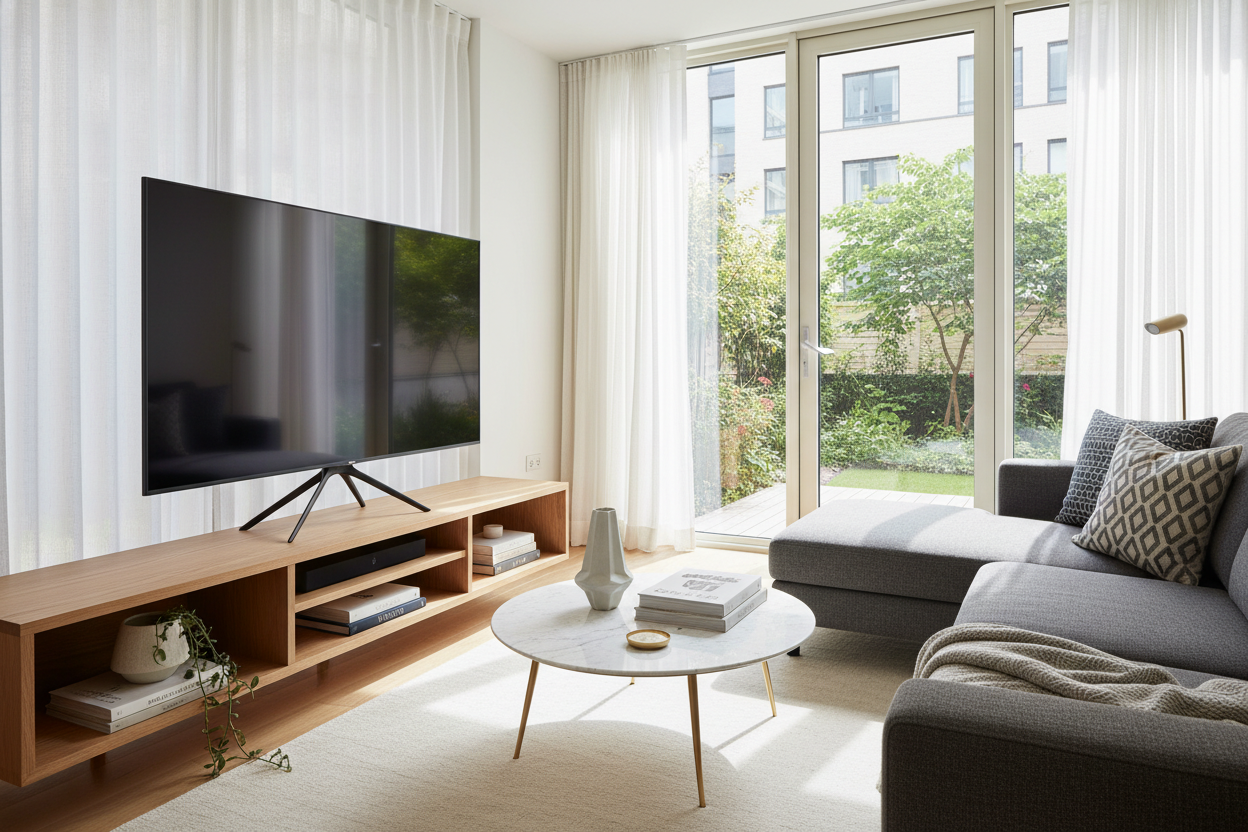
I spent three months scouring Facebook Marketplace for a 1960s teak credenza. When I finally found 'the one,' I hauled it up three flights of stairs, oiled the wood, and felt like a real interior designer. Then I bought a new screen and realized my 50 inch tv legs were literally wider than the piece of furniture I’d just spent half a paycheck on.
It is a design flaw that is ruining living rooms across the country. You have a perfectly good dresser or a slim console, but because the TV manufacturer decided to put the feet at the absolute outer edges, you are forced to buy a massive, clunky media unit that swallows your floor space. It does not have to be this way.
- Factory 'V-legs' are designed for manufacturing cheapness, not your home's aesthetics.
- Most 50-inch TVs have a leg span that exceeds 40 inches, requiring oversized furniture.
- Aftermarket pedestal stands use VESA mounts to create a much smaller 12-to-15 inch footprint.
- Swapping legs usually takes less than 10 minutes and a single screwdriver.
The 'V-Leg' Conspiracy (Why TVs Don't Fit on Anything Anymore)
If you look at a TV from ten years ago, it probably had a heavy, centered pedestal base. It was sturdy, it swiveled, and it fit on almost any surface. Fast forward to now, and every budget-to-mid-range 50-inch screen comes with two flimsy plastic 'V' shaped feet that screw into the far corners. Manufacturers didn't do this to help you; they did it because it is significantly cheaper to ship two ounces of plastic than a balanced metal base.
The result is a footprint nightmare. A 50-inch screen is roughly 44 inches wide. In the old days, you could put that on a 30-inch wide stand and be fine. With modern legs, you need a surface at least 45 inches wide just to keep the feet from hanging off the edge. This forces people into buying massive 60-inch consoles that they don't actually have the room for. It is a spatial tax that nobody asked for, and it makes small-apartment living a total headache.
My Dilemma: A Beautiful Vintage Credenza vs. A Wobbly Screen
My vintage credenza is 48 inches wide. It is the centerpiece of my living room. When I unboxed my new 4K screen, I realized the factory tv legs for 50 inch tv models were angled outward so aggressively that they sat exactly 47.5 inches apart. One wrong bump while vacuuming and that $500 screen was going to meet the floor. It looked ridiculous—like a giant bird perched on a tiny branch.
I spent a night staring at the overhang in total frustration. I considered selling the credenza, but why should I get rid of a solid wood heirloom because of some $2 plastic feet? That is when I realized those plastic universal tv stand 50 inch options were not just for people who lost their original parts—they were a legitimate design upgrade. I ordered a center-mounted base that night and never looked back.
The Fix: Upgrading to a Center-Mounted Pedestal Base
The solution is hiding in plain sight on the back of your TV. Those four screw holes (the VESA mount) are not just for wall mounting. You can buy a heavy-duty tempered glass or steel pedestal that bolts directly into those holes, giving your TV a single, solid 'spine' in the center. Suddenly, your 44-inch wide TV only needs a 12-inch wide footprint to stay upright.
This swap is a total game for anyone with a curated home. It allowed me to keep my vintage furniture while having modern tech. If you really want to go the high-end route and hide the screen entirely when you aren't watching, you could even look into a hidden tv mechanism with remote control. But for most of us, a simple $30 or $40 pedestal stand solves 90% of the layout problems. It makes the TV look more expensive, more stable, and significantly more intentional.
How to Measure Before Ordering Replacement Legs
Before you hit buy, you need to check your VESA pattern. Flip your TV around and measure the distance between the four screw holes in millimeters. For most 50-inch screens, it is usually 200x200mm or 400x400mm. Most universal stands come with a variety of bolts to fit different brands, but it never hurts to double-check your manual. You also want to check the weight; a 50-inch LED is light, but you don't want a stand rated for a 32-inch monitor.
Also, consider the height. One benefit of these stands is that they are often height-adjustable. If you have a chunky soundbar that usually blocks the bottom of your screen, you can set the pedestal a few inches higher to clear it. Understanding the true dimensions of television stands for 50 inch tv screens means knowing that the base, not the screen width, is what dictates your furniture choice.
Bonus Perk: You Actually Get Cord Management Now
Factory legs are the worst for cable clutter. They leave your HDMI and power cords dangling in the 'dead space' under the TV, looking like a tangled mess of black spaghetti. Because replacement pedestals have a central pillar, they almost always include cable clips or a hollow tube to route your wires through. You go from a mess to a clean, floating look in minutes.
If you have fixed the leg problem and realized your furniture still isn't quite right for the room, you can always browse a fresh collection of tv stands that actually fit your new, smaller footprint. But start with the legs. It's the cheapest way to reclaim your living room and stop letting a piece of plastic dictate your floor plan.
Will a universal stand tip over?
Not if you buy one rated for your TV's weight. Most are made of heavy tempered glass and steel. They are actually much harder to tip than the wide-set plastic legs because the center of gravity is more concentrated and the base is heavier.
Does this void my warranty?
No. Using the VESA mounting holes is exactly what the manufacturer intended for wall mounting or alternative stands. You aren't opening the TV or modifying the electronics.
How long does assembly take?
If you can build a basic IKEA shelf, you can do this in 15 minutes. It is usually just four bolts into the TV and a few more to assemble the base itself.

Laisser un commentaire
Ce site est protégé par hCaptcha, et la Politique de confidentialité et les Conditions de service de hCaptcha s’appliquent.