


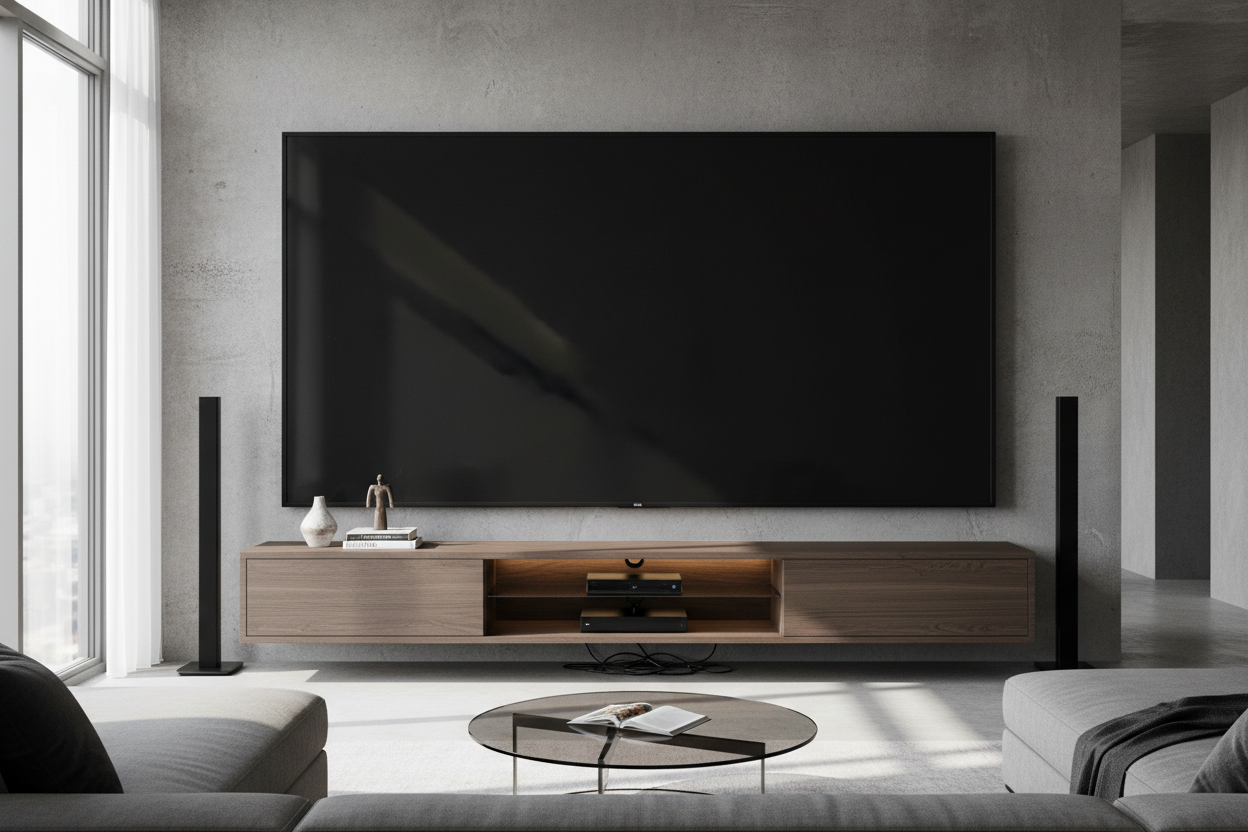
I remember the night I finally clicked 'buy' on that 85-inch beast of a screen. I’d measured the wall twice, cleared the credit card limit, and cleared my schedule for a Saturday of cinematic glory. But when the delivery guys left and I stepped back, my heart sank. It didn’t look like a high-end home theater; it looked like a Jumbotron had crashed into a studio apartment. The entertainment center for 85 inch tv I had was technically wide enough to hold the stand, but the room felt completely claustrophobic.
- The TV should never be wider than the furniture beneath it.
- Aim for at least 10 inches of 'breathing room' on either side of the screen.
- Avoid thin, spindly legs; massive screens need visual anchors.
- Low-profile cabinets prevent the screen from looming over the seating area.
The Dreaded 'Lollipop Effect' of Giant TVs
We’ve all seen it: a massive, expensive 85 inch entertainment center setup where the TV is actually wider than the console. I call this the 'Lollipop Effect.' It makes your expensive tech look top-heavy and precarious. Instead of a cohesive design, you get a 75-inch-wide black rectangle that looks like it's about to tip over and crush your coffee table.
When you put an 85 tv entertainment center in a room, you aren't just adding a piece of furniture; you're managing a massive amount of visual real estate. If the base is too small, the TV swallows the room. It stops feeling like a living room and starts feeling like a sports bar where the decor was an afterthought. You need enough horizontal surface area to 'ground' the screen so it feels integrated, not just perched.
The 25% Rule for a Large Entertainment Center for 85 Inch TV
Here is the cold, hard math that most people ignore. An 85-inch TV (which is measured diagonally) is usually about 74 to 75 inches wide. If you buy a 75-inch console, the edges of the TV will sit flush with the edges of the wood. This is a design sin. To make the room feel balanced, you want the furniture to be about 25% wider than the screen.
This means for an 85-inch screen, you really need a large entertainment center that is at least 94 to 100 inches wide. It sounds massive, but that extra 10 inches on each side provides the 'white space' your eyes need to relax. Without it, the TV feels like a bully. I’ve seen 85 entertainment center setups that ignore this, and they always feel cramped, no matter how big the room is.
Visual Weight Matters Just as Much as Width
It isn't just about the tape measure; it’s about the materials. I once tried to put a heavy screen on a mid-century piece with those thin, tapered hairpin legs. It looked like a bodybuilder standing on toothpicks. A 85 in tv entertainment center needs to look like it can actually support the 100-pound weight of the glass and metal above it.
Look for solid plinth bases or thick, blocky legs. Avoid anything that looks too 'airy' or fragile. You want a sturdy entertainment center collections that uses thicker wood slabs or metal framing. If the console looks like it would wobble if you bumped it, it’s the wrong choice for a large-format screen. Heavy oak, walnut, or even high-quality industrial steel provides the 'heft' required to balance the tech.
Modern Entertainment Center for 85 Inch TV: Avoiding the Monolith Look
The challenge with a modern entertainment center for 85 inch tv is avoiding that '90s wall unit' vibe. You don't want a giant wooden monolith that takes up the entire wall. To keep it contemporary, go low and long. A media cabinet for 85 inch tv that sits only 18 to 22 inches off the ground keeps the center of gravity low and the room feeling open. Use handle-less doors or integrated pulls to keep the lines clean and prevent the furniture from competing with the screen.
How to Style the Void Around an 85 In TV Entertainment Center
Once you have the right width, you’re left with the 'black hole' problem—that giant dark rectangle that dominates the room when the power is off. To fix this, you have to style the ends of the console with items that have enough height to bridge the gap between the furniture and the screen. Think tall, structural vases or a stack of oversized art books.
I’m a big fan of asymmetrical styling. On one side, place a tall lamp or a large dried floral arrangement. On the other, keep it lower with a few textured bowls or a small tray. This breaks up the rigid symmetry of the TV and makes the whole setup feel like part of the home. If you're wondering what actually belongs on an entertainment center, the answer is anything that adds organic texture to balance out all that cold plastic and glass.
I’ll be honest: I once tried to save money by keeping my old 60-inch dresser when I upgraded to a giant screen. I thought I could 'cheat' the look by putting plants on the floor next to it. It looked terrible. I spent three months staring at a setup that felt 'off' before I finally bit the bullet and bought a proper 96-inch console. The difference was night and day. The room finally felt finished.
FAQ
How wide should my console be for an 85-inch TV?
At a minimum, look for 90 inches, but 94 to 100 inches is the sweet spot. You want at least 8-10 inches of furniture visible on both sides of the screen to maintain visual balance.
Should I wall mount or use the TV stand?
Wall mounting is usually better for 85-inch screens because it allows you to set the perfect height (eye level when seated). However, you still need the console underneath to ground the look and hide your cables.
How high should the entertainment center be?
Go lower than you think. For a screen this size, a console height of 18 to 24 inches is ideal. If the console is too tall, you’ll be straining your neck looking up at the screen.

Laisser un commentaire
Ce site est protégé par hCaptcha, et la Politique de confidentialité et les Conditions de service de hCaptcha s’appliquent.