


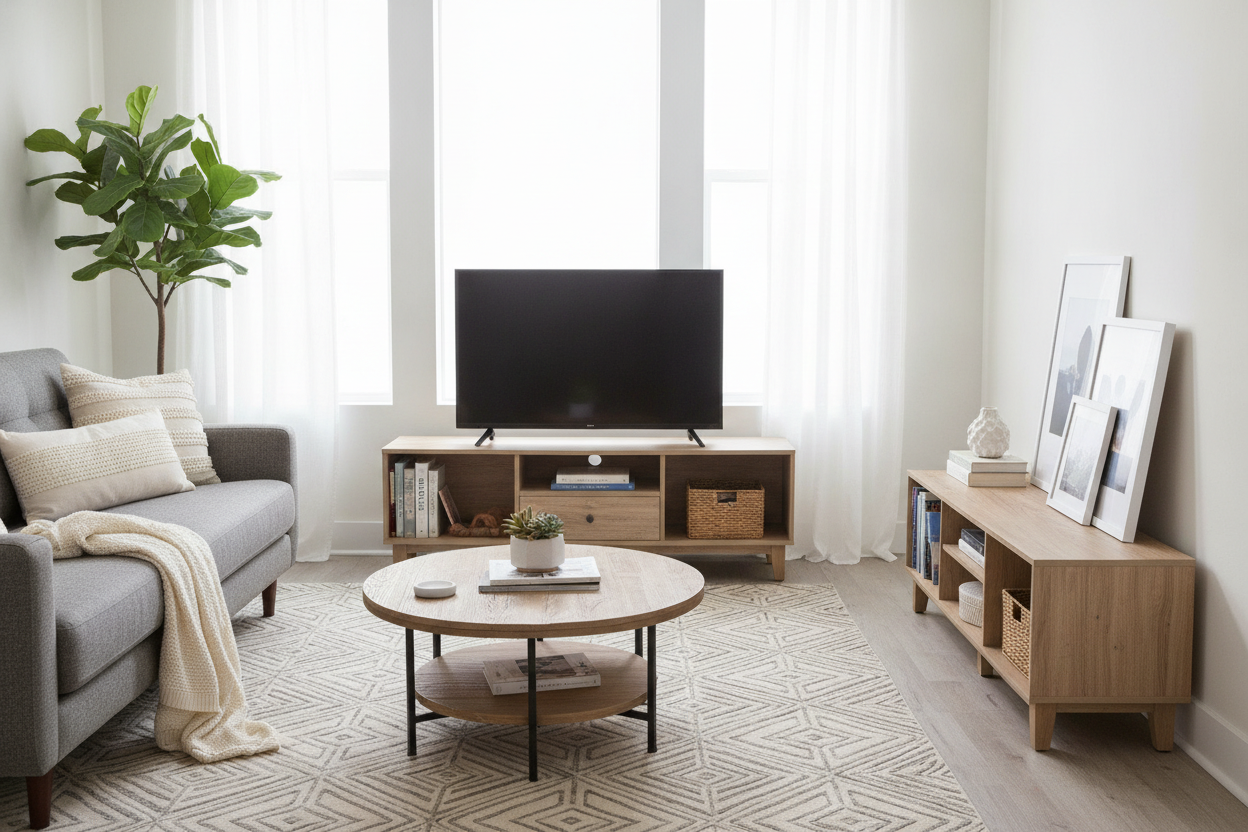
I remember the exact moment I realized my college furniture had to go. I was staring at my new living room—a decent 12x15 space with actual hardwood—and my TV was sitting on a black plastic cart that looked like it belonged in a middle school AV club. It was a basic 50 inch tv stand walmart had on clearance, but it was the wrong kind of 'basic.' It was flimsy, wobbly, and frankly, embarrassing.
The struggle of the first 'real' apartment is real. You’ve graduated from the tiny walmart tv stand 32 inch models that fit in a dorm corner, but you aren't quite ready for the $2,000 solid walnut credenzas that require a moving crew to lift. You need something that looks intentional, hides your messy cable spaghetti, and doesn't cost more than your security deposit.
- 48 to 50 inches is the 'Goldilocks' width for most standard apartment walls.
- Look for a depth of at least 15 inches to ensure your legs don't overhang.
- Avoid any model that uses plastic 'snap-together' legs; they will sag within six months.
- Integrated cable management holes are a non-negotiable requirement for a clean look.
The 'Goldilocks' Problem with Apartment Furniture
When you move out of a dorm or a shared house, your scale is usually all wrong. You’re used to the walmart tv stand 32 inch life—tiny, portable, and purely functional. But when you put a 32-inch stand against a standard 10-foot apartment wall, it looks like a postage stamp. It makes the whole room feel temporary and unanchored.
On the flip side, many people overcompensate. They see those massive 75-inch entertainment centers and think 'more is better.' In a typical 600-square-foot apartment, those things are space killers. They eat up your walking paths and make the ceiling feel lower than it actually is. I’ve seen friends buy beautiful massive units only to realize they can't actually open their front door all the way because the console sticks out too far.
The 50-inch profile is the sweet spot. It’s wide enough to support a 50 or 55-inch TV with a couple of inches of breathing room on either side, which is the golden rule for visual balance. It says 'I live here' without saying 'I have no room to walk to my kitchen.'
Why This Specific 50-Inch Profile Solved My Space Issue
I spent weeks trying to browse through standard tv stands online, and the sheer volume of options is paralyzing. What I eventually realized is that the 50-inch Walmart models—specifically the ones with a 16-inch depth—are designed for exactly my kind of floor plan. Most apartment living rooms have that one long wall that also serves as a walkway to the balcony or bedroom.
A 16-inch depth is thin enough that you don't feel like you're navigating an obstacle course, but deep enough to actually hold a soundbar and a few decorative items. I personally tested a model that was only 12 inches deep, and it was a disaster. The TV felt top-heavy, and every time my cat jumped near it, I had a heart attack. Stability matters more than saving those extra four inches of floor space.
The visual weight is also key. A medium-sized console with legs (rather than a solid base) allows you to see the floor underneath. This is an old designer trick: the more floor you can see, the larger the room feels. It keeps the piece from looking like a heavy, dark block of MDF sitting in the middle of your life.
But Does It Actually Hold Enough Gear?
Let’s talk about the 'gear' reality. If you’re like me, you have a router, a gaming console, a streaming box, and a tangled mess of power strips. The best walmart tv stands for 50 inch tv setups aren't just flat surfaces; they are cable-hiding machines. I look for units with at least two adjustable shelves and pre-drilled holes in the back panel.
I once bought a stand that looked great but had a solid back. I ended up having to use a hole saw to vent my PlayStation because it was literally cooking itself in the enclosed cabinet. If you're shopping at this price point, check the back panel material. If it's that flimsy cardboard, that's actually a win—it's easy to cut extra ventilation holes if you need them. Just don't expect it to hold a ton of weight if you're stacking heavy vintage receivers.
3 Red Flags to Avoid When Shopping in This Size
Not all budget furniture is created equal. The first red flag is 'hollow core' construction. If the description says the shelves are hollow, run. It’s basically two thin sheets of veneer over a honeycomb of cardboard. It will bow in the middle under the weight of a 50-inch TV within weeks. You want high-density particle board or MDF at a minimum.
The second red flag is the hardware. If the kit comes with plastic cam locks or those push-in plastic pegs for shelves, it’s a 'no' from me. You want metal-to-metal connections. I’ve assembled enough furniture to know that plastic hardware is the number one cause of the 'wobble' that makes cheap furniture feel cheap. If you need something sturdier, you might actually need a heavy-duty stand for 70 inch tv even if your TV is smaller, just to get the weight capacity.
Third, watch out for the height. A lot of these budget stands sit very low—around 18 inches. Unless you have a very low sofa, you’re going to be looking down at your TV, which is a recipe for neck strain. Aim for a height of 22 to 24 inches for a standard couch setup.
Flat Wall vs. Corner: Making the Layout Flow
Most people default to putting their TV stand flat against the longest wall. It’s the easiest move, but it’s not always the best for flow. If your apartment has an awkward 'L' shape or a fireplace that eats up the main wall, you might be better off styling a corner tv stand instead. A 50-inch stand is actually small enough to angle into a corner without losing too much floor space behind it.
The trick with corner placement is to manage the 'dead zone' behind the TV. I usually put a tall floor lamp back there to fill the gap and provide some soft bias lighting. It prevents that dark, dusty triangle from becoming a graveyard for lost cat toys. If you go flat-wall, make sure you center the stand on the wall, not just the TV. Symmetry is your friend when you’re working with budget-friendly materials; it makes everything look more expensive.
The Verdict: Worth It or Wait for an Upgrade?
Is a 50-inch Walmart stand a 'forever' piece of furniture? Probably not. The finish will likely chip if you move it three times, and the doors might eventually need a screwdriver to realign. But for a first or second apartment, it’s a brilliant move. It fills the space correctly, hides your tech, and leaves you with enough money to actually buy the 4K TV that goes on top of it.
If you’re someone who moves every year, this is the way to go. It’s light enough to move without a professional crew but sturdy enough to survive a U-Haul trip. Eventually, you might want to upgrade to a fancy electric vertical lift tv cabinet that hides the screen entirely, but for now, the 50-inch Walmart special is the smartest dollar-for-dollar investment you can make in your living room.
FAQ
How much weight can a 50-inch Walmart TV stand hold?
Most are rated for 50 to 75 pounds. Always check the specific manual, as some 'hollow core' models have much lower limits that can't handle older, heavier TVs.
Is it hard to assemble these by yourself?
It’s a one-person job, but it’ll take about 90 minutes. Use a real screwdriver, not the tiny one they give you in the box, and don't over-tighten the cam locks or you'll crack the veneer.
Will a 55-inch TV fit on a 50-inch stand?
Usually, yes. A 55-inch TV is actually only about 48 inches wide (the 55 is the diagonal). Just make sure the TV's legs aren't wider than the stand's surface.

Laisser un commentaire
Ce site est protégé par hCaptcha, et la Politique de confidentialité et les Conditions de service de hCaptcha s’appliquent.