


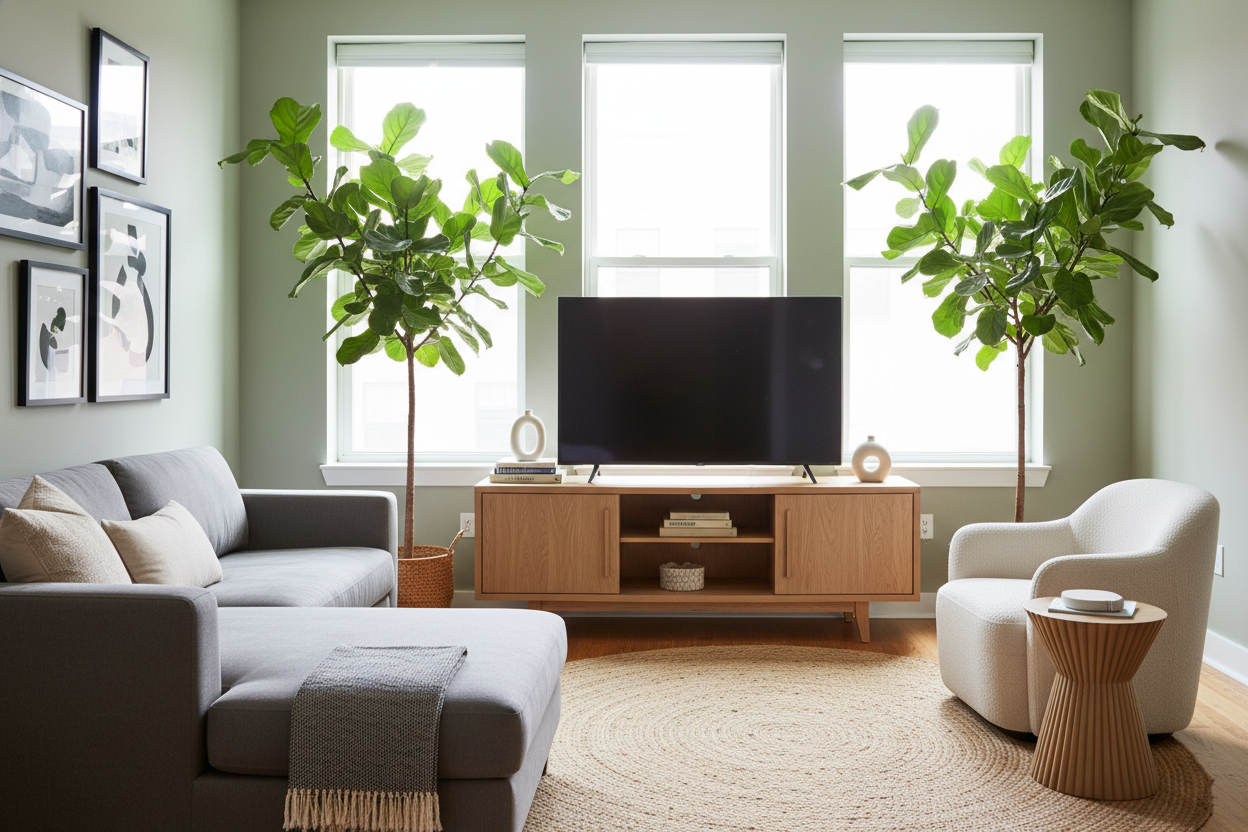
I once spent three weeks measuring my living room with blue painter's tape, trying to figure out why my 55-inch TV looked like a behemoth on a standard 48-inch console. It was a classic 'I measured the screen diagonally but forgot the actual width' rookie mistake. If you are currently staring at 47 browser tabs of media consoles at 1 AM, let me save you the headache: the 53 inch tv stand is the secret weapon for anyone living in a space that isn't a suburban mansion.
- Provides a 2.5-inch buffer on either side of a standard 55-inch screen.
- Fits into tight corners where 60-inch units fail.
- Offers enough internal storage for a PS5, router, and cable box without looking bulky.
- Creates a 'custom' look in rental apartments with awkward floor plans.
The 'Goldilocks' Problem with Standard Console Sizes
Shopping for furniture often feels like a choice between two extremes. You either get the tiny 'apartment-sized' units that look like dollhouse furniture, or you get massive consoles that eat up half your hallway. I have seen too many people try to squeeze a 55-inch TV onto a tv stand 47 inch wide. It is a disaster. The screen overhangs the edges, making the whole setup look top-heavy and precarious. It feels like your TV is wearing a t-shirt three sizes too small.
On the flip side, the big-box stores love pushing 60-inch or 72-inch consoles. In a 12x14 living room, a 60-inch piece of furniture is a space killer. It dictates the entire flow of the room and leaves no space for a floor lamp or a potted plant. The 53-inch dimension is the 'Goldilocks' zone. It is wide enough to support the visual weight of modern screens but slim enough to keep your floor plan breathable. I learned this the hard way after returning a solid oak 60-inch unit that made my living room feel like a storage locker.
The Visual Math Behind the 53 Inch TV Stand
Let's talk about the math, because the industry naming conventions are designed to confuse you. A 55-inch TV is measured diagonally. The actual physical width of a 55-inch screen is usually around 47.8 to 48.2 inches. If you put that on a 48-inch stand, the edges of the TV align perfectly with the edges of the wood. This looks cramped and cheap. In design, you want 'negative space'—a little bit of breathing room for the eye to rest.
A 53 inch tv stand gives you exactly 2.5 inches of surface area on each side of the screen. It is just enough space to signal that the stand is intentionally supporting the TV, rather than just barely holding onto it. It prevents that 'accidental' look. When I swapped my old cramped stand for a 53-inch model, the room suddenly felt finished. It is about the ratio. That small buffer allows the TV to feel like a curated part of the room rather than a black mirror that was shoved into a corner.
Hunting Down a TV Stand 53 Inches Wide
Finding a 53 tv stand isn't as easy as walking into a big-box retailer and pointing at the first thing you see. Most mass-market brands stick to even numbers (48, 54, 60). To find this specific width, you have to be a bit more surgical with your search terms. I usually search for '53 inch media console' or 'tv stand 53 inches wide' specifically on specialty furniture sites rather than just scrolling through generic marketplaces.
If you have an especially tricky layout—like a fireplace that isn't centered or a radiator that cuts into your wall space—you might even look for an adjustable tv stand for living room. These can sometimes be tweaked to hit that 53-inch sweet spot exactly. When shopping, prioritize structural integrity. Look for kiln-dried wood or high-grade MDF with a real wood veneer. Avoid the cheap particle board that bows in the middle after six months of holding up a heavy screen. I have seen 'bargain' stands sag so badly the cabinet doors wouldn't even close.
Keep It Leggy (Why Elevated Consoles Win)
If you are working with a mid-sized piece like a 53 inch tv stand, do yourself a favor and get something with legs. A solid block of wood sitting directly on the carpet looks heavy and dated. When you can see the floor underneath the furniture, the room feels larger. It’s a classic interior design trick that actually works. I always browse for elevated tv stands with tapered mid-century legs or a slim metal base. It makes the 53-inch width feel airy and light, even if it’s packed with heavy electronics.
Closed Storage Is Absolutely Non-Negotiable
I am going to be blunt: open shelving is a trap. Unless you are a minimalist monk who only owns one sleek remote and no cables, open shelves will eventually look like a junk drawer. Between the dust that settles on every surface and the tangled mess of HDMI cords, it is a visual nightmare. My 53-inch stand has solid cabinet doors, and it is the best decision I ever made. I can shove my router, my messy stack of games, and three different chargers in there, shut the door, and the room looks instantly clean. It is the only way to make a mid-sized console look like adult furniture.
How to Style the Edges Without Blocking the Screen
Once you have those extra 2.5 inches on either side of your TV, the temptation is to clutter them up. Don't. The goal is to maintain that sense of balance. I usually go for low-profile objects. A stack of two or three linen-bound coffee table books works perfectly. Or, if you want some life, a small trailing plant like a pothos can sit on the edge. Just make sure the leaves don't actually touch the screen—it is distracting when you are trying to watch a movie.
When you design big rooms, you have the luxury of putting tall vases or table lamps on the ends of a console. On a 53-inch stand, those will just block the frame. Keep everything below the bottom third of the TV height. I once tried to put a 'cute' ceramic bust next to my screen, and I spent the whole night staring at the back of its head instead of the subtitles. Stick to the rule of thirds and keep your decor minimal. The 53-inch width is the star; let it do the work of balancing the room for you.
FAQ
Is a 53-inch stand big enough for a 65-inch TV?
Absolutely not. A 65-inch TV is about 57 inches wide. It will hang over the edges and look like a safety hazard. Stick to a 55-inch screen or smaller for this stand size.
Will my gaming console overheat in a closed cabinet?
It can. If you choose closed storage, make sure the back panel has generous cutouts for airflow or leave the door cracked during long gaming sessions. I actually drilled extra holes in the back of mine just to be safe.
Does a 53-inch stand work in a corner?
Yes, it is actually one of the best sizes for corners. It is wide enough to bridge the gap without needing to be pushed so far back that you lose three feet of floor space behind it.


Laisser un commentaire
Ce site est protégé par hCaptcha, et la Politique de confidentialité et les Conditions de service de hCaptcha s’appliquent.