


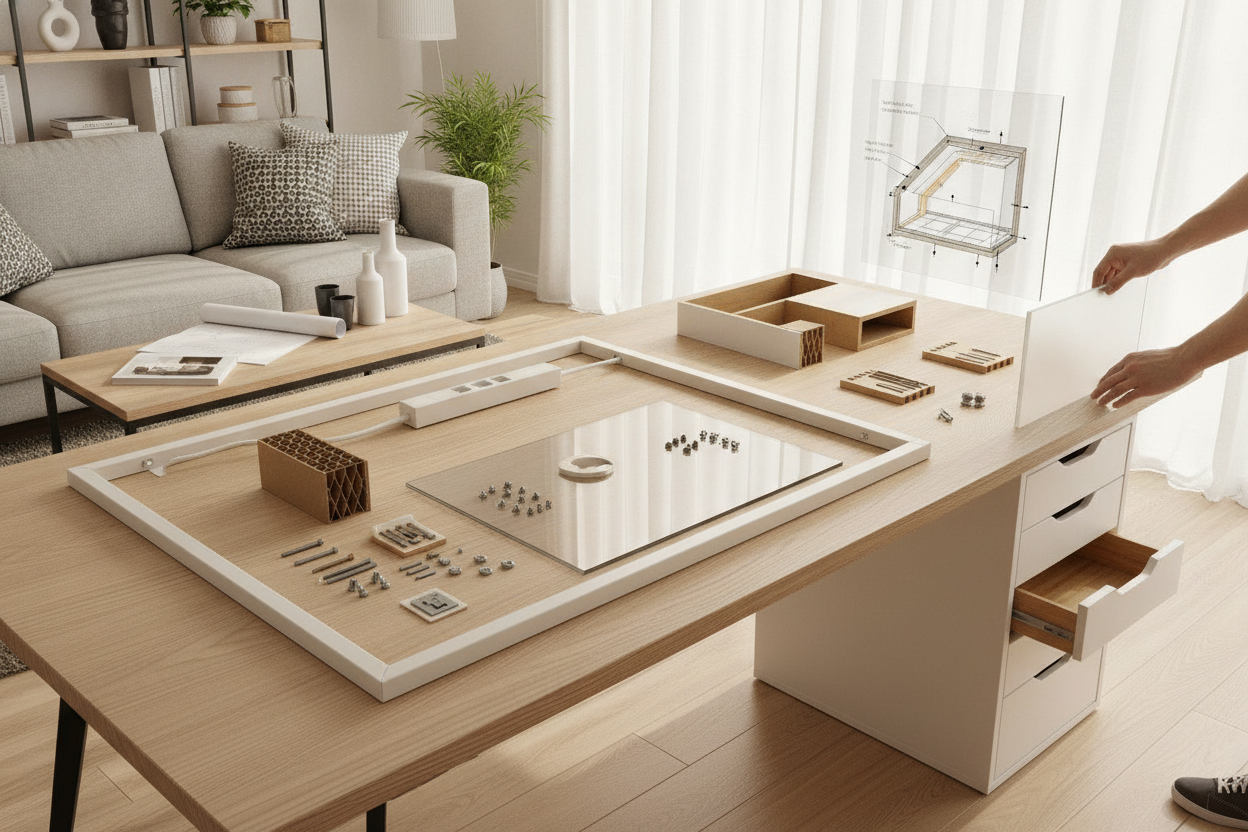
Planning a custom workspace often starts with modular furniture pieces that are easy to source, arrange, and style. However, before driving screws, clamping heavy monitor arms, or taking a saw to your tabletop, it helps to know what is happening beneath the outer veneer. Examining an ikea desk inside reveals an engineered internal design that behaves very differently from traditional solid lumber or thick plywood.
Understanding this internal composition allows you to plan modifications wisely, avoid structural crushing, and design a durable layout tailored to your everyday storage and equipment needs.
The Internal Anatomy: What Is Really Inside an IKEA Desk Top?
Many popular modular tabletops utilize a lightweight sandwich construction rather than solid wood or uniform particleboard. This layered build typically features:
- Top and bottom surface skins: Thin sheets of high-density fiberboard or printed laminate that create a smooth, clean aesthetic.
- Perimeter framing: Narrow bands of particleboard or engineered wood running along the outer edges to provide boundary structure and edge-banding adhesion.
- Mounting reinforcement blocks: Targeted blocks of denser composite material placed specifically at designated leg-attachment points.
- Honeycomb paper core: An expanded interior matrix made from recycled paperboard arranged in a honeycomb lattice, taking up the bulk of the internal volume.
This design makes surfaces lightweight, manageable to move, and resource-efficient. However, because the core is largely open air wrapped in corrugated paper cells, the load-bearing behavior differs significantly from solid core materials across the center span.
Modding and Drilling: Structural Challenges with Hollow-Core Tops
When you attempt DIY adjustments on hollow-core surfaces, the internal geometry becomes the defining factor in project success. Drilling into the designated leg mounting areas generally encounters solid particleboard backing, allowing standard wood screws to bite securely. In contrast, drilling anywhere across the expansive central zone penetrates only the thin outer skin before entering open paper cells.
Standard wood screws placed into these central zones can easily strip or tear free because the paper core cannot hold screw threads under tension. Similarly, clamping accessories like heavy monitor arms, microphone booms, or desk lamps concentrate downward torque onto a narrow surface area. Without reinforcement, this localized pressure can depress or punch through the thin outer fiberboard skin into the void below.
Cutting and Resizing: What to Expect Inside a Linnmon Table Top
Trimming a desk surface down to fit an awkward alcove or tight closet nook is a common DIY ambition. If you explore what lies inside linnmon table top models during a cut, you will quickly encounter the exposed paper honeycomb grid once the blade slices through the perimeter frame.
Cutting through these tops introduces specific fabrication challenges:
- Loss of perimeter rigidity: Severing the solid border leaves the cut end open and structurally vulnerable to flexing.
- Exposed core aesthetics: The paperboard matrix must be concealed to protect against moisture intrusion and unsightly edges.
- Need for blocking inserts: Restoring stability requires clearing away a small depth of paper core along the cut line and gluing in a custom-fitted wooden baton or block before applying matching edge banding.
Reinforcement Strategies for Heavy Workstations and Mounts
If you plan to run multi-monitor displays, heavy computer towers, or substantial desk accessories on a hollow-core setup, incorporating proactive reinforcement helps protect the furniture over the long term.
Consider these practical approaches for reinforcing modular tops:
- Under-desk support stiffeners: Fastening metal support rails or rigid angle channels along the underside helps distribute center-span weight toward the outer support legs or drawers.
- Surface spreader plates: When installing C-clamp monitor mounts, sandwiching wide wooden or steel reinforcement plates on both the top and bottom surfaces spreads clamping pressure across a broad area rather than a single focal point.
- Supportive base units: Positioning broad drawer units or sturdy storage cabinets beneath the desk provides continuous resting support along the outer edges, minimizing sagging across long spans.
When planning built-in cabinetry integrations, consulting a comprehensive desk ikea guide can help you design perimeter anchors and framing systems that properly distribute workstation loads.
Room Layout, Cable Routing, and Storage Integration
Designing a comfortable workspace requires balancing equipment support with functional room flow and clean organization. Drilling large cable grommets through hollow-core tops is possible, provided you insert lined plastic or metal grommet collars that seal the exposed internal cavity and prevent cords from snagging on interior paper edges.
To elevate organization without overburdening the primary work surface, consider vertical storage solutions:
- Overhead shelving: Wall-mounted modular shelves take the weight of books, reference binders, and decorative items off the desk surface.
- Integrated desktop risers: Freestanding monitor risers with built-in cubbies distribute display weight across multiple broad feet while adding drawer capacity underneath.
- Secondary storage towers: Matching drawer units and side credenzas keep bulky hardware, printers, and paperwork off the main workspace.
For ideas on organizing vertical storage and coordinating desktop risers, reviewing an ikea desk guide provides practical inspiration for cohesive workspace styling.
When to Mod vs. When to Choose a Dedicated Multi-Function Desk
Modifying a lightweight modular desktop can be an enjoyable weekend task, but it is not always the most practical route for every home setup. If your layout calls for concealed vanity storage, integrated compartments, or heavy-duty daily utility, the time and materials spent reinforcing hollow tops may outweigh the benefits of a purpose-built alternative.
For dual-purpose rooms such as bedrooms, guest suites, or studio apartments, choosing a dedicated desk product with built-in flip tops, hidden organizers, and solid structural framing can deliver ready-to-use durability without requiring custom carpentry or reinforcement plates.
By understanding the internal anatomy of your furniture before picking up tools, you can choose the right combination of modifications, reinforcements, or dedicated storage pieces to create a sturdy, functional workspace that stands up to daily use.


Laisser un commentaire
Ce site est protégé par hCaptcha, et la Politique de confidentialité et les Conditions de service de hCaptcha s’appliquent.