


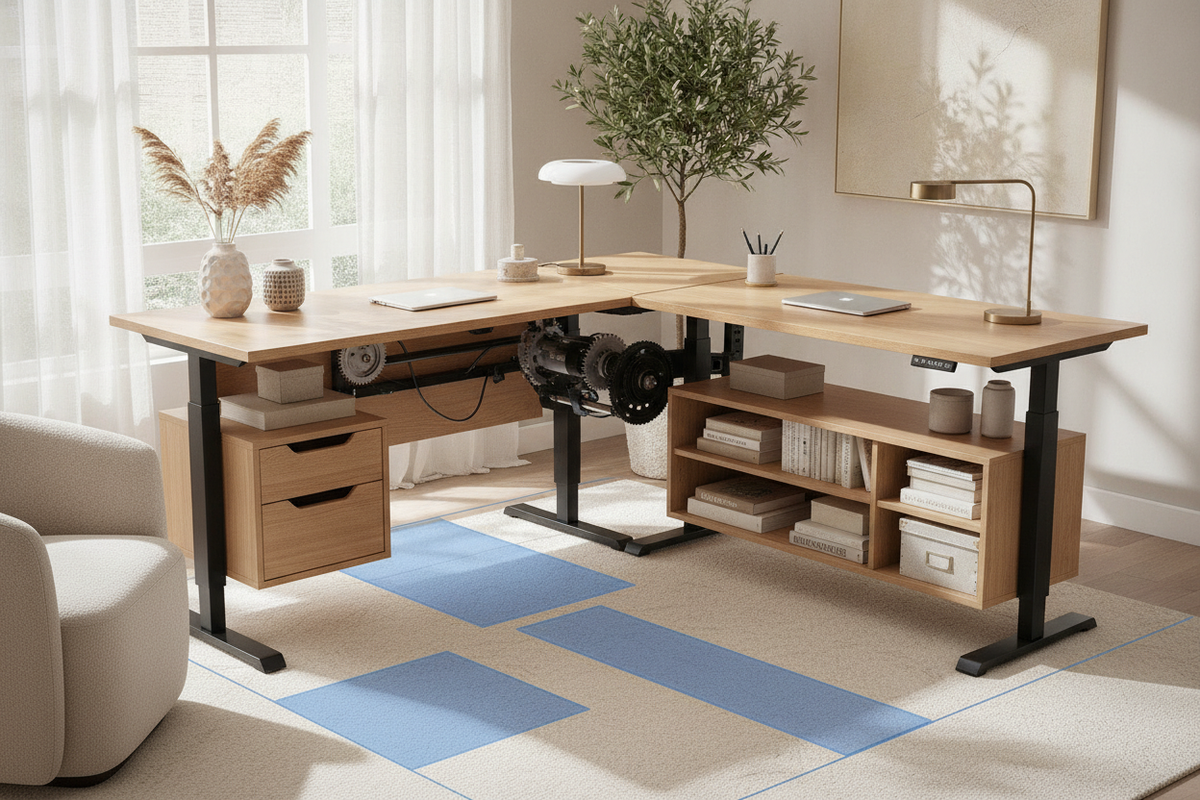
When browsing online marketplace selections for a wayfair l-shaped standing desk, workspace planners are often met with dozens of variations spanning different leg configurations, desktop split patterns, and lifting mechanisms. Selecting the right model requires balancing available square footage, corner ergonomics, dynamic lift mechanics, and storage needs. An L-shaped height-adjustable workstation provides substantial surface area, but its non-linear footprint introduces unique planning challenges that differ from standard rectangular desks.
Understanding L-Shaped Standing Desk Configurations in Large Online Catalogs
Broad retail listings generally feature two primary structural styles for corner standing desks: continuous one-piece curved tops and segmented multi-piece surfaces. Segmented configurations are the most common because shipping a multi-piece desktop in flat-pack packaging is significantly easier. In these models, a primary main desk section connects perpendicularly to a return extension, joined underneath by steel brackets.
Understanding whether a return is reversible or fixed to a specific side is crucial during initial room planning. Reversible frames offer symmetrical mounting patterns that allow users to orient the corner extension on either the left or right side depending on room architecture. Fixed configurations require strict pre-planning around existing walls, windows, and structural room elements.
Corner Geometry and Spatial Clearance Rules
Positioning a motorized corner desk involves accounting for dynamic clearances that static furniture does not require. When evaluating a fixed corner station compared to dynamic sit-stand frames, measuring the total swing and vertical travel zone prevents collisions with baseboards, windowsill trim, or wall hangings.
Reviewing a shaped desk product alongside design principles outlined in our standing desk guide highlights how corner footprints affect surrounding traffic lanes. When height-adjustable desks transition between sit and stand positions, desktop edges must maintain an unobstructed perimeter around adjoining walls to prevent surface scuffs or pinch hazards.
- Baseboard Offset: Maintain a slight perimeter gap along both wall lines to avoid rubbing against baseboards or electrical faceplates during vertical movement.
- Overhead Clearances: Account for wall-mounted shelving, framed art, or window treatments that could intersect with elevated monitor arms.
- User Ingress and Egress: Ensure the inner return corner allows smooth chair swivel and natural clearance for legs when transitioning between distinct task zones.
Dual vs. Triple Motor Frame Archetypes and Weight Distribution
The mechanical stability of an L-shaped height-adjustable desk depends on its lifting column configuration. Broad catalog listings typically offer dual-motor two-leg or three-leg frames, as well as triple-motor three-leg assemblies:
- Dual-Motor Three-Leg Systems: Often utilize a single motor driving the main surface legs with an interconnected drive rod powering the return leg, or individual motors on the outer columns with an unpowered idler leg. These systems balance everyday gear loads effectively for standard multi-screen setups.
- Triple-Motor Three-Leg Systems: Feature a dedicated synchronized motor within each lifting column. This configuration provides uniform lifting response across the entire asymmetrical surface, handling heavier peripheral distributions and larger monitor arrays without uneven strain on the frame.
Desktop Materials, Edge Profiles, and Long-Term Surface Durability
Desktop construction dictates how well an L-shaped workstation supports clamp-mounted monitor arms and resists daily wear. Most catalog desks use engineered wood substrates with high-pressure laminate or melamine coatings. When planning equipment placement, consider how the joint seam between the main desk and return interacts with heavy desktop hardware.
For insights on harmonizing workstation materials with broader room aesthetics, reference our visual standing desk guide. Beveled or radiused edges on the interior corner improve forearm comfort during extended typing, while reinforced under-desk crossbeams prevent surface deflection when supporting multiple monitors near the return junction.
Integrating Storage: Built-In Modules vs. Independent Under-Desk Cabinets
One of the central decisions when configuring an l-shaped standing desk wayfair style setup is determining how storage will interact with the lifting frame. In fixed furniture, such as a traditional shaped desk product, drawers and shelving units serve as structural supports. Height-adjustable frames, however, require specialized storage planning:
- Under-Desk Mobile Pedestals: Freestanding mobile filing cabinets placed beneath the return allow items to remain accessible while keeping the lifting frame unencumbered. Users must ensure sufficient clearance between the top of the cabinet and the lowest desk height setting.
- Frame-Mounted Hanging Drawers: Lightweight under-mount drawer modules attach directly to the underside of the dynamic surface. This design keeps essential accessories within reach at both sitting and standing heights, though overall storage capacity is more compact.
- Perimeter Credenzas: Positioning an independent low credenza behind or adjacent to the return wing creates an executive-style workstation envelope with ample storage that remains independent of the motorized frame.
Cable Management and Kinetic Slack Architecture
An expansive L-shaped surface naturally encourages multi-device workflows, which can lead to complex cable arrangements across dual desktop planes. Because the entire desktop moves vertically, wire management requires a deliberate kinetic slack strategy:
- Centralize Surface Power: Mount heavy-duty power strips directly to the underside of the main desktop junction rather than plugging individual devices into distant wall outlets.
- Segment Return and Main Channels: Route peripheral cords along dedicated raceways beneath each desk wing toward a central intersection point.
- Deploy Articulated Cable Spines: Run a single flexible cable spine or umbilical track from the centralized under-desk power hub to the wall outlet, ensuring wires flex smoothly through the entire height adjustment range without tension or snagging.
Decision Matrix: Selecting the Right Corner Workstation for Your Floor Plan
Choosing the ideal corner workstation requires balancing your floor plan dimensions with intended equipment weight and task distribution. If your available space is restricted, pairing a dedicated single-surface work table like a compact desk shaped product with modular wall shelving may be preferable to a large multi-leg corner unit.
When an L-shaped format fits your space, confirm whether the return orientation is reversible, verify that lifting motor capacity aligns with your hardware load, and plan clearance zones along adjoining walls. By systematically reviewing frame geometry, surface construction, and storage integration, you can establish an organized, ergonomic, and durable corner workspace tailored to your everyday operational demands.

Laisser un commentaire
Ce site est protégé par hCaptcha, et la Politique de confidentialité et les Conditions de service de hCaptcha s’appliquent.