


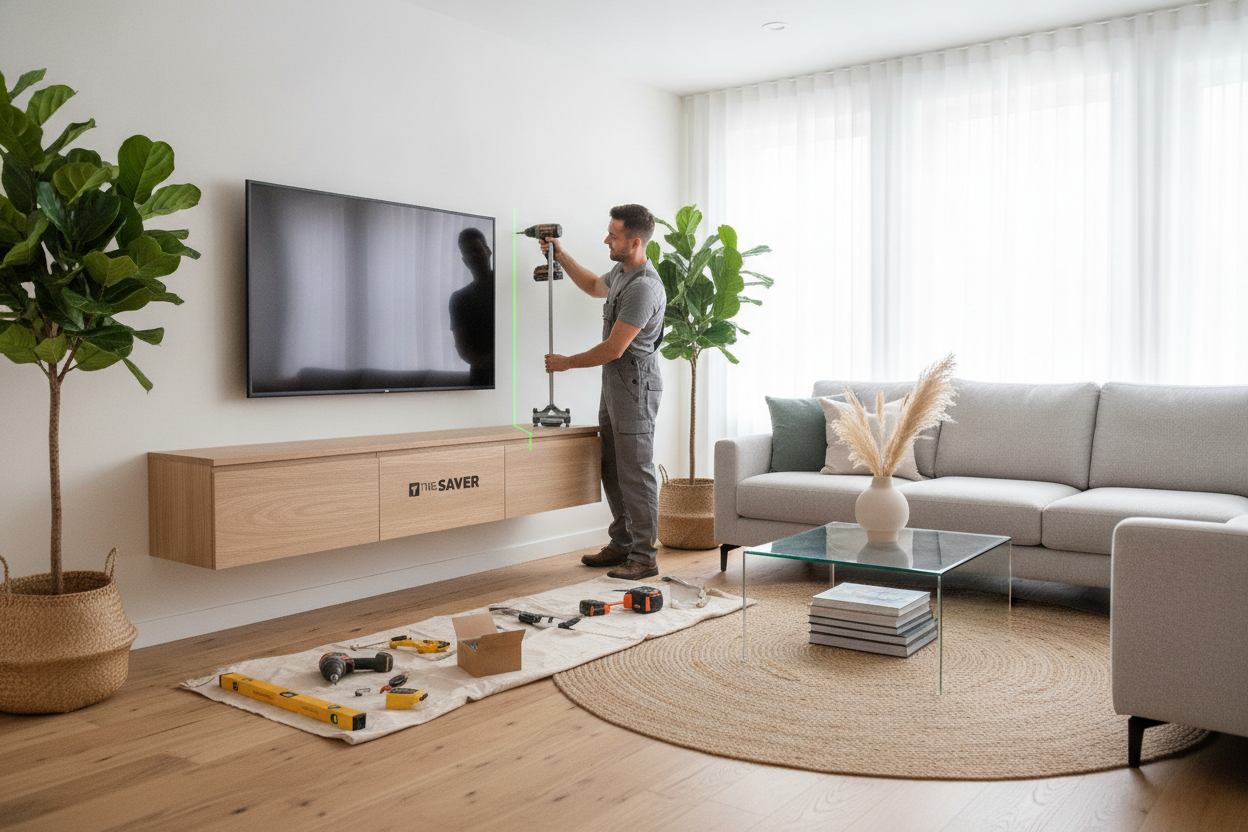
I spent three hours staring at a pile of MDF and a spirit level, wondering why I thought I could defy gravity on a Tuesday night. A floating console looks sleek and airy in photos, but the reality of a floating tv stand installation is often a sweaty, high-stakes game of 'will this rip my drywall out?' It is a project that tests your patience and your relationship.
I have mounted dozens of these, and I have learned the hard way that the instructions are usually lying to you. They make it look like a ten-minute job with a screwdriver. It is not. But once it is up, and those floor-clearing shadows hit the rug, you will forget the three times you almost threw your drill across the room.
- Never work alone: You need a second person to hold the unit while you level and mark.
- Toss the stock anchors: The plastic plugs included in the box are almost always garbage.
- Level twice, drill once: Even a 1/8-inch tilt looks like a disaster from across the room.
- Manage cables early: If you do not plan the wire route before mounting, you will have a mess of 'black vines' ruining the look.
Before You Start: Accept That You Can't Do This Alone
Modern media consoles are deceptively heavy. Even the ones made of engineered wood have a density that will catch you off guard the moment you try to lift them against a vertical surface. Trying to hold a 60-pound box perfectly level with one hand while marking drill holes with the other is a recipe for a trip to the urgent care clinic.
I once tried to solo-mount a unit and ended up with a series of 'oops' holes in my drywall that looked like Swiss cheese. If you are reading this and realizing you do not have a partner or the upper body strength to wrestle a cabinet into submission, you might be better off with a wood TV stand with mount. It gives you that elevated, 'floating' screen look without the structural commitment of drilling sixteen holes into your studs.
Why I Tossed the Included Hardware Immediately
Open any furniture box and you will find a little bag of yellow or white plastic wall anchors. Do yourself a favor: throw them in the trash. Those anchors are fine for a picture frame, but they are not designed to support the leverage of a deep shelf that people will inevitably lean on. When you mount floating tv stand units, you are dealing with cantilevered weight, which pulls out and down simultaneously.
I always swap the factory hardware for heavy-duty 1/4-inch toggle bolts or 3-inch lag screws if I am hitting studs. When I installed my latest wall mounted media console, I used Snaptoggles. They can hold hundreds of pounds and do not require a prayer to stay in the wall. It is an extra five dollars at the hardware store that prevents a thousand-dollar TV crash in the middle of the night.
How to Mount a Floating TV Stand When Studs Don't Cooperate
Here is the annoying truth: studs are rarely where you need them to be. You want your console centered under the TV, but the framing of your house was likely done by someone who did not care about your living room symmetry. This is where the math gets frustrating. You have to decide if you want the unit centered on the wall or centered on the studs.
I usually prioritize the visual center. If I am hanging a gray floating TV stand, I want it perfectly aligned with the couch and the television, even if it means only hitting one stud and using high-end toggles for the rest. Knowing how to install floating tv stand brackets off-center is a vital skill. Use a French cleat system if the unit allows it; it gives you the lateral flexibility to slide the console left or right until it looks right.
Hiding the Wires (The Part Nobody Warns You About)
The entire point of this aesthetic is the 'magic' of a floating box. That magic dies the second a thick black power cord dangles down to the baseboard. You have to think about cable management before the unit is actually on the wall. I always use an in-wall power kit to route the TV cables behind the drywall and out through a brush plate behind the console.
If you are eyeing a high gloss TV stand with LED light, the cable situation gets even more complex. You have the TV power, the HDMI cables, and now a power brick for the lighting. I usually stick a power strip inside the console itself using heavy-duty Velcro. That way, only one main cord has to disappear into the wall, keeping the 'floating' illusion intact and clean.
Was the Sweaty Weekend Project Actually Worth It?
After the dust settled and I vacuumed up the drywall shavings, the result was undeniable. My living room felt three feet wider because I could see the floor running all the way to the baseboard. It makes a small apartment feel like a custom-built loft. The process of learning how to mount a floating tv stand is a rite of passage for any modern DIYer, even if it involves a few choice words during the leveling phase.
The payoff is a clean, minimal look that you just cannot get with bulky furniture. However, if the idea of drilling massive holes into your home makes you break out in a cold sweat, there is no shame in sticking to traditional TV stands. They offer plenty of storage and zero risk of your electronics taking a dive. But for me? I will take the floating look every single time.
FAQ
Do I really need to find studs?
Yes, at least one. While modern anchors are strong, hitting at least one 2x4 stud provides the structural integrity needed to ensure the console doesn't sag over time as you add heavy components or books.
How high should I mount it?
The sweet spot is usually 8 to 12 inches off the floor. You want enough space to see the floor underneath (which creates the floating effect) but not so high that your TV ends up at a neck-straining height.
Can I mount this on plaster walls?
It is possible, but much trickier than drywall. You will need specialized masonry bits and should avoid expansion anchors, which can crack the plaster. Toggle bolts are generally your best bet for lath and plaster.

Laisser un commentaire
Ce site est protégé par hCaptcha, et la Politique de confidentialité et les Conditions de service de hCaptcha s’appliquent.