


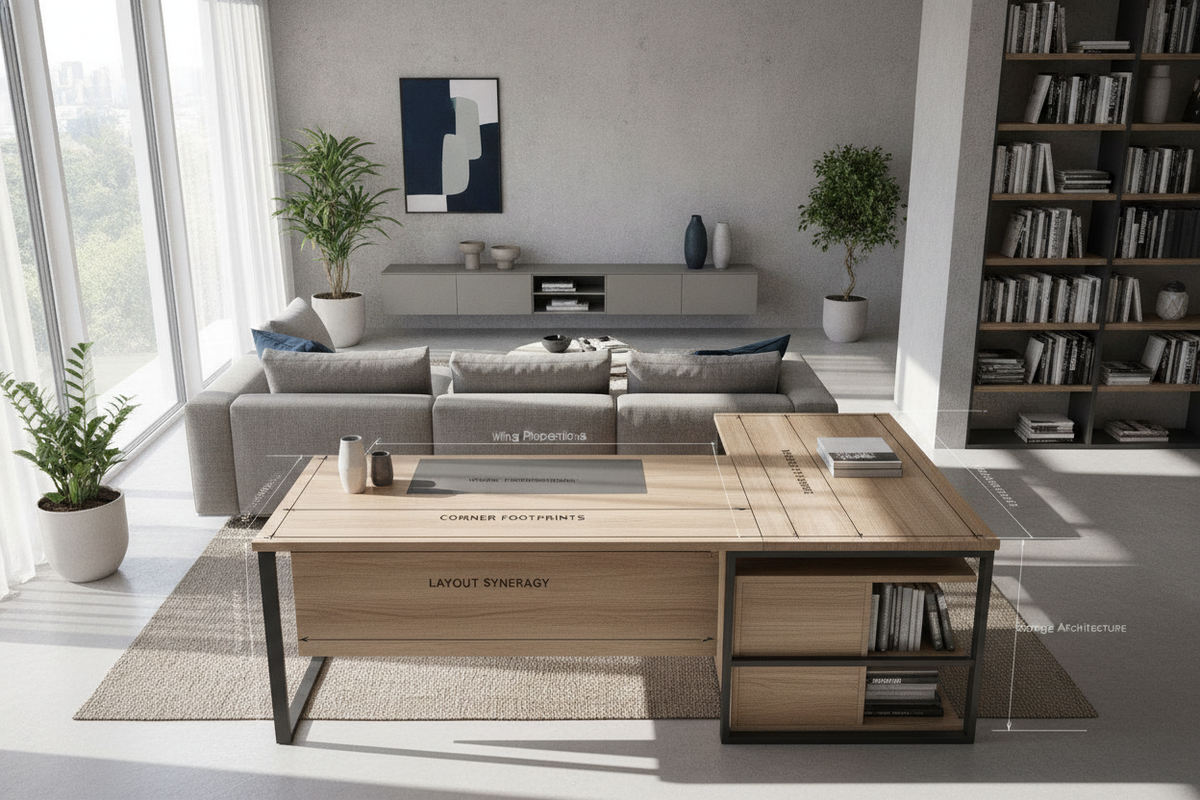
A well-planned home office relies heavily on how efficiently desktop surface area translates into ergonomic comfort and everyday productivity. Integrating a computer desk l shaped configuration offers an effective way to maximize underutilized room corners while expanding usable workspace. By dividing tasks across two perpendicular work surfaces, an l-shaped corner computer desk creates dedicated zones for computing, paperwork, analog drawing, and peripheral storage without forcing a cluttered desktop.
Choosing the right l shape computer table involves balancing spatial dimensions, room traffic flow, return wing orientation, and integrated storage. In our editorial review of workstation planning, we find that understanding how geometry aligns with daily workflow is the most critical step in establishing a sustainable, fatigue-free setup.
1. Dimensional Footprints and Wing Proportion Tiers
L-shaped desks are not one-size-fits-all solutions. Workstation footprints generally fall into three structural tiers, each tailored to distinct room layouts and equipment loads.
Compact Corner Footprints for Space-Constrained Rooms
In secondary bedrooms, studio apartments, or alcoves, compact corner workstations provide dedicated work surfaces without obstructing walkways. These models often feature abbreviated return wings designed to cradle a single laptop or screen setup alongside essential accessories. A dedicated modern minimalist computer corner desk demonstrates how streamlined corner proportions can house dual displays while maintaining an open visual profile in smaller spaces.
Balanced Dual-Wing Workstations for Multi-Tasking
Balanced models feature nearly identical wing lengths on both sides of the 90-degree junction. This symmetrical layout is well-suited for professionals who divide their workday between digital computing on one wing and tactile tasks—such as notebook planning, drafting, or secondary devices—on the other. An equal-span l shaped table helps keep active documents within arm's reach without intruding into primary typing zones.
Extended Executive Returns for Multi-Monitor Rigs
Expansive configurations feature a wide primary desk paired with an extended secondary return. This style provides ample real estate for multiple large displays, studio audio interfaces, desktop document sorters, and printers. Equipping your setup with a four-drawer L-shaped computer desk introduces robust cabinetry directly beneath the return wing, keeping hardware accessories and sensitive records organized without requiring auxiliary credenzas.
2. Structural Geometry, Orientation, and Desk Shape Comparisons
The functional value of any shaped computer desk depends on how its joint geometry interacts with user posture and room architecture.
Reversible Left- vs. Right-Hand Modular Returns
Fixed returns restrict desk placement to a single room orientation, which can create awkward layout conflicts with window sills, electrical outlets, or door swings. Modular, reversible frames allow the secondary wing to mount on either the left or right side of the main surface. This versatility ensures that an l shaped desk computer hub can adapt effortlessly whenever you reconfigure or relocate your office.
Diagonal Bevel Corners vs. Crisp Right-Angle Junctions
Inner corner transitions generally follow two distinct profiles:
- Crisp 90-Degree Angles: These clean joins optimize inner edge clearance, making them ideal when users sit primarily along one straight wing while utilizing the perpendicular wing as an auxiliary reach-out surface.
- Diagonal Bevel Bridges: These angled center panels provide a curved or diagonal workspace that allows the chair to sit directly in the corner vertex. This setup accommodates centered main screens and curved panoramic monitor arrangements.
Comparing L-Shaped Geometry to Traditional Straight I-Shaped Desks
When comparing an L-shaped layout to a traditional i shaped desk, the primary difference lies in radial reach versus linear width. A straight desk requires lateral sliding to access items spread across long spans. By contrast, a computer l table wraps surfaces around the natural rotational radius of an office chair, reducing strain during transitions between monitors, note pads, and peripherals. Those evaluating broader workstation styles can browse a varied writing and computer desk collection to contrast straight tabletop profiles with angular corner frames.
3. Integrated Storage Architecture and Peripheral Management
Maintaining a clutter-free work surface is essential for mental clarity and day-to-day focus. Selecting an l-shaped desk with computer shelf options or integrated pedestals helps clear valuable desktop territory.
Dedicated CPU Platforms and Elevated Computer Shelves
Placing computer towers directly on the floor exposes internal cooling fans to dust, carpet fibers, and accidental kicks. Integrated lower CPU shelves lift desktop towers off the floor, promoting unobstructed airflow while keeping input cables tidy. Similarly, elevated upper monitor shelves raise screens closer to natural eye level, promoting neutral neck posture while freeing up the surface beneath for keyboard stowage and desk accessories.
Under-Desk Drawers, Open Cubbies, and Vertical Shelving
Strategic lower cabinetry prevents peripheral clutter from accumulating on top surfaces. Drawer stacks provide concealed organization for charging cables, stationery, and notebooks, while open cubbies allow rapid access to reference literature and tablet stands. For creative layout ideas on maximizing lower desk zones, exploring an under-desk shelf styling guide can provide useful inspiration for custom organization.
4. Material Resilience, Substrates, and Structural Stability
Because an L-shaped workstation spans two interconnected planes, joint rigidity and durable surface materials are vital for preventing sagging or wobble.
Engineered Wood, Scratch-Resistant Melamine, and Textures
High-density engineered wood and manufactured composite boards finished with thermal-fused laminate or melamine deliver consistent daily wear resistance. These non-porous surfaces resist moisture rings, micro-scratches from mouse movement, and pen pressure, making them low-maintenance and easy to clean with a damp microfiber cloth.
Heavy-Gauge Steel Framing, Diagonal Braces, and Leveling Feet
Extended corner tables rely on robust underlying frame support. Tubular steel leg assemblies with welded corner gussets and rear diagonal crossbars distribute vertical loads evenly across both wings. Adjustable leveling glides under each leg are crucial for eliminating wobble on uneven floors or thick area rugs.
5. Room Placement, Spatial Flow, and Zoning Strategies
Proper placement ensures that an L-shaped workstation enhances room harmony rather than creating a visual bottleneck.
Corner Flush Alignment for Maximum Walkway Clearance
Positioning both outer edges flush against two intersecting walls tucks the desk securely away, preserving central floor space for walking and chair movement. This placement works exceptionally well in shared guest bedrooms or multifunctional dens where open floor area is at a premium.
Peninsular Room Partitioning for Open-Concept Living Spaces
In open-plan living rooms or studio apartments, placing one wing against a wall while extending the second wing outward forms a functional peninsula. This layout acts as an architectural room divider, creating a clear visual boundary between professional work zones and personal relaxation areas. Reviewing practical budget-friendly workspace styling tips can assist in coordinating accent lighting, cable sleeves, and surrounding decor to polish your zoned layout.
6. Assembly Sequencing, Cable Routing, and Long-Term Care
Careful assembly and cable management protect your workstation investment over time:
- Staged Bolt Tightening: During assembly, loosely fasten all frame and top connector bolts until the entire structure is aligned, then tighten them uniformly to prevent panel misalignment.
- Under-Desk Cable Trays: Mount raceways or wire baskets beneath the primary wing seam to bundle power bricks, display cords, and USB leads away from leg space.
- Periodic Joint Auditing: Check and retighten structural fasteners every few months to maintain frame rigidity under heavy daily typing and monitor arm tension.
Whether you are outfitting a compact bedroom nook, building an executive dual-screen workstation, or selecting a uniquely styled novelty piece like a thematic house shaped desk for creative spaces, selecting a properly proportioned L-shaped workstation ensures lasting ergonomic comfort, smart storage, and seamless room integration.

Laisser un commentaire
Ce site est protégé par hCaptcha, et la Politique de confidentialité et les Conditions de service de hCaptcha s’appliquent.