


I spent three hours leveling the mount for my 65-inch OLED above the mantel last spring. I stepped back, cracked a cold beer, and immediately realized I had created a visual disaster. A thick, black 'tail' of HDMI cables and power cords was dangling across my white brick, and my router was literally taped to the side of the stone. It looked like my fireplace was on life support.
Finding the right storage solutions tv over fireplace setups require isn't just about aesthetics; it is about sanity. If you are going to commit to the high-mount life, you have to have a plan for the hardware that actually makes the TV work. Otherwise, you are just staring at a million-dollar screen with a ten-cent cable problem.
Quick Takeaways
- Built-ins offer the cleanest look but require the biggest budget.
- Symmetrical consoles flanking the hearth can fake a custom look for less.
- Ventilation is non-negotiable for electronics hidden in cabinets.
- In-wall cable kits are the only way to achieve a true 'floating' effect.
The 'Floating Router' Problem (And Why I Panicked)
I didn't think about the Apple TV. I didn't think about the soundbar. I definitely didn't think about the mesh router node that needs to be 'somewhere central.' When you mount a TV over a fireplace, you are essentially putting your tech on a pedestal. Without a plan, your mantel becomes a graveyard for blinking plastic boxes and tangled wires.
The panic set in when I realized my wife's carefully curated ceramic vase collection was now competing for space with a bulky PlayStation 5. The 'clean' look I saw on Pinterest was a lie—or at least, it was a half-truth that didn't show where the wires went. You need a dedicated landing zone for the guts of your home theater, or the fireplace becomes an eyesore rather than a focal point.
The Holy Grail: A Built In TV Cabinet Over Fireplace
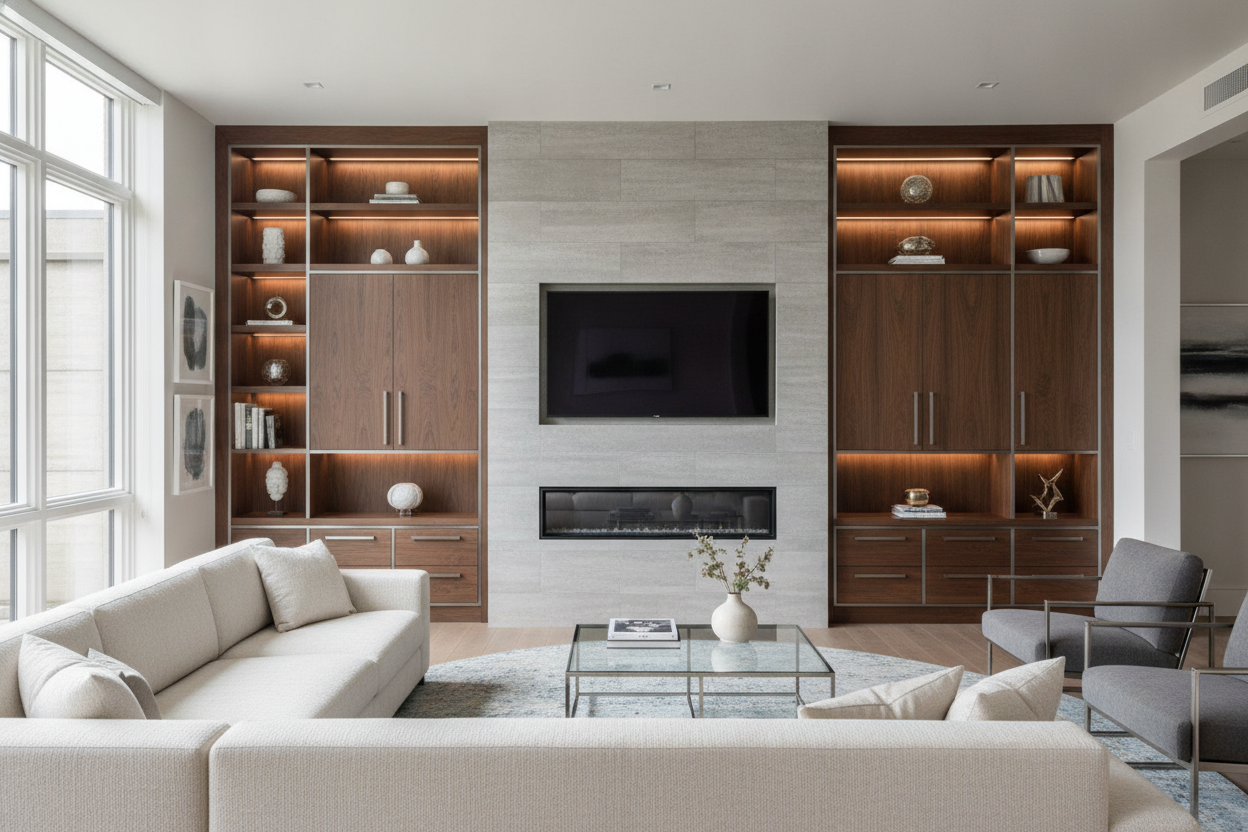
If you own the home and have some room in the budget, a built in tv cabinet over fireplace is the undisputed gold standard. This usually involves flanking the chimney breast with custom millwork that stretches to the ceiling. It hides everything. The wires run behind the new 'wall,' and your components sit pretty behind cabinet doors.
I’ve seen people try to DIY this with prefab bookshelves, but custom work allows you to hide specific depths for receivers. Transitioning from a cluttered mantel to a modern wall cabinet for living room storage completely changes the room's footprint. It stops feeling like a room with a TV slapped on the wall and starts feeling like a cohesive, architectural space.
The Renter-Friendly Fix: Flanking the Hearth
For those of us not ready to tear into the studs, the best move is 'The Flank.' You place two identical cabinets on either side of the fireplace. This creates symmetry and gives you a place to run cables down the side of the chimney. I suggest using paintable cord covers that match your wall color to hide the descent.
I personally used a large TV cabinet with spacious storage on the right side of my hearth to house the heavy stuff—the subwoofer and the gaming consoles. For the other side, a wide storage cabinet with drawers works perfectly for hiding the smaller accessories like remote chargers, extra controllers, and those manuals you'll never read again. It balances the room without the $5,000 contractor bill.
Hiding Things in Plain Sight: TV Above Fireplace Media Storage
If you don't have room for big cabinets, you have to get sneaky with tv above fireplace media storage. I’ve seen some brilliant uses of oversized decorative baskets on the hearth to hide subwoofers. You can also use hollowed-out 'faux books' to hide a router right on the mantel. It's all about misdirection.
Another trick is integrating your tech into book and media storage shelves that sit adjacent to the fireplace. If you mix your Apple TV in with actual books and some greenery, the eye just skips right over it. Just make sure you aren't stacking things too tightly—electronics need to breathe, or you'll be buying a new router every six months.
The 'Behind the Wall' Trick for Absolute Minimalists
If you refuse to have any furniture near the fireplace, you have to go into the wall. This involves installing an 'in-wall' media box behind the TV. It creates a recessed cavity where the plugs and small devices like a Roku or Fire Stick can live. Then, you run a conduit (a plastic pipe) behind the drywall down to a baseboard-level exit point.
It’s a 'measure twice, cut once' kind of Saturday project. It requires a bit of bravery to saw a hole in your living room, but the result is a TV that looks like a piece of art. No cords, no boxes, no clutter. Just remember that if you have a stone or brick fireplace, this gets significantly more complicated and usually requires a professional with a masonry bit.
FAQ
Will the heat from the fireplace damage my electronics?
It can. If you don't have a mantel to deflect the rising heat, your TV and any tech sitting nearby will cook. Always use a thermometer to check the surface temp of your TV after the fire has been going for an hour. If it's over 100 degrees, you need a deeper mantel.
How do I hide the cables if I have a stone fireplace?
Stone is tough because you can't easily go through it. Your best bet is high-quality cord channels that you can paint or even 'texture' to blend in with the mortar lines. Or, lean into the furniture look and use a cabinet to hide the vertical run.
Can I put my router inside a closed wooden cabinet?
You can, but signal strength will drop slightly. More importantly, heat will build up. Always choose a cabinet with a slatted front or drill some ventilation holes in the back to keep the air moving.

Laisser un commentaire
Ce site est protégé par hCaptcha, et la Politique de confidentialité et les Conditions de service de hCaptcha s’appliquent.