


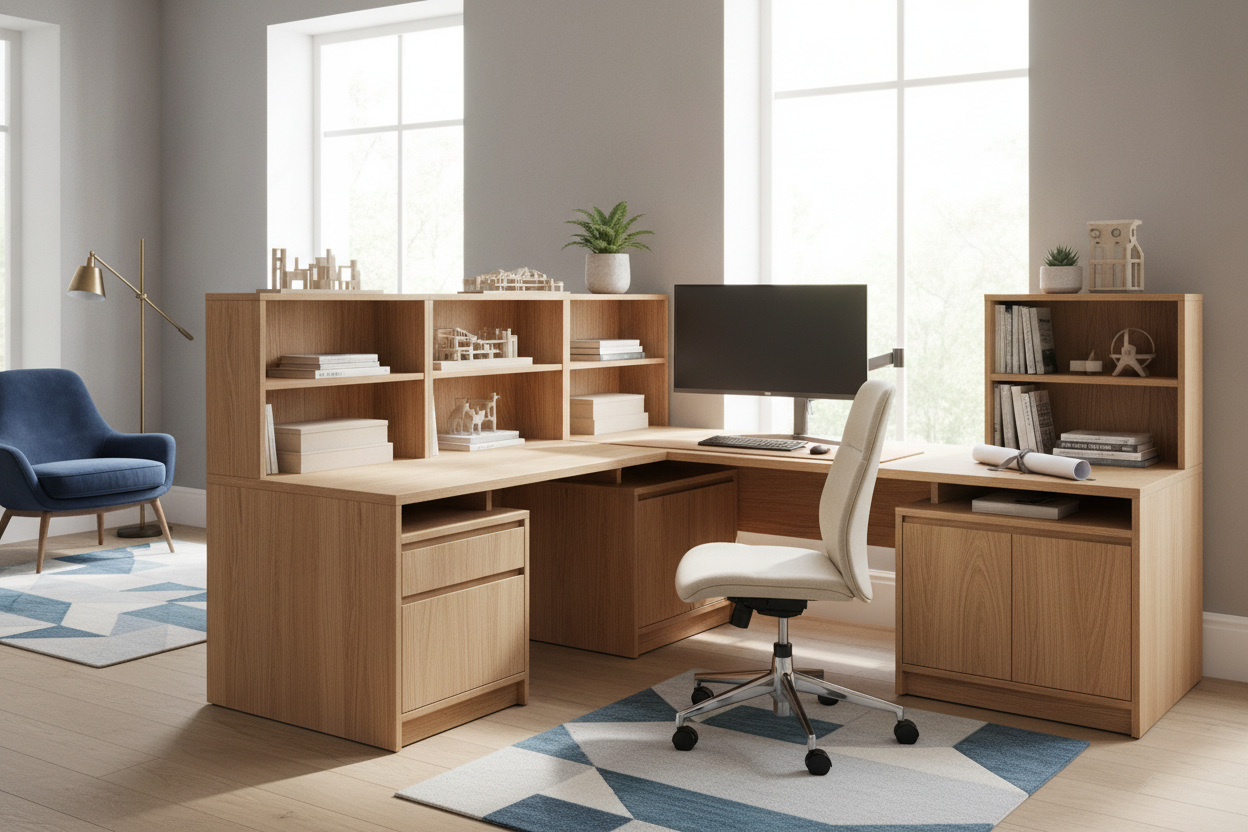
Balancing functional workspace against limited square footage requires thoughtful layout planning. When outfitting a compact home office, bedroom nook, or multi-purpose living area, a 50 corner desk serves as an efficient middle ground between traditional linear workstations and expansive executive suites. Choosing the right layout involves understanding geometry, knee clearance, and peripheral distribution across both wings of the furniture piece.
Reviewing options across a broader computer desk collection reveals that small-footprint corner desks typically fall into two main categories: symmetrical corner wedges and compact asymmetrical L-shaped workstations. Evaluating room proportions before selecting a profile ensures your workspace supports day-to-day productivity without interrupting room traffic.
Understanding the 50 Corner Desk Footprint
A compact corner workstation provides substantial utility by turning underutilized 90-degree room corners into dedicated activity centers. Rather than extending deep into the middle of the room, a corner-oriented profile keeps equipment tucked against perimeter walls.
When evaluating a 50 inch l shaped computer desk, the dimension generally describes either the overall length of the primary desk wing or the diagonal envelope of the frame. In compact layouts, this span is sufficient to support a primary monitor setup while leaving an adjacent return wing open for secondary accessories, paperwork, or task lighting.
Geometry and Return Configurations: Symmetrical vs. Asymmetrical Wings
Choosing between equal-length wings and an offset return dictates how natural movement flows through your room. Consulting an architectural computer desk guide highlights that choosing incorrect desk orientation relative to doorways is a frequent layout misstep.
- Symmetrical Corner Layouts: Equal-depth wings nest evenly against two perpendicular walls. This creates a centered focal point directly into the corner vertex, which works well for compact single-screen setups or balanced paper sorting.
- Asymmetrical L-Shaped Configurations: An extended primary wing paired with a shorter return provides clear prioritization. The longer surface houses computer monitors and keyboard trays, while the shorter side accommodates notebook docking, drafting, or stationary storage.
- Reversible Side Returns: Many modern frames allow the shorter return to install on either the left or right side, ensuring flexibility if you relocate furniture to a different corner in the future.
Dual-Zone Desktop Ergonomics: Primary Workstation vs. Side Tasking
Productivity improves when the desktop is divided into dedicated functional zones. A 50-inch corner platform naturally lends itself to a two-tier spatial layout:
- Primary Focus Zone: Located directly along the primary wing or facing the central diagonal, this area holds the main monitor, keyboard, and mouse. Keeping input devices aligned directly in front of your seated posture prevents prolonged neck and spinal rotation.
- Secondary Utility Zone: Positioned along the adjacent return surface, this zone provides an arm's-reach staging ground for writing pads, reference books, audio equipment, or beverage coasters without crowding the main keyboard area.
Legroom Clearance and Knee-Well Proportions
While surface area is vital, lower-body clearance determines long-term seated comfort. Poorly positioned diagonal crossbars or interior support legs can obstruct chair rotation and leg extension.
When comparing compact corner units against larger furniture such as a shaped corner desk product, observe the placement of center structural posts. High-clearance corner designs use recessed center legs or cantilevered steel frames, allowing office chairs to pivot smoothly from the main desktop to the return wing without catching armrests or striking user knees.
Integrated Shelving and Companion Storage Strategies
Small-footprint workstations must maximize vertical volume to prevent desktop clutter. Corner desk designs often incorporate built-in shelving, monitor risers, or under-desk CPU caddies.
For those prioritizing a light visual profile, choosing a minimalist frame such as a modern computer corner desk product keeps the floor plan open while offering designated storage platforms. To maintain an organized workspace, consider these structural storage arrangements:
- Tiered Corner Risers: Elevating displays onto a corner shelf frees up usable desk surface beneath the screens for notebooks and peripheral docks.
- Reversible Side Shelves: Lower open tiers provide a stable base for desktop towers, reference binders, or decorative baskets while reinforcing frame rigidity.
- Slim Rolling Pedestals: Adding a narrow mobile drawer unit beneath an open desk wing adds concealed filing capacity without permanently restricting under-desk movement.
Room Placement and Traffic Flow Blueprints
Positioning a corner desk requires analyzing window placement, power outlet accessibility, and door swing clearances. While tucking the desk flush into a perimeter corner is the most space-conscious approach, other configurations can serve specific layout goals.
For multipurpose studio apartments or shared bedrooms, a corner desk can be positioned with one wing against the wall and the return extending outward as a functional room divider. Alternatively, reading a specialized computer desk guide illustrates how concealed furniture or nook-aligned desks maintain boundary separation between living and working zones. Always ensure at least a comfortable walking lane behind the seated position so passing household members do not disrupt your workflow.
Assembly, Cable Routing, and Corner Management Considerations
Tight ninety-degree wall junctions often complicate power cord management and furniture leveling. Implementing intentional cable routing during assembly prevents maintenance headaches later on:
- Baseboard Offsets: Wall baseboards and quarter-round trim can prevent desk frames from sitting completely flush against the drywall. Desks with subtle rear overhangs or adjustable leveling feet accommodate these architectural variations smoothly.
- Corner Grommet Routing: Utilizing built-in desktop grommets or passing power cords through the rear diagonal gap allows power strips to remain accessible while preventing wires from pinching behind the frame.
- Under-Desk Cable Trays: Mounting a wire basket beneath the central corner junction consolidates power bricks, monitor cables, and surge protectors off the floor, preserving legroom and creating a clean, organized aesthetic.

Laisser un commentaire
Ce site est protégé par hCaptcha, et la Politique de confidentialité et les Conditions de service de hCaptcha s’appliquent.