


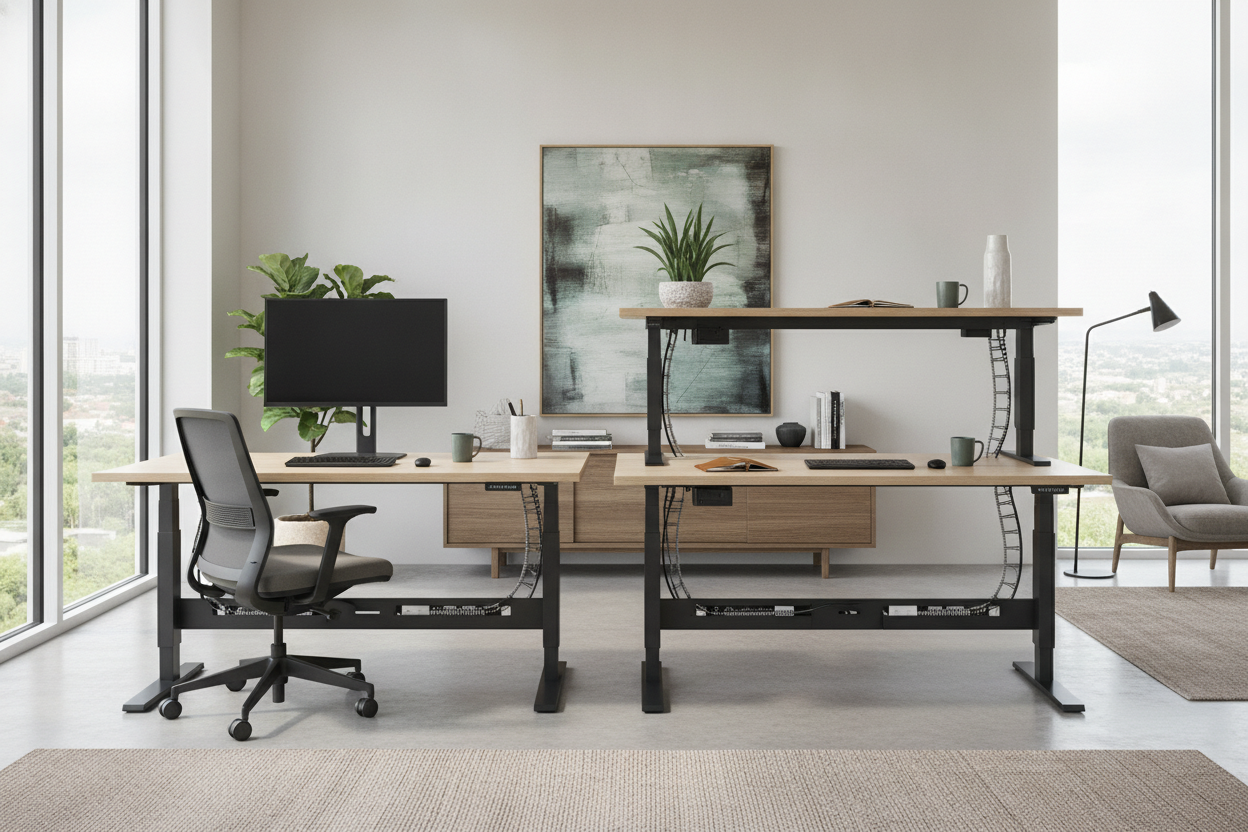
I spent three years staring at a beige wall three feet from my face. I thought it was 'efficient' because the outlet was right there, but after 47 browser tabs of office inspo, I realized I was just recreating a sad corporate cubicle in my own home. If you just bought one of those fancy adjustable electric desks, do yourself a favor: pull it into the middle of the room.
- Floating a desk opens up the room and stops you from staring at drywall.
- Cable management is the only thing standing between you and a Pinterest-worthy office.
- Routing wires down a single leg is the pro move for an electric stand table.
- The 'Command Position' (facing the door) actually reduces work anxiety.
The Problem with the 'Desk Facing the Wall' Default
We treat our power desks like appliances. We shove them against the baseboards because that's where the juice is. But when you're pinned against a wall, your peripheral vision is basically a blank slate of nothingness. It’s a creativity killer. This layout is likely ruining your room's vibe by making the space feel smaller than it actually is. You’re essentially putting yourself in a time-out for eight hours a day.
Most people think they don't have the square footage to float a desk. In reality, a standard 60-inch desktop only needs about three feet of clearance behind it for a chair. By pulling it out, you create a 'zone' that feels professional rather than tucked away. It turns a bedroom corner into a legitimate executive suite.
Yes, the Power Cord is Annoying (Here's How to Hide It)
The 'umbilical cord' is the main reason people fear floating a sit stand motorized desk. You have one thick black cable running to the wall, and it looks like a trip hazard waiting to happen. First, get an under-desk cable tray—the metal mesh ones are better than the plastic clips that always unstick. Plug everything (monitors, laptop, desk motor) into one heavy-duty power strip mounted inside that tray. Now, you only have one cord to hide.
Use a braided cable sleeve or a 'snake' cable manager that attaches to the desk leg. This keeps the slack from bunching up when you lower the desk. If you have hardwood, a clear floor cord cover or a well-placed rug can hide the run to the nearest outlet. It takes twenty minutes of effort, but it makes your power adjustable desks look like high-end furniture instead of a science experiment. I've used the 'weighted' cord covers before, and they're great because they don't require adhesive that ruins your floors.
Why Floating Your Setup Changes How You Work
Feng Shui experts call it the 'command position.' When you face the door or a window, your brain stops scanning for 'threats' behind you. It sounds woo-woo, but it works. I noticed my eye strain dropped significantly when I could look past my monitor into the distance instead of hitting a wall 24 inches away. It gives your eyes a chance to reset their focus, which is a lifesaver during 4-hour Zoom marathons.
Just be sure you like where you put it. I learned the hard way how heavy electric stand up desks actually are once they're fully loaded with gear. You aren't going to want to shimmy a 150-pound steel-framed desk across the floor twice a week. Pick a spot with good lighting and commit to it. The psychological shift of being 'in the room' rather than 'at the wall' is worth the heavy lifting.
What to Look for if You're Upgrading Now
If you're shopping for electric adjustable standing desks, look at the back. Most cheap ones use unfinished particle board on the side that usually faces the wall. If you're floating it, that ugly raw edge is going to be front and center. I'm a fan of the modern electric height adjustable desk because it actually considers the 360-degree view. It has a finished back and integrated storage that hides the mess.
Look for dual-motor systems—they're quieter and handle the weight of heavy monitors better than the single-motor versions that struggle and whine every time you hit 'stand.' Also, check the leg design. T-frame legs are more stable for floating setups than C-frame legs, which can feel a bit tippy when they aren't braced against a wall. If you’re going to be standing, you don’t want your monitor wobbling like a bobblehead every time you type.
My Personal Setup Mistake
I once tried to float my desk using a standard white extension cord I found in the junk drawer. It was too thin, got warm under the load of my PC, and looked like absolute trash against my dark wood floors. I eventually upgraded to a 14-gauge black cord that blended into my rug. Don't cheap out on the power supply; these motors pull more current than a lamp, especially when they're lifting 50 pounds of gear.
FAQ
Isn't a floating desk a trip hazard?
Not if you use a weighted floor cord cover. They're flat, rubberized, and stay put without tape. You can also run the cord under an area rug if the outlet is positioned correctly.
How do I hide the cables under the desk?
Use a cable management tray mounted to the underside of the desktop. Put your power strip in there so only one main cord ever has to leave the desk surface.
Will a floating desk make my room look smaller?
Counter-intuitively, no. Seeing the floor space behind the desk actually makes a room feel deeper. It’s the same reason designers tell you to buy sofas with legs instead of blocky bases.

Laisser un commentaire
Ce site est protégé par hCaptcha, et la Politique de confidentialité et les Conditions de service de hCaptcha s’appliquent.