


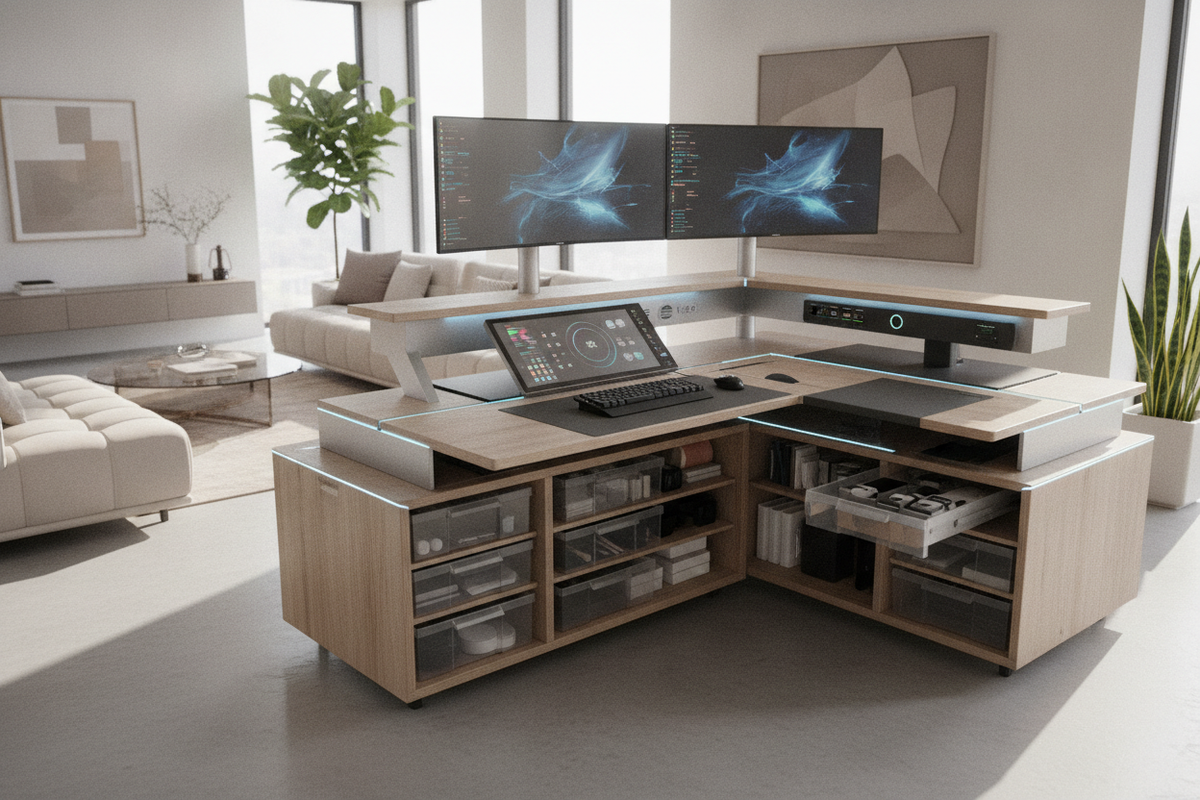
Introduction: The Evolution of the Connected Workstation
The modern workspace has transitioned from static writing surfaces to responsive platforms engineered around personal ergonomics and technological integration. A contemporary smart computer table combines structural engineering with digital utility, providing dynamic transitions between seated and upright postures while consolidating power distribution. Rather than treating furniture and electronic equipment as separate entities, modern smart work desk designs integrate connectivity directly into the desktop architecture to streamline daily workflows.
What Is a Smart Desk? Core Features and Kinetic Capabilities
Understanding what is a smart desk requires looking beyond basic motorized lifting legs. A comprehensive smart office table brings together kinetic movement, programmable digital controls, embedded power supplies, and intuitive cable management. Core capabilities typically include:
- Digital Control Interfaces: Touchpads equipped with programmable height presets allow users to transition between customized ergonomic heights with single-touch convenience.
- Anti-Collision Detection: Integrated gyroscopic or resistance sensors halt kinetic travel when encountering obstacles such as armchairs, window ledges, or storage units.
- Integrated Power and Data Modules: Built-in AC outlets, rapid-charging USB ports, and embedded wireless charging pads built flush into the desktop surface.
- Kinetic Motor Columns: Precision telescoping steel columns driven by synchronized internal drive shafts or dual-motor systems.
When planning an ergonomic space, consulting a work desk office guide helps establish whether dynamic adjustability or traditional static surfaces best serve your routine task requirements.
Dimensional Decision Categories for Smart Computer Tables
Selecting the right desk dimensions depends on balancing available floor area with the hardware envelope of your workstation. Browsing a curated computer desk collection reveals standard format tiers designed for varying work volumes.
Compact Formats for Nooks and Urban Workspaces
Compact smart desks prioritize space efficiency for dedicated laptop tasks or single external display configurations. These surfaces fit neatly into shared living areas or tight bedroom alcoves while retaining kinetic functionality and integrated charging features.
Mid-Scale Workstations for Dual-Monitor Productivity
Mid-scale desks provide sufficient depth and width to support dual monitors, desktop speaker monitors, and dedicated peripheral surfaces. The extended depth maintains a comfortable focal distance while leaving room for desk pads and reference documents.
Expanded and Corner Configurations for Multi-Device Hubs
L-shaped and broad executive smart desk furniture setups divide physical real estate into dedicated task zones. One wing can support primary computer displays while the adjacent section remains open for analog writing, tablet drawing, or video conferencing equipment.
Embedded Power, Docking, and Dynamic Cable Routing Architecture
A frequent design challenge with motorized smart desk furniture is cable tension during kinetic movement. When a desktop elevates, power cables and display leads stretch across the vertical travel envelope. Smart table architecture solves this through integrated under-desk power bars, articulated cable spine conduits, and wide raceway channels. By plugging all desktop peripherals into a single under-mounted power distribution hub, only a single master power cord needs to extend to the wall outlet, preserving clean lines and preventing snagging.
Kinetic Clearances and Vertical Travel Envelope Planning
Installing an adjustable smart office table requires planning for dynamic clearance around the entire perimeter of the desk:
- Wall Offsets: Maintain a small gap between the back edge of the desktop and the drywall to prevent friction or damage to wall paint during vertical travel.
- Monitor Arm Sweep: Articulated monitor arms often extend past the rear boundary of the desktop; ensure monitors do not strike high wall shelving or art frames when raised.
- Under-Desk Clearance: Keep footrests, stationary waste bins, and mobile pedestals outside the downward travel path to avoid triggering anti-collision safety stops.
Material Selection, Frame Rigidity, and Dynamic Stability
Stability is paramount when operating at elevated heights. High-grade smart computer tables utilize reinforced steel subframes with crossbars or dual-beam understructures that prevent lateral wobble during typing. Desktop surfaces generally feature high-density engineered wood cores finished with scratch-resistant and moisture-resistant laminates, ensuring durability under continuous peripheral contact and monitor clamp pressure.
Storage Architecture: Balancing Motorized Decks with Perimeter Cabinetry
Unlike traditional executive desks packed with built-in pedestal drawers, smart desks maintain open legroom beneath the primary deck to reduce motor strain and facilitate smooth elevation. Integrating an office computer desk product alongside functional perimeter storage creates a balanced workstation that maintains motor longevity.
Low-Profile Under-Desk Drawers and Modesty Panels
When selecting accessories mounted directly to the lifting frame, choose slimline pencil drawers or integrated felt drop-trays. These compact solutions hold essential stationery without impeding knee clearance in seated positions.
Perimeter Storage Integration and Coordinated Office Furniture
To store archival paperwork, bulky reference books, and secondary hardware, pair your motorized table with freestanding credenzas, mobile filing cabinets, or tall storage units. Reviewing a detailed computer desk office guide offers insight into coordinating enclosed cabinetry to keep physical clutter away from active work zones.
Assembly Sequencing, Leveling, and Controller Programming Protocol
Proper assembly ensures smooth mechanical travel and reliable leveling for your smart computer table:
- Inverted Frame Construction: Assemble the steel lifting columns, crossbars, and side brackets while resting on a soft rug or packaging foam to protect desktop finishes.
- Subframe Centering: Secure all mechanical fasteners into the pre-drilled threaded inserts on the underside of the desktop, ensuring symmetrical alignment.
- Electronic Coupling: Connect the control box, synchronized motor cables, and digital keypad, securing loose wiring inside the integrated cable management channel.
- Base Leveling: Upright the table with assistance, and adjust the threaded floor glides on the feet until the desktop is level across both axes.
- Memory Calibration: Run the initial reset sequence on the digital controller and program your preferred seated and standing height presets.
Room Layout Strategies and Workstation Use Cases
Positioning your desk within the room shapes both focus and productivity. While corner placement maximizes open floor space, placing a smart table in a semi-floating layout facing the room entrance provides open sightlines and natural light distribution. Pairing an adjustable table with a secondary office computer desk product in an adjacent zone creates dedicated multi-user workstations suitable for collaborative modern home offices.

Laisser un commentaire
Ce site est protégé par hCaptcha, et la Politique de confidentialité et les Conditions de service de hCaptcha s’appliquent.