


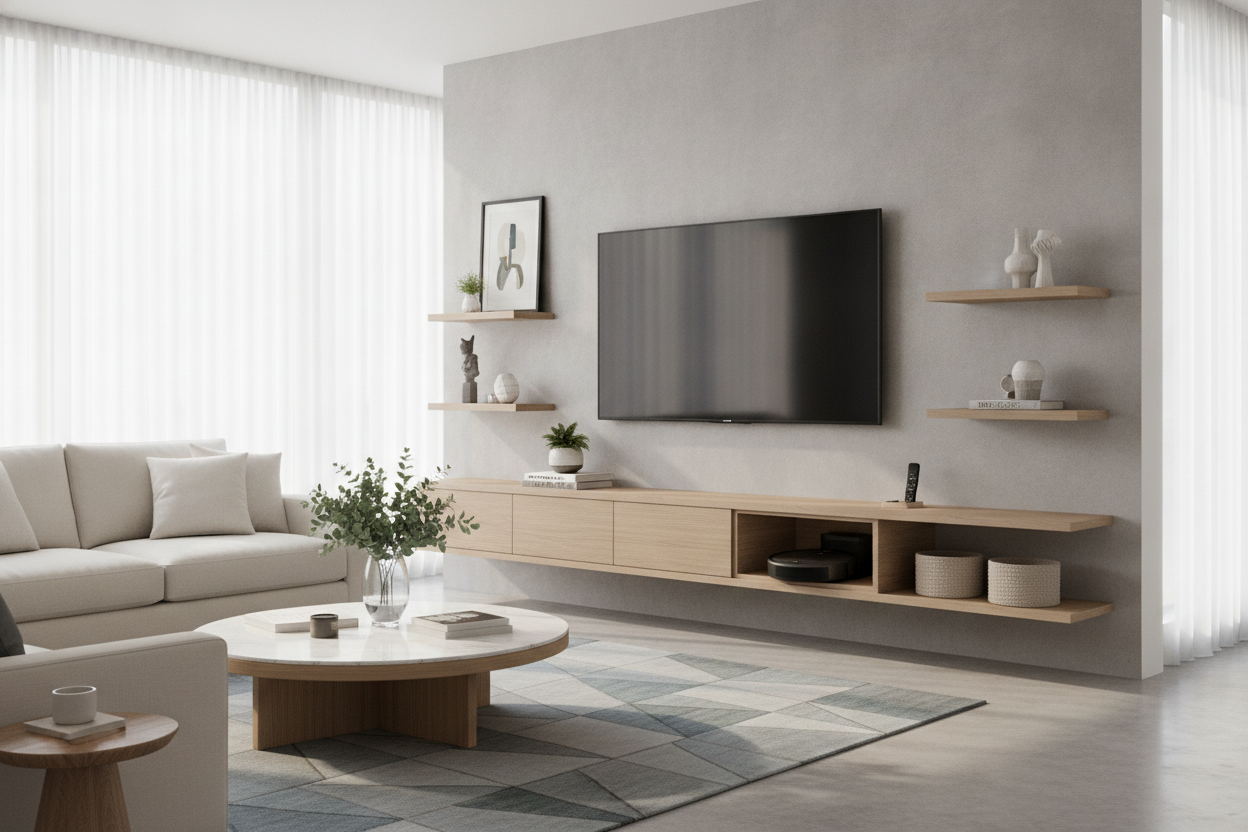
I used to think my living room was clean until I moved my media console to paint the wall. Behind that 150-pound slab of particle board was a sentient tumbleweed of Golden Retriever fur and tangled HDMI cables. It was a graveyard where my robot vacuum went to die, or at least to beep pathetically before getting stuck on a power strip.
That was the moment I realized the floor is the enemy. By switching to a tv wall mount and shelves, I didn't just clear the clutter; I gave my floor back to the vacuum and my sanity back to me. Here is how I finally won the war against dust bunnies.
- Lifting everything off the floor eliminates 'dead zones' where dust accumulates.
- Floating shelves provide a landing pad for remotes without the bulk of a cabinet.
- Hidden brackets behind the screen keep ugly tech out of sight.
- Cable management is 90% of the aesthetic success.
The Dust Bunny Graveyard Behind My Old Console
My old media unit was beautiful in a catalog, but in reality, it was a dust magnet. It sat about two inches off the floor on tapered legs—just high enough for a cat toy to disappear under, but too low for any vacuum head to reach. Every time the robot vacuum approached, it would spend five minutes aggressively ramming the base before spinning in circles and leaving a trail of gray fluff behind.
When I finally pulled it away from the wall, I found a literal bird’s nest of cables. Dust had fused with the heat from the power bricks to create a sticky, gray coating on everything. It wasn't just messy; it felt like a fire hazard. I knew I couldn't just put it back. I needed a solution that left zero footprint on the hardwood.
Making the Switch to a TV Wall Mount and Shelves
I decided to go 'full float.' This meant mounting the 65-inch screen and adding a minimalist tv wall mount and shelves system to handle the peripherals. I opted for a mount with a 20-inch extension arm so I could get behind it easily for swaps, and I fixed my dangling cord nightmare by installing an in-wall power kit. If you’re still seeing cords trailing down to the baseboard, you’re only halfway there.
The trick is intentionality. You aren't just slapping a screen on a wall; you're creating a vertical station. I used a heavy-duty steel bracket that hit two studs—don't even think about using drywall anchors for a setup like this unless you want a $2,000 heart attack. The result is a setup that looks like it belongs in a high-end gallery rather than a suburban basement.
Hiding the Ugly Stuff: The Shelf for Back of TV
Most people forget that a smart TV still needs 'stuff.' You’ve got a router, a streaming box, maybe a Hue bridge. Instead of cluttering up the visible surfaces, I used a dedicated shelf for back of tv. These are small, ventilated metal brackets that screw directly into the VESA holes on the back of your monitor.
It’s a total stealth move. My Apple TV and mesh router are tucked completely out of sight, yet they still get plenty of airflow. I used 4-inch Velcro ties to keep the power cables tight against the mounting arm. Now, when you look at the TV from the side, you don't see a mess of plastic—you just see the thin profile of the screen.
Keeping the Visible TV Mounted Shelf Clean
For the things that actually need to be visible—like my soundbar or a single piece of decor—I added a sleek tv mounted shelf just below the screen. The temptation is to treat this ledge like a junk drawer for mail and spare change, but that defeats the purpose. I keep mine strictly limited: soundbar, one ceramic bowl for remotes, and that’s it.
I spent a long time debating if I should even install an on wall TV shelf or just leave the wall bare. In the end, the shelf helps 'ground' the TV visually so it doesn't look like a black hole floating in the middle of the wall. Just make sure you mount it at least 4-6 inches below the screen to give the IR sensors room to breathe.
The Ultimate Floor-Clearing Payoff
The first time I ran the robot vacuum after the install, I actually sat on the sofa and watched it work. It glided right under the entire media setup without a single 'collision detected' error. No more manual sweeping, no more moving heavy furniture twice a year, and no more dust bunnies mocking me from the shadows.
Beyond the cleaning benefits, the room feels twice as big. When you can see the floorboards go all the way to the baseboard, your brain registers more square footage. I ended up moving my old DVD collection and board games to some adjustable shelf storage in the hallway closet, which further decluttered the living zone. It’s a cleaner look and a cleaner home, literally.
FAQ
Is wall mounting safe for heavy TVs?
Yes, provided you hit the studs. Never trust a plastic toggle bolt with a large screen. Use a stud finder, pre-drill your holes, and use the lag bolts that come with the kit.
How do I hide the wires if I can't go inside the wall?
If you're renting, use a paintable cable raceway. It’s a plastic track that sticks to the wall and hides the cords. It’s not invisible, but it’s a 100% improvement over a 'cable waterfall.'
Where should I put my gaming console?
Consoles like the PS5 are bulky and run hot. I recommend a dedicated ventilated wall bracket specifically made for the console, mounted slightly to the side or behind the TV if space permits.


Laisser un commentaire
Ce site est protégé par hCaptcha, et la Politique de confidentialité et les Conditions de service de hCaptcha s’appliquent.