


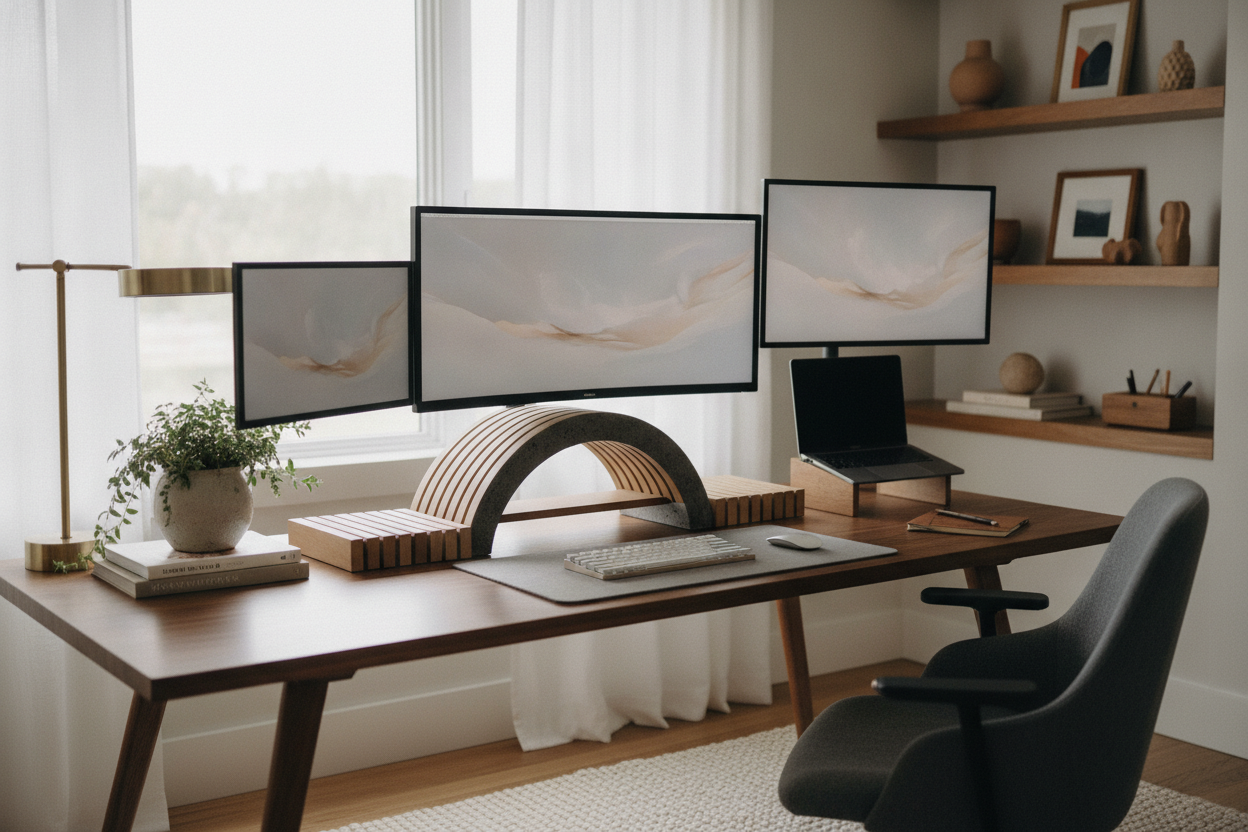
I spent an hour last Tuesday staring at my desk and realized I was miserable. My expensive monitor was sitting on a stack of old hardcover novels, and my neck felt like it was being twisted into a pretzel by 3 PM every day. I went online to find a computer display riser, but everything I saw looked like it was stolen from a 1998 corporate accounting office. Gray plastic, chunky metal legs, and zero personality.
After testing way too many monitor screen risers that felt like they were made of cardboard, I finally figured out the secret. You don't have to sacrifice your aesthetic just to save your spine. Whether you need a riser monitor stand for a tiny apartment desk or a massive desktop monitor shelf for a dual-screen setup, the right choice makes your workspace feel intentional rather than accidental.
- Material matters: Solid wood or thick acrylic beats hollow plastic every time.
- The 'Basement' Rule: Make sure your keyboard actually fits underneath.
- Eye Level: Your eyes should hit the top third of your screen, not the middle.
- Stability: If it wobbles when you type, send it back immediately.
The Problem With Corporate-Looking Desk Accessories
Most ergonomic gear is designed for utility, not joy. We spend forty-plus hours a week at these stations, yet we’re expected to stare at industrial-grade pc monitor risers that belong in a hospital. I tried one of those adjustable black plastic stands with the little drawers—it was a nightmare. It creaked, it collected dust like a magnet, and it made my beautiful walnut desk look cheap.
Aesthetics actually impact your focus. When your desk looks like a cluttered cubicle, your brain stays in 'survival mode.' When you swap that plastic junk for a sleek computer monitor platform, the whole vibe shifts. You want a desktop monitor riser stand that feels like a piece of furniture, not a piece of office equipment.
Acrylic vs. Wood: Picking a Riser That Fits Your Vibe
If you want your desktop monitor riser to basically disappear, go with acrylic. It’s perfect for small rooms because it doesn't add visual weight. I used a clear screen riser stand in my guest-room-turned-office, and it made the desk feel twice as large. Just make sure it’s at least 10mm thick; the cheap ones will bow in the middle if your monitor is heavy.
On the other hand, warm wood tones are the gold standard for a cozy, mid-century look. A solid oak or walnut computer monitor riser for desk setups adds a layer of texture that plastic just can't touch. I’ve found that a monitor shelf riser in a dark stain hides coffee rings better, too—because let's be honest, we all spill eventually.
What About Desks With Built-In Shelves?
Sometimes, adding a standalone accessory feels like a band-aid on a bigger problem. If your current desk is too small or too low, you might be better off upgrading the whole rig. I recently looked into a computer desk with monitor stand built right into the frame. It’s way more stable than a separate riser stand for monitor use because it’s bolted down.
These integrated setups often include perks like LED strips or power hubs. If you’re a gamer or a heavy power user, having a desk with riser for monitor height already figured out saves you the headache of matching wood grains or worrying about weight limits. It’s the 'set it and forget it' version of ergonomics.
Reclaiming the 'Basement' Under Your Screen
The best part of a computer monitor riser desk stand isn't actually the height—it's the storage. I call the space under the riser 'the basement.' It’s the perfect spot to slide your keyboard and mouse when you need to actually write on paper or eat lunch without getting crumbs in your mechanical switches. On a compact writing computer desk, this extra six inches of clearance is a total lifesaver.
I use my computer shelf riser to hide my external hard drives and a messy nest of cables. It keeps the surface clear for my coffee and my notebook. Even a cute monitor stand should be functional; if it doesn't have enough clearance to fit a standard keyboard, it’s just taking up space. Look for at least 2 inches of height to ensure your hands don't get stuck when reaching for your pens.
Don't Forget to Measure Your Eye Level First
Before you buy any computer screen riser desk accessory, grab a tape measure. Sit in your chair with your feet flat on the floor. Have someone measure the distance from the floor to your eyes. If your monitor's current height is more than 3 inches below that, you need a riser. A raised computer monitor stand is useless if it’s too short, and it’s a literal pain in the neck if it’s too high.
If you’re working with a massive 40-inch ultrawide or a literal television, a standard desktop riser stand might actually be too much. In those cases, you need a different approach. Try a TV Monitor on Stand for those oversized displays that would crush a dainty acrylic riser. Get the height right first, then worry about the style.
Is a monitor riser better than an arm?
Monitor arms offer more movement, but they require a desk lip to clamp onto and can look very 'techy.' A riser is easier to set up, provides storage underneath, and feels more like home furniture.
Can I use a monitor riser for a laptop?
Absolutely. A monitor riser laptop setup is great if you use an external keyboard. It brings the laptop screen up to your eye level so you aren't hunching over like a gargoyle all day.
How much weight can a glass riser hold?
Tempered glass risers are surprisingly strong, usually rated for 40-60 lbs. However, they show every single fingerprint. If you hate cleaning, stick to wood or matte acrylic.

Laisser un commentaire
Ce site est protégé par hCaptcha, et la Politique de confidentialité et les Conditions de service de hCaptcha s’appliquent.