
Yes, you can mount a TV in the corner: use a full-motion articulating arm or a dedicated corner TV mount, bolt the wall plate into a stud near the corner on one wall, and extend the arm until the screen angles across the corner toward your seating. The number that matters is arm reach, because a 65-inch TV turned 45 degrees needs its center about 20 inches off each wall before its edges clear.
This guide covers how to mount a TV in the corner step by step, plus a no-drill corner placement using a stand from the FUFU&GAGA TV stand collection. Treat it as planning help: your mount's manual, its weight rating and your actual wall decide what is safe.
Quick answer
- Mount type: full-motion articulating arm or corner mount. A flat mount can't angle a TV out of a corner.
- Extension: the center of the TV's back must sit about 0.354 x screen width from each wall (arithmetic below).
- Fastening: into wall studs, as the mount's manual directs. Studs are often 16 or 24 inches apart, but spacing near corners varies.
- Limits: stay inside the mount maker's stated TV size, weight and VESA range.
- No-drill option: a rectangular stand set across the corner needs about 0.707 x (stand width + depth) of wall on each side.
Should you put a TV in the corner of a room?
A TV in the corner works best when the usual TV wall isn't available. Corner placement suits a living room where a fireplace already holds the focal point, a long wall broken up by doors or large windows, and open concept spaces with little solid wall space. It also helps when a seating area faces two directions, because the screen can swing toward whichever sofa is in use.
A corner is a weaker choice when the TV would block traffic flow, when a door swings into the spot, or when the only sofa sits straight across from the long wall. Sit in your usual spot and look at the corner: if you have to turn your neck to see it, the TV placement needs rethinking.
Which TV mount works in a corner?
A corner TV mount has to hold the screen away from the wall and swivel it toward the room, which is why fixed mounts don't suit this job. Here are the realistic options for wall mounting and corner placement.
| Option | How it works | Best for | Watch for |
|---|---|---|---|
| Full-motion articulating arm | Wall plate on one wall; the arm extends, swivels and tilts | Most corner TV setups; TV can fold back toward the wall | Reach must suit your screen width |
| Dedicated corner mount | A long arm or split arms sold for corners, fastened beside the corner | Corners where a stud sits close to the angle | Check how many studs the plate needs |
| Fixed or low-profile mount | Holds the TV flat against one wall | Not suitable for a corner | Can't angle the screen out |
| TV stand across the corner | Freestanding furniture, no wall mount | Renters, walls you can't drill | Takes more floor; anchor it |
One mount maker's corner-mounting guide says to use a corner or long-arm mount rather than a flat one, and to check that the TV's back corners clear both walls when angled. Its own corner models run from 15 inches of maximum reach on a mount for 19 to 55-inch TVs up to 42.5 inches on a mount for 43 to 100-inch TVs, with ratings from 66 to 220 lb. Read the spec sheet of the exact mount you buy.
Why does a TV in the corner need extension?
Angled at 45 degrees, a flat screen forms the long side of a triangle with the two walls, so its center has to come well out into the room. Without enough extension, one edge hits a wall before the screen reaches the angle you want.
The math is simple. Screen width is about 0.872 x the diagonal size for a 16:9 TV. At 45 degrees, each half of the screen covers 0.354 x width in both directions, so the center of the TV's back must sit at least that far from each wall. A stud closer to the corner than that distance means the arm also has to reach sideways, which adds length (square root of the sideways gap squared plus the outward distance squared).
| Screen size | Approx. width | Min. distance from each wall | Wall used per side | Corner to screen | Reach, stud 16 in from corner | Reach, stud 8 in from corner |
|---|---|---|---|---|---|---|
| 43 in | 37.5 in | 13.3 in | 26.5 in | 18.7 in | 13.3 in | 14.3 in |
| 50 in | 43.6 in | 15.4 in | 30.8 in | 21.8 in | 15.4 in | 17.1 in |
| 55 in | 48.0 in | 17.0 in | 33.9 in | 24.0 in | 17.0 in | 19.2 in |
| 65 in | 56.7 in | 20.0 in | 40.1 in | 28.3 in | 20.4 in | 23.4 in |
| 70 in | 61.0 in | 21.6 in | 43.2 in | 30.5 in | 22.3 in | 25.5 in |
| 75 in | 65.4 in | 23.1 in | 46.2 in | 32.7 in | 24.2 in | 27.6 in |
These are geometric minimums for a thin screen at exactly 45 degrees, not a mount specification. Your TV has thickness, its real width may differ, and makers measure reach in different ways, so use your TV's published width and pick a mount with reach to spare. Confirm on the spec sheet that the swivel covers at least 45 degrees.
What size TV can you mount in a corner?
A corner mount can carry a 65 or 70-inch TV if its size, weight and VESA range all include that TV and your wall can take the load. Big screens are harder because a 70-inch TV needs more than 22 inches of reach and over 43 inches of each wall, which a door or window trim can easily interrupt. For a screen over 125 lb, the same mount maker points to a dual-arm bracket.
How do you find studs on two walls?
Scan both walls, starting at the corner and working outward. Studs are often 16 or 24 inches apart, center to center, but spacing can vary around corners, doors, windows and remodeled areas, which is why you can't simply measure from the corner. Older homes deserve extra suspicion.
- Run an electronic stud finder along each wall at the planned mounting height and mark both edges of each stud with painter's tape.
- Rescan above and below each mark. A stud should continue vertically behind the wall.
- Treat an unusually wide or shifting reading as a warning: it could be metal, wiring or plumbing. If you aren't confident, don't guess.
- Compare the two walls and pick the one that suits your arm's reach.
Corner-mounting guides suggest the stud closest to the corner, which tucks the TV in tightest. The trade-off is reach: for a 65-inch TV, a stud 8 inches out needs about 3 inches more than one 16 inches out.
Check how many studs your wall plate needs. Some corner models are single-stud designs, but one such listing states it can't be mounted on plain drywall. Follow the wall types and fasteners in your manual.
How to mount a TV in the corner, step by step
Your mount's instructions come first; this is the general order. You will usually need a drill, stud finder, level and socket set, plus a helper to lift the screen.
- Confirm the fit. Check your TV's width, weight and VESA pattern against the mount's stated limits.
- Attach the bracket to the TV using the screws and lengths your TV and mount manuals specify.
- Mark the height. Work out where the screen center should land, then mark the wall plate position with a level.
- Drill and fasten the wall plate into the marked stud with the supplied hardware, drilling pilot holes as the manual directs. Stop if the bit doesn't hit solid wood where you expected it.
- Hang the TV on the arm with a helper, and engage every lock or safety screw before you let go.
- Swing it slowly through its full range to confirm the edges clear both walls, then set the viewing angle.
- Dress the cables with slack, so the arm can still fold and swivel.
Weight ratings: follow the mount maker's limits
A mount's weight rating is a ceiling, and a corner setup works the arm near full extension, where leverage on the fasteners is greatest. Compare your TV's weight without its stand to the stated limit, don't swap fasteners unless the manual allows it, and if the numbers are close, step up to a higher-rated mount.
TV placement: height, viewing angle and glare
Set the screen for how you sit. A mount maker's height guide recommends seated eye level or slightly below, measured from the floor to the middle of the screen, and gives about 39 to 43 inches for a 55-inch TV and 39 to 47 inches for a 65-inch TV. Measure your own eye height from the sofa rather than trusting a single number. A screen set too high strains the neck, and high ceilings tempt people upward.
After mounting, watch something from every regular seat. Swivel the screen toward the main seat, then adjust tilt to cut reflections. A corner is not automatically glare-free. Light should hit the screen at the most oblique angle possible, and a TV facing a window will still catch it, so check the corner at different times of day. Blackout drapes help where you can't avoid a window.
Near a fireplace, keep the TV clear of heat and read your TV manual for ventilation and clearance requirements.
How do you route cables for a corner TV?
The simplest route is on the surface: a paintable adhesive channel down the corner, where the vertical line is easy to hide, with enough slack for the arm to move. Keep power strips inside nearby storage furniture.
Going inside the wall has separate rules for power and signal cables. The National Electrical Code's Article 400 restricts flexible cords, including use where run through holes in walls or concealed by walls, so don't push a TV power cord or extension cord through drywall. The fix that article suggests is a new outlet installed behind the TV, and that is a job for a licensed electrician.
Signal cables are different. CL2 and CL3 rated cable is permitted in walls under the NEC, and audio and video cable shouldn't share the same enclosure with power circuits unless a barrier separates them. Local code applies too, so confirm with your inspector before you open a wall.
When should you hire an installer?
A corner mount holds a TV on a long arm, so a mistake has real consequences. Hire help if:
- You can't confirm a stud in the right spot, or readings suggest wiring or plumbing.
- The wall is plaster, brick, concrete or metal stud, and your manual doesn't cover it.
- The TV is near the top of the mount's rating, or too large to lift safely.
- The TV goes near a fireplace, or the job needs a new outlet (use a licensed electrician).
- You rent. Check your lease before drilling at all.
Can you put a regular TV stand in a corner?
Yes. A regular rectangular stand can sit across a corner with no wall mounting, and the open triangle behind it is handy for cables and power strips. Two formulas tell you if it fits, for a stand at 45 degrees with its back corners touching the walls:
- Wall needed on each side: 0.707 x (stand width + stand depth).
- Distance from the corner to the stand's front edge: (stand width / 2) + stand depth.
For a stand 70.9 inches wide and 15.7 inches deep, that is 0.707 x 86.6 = 61.2 inches of wall on each side, and 35.45 + 15.7 = 51.2 inches into the room from the corner. Tape that outline on the floor to check traffic flow, then size the stand to your screen with our TV stand size chart.
Safety still applies. The CPSC says televisions should only go on furniture designed to hold a television, and that TVs that aren't wall mounted should still be anchored to the wall. A diagonal stand sits away from the wall at its center, so plan strap length and stud location first, and follow the anchoring kit's instructions.
Our picks for a corner placement
None of these is a corner unit. They are rectangular FUFU&GAGA TV stands that can sit across a corner if the math fits your room, and none swivels, so you aim the screen by turning the stand.
50.4" Lifting TV Stand with Motorized Vertical Lift
This is the smallest footprint here. The remote-controlled lift holds a TV of up to 50 inches and raises it anywhere from 28.7 to 68 inches high, then lowers it out of sight. It is finished on every side, which helps when the back shows from an angle, and side ports handle the cables. It measures 39.3" H x 50.4" W x 15.7" D, and a TV anti-tip kit is listed as included.
Best for: small rooms where the screen should vanish when it's off.

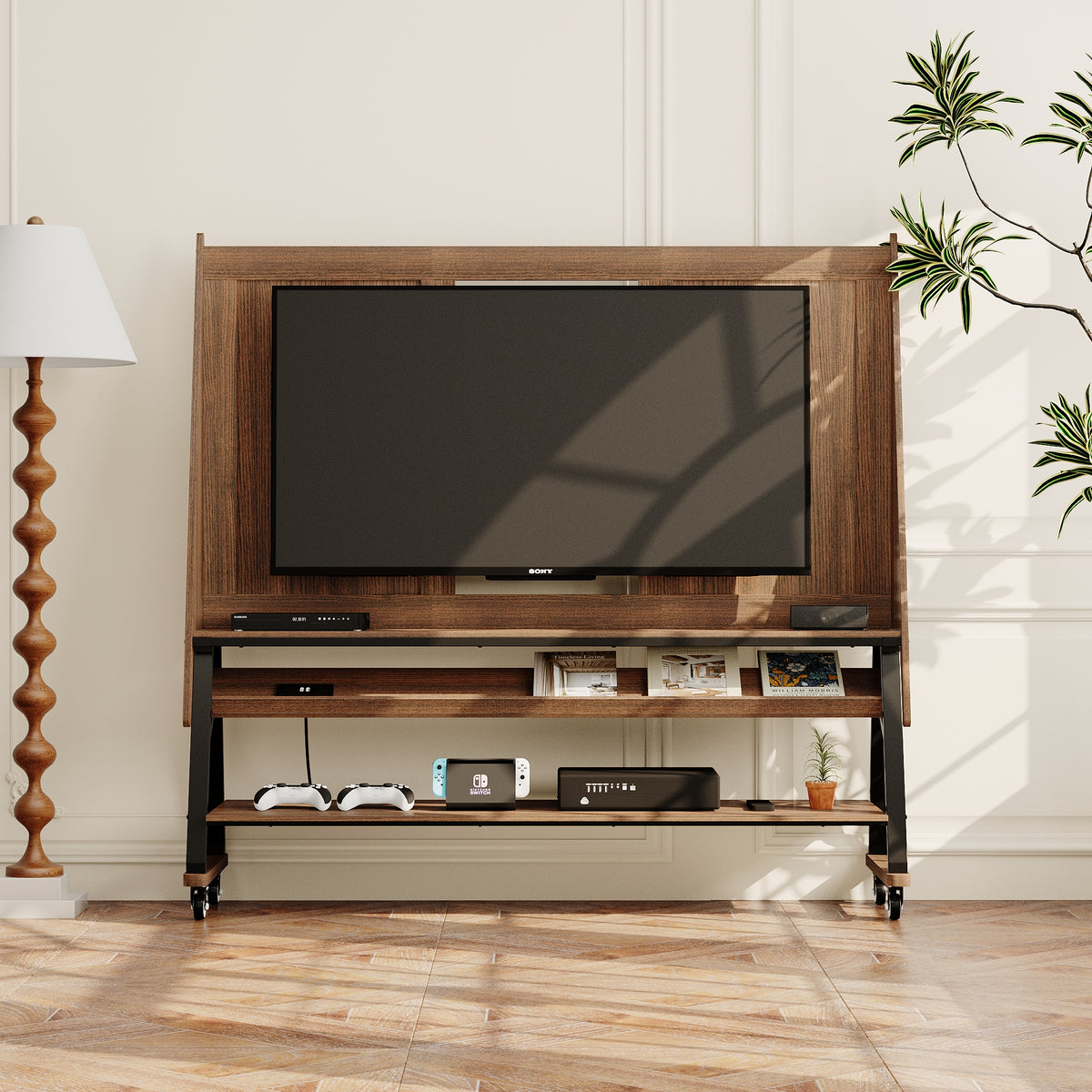
60.2" Industrial Brown TV Stand with TV Mount and Rolling Wheels
This stand is the closest thing to a mount without touching the wall. A built-in TV mount sits on a 34-inch back panel, open shelves hold consoles and media players, and casters let you roll it out for cleaning or a new layout. It measures 58.4" H x 60.2" W x 18.5" D. The listing gives no TV size or weight limit, so check both with our customer service team, and ask whether the casters lock, before you buy.
Best for: renters who want a mounted look and a movable TV.
71" Minimalist High Gloss TV Stand with LED Ambiance
This low stand fits TVs up to 70 inches and is rated for 150 lb, with four drawers on metal slides for consoles and cables. An LED strip around the base gives a soft glow in three colors. At 11.8" H x 70.9" W x 15.7" D, it needs a generous corner, and it comes without a tip-over restraint, so buy an anchoring kit with it.
Best for: larger living rooms with a big screen and real floor space.
78.7" Modern Minimalist Media Console
If the math says a corner won't work, this is the long wall option. It is 12" H x 78.7" W x 15.7" D, takes TVs up to 85 inches within its 80 lb weight limit, and has two push-to-open drawers with cable cut-outs. No tip-over restraint is included.
Best for: rooms that move the TV off the corner and onto a long wall.

| Stand | W x D | Listed TV size | Wall per side at 45 degrees | Corner to front edge |
|---|---|---|---|---|
| Lifting TV stand | 50.4 x 15.7 in | Up to 50 in | 46.7 in | 40.9 in |
| Rolling stand with mount | 60.2 x 18.5 in | Not stated | 55.6 in | 48.6 in |
| High gloss LED stand | 70.9 x 15.7 in | Up to 70 in | 61.2 in | 51.2 in |
| Media console | 78.7 x 15.7 in | Up to 85 in | 66.8 in | 55.0 in |
Corner TV design ideas
A corner TV looks intentional when the rest of the living room design acknowledges it. Balance the screen with art or a tall plant on the adjacent wall, use slim storage instead of bulky cabinets, keep visual clutter off the stand, and angle a chair or rug slightly toward the corner so the seating area ties to the screen.
Corner TV checklist
- Measure both walls and confirm the clear run for your screen (65-inch TV: about 40 inches each).
- Check doors, windows and traffic paths around the spot.
- Confirm your TV's width, weight and VESA pattern.
- Choose a full-motion or corner mount rated above your TV's weight.
- Confirm reach beyond the table's minimum and at least 45 degrees of swivel.
- Find and verify studs on both walls.
- Plan the screen center at seated eye level, and a surface or code-approved cable route.
- Test glare at different times of day.
FAQ
Can I mount a 65-inch TV in the corner?
You can if the mount is rated for that TV and your wall allows it. By the math, a 65-inch screen at 45 degrees needs its center about 20 inches from each wall, about 40 inches of clear wall per side, and 20 to 23 inches of reach depending on the stud's position. Buy more reach than that minimum.
What is the best TV mount for a corner?
The best mount for a corner is one with enough reach for your screen width, at least 45 degrees of swivel, and a rating that covers your TV's weight and VESA pattern. A full-motion articulating arm suits most rooms. A dedicated corner mount helps where the nearest stud sits close to the angle.
Are corner TV units old-fashioned?
The bulky corner cabinets built for deep tube sets have gone out of style, but a corner TV hasn't. A slim screen on an arm or a low stand takes up far less of the room, and designers still use corners when wall space is limited or a fireplace holds the focal point.
Where should you not place a TV?
Avoid spots with the screen facing a window, directly above a heat source without checking your TV's manual, in a door swing or traffic path, or high enough that you tilt your head back. Also avoid furniture not designed to hold a TV, and any spot where you can't fasten or anchor it properly.
Browse the full TV stands collection for sizes that fit your corner or your long wall.


Laisser un commentaire
Ce site est protégé par hCaptcha, et la Politique de confidentialité et les Conditions de service de hCaptcha s’appliquent.