


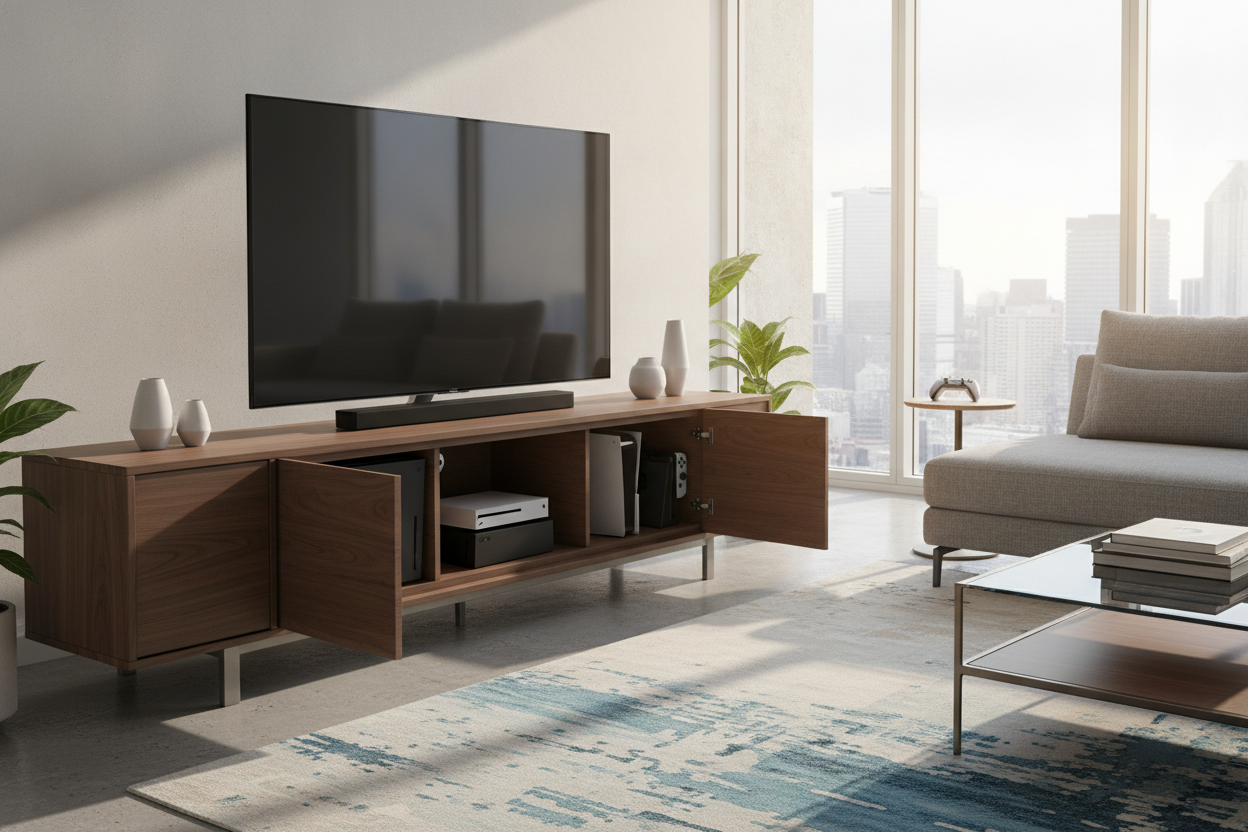
I remember staring at my PS5, a dusty Switch dock, and an Xbox Series X and thinking my living room looked like the back room of a GameStop. I spent three weeks scrolling through game and tv stand options before realizing that the 'gaming' label is usually a trap. It usually means cheap carbon fiber textures and enough RGB lights to be seen from space.
My goal was simple: I wanted a space that felt like a home, not a dorm room. I needed a way to tuck away the plastic boxes and the mountain of tangled HDMI cables without causing a literal electrical fire in my media console. It turns out, the secret isn't buying specialized gear; it's buying smart furniture.
- Airflow is non-negotiable: If your console can't breathe, it will die. Look for slatted doors or open backs.
- Scale matters: A 65-inch TV on a 50-inch stand looks like a bobblehead. Always go wider than the screen.
- Cable management: If the stand doesn't have pre-drilled holes, you'll be drilling them yourself. Pick one that does the work for you.
- Hidden storage: Drawers are for controllers; cabinets are for the consoles themselves.
The Problem With Most 'Gamer' Furniture
Most gaming entertainment unit designs I see online are aggressive. They have sharp angles, neon accents, and look like they were designed by a teenager in 2004. If you are trying to maintain a cohesive interior design, that aesthetic is a total dealbreaker. You want your home to look like an adult lives there, which is why the best setup often doesn't look like gaming furniture at all.
The 'gaming stands' you find at big-box retailers are often made of thin, 0.5-inch particle board that sags the moment you put a heavy receiver or a modern console on it. I’ve seen 70-inch TVs sitting on stands that were clearly screaming for mercy. You need something with a bit of heft—think 1-inch thick top panels and solid legs that can actually support the weight of your tech and your decor.
Airflow is Everything (Please Don't Suffocate Your PS5)
Modern consoles are basically space heaters. A PS5 can pull over 200 watts during a heavy session, and all that heat has to go somewhere. If you shove it into a closed cabinet in a tv and gaming stand, you’re basically slow-cooking your motherboard. I learned this the hard way when my fan started sounding like a jet engine taking off during a round of Elden Ring.
When shopping for tv stands for game consoles, look for 'breathable' designs. This means either an open-shelf tv game stand or a unit with slatted front doors. Slats allow the infrared signal from your remote to pass through and, more importantly, let hot air escape. If you fall in love with a solid-door unit, make sure the back panel is either removable or has massive cutouts. I actually took a hole-saw bit to the back of my last cabinet just to give my Xbox some room to breathe. It wasn't pretty, but it worked.
Hiding the Chaos: Cables, Controllers, and Headsets
The worst part of any gaming setup is the 'cable waterfall'—that mess of black wires hanging down behind the unit. A proper gaming entertainment stand should have integrated wire management. We're talking channels, clips, or at the very least, large grommet holes. I prefer a modern TV stand with cabinets because it allows me to hide the power strips and the bulky external hard drives behind closed doors.
Controllers are another clutter nightmare. They never look 'neat' sitting on a coffee table. I dedicated one drawer specifically to my peripherals. Pro tip: get a small felt tray for the inside of the drawer so your controllers aren't sliding around and getting scratched every time you open it. It keeps the living room looking like a sanctuary rather than a tech graveyard.
Getting the Scale Right for Big Screens
If you have a 65-inch TV, do not buy a 60-inch stand. It’s a rookie mistake that makes the whole room feel cramped and unstable. For a gaming tv stand 65 inch setups, you want at least 4 to 6 inches of clearance on either side of the TV frame. This creates a visual 'anchor' for the room.
I usually recommend a wide adjustable entertainment stand for people who like to upgrade their tech often. It gives you the flexibility to move things around. A wider base also means more room for a soundbar, which is a must because let’s be honest—built-in TV speakers are garbage for gaming. Just make sure the height of the stand keeps the middle of the screen at eye level when you're sitting on the sofa. Your neck will thank you.
You Can Have a Nice Room and Play Zelda, Too
You don't have to choose between a 'cool' house and your hobby. The trick is finding pieces that serve the tech without making it the center of attention. When you search for a tv stand at game stores or tech sites, you get tech-first designs. When you look for adult-approved TV stands from furniture-first brands, you get something that actually complements your rug and your wall art.
I ended up with a mid-century inspired unit with sliding slatted doors. From the outside, it looks like a piece of high-end furniture. Inside, it's a high-performance hub for three different platforms. It’s the best of both worlds.
How do I stop my consoles from overheating in a cabinet?
Ensure there is at least 3 inches of clearance on all sides of the console. If the cabinet has a solid back, remove it or use a hole-saw to create large vents. Slatted doors are the gold standard for airflow.
What is the best height for a gaming TV stand?
Your eyes should be level with the center of the screen when seated. For most standard sofas, this means a stand height between 18 and 24 inches. Avoid 'fireplace' height stands if you want to avoid neck strain.
Can I put a PS5 vertically inside a TV stand?
Only if the shelf height allows for it with at least 2 inches of 'headroom' for the top exhaust. Most people find that laying it horizontally is safer and fits better in standard media units.

Laisser un commentaire
Ce site est protégé par hCaptcha, et la Politique de confidentialité et les Conditions de service de hCaptcha s’appliquent.