


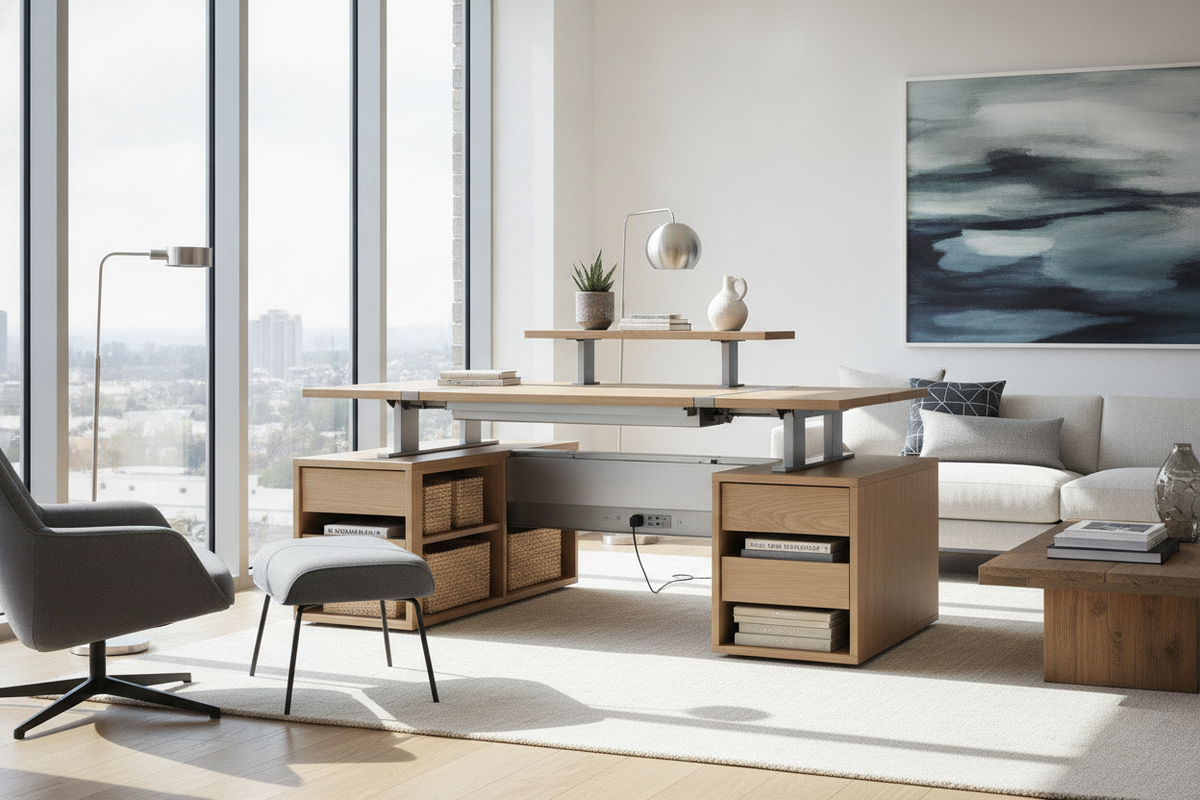
Designing an effective home workspace requires balancing physical movement with residential spatial boundaries. Incorporating a home sit stand desk transforms a conventional workstation into a kinetic environment, allowing remote professionals to alternate between seated and upright working postures throughout the day. However, deploying an active furniture piece in a residential setting introduces distinct architectural considerations, including vertical clearance arcs, cable tension dynamics, and modified storage planning.
Kinetic Workspaces: Core Dynamics of a Home Sit Stand Desk
Static desks anchor the user into a single physical posture, which can lead to fatigue over prolonged working sessions. A home office sit stand desk introduces mechanical versatility by allowing smooth vertical transitions. In residential settings, where work zones often blend into living rooms, guest suites, or bedroom corners, an adjustable workstation must support postural shifts without disrupting the aesthetic and physical harmony of the room.
Rather than viewing an adjustable workstation as a stand-alone gadget, interior planners evaluate it as an active kinetic hub. This perspective requires checking the entire travel corridor of the desk to ensure that lighting fixtures, window sills, and nearby furnishings accommodate both the lowest seated position and the peak standing height.
Dimensional Footprint Tiers for Residential Interiors
Choosing the correct surface size for a standing office desk for home depends on room proportions, peripheral equipment, and task requirements. Selecting a footprint that is too large can overwhelm floor circulation, while choosing a desk that is too small can create desktop clutter and limit monitor placement.
Compact Nook Footprints for Multi-Use Spaces
Compact workstations are ideal for small alcoves, bedroom work corners, and shared living areas. These configurations prioritize a narrow depth profile, providing sufficient surface area for a single laptop, an external keyboard, and essential writing tools without protruding excessively into walkways. For compact residential configurations, exploring a versatile office sit stand product helps maintain an unobtrusive footprint while preserving full vertical adjustability.
Standard and Executive Surface Spans for Dedicated Offices
Dedicated home office rooms allow for wider and deeper surface platforms. Broader desktop profiles comfortably accommodate dual-monitor arms, reference materials, tabletop lighting, and specialized input devices. When selecting an extended surface, consider the depth needed to maintain comfortable viewing distances between the screen array and your seated or standing eyeline.
Frame Dynamics and Lift Architecture
The structural backbone of an adjustable desk lies in its motorized frame and telescoping leg system. High-performance frames feature steel column construction engineered to minimize lateral sway, particularly when raised to maximum standing heights. Dual-motor mechanisms distribute the lifting force evenly across both legs, delivering steady motion and consistent leveling across the entire desktop surface.
Integrated programmable digital controllers provide customizable height presets, enabling seamless transitions between preferred sitting and standing levels with minimal interruption to your workflow. Investing in a reliable office sit stand product provides quiet travel and repeatable height precision, ensuring your setup adapts effortlessly to different daily tasks.
Decoupled Storage and Perimeter Organization Strategies
A primary architectural distinction between traditional executive desks and height-adjustable desks is storage integration. Built-in pedestal drawers add significant weight to moving frames and can obstruct leg travel. As a result, modern sit-stand planning relies on decoupled storage architectures that position filing and supplies around the perimeter of the desk.
Pairing an adjustable desk with low mobile pedestals, credenzas, or tall bookcases ensures that documents and stationery remain organized without restricting the desk's vertical movement. If your workflow demands extensive filing and fixed cabinetry alongside a dedicated writing area, integrating an all-in-one office desk product in an adjacent zone can provide substantial perimeter storage. To maximize vertical wall space above the workstation, explore practical storage methods in this desk office guide to keep surfaces clutter-free while respecting upper clearance boundaries.
Surface Materials, Finish Durability, and Room Integration
Desktop surfaces for residential adjustable workstations must balance structural stability, tactile comfort, and visual warmth. Common material choices include:
- High-Pressure Laminate: Highly resistant to scratches, moisture, and daily surface wear, making it an excellent choice for demanding everyday workloads.
- Engineered Wood with Woodgrain Veneer: Provides the rich, natural appearance of solid timber while offering superior dimensional stability against seasonal humidity fluctuations.
- Beveled and Contoured Edges: Eases forearm pressure during keyboard use and prevents hard contact points during extended typing sessions.
Matching the desktop finish with surrounding interior elements—such as existing shelving, trim, or flooring tones—helps the workstation feel like an intentional part of the home's overall design scheme.
Dynamic Clearance, Cable Management, and Assembly Staging
Deploying a motorized workstation requires a structured setup plan to prevent mechanical interference and cable strain during height adjustments:
- Map the Vertical Travel Zone: Clear the path above and below the desktop. Check for low window sills, floating wall shelves, wall-mounted artwork, and chair armrests that could catch during movement.
- Incorporate Flexible Cable Slack: Route monitor cords, power cables, and accessory leads through an under-desk cable management tray. Provide sufficient cable slack to accommodate the desk at its highest setting without pulling plugs loose.
- Centralize Power Distribution: Mount a surge protector directly beneath the desktop surface so that only a single main power cord travels between the moving desk and the wall outlet.
- Stage Assembly on a Protective Mat: Assemble motorized desk frames inverted on a soft rug or drop cloth to prevent scratching the desktop finish before standing the unit upright.
For additional layout solutions and preventative room arrangement tips, consult this comprehensive office standing desk guide before finalizing your workstation placement.


Laisser un commentaire
Ce site est protégé par hCaptcha, et la Politique de confidentialité et les Conditions de service de hCaptcha s’appliquent.