


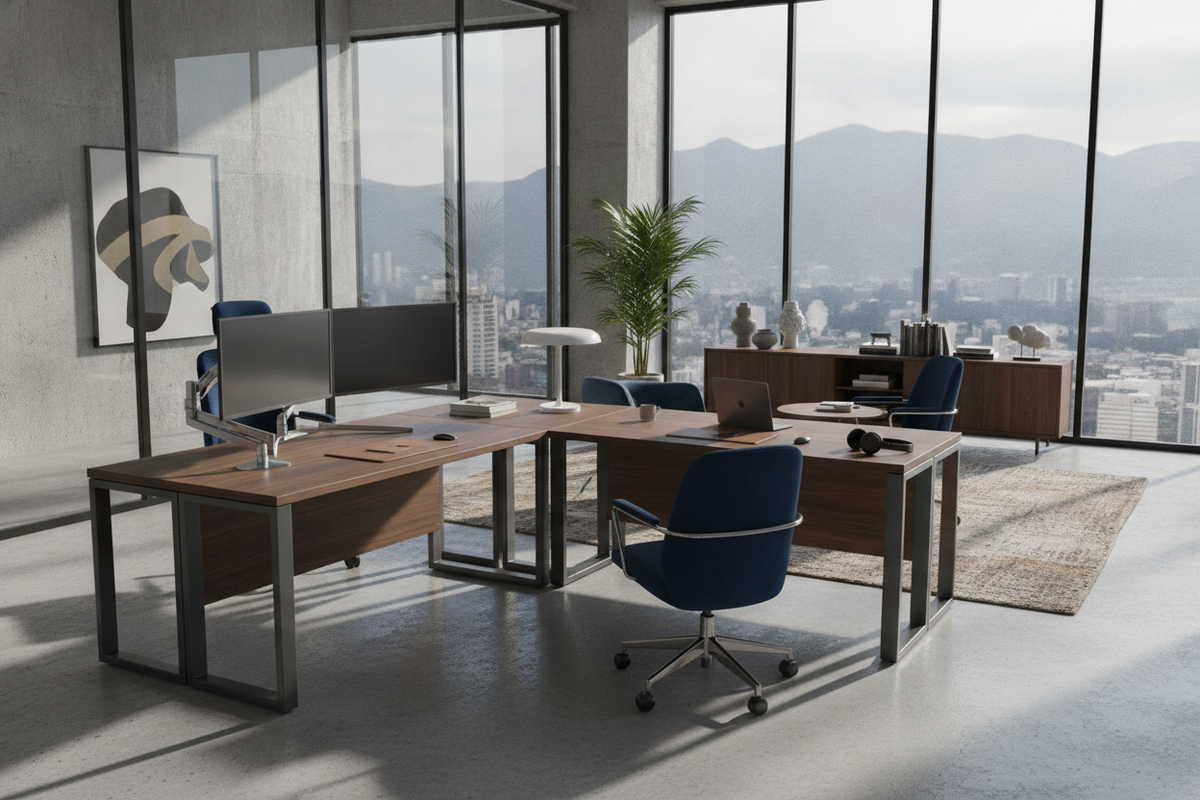
Architectural Demands of a Commercial Corner Desk
Modern professional workspaces place rigorous demands on furniture infrastructure. When configuring high-output home studios or corporate workstations, standard light-duty tables often fall short under the weight of multiple display mounts, central processing towers, audio gear, and heavy reference volumes. A dedicated commercial corner desk is engineered specifically to withstand continuous daily operations, shifting the focus from purely ornamental appeal to heavy-load stability, ergonomic geometry, and expansive surface zoning.
Residential Desks vs. Commercial-Grade Structural Architecture
The primary distinction between residential lightweight desks and commercial-grade corner configurations lies in their internal structural engineering. While basic home tables rely on thin top panels and simple vertical dowels, commercial corner desks utilize reinforced connection plates, rigid sub-aprons, and structural crossbeams designed to prevent long-term surface bowing. This architectural foundation ensures that heavy peripheral equipment placed across expansive spans remains level and stable throughout years of intensive use.
Load Distribution and Multi-Monitor Surface Rigidity
Multi-monitor cantilever arms concentrate substantial downward force onto localized desktop contact points. Commercial corner workstations address this stress concentration through rigid top construction and strategically positioned under-desk support rails. By evenly dissipating vertical loads toward heavy-duty leg assemblies and corner posts, these desks eliminate wobble and vibration during intensive typing or simultaneous monitor repositioning.
Spatial Footprint Tiers and Wing Geometry
Corner workstations feature diverse geometric profiles tailored to varying floor plans. Choosing the appropriate layout depends heavily on operational tasks, peripheral density, and the boundary dimensions of the room.
Compact Professional Tiers for Executive Home Offices
In smaller executive studies or secondary home workspaces, space efficiency is paramount. Those navigating tight square footage can benefit from strategic planning principles for fitting a work desk into compact corners without sacrificing legroom or primary display depth. Compact commercial desks preserve essential depth in the central apex while trimming wing lengths to keep surrounding pathways clear.
Balanced Dual-Wing Workstations for Multi-Tasking Workflows
For hybrid roles requiring both digital workstation tasks and offline drafting, paper processing, or physical conferencing, symmetrical dual-wing L-desks provide dedicated zones. A versatile configuration such as a white corner workstation with large storage enables professionals to dedicate one wing to multi-screen computing and the adjacent wing to writing, tactile organization, or peripheral printers.
Expansive Corner Suites for Multi-Screen and Peripheral Arrays
Large commercial suites utilize extended asymmetric wings to support specialized equipment such as tertiary reference displays, hardware mixers, wide-format document scanners, and rack-mounted gear. These expansive desks typically feature deep primary work zones paired with extended return wings, creating a continuous wrap-around cockpit that minimizes physical reaching and neck strain.
Heavy-Duty Materials and Structural Resilience
Long-term durability in high-demand office environments depends directly on core material density, surface lamination, and joinery mechanics.
Reinforced Steel Subframes and Weight-Bearing Support Legs
Commercial-grade desk foundations frequently combine heavy-gauge tubular steel legs with under-mount channel frames. Powder-coated metal surfaces resist scuffs, shoe marks, and office chair impacts, while integrated leveling glides compensate for minor floor unevenness to eliminate surface movement.
High-Density Engineered Wood and Commercial Melamine Surfacing
Desktop surfaces in commercial environments are commonly constructed from high-density engineered wood panels sealed with heat-fused commercial melamine or laminate overlays. These industrial-grade finishes provide superior defense against moisture ring marks, coffee spills, surface scratches from equipment dragging, and prolonged thermal exposure from electronic devices.
Edge Banding and Impact-Resistant Joinery
Exposed edges represent the most vulnerable failure point on lower-tier office furniture. Commercial corner desks incorporate thick edge banding, reinforced cam-lock assemblies, and threaded metal inserts that accommodate repeated assembly adjustments without degrading the structural integrity of the core material.
Storage Integration and Cable Management Architecture
A functional workstation balances expansive desktop surface area with organized under-desk storage and cleanly routed peripheral cabling.
Integrated Pedestals, Credenzas, and CPU Storage Bays
To keep desktop surfaces uncluttered, commercial designs often integrate under-desk file drawers, utility shelving, and ventilated lower compartments. Opting for a comprehensive L-shaped corner desk with storage anchors the workstation's perimeter, offering dedicated enclosures for PC towers, document archives, and active office supplies while maintaining ample central knee clearance.
Modesty Panels and Integrated Wire Routing Channels
High-density electronics generate a vast web of power cables, display connections, and USB lines. Commercial corner workstations feature integrated wire routing grommets, under-desk cable troughs, and structural modesty panels that conceal dangling cords from view while maintaining clean airflow around active hardware.
Room Synergy, Zoning, and Layout Strategy
The positioning of a large L-shaped desk dramatically influences the ambient acoustics, lighting balance, and visual authority of an executive office.
Flush Wall Placement vs. Floating Executive Peninsula Layouts
Installing commercial corner desks flush against structural walls maximizes floor space in compact rooms and keeps cable routing discrete. Conversely, arranging the desk as an open-room peninsula—where one wing extends into the center of the office—establishes a commanding executive presence, naturally dividing open-plan rooms into collaborative and operational zones.
Ergonomic Sightlines, Lighting Synergy, and Walkway Clearances
When placing a large workstation, orient primary monitors perpendicular to natural light sources to prevent harsh screen glare. Combine functional ergonomics with aesthetic design principles, such as refined strategies for styling corner desks for a high-end look, using balanced desk lamps, integrated monitor risers, and cohesive desktop accessories to create an inspiring, professional environment.
Assembly Verification and Long-Term Maintenance Protocols
Proper assembly and routine maintenance preserve the structural stability and aesthetic quality of commercial workstations over years of active service.
Step-by-Step Subframe Alignment and Hardware Torque Strategy
During initial assembly, loosely position all structural framework bolts before fully tightening any individual connection. This approach allows the multi-panel desktop sections to align seamlessly at corner seams. Once the frame is square and level, systematically tighten all hardware to establish a solid, unified structure.
Surface Care Protocols for Daily Commercial Use
Maintaining commercial surfaces requires straightforward care. Use soft microfiber cloths dampened with neutral, non-abrasive cleaning solutions to remove dust and smudges. Avoid harsh chemical solvents or abrasive pads that could dull the protective melamine layer, and conduct periodic checks on structural fasteners to ensure permanent, vibration-free stability.


Laisser un commentaire
Ce site est protégé par hCaptcha, et la Politique de confidentialité et les Conditions de service de hCaptcha s’appliquent.