

















Understanding the Role of a Modesty Panel for Desk Workstations
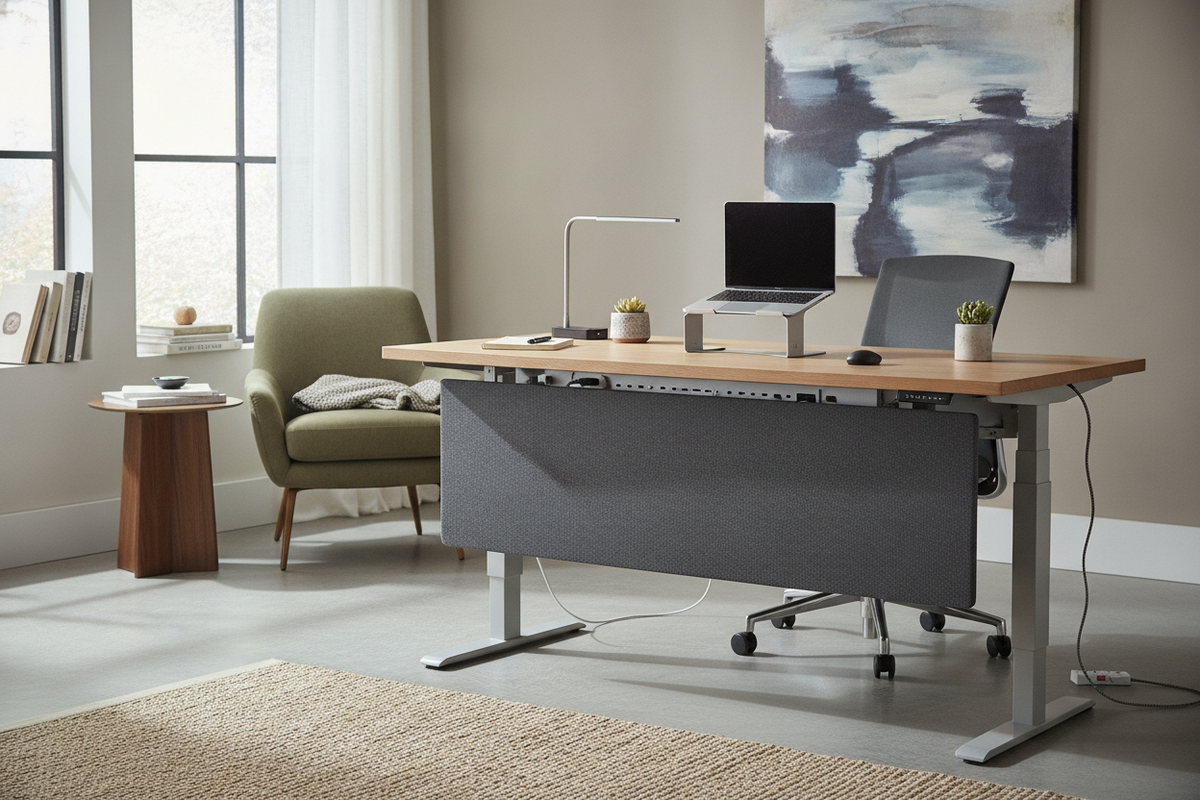
A modesty panel for desk setups is a vertical or semi-vertical barrier mounted beneath the front or back edge of a workstation surface. Traditionally found on executive credenzas and reception counters, this architectural feature serves both visual and functional roles in residential and commercial offices alike.
Its primary visual role is straightforward: it provides under desk privacy by blocking sightlines to legs, feet, chair casters, and personal belongings. In open-concept office environments or shared home workrooms where desks float away from walls, sitting without a front shield can leave individuals feeling exposed. Installing a dedicated desk front panel creates a defined psychological boundary, giving remote workers and office professionals a more grounded, comfortable posture throughout the day.
Beyond personal coverage, a desk front cover acts as a tailored visual partition that masks the inevitable clutter beneath a busy work surface. Power strips, network boxes, dangling cords, and floor-based computer towers stay tucked out of view behind a clean architectural plane. By hiding these elements, a modest barrier elevates the room's overarching decor and keeps the focal point on clean joinery and purposeful furniture forms.
Dimensional Planning and Clearance Decisions
Choosing an under desk modesty panel requires balancing visual coverage against personal ergonomic comfort. If a panel hangs too low or sits too close to the user, it can restrict legroom, limit knee movement, or prevent an office chair from sliding neatly under the desktop at the end of the day.
When assessing an under desk panel, evaluate three core dimensions:
- Vertical Drop: A full-height panel extends near the floor, offering total privacy and maximum cable concealment, but it requires generous depth to avoid blocking outstretched feet. A partial-height privacy panel for under desk placement drops roughly halfway down, shielding direct sightlines across the room while leaving the lower floor zone open for stretching and footrests.
- Horizontal Width: A panel may run the full width between desk frame legs or center itself within the middle span. Full-width panels maximize visual shielding from oblique angles, whereas inset designs allow space for side clamp monitor arms, routing conduits, or secondary accessory mounts.
- Knee Depth Clearance: The distance between the back of the modesty board and the front seated edge of your desk must accommodate natural leg extension. Selecting a spacious station, such as an expansive height adjustable standing product, offers generous lower frame geometry that ensures modesty additions do not crowd lower extremities.
Modesty Panels for Standing Desks: Height-Adjustable Dynamics
Integrating a standing desk modesty panel introduces mechanical factors not present on traditional four-legged desks. Because sit-stand frames travel upward and downward across variable height ranges, the panel must travel seamlessly with the desktop without striking support crossbeams, motorized lifting columns, or surrounding walls.
A modesty panel for standing desk systems typically mounts directly to the underside of the moving desktop or fastens onto the structural crossbar of the motorized chassis. When you raise the workstation into a standing posture, a standing desk with modesty panel preserves visual shielding, concealing hanging cables that might otherwise stretch visibly below the frame. Exploring an adjustable frame setup through a dedicated standing desk resource helps clarify how under-desk crossbeams and drive shafts interact with secondary panel mounting brackets.
When planning a height adjustable desk with modesty panel, confirm that the drop length does not collide with your office chair arms or under-desk drawer pedestals when the desk lowers to its seated stop. Adequate perimeter spacing prevents pinch points around lifting columns and preserves the smooth, balanced movement of your lifting mechanism.
Material Architecture: Structural Wood, Mesh, and Acoustic Felt
Different materials serve distinct aesthetic, structural, and acoustic priorities within a workstation setup. Selecting the ideal under desk privacy panel depends on your room's ambient noise, framing style, and desired level of rigidity.
- Engineered Wood and Solid Boards: Rigid wood panels provide exceptional structural stability and match the visual grain of your existing desk furniture. They create an opaque barrier that looks deliberate and tailored. In some desk designs, a sturdy wooden standing desk back panel also enhances lateral resistance, reducing side-to-side wobble on tall frames.
- Acoustic Felt and Fabric Boards: Lightweight compressed polyester felt or fabric-wrapped panels bring sound-dampening qualities to open layouts. An acoustic under desk privacy screen helps absorb lower-frequency room echoes and typing noise bouncing between hard floors and drywall. Because felt is flexible and featherweight, it minimizes added load on motorized desk motors.
- Perforated Metal and Mesh Screens: Metal panels deliver an airy, industrial aesthetic while permitting passive ventilation around warm computer towers and power transformers. Mesh screens soften sightlines and diffuse light while preventing hot air from trapping underneath deep desktops.
Integrated Cable Management and Peripheral Concealment
One of the most practical secondary benefits of a desk front cover is its capacity to function as a concealed wiring channel. Electronic workstations accumulate numerous cords, including display cables, monitor power bricks, charging pucks, and grounding lines. Left unmanaged, these cords create visual chaos and present a tripping hazard.
By fastening horizontal wire raceways, hook-and-loop straps, or power strip cradles directly to the inner face of a standing desk with front panel, you create a private utility zone hidden from view. As highlighted in this comprehensive standing desk guide, routing all cords into a single vertical flexible umbilical sleeve anchored to a back panel preserves pristine visual order while safeguarding wiring from stretching during transitions.
Room Layout Typologies: Floating Desks vs. Wall-Facing Configurations
Room orientation heavily dictates whether a workstation requires an under-desk screen. When a desk faces a solid drywall perimeter, cords and lower leg spaces remain naturally hidden from view. However, contemporary home offices and executive suites often employ central or floating arrangements.
Consider these layout scenarios when deciding on a standing desk privacy panel:
- Center-Room Island Placements: If your desk faces inward toward the entrance or door, the back edge directly confronts anyone stepping into the room. A standing desk with privacy panel finishes the rear elevation of the desk, giving it the presence of an executive workstation rather than an unfinished piece of utility furniture.
- Back-to-Back Pod Arrangements: In shared home offices or collaborative studios, workstations positioned back-to-back benefit from under-panel barriers to prevent personal boundary overlap, accidental foot bumps, and tangled wiring.
- Angled or Peninsular Workstations: Workstations positioned perpendicular to windows or entryways leave the knee hole visible in profile. Incorporating thoughtful storage and screening, like pairing an adaptable workspace with a multi-tier height adjustable standing product, creates a balanced perimeter that keeps daily essentials and wiring organized.
Installation, Hardware Mounts, and Retrofit Considerations
Adding a privacy panel for under desk setups can be achieved through various mounting styles, depending on whether you are assembling an integrated workstation or retrofitting an existing frame.
- Under-Desktop Screw Brackets: Heavy-duty L-brackets attach directly to the underside of solid or thick engineered wood desktops. This approach creates a rigid, permanent bond that keeps the top surface smooth and unobstructed by external clamps.
- C-Clamp Edge Brackets: For renters or those seeking non-destructive assembly, clamp-on brackets fasten securely along the back desktop bevel. These brackets can support felt panels or modesty boards with no drilling required.
- Chassis Rail Connections: Many modular sit-stand frames feature pre-drilled threaded inserts along their steel center rails, allowing an under desk panel to mount directly to the metal skeleton rather than the wood core.
Before fastening any hardware, review practical installation steps found in our standing desk guide to ensure proper clearance for crossbars, control boxes, and drawer slides, guaranteeing a durable and harmonious office setup.

Leave a comment
This site is protected by hCaptcha and the hCaptcha Privacy Policy and Terms of Service apply.