

















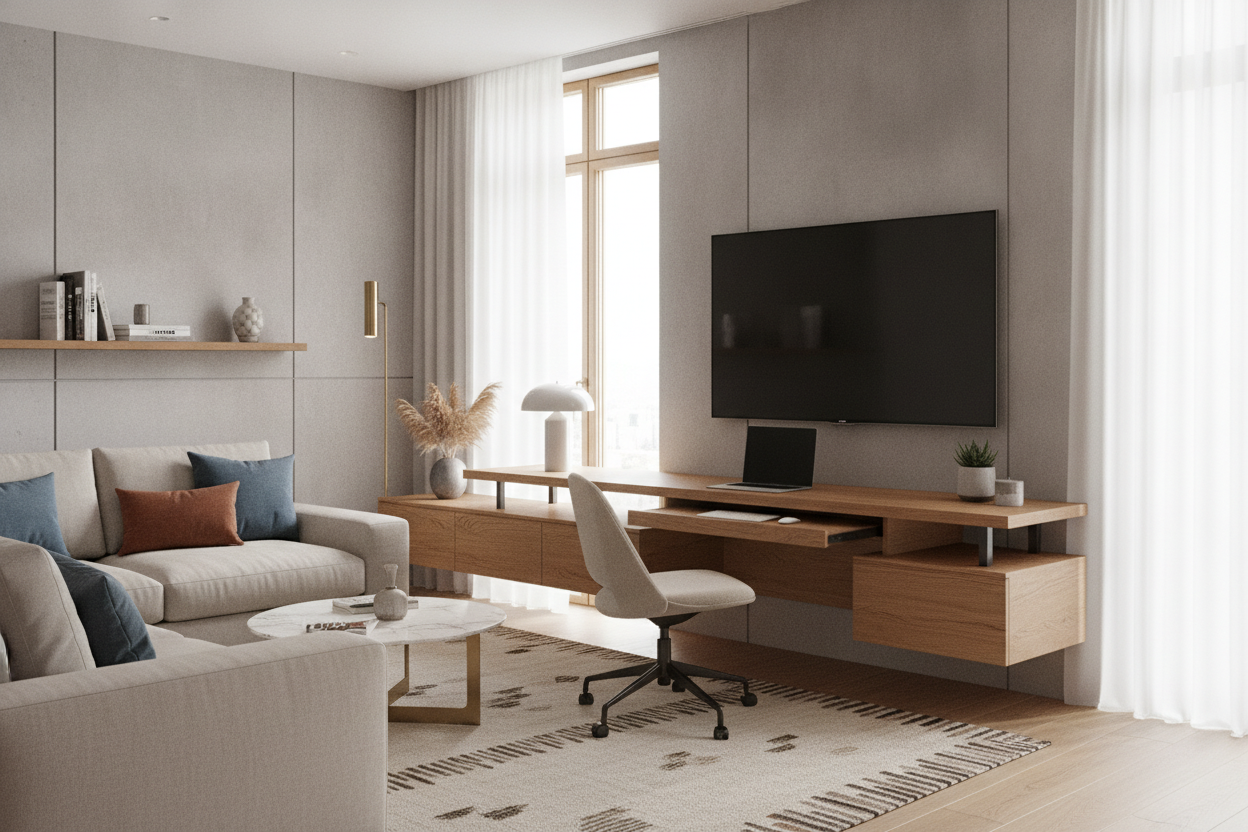
I spent three weeks measuring my living room with blue painter's tape, trying to figure out why a standard media console felt like a massive boulder in a stream. My 55-inch LG OLED was great for Sunday nights, but my laptop was permanently perched on a wobbly TV tray that killed my back. I finally ditched the bulky console for a tv desk, and honestly, I should have done it two apartments ago.
- Wall-mount the TV at least 8-10 inches above the desk surface for clearance.
- Choose a desk with a shallow depth (20-24 inches) to keep the floor plan open.
- Cable management is non-negotiable—buy the J-channels before you assemble anything.
- Closed storage is your best friend for hiding the 'office' vibe after hours.
The 'Aha!' Moment: Blending Screens and Workspaces
Small space living usually forces you into a 'one-function-per-wall' trap. You have the 'TV wall' and the 'Work wall,' and suddenly your living room feels like a Tetris game gone wrong. By merging these zones, you reclaim about 15 square feet of floor space. That is enough room for a decent armchair or, you know, actually being able to walk to your window.
The dilemma is always the same: you want a screen that makes movies feel cinematic, but you need a workspace that doesn't involve your kitchen table. When you combine them, the wall becomes a dedicated tech hub. It stops the room from feeling fractured and makes the layout feel intentional rather than desperate.
Ergonomics First: Nailing the Under TV Desk Clearances
This is where most people mess up and end up with a literal pain in the neck. If you mount the TV too high, you get 'TV-Too-High' syndrome and a stiff neck from the sofa. Too low, and your laptop screen blocks the subtitles. I found the sweet spot is keeping the under tv desk gap around 10 to 12 inches. This allows for a standard 14-inch laptop to sit open without clipping the bottom of the TV frame.
If you are a power user with a massive 32-inch secondary monitor, this layout gets tricky. Is Your Desk Too Small For That Screen Try A Tv Monitor On Stand? If so, you might need to offset the monitor to the side so it doesn't overlap the TV. For the laptop-and-monitor-arm crowd, though, this vertical stacking is a spatial win. Just make sure your wall mount tilts; angling the TV down 5 degrees makes a world of difference when you are slumped on the couch.
How to Style an Under TV Table for Living Room Cohesion
You do not want to stare at a printer and a stack of tax returns while watching a movie. An under tv table for living room use needs to be a chameleon. I swapped my bulky executive desk for a slim Desk that has two hidden drawers. Everything—chargers, pens, my notebook—goes in those drawers at 5:01 PM.
Cords are the enemy of aesthetics. I used a heavy-duty cord raceway painted the same color as my walls—Benjamin Moore 'White Dove'—to hide the spaghetti of HDMI and power cables. If you can see a single black wire dangling, the whole 'chic living room' illusion is shattered. Use Velcro ties, not plastic zip ties, because you will inevitably need to swap a cable later and zip ties are a nightmare to cut off without nicking the wire.
Picking Furniture That Doesn't Scream 'Cubicle'
Skip the particle board stuff that starts sagging after six months. I went with a solid mango wood Writing Computer Desk because the warm grain makes it feel like furniture, not office equipment. Avoid anything with 'gaming' in the title or cheap RGB lights unless you want your living room to look like a dorm room. Look for tapered legs—they let more light pass through, which makes the footprint feel smaller than it actually is.
I also recommend a desk with a finished back. Even if it is against a wall, those cheap cardboard backs look terrible from any side angle. Go for something with a 1-inch thick solid top. It feels substantial and won't wobble when you're typing frantically to meet a deadline. Metal frames are fine, but keep them matte black or brass to maintain a residential feel.
The Final Verdict: Is the Double-Duty Wall Worth It?
Six months in, I do not miss the media console at all. The only real downside? If you have a partner who wants to watch TV while you finish a deadline, you are going to be fighting for the same square footage. But for solo dwellers or disciplined couples, it is the ultimate space hack. It turned my cramped studio into a place where I actually enjoy working and relaxing.
If you want something even more integrated, Stop Splitting Your Room The Case For A Tv And Desk Wall Unit is the logical next step for a permanent, built-in look. For most of us renters, though, the desk-under-TV combo is the most flexible way to live large in a small footprint.
Isn't the TV too high for comfortable viewing?
Not if you use a tilting wall mount. Angle the screen down 5-10 degrees and it feels completely natural from a standard-height sofa. Just avoid mounting it 'fireplace high.'
How do I hide my keyboard and mouse?
I use a decorative woven basket on a lower shelf or just tuck them into the desk drawer. If your desk is too slim for drawers, a felt desk mat helps the peripherals blend in so they don't look like clutter.
Will the heat from the TV ruin my laptop?
Modern LED and OLED TVs run surprisingly cool. As long as you have a 4-inch air gap between the top of your laptop and the bottom of the TV, you won't have any heat-related issues.

Leave a comment
This site is protected by hCaptcha and the hCaptcha Privacy Policy and Terms of Service apply.