

















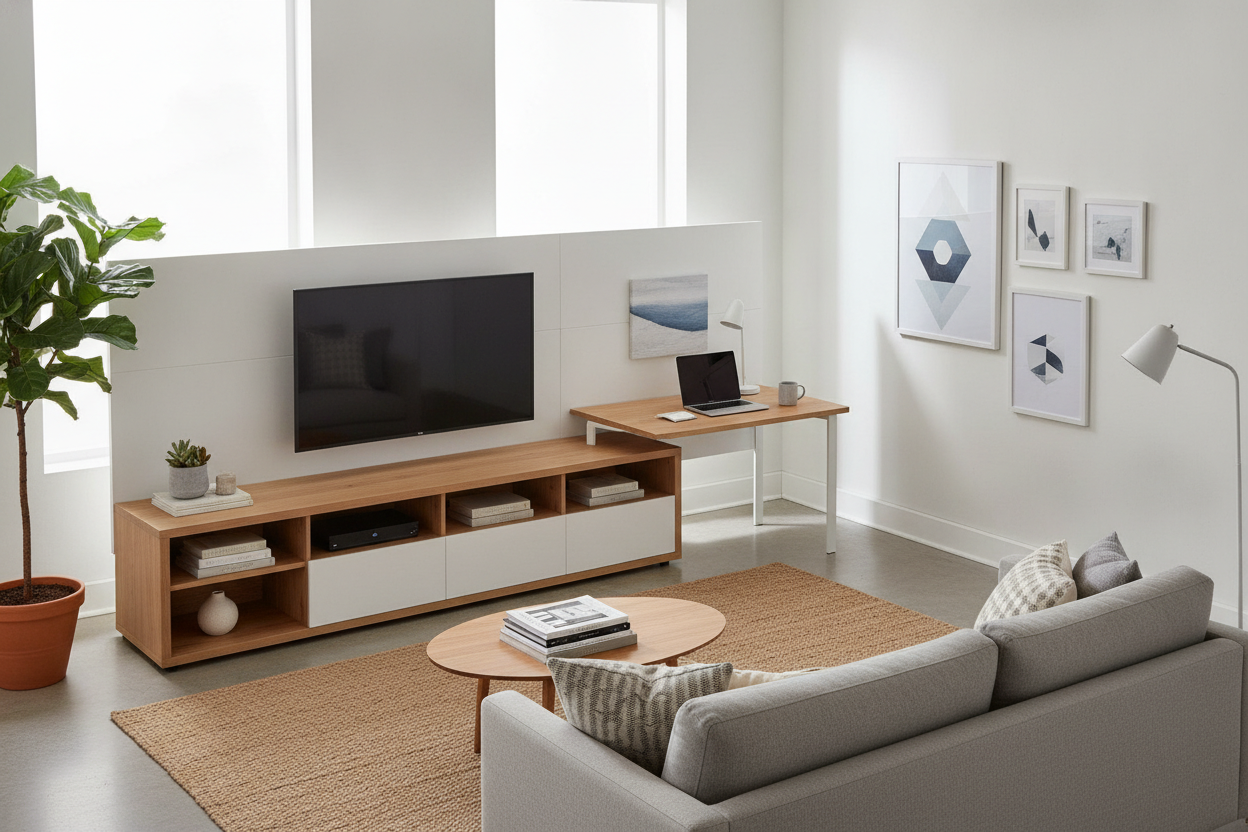
I spent three months stepping over a rogue HDMI cable just to reach my bed every night. Living in a 400-square-foot studio means every piece of furniture is a roommate you either love or deeply resent. For a long time, I was in the resentment camp, staring at a wobbly folding table that served as my 'office' and a chunky hand-me-down dresser acting as a media console. The room felt like a warehouse, not a home.
The breakthrough happened when I stopped trying to force two separate zones into a space meant for one. I realized that a tv stand with desk wasn't just a compromise for people in dorms; it was the exact organizational tool I needed to stop the furniture sprawl. It turns out, combining your screen time and your grind time into one footprint is the smartest layout move you can make when square footage is at a premium.
Quick Takeaways
- Consolidating furniture frees up roughly 10-15 square feet of floor space.
- Integrated cable management is significantly easier with a unified unit.
- Modern designs look like high-end built-ins, not cheap dorm furniture.
- L-shaped combo units can serve as effective room dividers in open studios.
The 'Two Bulky Tables' Problem
The math just never added up. I had a media unit that was 50 inches wide and a standard dedicated work desk that took up another 48 inches. By the time you factor in the 'dead space' between them and the clearance needed for a chair, half my main wall was gone. It looked cluttered, and worse, it felt like I was living in a corporate cubicle that happened to have a bed in the corner.
I tried everything to fix it. I bought smaller chairs. I tried a desk as a tv stand, but my neck hated me because the height was all wrong for watching movies from the sofa. The real issue was the visual noise. Having eight different furniture legs in a six-foot span makes a room feel frantic. You need a singular, grounded piece to anchor the space.
Wait, What Exactly Is a TV Stand With Desk?
If you're picturing a clunky 1990s computer hutch, stop. The modern tv stand and desk combo is much more sophisticated. Usually, you're looking at one of three styles. There’s the long linear console where the desk surface is a slightly lower or higher extension of the TV shelf. Then there’s the desk tv console combo that uses an L-shape to wrap into a corner, which is a godsend for awkward layouts.
My favorite, and the one I eventually bought, is the nesting desk media console combo. The desk portion actually slides out when you need to work and can be tucked partially under the TV stand when you’re done for the day. It’s a tv desk combo that adapts to your schedule, which is exactly what you want when your living room has to pull double duty as a boardroom.
Why This Setup Actually Works (Even if You Hate Combo Furniture)
I’ll be honest: I was worried a tv stand desk combination would look 'budget.' We’ve all seen those flimsy particle board units that shake when you type. But if you look for a unit with a sleek writing computer desk profile—think matte black steel frames and thick oak-textured surfaces—it actually looks incredibly intentional. It creates a streamlined horizontal line that makes a small room look wider.
The modern tv stand with desk designs often prioritize aesthetics over raw storage, which is actually a blessing. It forces you to stop hoarding old manuals and dead batteries in drawers. Instead, you get a clean, open-concept tv table desk that keeps the room feeling airy. I went with a 60-inch unit, and it’s the sturdiest thing I own; it doesn't budge even when I’m hammering away on my keyboard during a deadline.
The Cord Management is Surprisingly Genius
This was the unexpected win. When you use a computer desk tv stand combo, all your tech is in one zip code. I no longer have power strips trailing across the baseboards. I tucked a single heavy-duty surge protector behind the TV section, and now my laptop dock, monitor, gaming console, and TV all plug into the same spot. It’s the cleanest my computer and tv desk area has ever looked.
It Can Act as a Sneaky Room Divider
If you opt for an entertainment center desk combo that has a finished back, you don't have to shove it against a wall. I used an L-shaped tv stand and computer desk combo to create a 'half-wall' between my sleeping area and the rest of the studio. It provides a clear psychological boundary. When I’m at the desk, I’m in the 'office.' When I’m on the couch looking at the TV, the desk is behind my line of sight.
What if You Already Have a Workspace You Love?
I get it—some of you have a vintage teak desk or a high-end standing desk you aren't ready to part with. If you can't commit to a full matching tv stand and desk set, you have to get creative with your vertical space. You don't necessarily need a desk as tv stand setup to save space.
I've seen friends have great luck using a floor stand for TV monitor screens. These stands have a tiny footprint that can slide right behind your existing desk or a small media cabinet. It lifts the screen up and away, giving you back the surface area without requiring you to buy a whole new tv stand with computer desk unit. It's the best 'hack' for people who are precious about their current furniture.
FAQ
Is a TV stand too high to use as a desk?
Standard TV stands are usually 20-24 inches high, while a desk should be 29-30 inches. That’s why a dedicated tv stand with desk attached is better—it builds in that height difference so you aren't hunching over.
Can I put a 65-inch TV on a desk combo?
Most desk entertainment center combo units are rated for specific weights. A 65-inch TV is heavy, so ensure the unit is made of solid wood or heavy-gauge steel, not thin MDF, before mounting or placing a large screen.
Does it feel weird to work right next to your TV?
Only if you leave the TV on. I find that using a computer desk with tv setup actually helps me stay focused because I’ve designated that specific wall as the 'tech zone,' leaving the rest of my apartment for relaxing.

Leave a comment
This site is protected by hCaptcha and the hCaptcha Privacy Policy and Terms of Service apply.