

















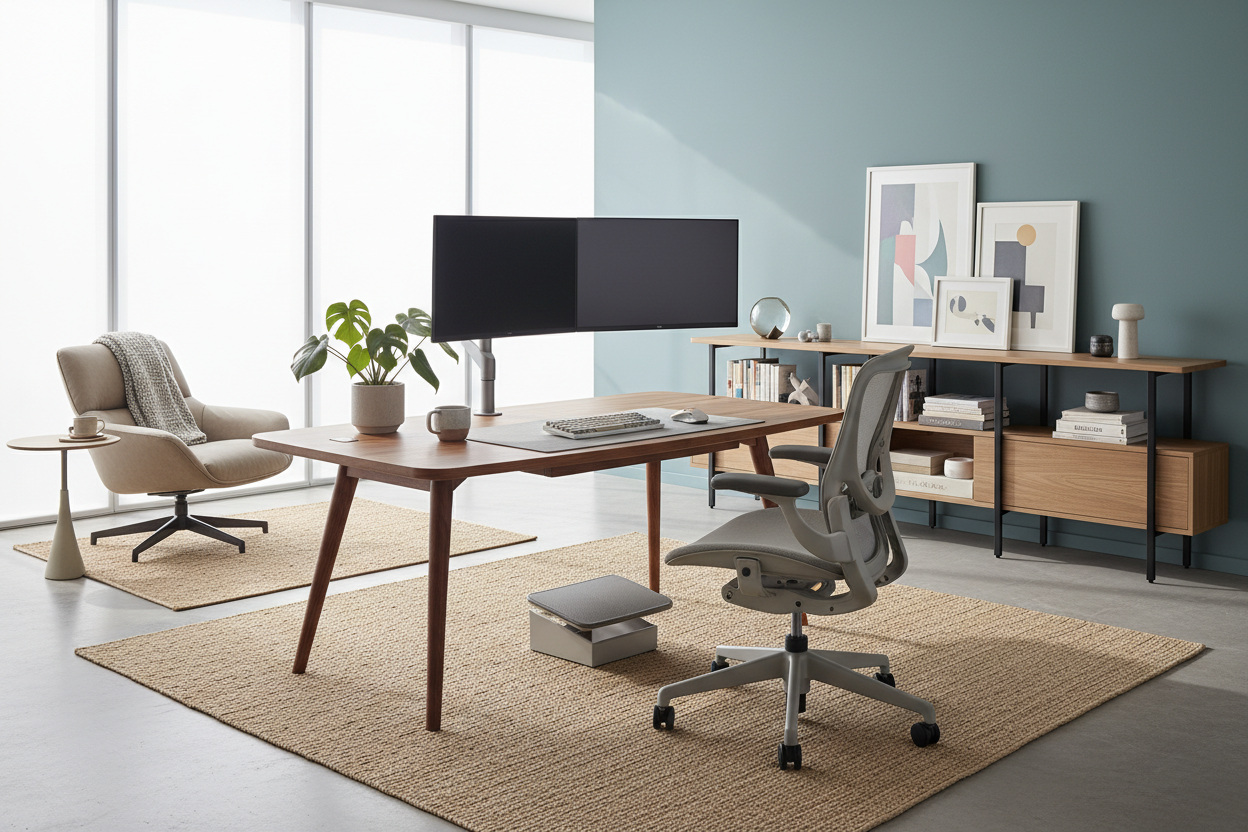
I have seen it hundreds of times: a client points to a cramped corner of their living room, occupied by a wobbly accent table and a stiff dining chair, and sighs. When you work from home, the line between your living space and your corporate life blurs rapidly. What starts as a temporary setup at the kitchen island often turns into months of back pain and visual clutter.
If you find yourself struggling to maintain focus or comfort when working from home, the problem usually is not your workload—it is your furniture. In this guide, I will walk you through exactly how to plan, furnish, and arrange a home office that supports your posture, hides your tech, and respects your home's aesthetic.
Quick Decision Guide
- Prioritize seat depth and lumbar support: A standard dining chair is built for 45-minute meals, not 8-hour workdays. Look for adjustable tension and a seat pan that supports your thighs without cutting off circulation.
- Mind the 36-inch rule: Always leave at least 36 inches of clearance behind your desk chair to allow for easy movement without scuffing baseboards or feeling trapped.
- Float the desk if possible: Facing a blank wall creates visual fatigue. Facing the room or a window reduces eye strain and establishes a commanding, professional position.
- Layer your lighting: Relying solely on overhead recessed lights causes harsh screen glare and unflattering shadows on video calls. Always incorporate dedicated task lighting.
Space Planning for the Home Office
Finding the right footprint for your desk is the most critical step. In North American suburbs, we often have the luxury of a dedicated spare bedroom, but in urban apartments, the office frequently shares a wall with the living room.
The Command Position
Whenever layout permits, avoid shoving your desk flat against a wall. Placing your desk in the 'command position'—facing the door with a solid wall behind you—instantly makes the room feel larger and more intentional. If you must face a wall due to square footage limits, use a deep desk (at least 24 to 30 inches) to maintain a healthy focal distance from your monitors.
Clearance and Flow
Furniture that looks appropriately sized in an empty room can quickly choke a space once you add a human and a rolling chair. I always advise clients to map out the room with painter's tape first. Ensure you have a clear walkway around the desk, and check that opening desk drawers won't block closet doors or room entryways.
Ergonomics: The Reality of 8-Hour Furniture
We all want our homes to look like a magazine spread, but a rigid acrylic ghost chair or an unpadded wooden stool will severely punish your spine by Tuesday afternoon.
The Truth About Desk Height
Most standard dining tables are 30 inches high, which is actually too tall for the average person to type comfortably without hiking up their shoulders. A proper writing desk should sit around 28 to 29 inches high. If you are using an adjustable standing desk, pay close attention to the lowest setting; many budget options do not go low enough for petite users to sit ergonomically.
Blending Tech with Residential Warmth
The biggest challenge of bringing corporate tasks into a residential space is the sheer volume of ugly plastic. Monitors, docking stations, and ergonomic chairs can easily ruin the visual harmony of a carefully curated transitional or mid-century room.
To fix this, introduce natural textures. A solid walnut desktop, a woven wool rug, or a linen-upholstered pinboard can absorb the cold, hard lines of your electronics. When selecting an office chair, look for commercial-grade mechanisms wrapped in residential fabrics like boucle or performance velvet to soften the visual weight.
Designer's Honest Take
Early in my career, I designed a stunning home office for myself featuring a minimalist, floating glass desk. It looked incredible on day one. By day three, the reality of my workflow set in. The glass surface meant every single cable, power brick, and rogue sticky note was visible from across the room. It was a visual nightmare that spiked my anxiety every time I walked past the door.
I learned the hard way that when you actually use a space for 40 hours a week, cable management and closed storage are non-negotiable. I eventually swapped the glass for a solid white oak desk with built-in wire routing channels and deep drawers. It visually grounded the room, gave me a place to hide the necessary tech, and proved that pure aesthetics can never override daily function.
Frequently Asked Questions
How do I separate my workspace in a small apartment?
Use visual anchors. A dedicated area rug under your desk instantly defines the workspace as its own 'room' within an open floor plan. You can also use a tall bookcase perpendicular to the wall to create a physical room divider without blocking natural light.
What size desk do I need for two monitors?
For a comfortable dual-monitor setup, you need a desk that is at least 48 inches wide and 24 inches deep. If you use monitor arms that clamp to the back, you can get away with a slightly shallower desk, but a 30-inch depth is ideal to prevent long-term eye strain.
Are standing desks actually worth the investment?
Yes, but only if you buy one with a dual-motor mechanism. Cheaper single-motor frames tend to wobble noticeably at standing height, making it incredibly frustrating to type or take video calls. Invest in stability over trendy tabletop materials.


Leave a comment
This site is protected by hCaptcha and the hCaptcha Privacy Policy and Terms of Service apply.