

















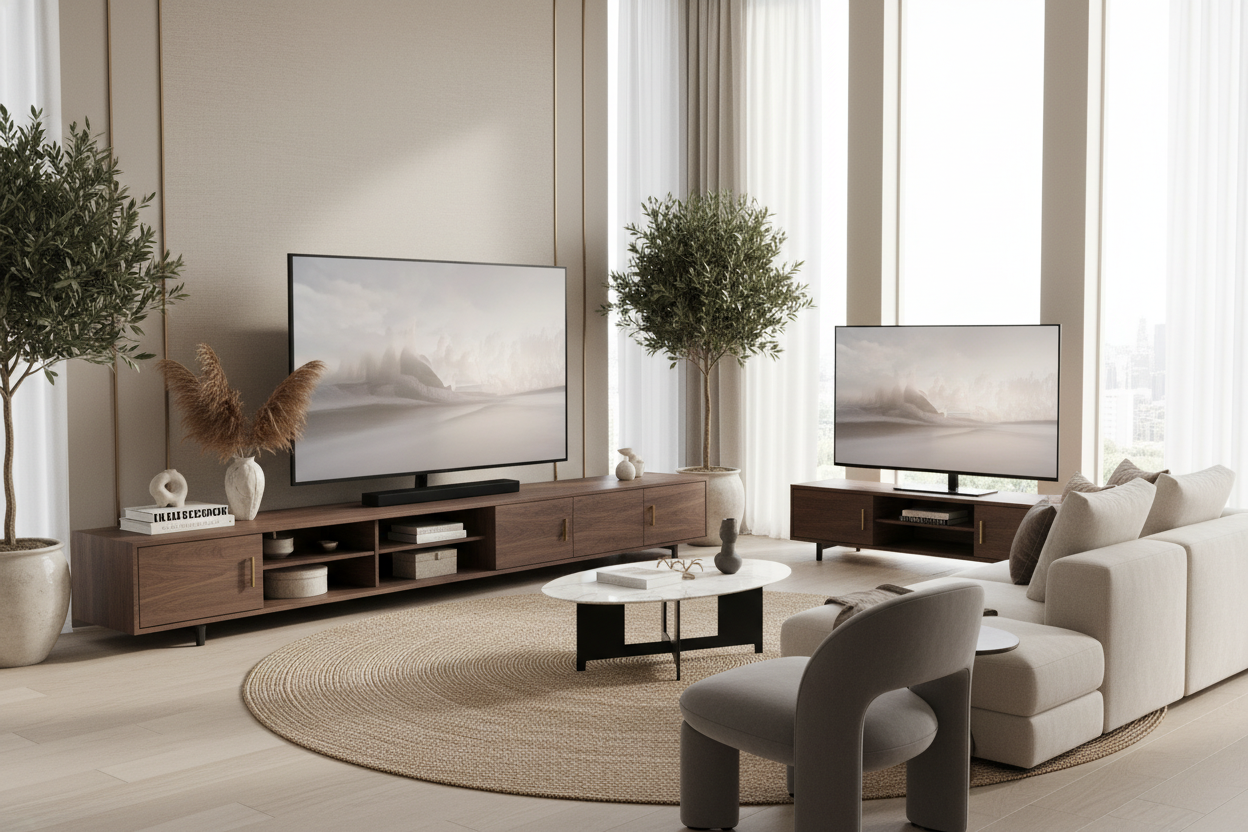
I remember the day I finally pulled the trigger on an 85-inch screen. I spent weeks obsessing over refresh rates, OLED vs. QLED, and how many HDMI 2.1 ports I actually needed. When the delivery guys finally left and that massive piece of glass was sitting in my living room, I realized I’d made a rookie mistake. I tried to put it on my old 60-inch console, and it looked ridiculous. It looked like a billboard perched on a toothpick.
This is a classic design fail I see all the time. People spend thousands on the tech but try to save a few hundred by keeping their old furniture. The result is a room that feels cramped, nervous, and visually lopsided. If you’re going big with your screen, you absolutely have to go big with your extra large tv cabinet. It’s not just about storage; it’s about grounding the room so your TV doesn't look like it’s about to tip over and crush your coffee table.
Quick Takeaways
- The 'Lollipop Effect' happens when your TV is wider than your furniture, creating a top-heavy visual mess.
- Your console should be at least 25% wider than your TV screen for proper balance.
- Standard stands often lack the weight capacity for modern 80+ inch screens, creating a tipping hazard.
- Extra-long consoles provide much-needed surface area for decor to soften the 'black hole' effect of a large screen.
What Exactly is the 'Lollipop Effect'?
The 'Lollipop Effect' is that cringeworthy visual phenomenon where a massive, ultra-wide television sits on a standard-sized media console. It looks exactly like it sounds: a giant head on a tiny stick. When you browse for big screen store tv stands, you’ll see plenty that claim to 'support' a 75-inch TV, but 'supporting' the weight and actually looking good are two very different things.
When the TV screen overhangs the edges of the furniture, it creates a sense of instability. Your eyes are drawn to the corners of the screen hanging out in space, which makes the whole room feel unfinished. Realizing your screen outgrows your furniture is the first step to fixing the room's proportions, and usually, that means admitting you need a dedicated media cabinet for tv that actually frames the technology rather than just holding it up.
I’ve seen people try to 'cheat' this by centering the TV and putting floor plants on either side. It doesn't work. It just looks like you’re trying to hide a mistake. A massive screen needs a massive base to feel intentional. Without that horizontal anchor, the TV dominates the room in a way that feels aggressive rather than cinematic.
The Golden Ratio for Big Screen TV Consoles
In interior design, scale is everything. If you want your living room to look like it was professionally styled, you need to follow the 25% rule. This means your furniture should be roughly 25% wider than the TV itself. For example, a 75-inch TV is about 66 inches wide. To make it look balanced, you should be looking at big screen tv consoles that are at least 82 to 85 inches long. If you go for a 90-inch or 100-inch unit, even better.
Why the extra space? It creates a 'buffer zone' on either side of the screen. This prevents the TV from feeling like it’s suffocating the furniture. When you have that extra 8-10 inches on each side, the screen feels nestled into the design. It becomes a part of the wall’s composition rather than a giant black rectangle slapped onto a small box.
I personally prefer low-profile units for these giant screens. If the console is too high and too long, it starts to look like a kitchen island in your living room. Keep the height between 18 and 24 inches. This keeps the center of the screen at eye level—which is better for your neck—and keeps the overall look sleek and modern. I’ve tested units that were 30 inches high with an 85-inch screen, and I felt like I was sitting in the front row of a movie theater. Not a good vibe.
Safety First: Your Standard Stand is Sweating
Let’s talk about the stuff no one wants to think about: physics. A modern 85-inch TV can weigh anywhere from 90 to 120 pounds. While that doesn't sound like much compared to an old CRT, it’s a lot of weight for a flimsy, flat-pack stand made of thin particle board. Most standard-sized furniture isn't reinforced for that kind of localized pressure. I’ve seen cheap stands literally bow in the middle after six months of holding a heavy screen.
Investing in dedicated big screen tv furniture isn't just a style choice; it’s a safety requirement, especially if you have kids or pets. A wider base provides a much more stable foundation. If a dog bumps into a TV that is perfectly balanced on an extra-long unit, it’s much less likely to tip than one perched on a stand that barely fits the legs. I always recommend a large entertainment center bench because the low center of gravity and wide footprint make it incredibly difficult to knock over.
Also, check the weight limits. If the box says 'up to 60 lbs' and you’re putting a 95-lb screen on it, you’re asking for a disaster. Look for kiln-dried hardwoods or reinforced steel frames. Avoid anything that feels 'crunchy' or hollow when you tap on it. You want a piece that feels like it’s going to be there for a decade, not something that sways when you plug in an HDMI cable.
Styling That Much Surface Area Without Clutter
The biggest fear people have with a massive flat-panel tv credenza furniture piece is that it will look like an empty runway. It’s a lot of surface area to fill. The trick is to use a large tv shelf or the top of the console to create 'vignettes' that break up the horizontal line. You don't want to line up small knick-knacks like soldiers; that just looks like clutter.
I like to use what I call the 'Rule of Three.' On one end of the console, place a large, structural item—think a heavy ceramic vase or a tall lamp. On the other end, use a stack of three oversized coffee table books topped with a small decorative object. This creates asymmetrical balance. Adding a trailing plant, like a Pothos, can also help soften the harsh, straight lines of the TV and the furniture. It makes the tech feel more 'lived-in' and less like a showroom.
Don't forget about the visual noise underneath. Huge TVs come with huge amounts of cables. When you're browsing a collection of tv stands, prioritize pieces with closed storage. You want to hide the gaming consoles, the soundbar wires, and the power strips. Nothing ruins the look of a high-end extra-large cabinet faster than a 'spaghetti monster' of wires peeking out from the bottom.
My Favorite Units for Grounding a Giant Screen
If you're looking for recommendations, I always lean toward pieces that prioritize length over height. You want something that stretches across the wall, making the room feel wider and more expensive. Avoid the 'entertainment towers' of the 90s that wrap around the TV. Those just make your room feel smaller and the TV feel dated.
For anyone rocking an 85-inch or larger screen, I almost always point them toward a spacious 94-inch tv cabinet. A unit of that size gives you plenty of breathing room on the ends and usually offers enough internal storage to hide an entire home theater setup. Look for matte finishes—glossy surfaces reflect the light from the TV and can be incredibly distracting during a movie.
My personal unit is a 96-inch walnut credenza with slatted doors. The slats allow my remote signals to pass through and keep my consoles from overheating, but they hide all the ugly plastic boxes. It was an investment, sure, but it turned my TV from a giant appliance into a legitimate piece of home decor. Don't let your TV be a lollipop. Give it the foundation it deserves.
Personal Experience: The Wobble Factor
I once tried to mount a 77-inch OLED on a vintage mid-century sideboard I found at a flea market. It was 60 inches long, and the TV's feet were exactly 58 inches apart. I thought I was a genius for saving the money. Then I realized that every time my robot vacuum bumped the sideboard, the TV would oscillate for thirty seconds. It looked cheap, it felt dangerous, and it drove me crazy. I eventually sold the sideboard and bought a proper 84-inch media unit. The room immediately felt bigger, even though the furniture was larger. It’s a counterintuitive design trick: larger furniture can actually make a small room feel more composed.
FAQ
How much wider should my TV stand be than the TV?
Ideally, you want at least 6 to 10 inches of extra space on each side of the screen. This ensures the TV looks anchored and prevents the 'overhang' that makes a room look cluttered and unplanned.
Can I put a small TV on an extra large cabinet?
Yes! This actually looks great. It gives you more room for styling with lamps, books, and art. It makes the TV feel like a choice rather than the only thing that fits on the furniture.
What is the best height for a large TV console?
For screens 75 inches and larger, stick to a height between 18 and 22 inches. This keeps the center of the screen at eye level when you're seated on a standard sofa, which is the most ergonomic position.


Leave a comment
This site is protected by hCaptcha and the hCaptcha Privacy Policy and Terms of Service apply.