


















Understanding the Dynamics of Standing Work vs. Traditional Seated Setups
Modern office environments have evolved beyond static desk arrangements. Introducing standing work into a daily routine allows individuals to disrupt continuous seated habits and engage in dynamic posture management throughout the business day. Rather than replacing seated tasks entirely with constant upright elevation, an active workspace relies on deliberate variation.
When professionals alternate between seated and upright positions, they introduce kinetic movement into their workflow. A balanced work sit strategy prevents the muscular stiffness associated with stationary chairs while avoiding the fatigue that comes from prolonged standing on hard floors. Achieving this balance requires an intentional spatial layout, adaptable furniture, and a clear understanding of daily body mechanics.
Adopting regular periods of standing at work is most effective when approached as an architectural system. By coordinating desk height adjustments, monitor viewing angles, and nearby peripheral organization, you can maintain seamless focus regardless of whether you are sitting down for focused typing or rising for interactive discussions.
Structuring Your Daily Work-Sit Rhythm: Transition Pacing Models
Transitioning into an upright routine requires structured pacing rather than sudden, day-long standing marathons. When beginning to stand and work, gradual interval adjustments allow your muscles and joints to acclimate naturally to shifting load distributions.
- Initial Transition Phase: Begin by introducing brief standing intervals during routine administrative tasks, such as reviewing morning communications or sorting files.
- Interval Alternation: Progress toward predictable time blocks where you alternate between seated analytical work and standing up to handle active tasks.
- Energy-Driven Shifts: Shift positions in response to natural daily energy rhythms, using upright postures during afternoon lulls to promote alertness.
Using a height-adjustable sit stand workstation simplifies these transitions. Programmable presets allow you to return to precise, repeatable seated and standing heights at the push of a button, removing the friction of manual calibration and encouraging consistent daily alternation.
Establishing a sustainable rhythm when standing up to work ensures that posture changes support productivity rather than becoming an intrusive distraction during deep concentration.
Ergonomic Alignment Framework for the Active Workstation
Achieving proper ergonomic alignment while standing up at work involves coordinating multiple spatial planes. Raising a desktop without adjusting monitor position or peripheral placement often leads to unnatural neck bending or wrist strain.
Upper Body and Arm Geometry
When positioning your keyboard and input devices, aim for a neutral elbow orientation where forearms rest parallel to the floor or slope gently downward. Your wrists should remain straight rather than angled upward against the front desk edge. Positioning keyboards at a comfortable resting height reduces shoulder elevation and prevents tension across the upper back.
Visual Plane and Monitor Placement
Your primary monitor screen should be positioned so that the top third of the display aligns directly with eye level. When standing at work, users often tilt their heads forward if screens remain too low. Articulating monitor arms provide vertical flexibility, allowing you to fine-tune viewing distance and height independently from the main desktop surface.
Base Support and Stance Mechanics
A stable foundation is essential during upright sessions. Distribute body weight evenly across both feet, keeping knees relaxed rather than locked in a rigid stance. Supportive footwear and cushioned anti-fatigue mats provide necessary underfoot dampening, reducing contact pressure from firm floor surfaces during extended upright intervals.
Dynamic Hardware Integration: Height-Adjustable Desks and Kinetic Clearance
Integrating height-adjustable furniture requires careful consideration of the physical workspace envelope. As a desk moves vertically, it alters spatial relationships with surrounding walls, power outlets, and adjacent cabinetry.
When deploying an ergonomic motorized sit-stand desk, ensure that the entire perimeter remains clear of obstructions. Window sills, wall-mounted shelving, and low-hanging artwork should sit outside the maximum upward travel path to prevent collisions during elevation cycles.
Cable Management and Articulating Spines
One of the primary technical challenges of kinetic workstations is power delivery. Cords connected to wall outlets must have adequate slack to accommodate the desk at its highest position without tensioning or pulling plugs from their sockets. Implementing an under-desk cable tray alongside an articulating vertical cable spine keeps wires bundled, tidy, and protected throughout continuous vertical movement.
Desktop Load Distribution
Balanced weight distribution across the desktop surface protects motor mechanisms and ensures smooth travel. Heavy desktop towers, multi-monitor arrays, and task lamps should be arranged symmetrically to maintain equilibrium along the primary lifting columns.
Decoupled Storage and Layout Architecture for Standing Work Environments
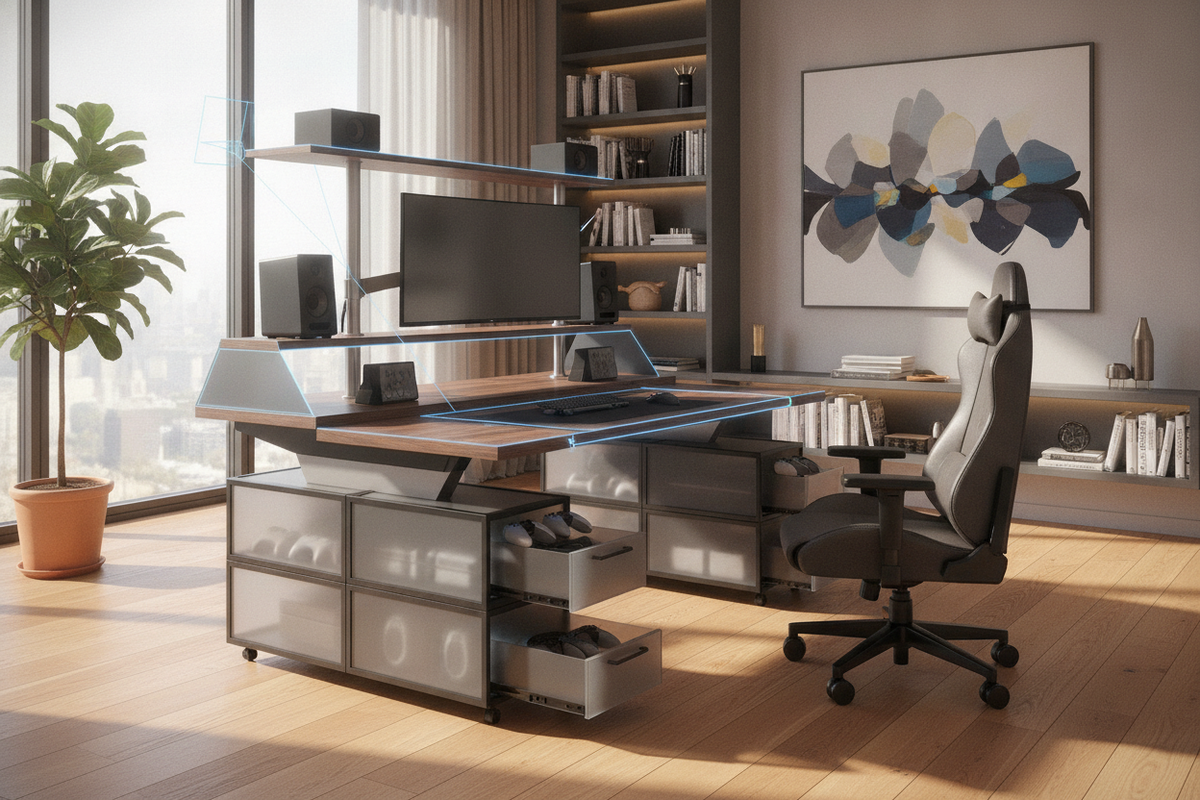
Traditional executive desks often incorporate heavy integrated pedestal drawers. However, kinetic desks perform best with minimal under-desk clutter, which allows unobstructed legroom and clean vertical clearance.
To maintain organized utility, separate your storage architecture from the moving desk frame. Utilizing a free-standing open shelving bookcase nearby provides easy access to reference materials, binders, and peripheral hardware without cluttering the primary work surface or adding weight to lifting mechanisms.
- Mobile Under-Desk Pedestals: Low-profile rolling drawer units can slide beneath the desk during seated sessions and tuck neatly to the side when the desk is raised.
- Perimeter Wall Storage: Position heavy archival files and equipment cabinets along perimeter walls to keep the central kinetic zone open and functional.
- Desktop Caddies: Keep everyday essentials—such as writing tools and input accessories—in compact trays that travel smoothly with the tabletop.
Decoupling storage from the lifting surface creates an adaptable environment where both seated and upright workflows enjoy immediate access to essential supplies.
Task-Based Posture Pairing: Matching Workflow Types to Body Positions
Optimizing an active home office involves pairing specific work tasks with corresponding physical postures. Different cognitive and mechanical activities naturally align with distinct body arrangements.
Tasks Suited for Upright Postures
- Virtual Meetings and Presentations: Standing while speaking encourages upright diaphragm expansion and dynamic body language during video conferences.
- Quick Email Processing: Sorting through routine correspondence or clearing backlogs can be executed swiftly while standing.
- Brainstorming and Concept Planning: Reviewing sketches, whiteboards, or project timelines benefits from the freedom of movement that standing provides.
Tasks Suited for Seated Postures
- Intense Data Entry and Extended Typing: Long drafting sessions often benefit from the forearm stability and precise wrist support of a properly adjusted ergonomic chair.
- Detailed Design and Precision Editing: Fine motor control tasks requiring steady cursor movement are typically easier to sustain while comfortably seated.
- Deep Reading and Analytical Research: Complex conceptual reading often pairs best with a stable, relaxed posture that minimizes physical restlessness.
By pairing your daily task calendar with intentional posture changes, you establish a harmonious workflow that balances dynamic activity, spatial organization, and consistent professional focus.


Leave a comment
This site is protected by hCaptcha and the hCaptcha Privacy Policy and Terms of Service apply.