

















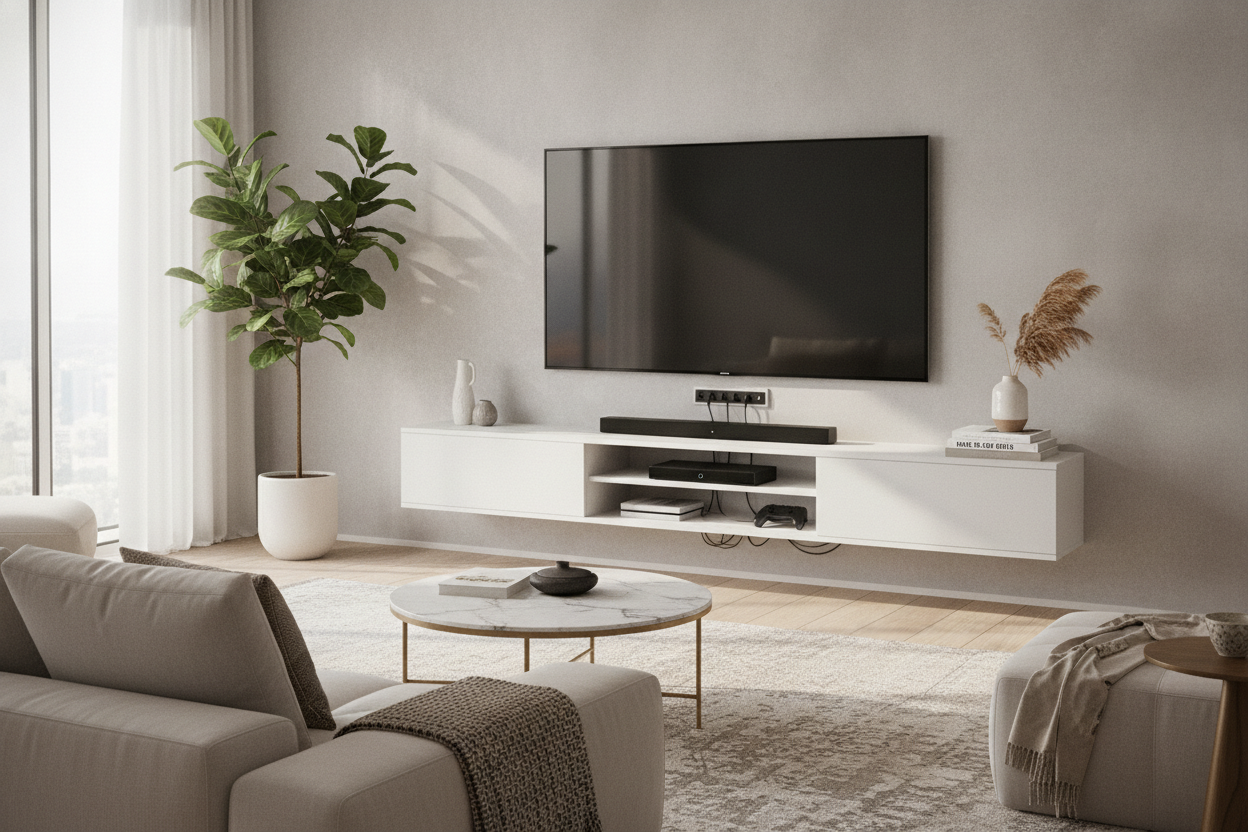
I remember the day I finally mounted my 65-inch OLED. I stepped back, proud of my level-work, only to realize my living room now looked like the back of a server rack. Five thick black cables were weeping down my eggshell-white wall toward a power strip that sat on the floor like a dusty plastic brick. It was a disaster. The solution wasn't a cord hider strip that never sticks; it was a floating tv stand with outlets.
Quick Takeaways
- Integrated power strips eliminate the 'medusa' effect of cables hanging below your TV.
- You only need to manage one main power cable rather than five or six device cords.
- Weight limits are non-negotiable—always check if the unit can handle your consoles and soundbar.
- For renters, there are 'no-drill' alternatives that mimic the hovering look.
The Dirty Little Secret About 'Sleek' Wall-Mounted Consoles
We’ve all seen the Pinterest boards. A beautiful, minimalist room with a TV that seems to hover in mid-air, a thin console underneath, and absolutely zero wires in sight. What they don't tell you is that those photos are usually staged before the router, the Apple TV, the PS5, and the soundbar are actually plugged in. In the real world, electronics need electricity, and most walls don't have six outlets perfectly positioned behind a thin piece of furniture.
When you browse modern TV stands, it’s easy to get seduced by the slim silhouettes. But the reality of a standard floating unit is a nightmare. Without a built-in power source, you’re forced to either fish wires through your drywall—which is a huge pain and often a fire code violation if you aren't using rated cables—or you let the wires hang. There is nothing that kills a high-end vibe faster than a cluster of black cords dangling over your baseboards. I’ve tried the plastic 'cord management' channels, and they always look like a cheap afterthought. You need a unit that acts as its own hub.
Why a Floating TV Stand With Power Outlet Capabilities Changes Everything
The magic happens when the power source lives inside the furniture. A floating tv stand with power outlet capabilities acts as a central terminal. Instead of routing five different thick cables down your wall, you plug everything directly into the back of the stand itself. The console becomes a hidden bunker for your tech mess. All those bulky power bricks for your gaming systems? They stay inside the cabinet, out of sight and off the floor.
This setup solves the 'short cord' problem too. Have you ever tried to wall-mount a soundbar only to realize the power cord is three inches too short to reach the floor? By having the outlets inside the floating unit, you’re only ever inches away from power. It creates a self-contained ecosystem. You can finally achieve that gap between the bottom of the stand and the floor—the very thing that makes floating furniture look so good—without a power strip ruining the negative space. It makes the room feel larger and much easier to vacuum, which is a win for anyone who hates moving heavy furniture to get to the dust bunnies.
How It Actually Works (Without Hiring an Electrician)
You don’t need to be a DIY expert to make this work. Most of these units come with a single, heavy-duty main power cord that exits the back of the stand. You run that one cord down to your existing wall outlet. If you’re feeling fancy, you can use a paintable cord cover for that one single wire, and it virtually disappears. Inside the unit, you’ll find a power strip—sometimes with USB ports—ready to handle your hardware. It’s a plug-and-play solution that mimics a custom professional install for a fraction of the cost.
If you are a renter and the idea of drilling four-inch lag bolts into your wall makes your security deposit scream, there are workarounds. I’ve seen people use a TV hanging stand wall setup which gives you the illusion of a wall-mount without the structural commitment. These often include integrated cable management that pairs perfectly with a powered console. Whether you’re drilling or using a hybrid stand, the goal is the same: keep the 'brain' of the operation hidden inside the wood, not exposed on the drywall.
3 Things I Always Check Before Hitting 'Add to Cart'
After assembling and returning more furniture than I care to admit, I’ve learned that the spec sheet is your best friend. First, check the length of the unit’s main power cord. If your wall outlet is six feet away and the stand only has a four-foot cord, you’re back to using an ugly extension cord. Always look for at least a six-foot lead. Second, look at the spacing of the internal outlets. Modern tech uses 'wall warts'—those giant square plugs that take up two spots. If the internal outlets are too close together, you’ll only be able to plug in half your gear.
Third, and most importantly, verify the weight limit. Floating units are held up by a French cleat or heavy-duty brackets. Cheap MDF (medium-density fiberboard) has a tendency to sag or even pull away from the wall if you overload it with a heavy receiver or a stack of vintage vinyl. I always look for units with a weight capacity of at least 50-70 lbs. If you have a cat that likes to jump on furniture, add another 15 lbs to your calculation. I once had a cheap unit start to tilt forward because I underestimated the weight of my soundbar and a few coffee table books. Don't make that mistake.
Styling It So Your Living Room Doesn't Look Like a Server Rack
Once the tech is hidden, you have to make the piece look like furniture, not a computer accessory. High-tech units can sometimes feel a bit 'cold' or sterile. I’m a big fan of using a high gloss TV stand with LED light to add some depth. The under-glow of the LEDs highlights the fact that the unit is floating, and if you choose a warm white light, it doubles as great ambient lighting for movie night. It softens the hard edges of the electronics.
To break up the geometry, I always add something organic. A trailing plant like a Pothos or a Philodendron is perfect here—let the leaves drape over the edge to hide the seam where the stand meets the wall. Stack a few oversized art books on top, perhaps covering any visible ventilation vents (just make sure you aren't blocking the airflow for your PS5). The goal is to create a balance between the high-gloss, tech-heavy reality of the console and the cozy, lived-in feel of a real home. When it’s done right, people won't ask where your wires are—they’ll just wonder how you kept the room so clean.
FAQ
Do floating TV stands fall off the wall?
Only if you're lazy with the installation. You must secure the mounting bracket into wooden studs. If you try to hang a 60-inch console using only drywall anchors, it will eventually fail. Find the studs, use a level, and it’s not going anywhere.
Will my devices overheat inside a closed cabinet?
It depends on the unit. Look for stands with 'media vents' or an open-back design. If you're running a high-powered gaming console, I usually recommend leaving the cabinet door cracked during long sessions or choosing a unit with slatted doors for airflow.
Are the built-in outlets safe?
Most reputable brands use UL-listed power strips. However, I always check the total wattage. If you’re plugging in a massive TV, a subwoofer, and a space heater (please don't do that), you might trip a breaker. Stick to standard media electronics and you'll be fine.


Leave a comment
This site is protected by hCaptcha and the hCaptcha Privacy Policy and Terms of Service apply.