

















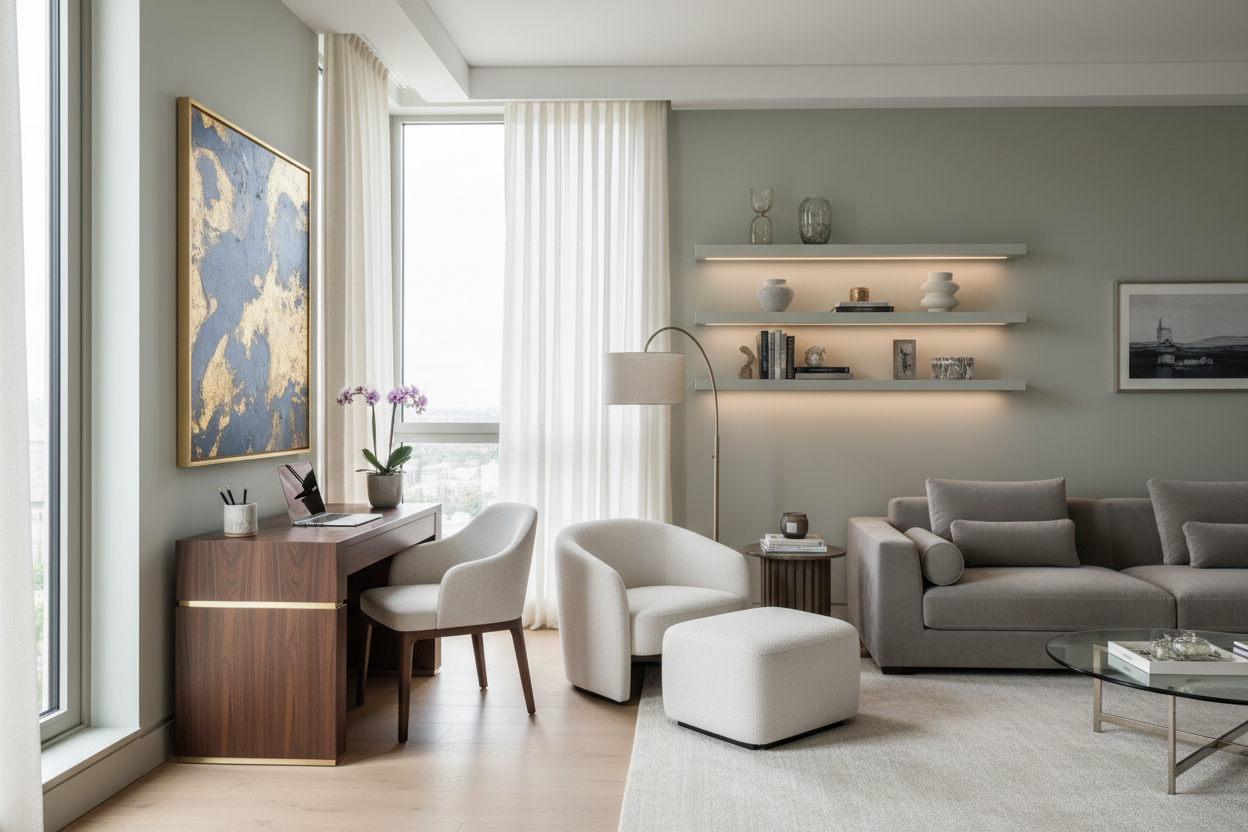
The modern home presents a unique architectural challenge: how do we introduce a functional workspace into a zone dedicated to relaxation without destroying the aesthetic flow? Often, homeowners force a corporate-style desk into a corner, resulting in a jarring visual disconnect. A successful living room office setup requires a shift in perspective. We are not just placing furniture; we are curating a vignette that must perform double duty as high-performance equipment and sculptural decor.
Key Features for a Cohesive Workspace
- Visual Continuity: Select desk materials (walnut, oak, marble) that match existing cabinetry or coffee tables rather than introducing industrial laminates.
- Scale and Proportion: Ensure the desk profile is slim enough to mimic a console table when not in use.
- Concealed Ergonomics: Prioritize chairs with upholstered fabrics and wood legs over mesh-backed, plastic-base executive chairs.
- Cable Management: Look for desks with integrated modesty panels or internal routing to keep cords invisible from the sofa.
Zoning and Layout Strategy
The placement of your workspace dictates the room's circulation. Placing a desk directly against a wall is the standard default, but it often leaves the worker with their back to the room, feeling isolated. Consider floating the desk behind your sofa. This creates a natural partition where the sofa back acts as a visual barrier, hiding the clutter of your desktop from the rest of the room. This layout also allows you to face the television or window, maintaining a connection with the space's energy.
Selecting Materials: The Anti-Corporate Approach
When curating an office setup in living room environments, material selection is paramount. Avoid the standard office supply store finishes. Instead, treat the desk as a piece of case goods.
Wood vs. Metal
Solid wood or high-quality veneers bring warmth and texture that allows the desk to blend with bookshelves and media units. If you prefer a modern edge, a glass top with a brass or blackened steel base offers a lighter visual weight, preventing the room from feeling overcrowded. However, be wary of glass if you use an optical mouse, as you will need a mousepad that might disrupt the clean look.
The Chair Dilemma: Comfort vs. Style
The most difficult element to integrate is the chair. A bulky, high-back ergonomic chair is a focal point killer. Look for "conference style" seating or mid-century modern dining chairs that have been upgraded with tilt mechanisms and casters. Brands are increasingly releasing task chairs wrapped in boucle, velvet, or leather that look like lounge furniture but offer lumbar support. If the chair is visible from the main seating area, its silhouette must complement your sofa, not compete with it.
My Personal Take on Living Room Office Setup
In my years of designing multi-functional spaces, I have learned that the biggest enemy isn't the desk—it's the monitor. I recently worked on a project where we sourced a stunning vintage Danish teak desk that looked perfect in the client's lounge. However, the moment we placed dual 27-inch black plastic monitors on it, the luxury vibe vanished.
My workaround, which I now use in my own home, is intentional concealment. I stopped trying to make monitors look pretty; they never will. Instead, I focus on the "shut down" ritual. I use a monitor arm that allows the screen to push flush against the wall or swing into a bookshelf niche when not in use. Furthermore, I learned the hard way that matte-finish desks are a nightmare for fingerprints if you use hand cream. I now strictly advise clients to use a high-quality leather desk pad. It defines the work zone, improves mouse tracking, and protects that expensive veneer from the inevitable coffee ring or pen indentation.
Conclusion
Integrating a workspace into your living area doesn't mean compromising on sophistication. By prioritizing material continuity, smart layout choices, and furniture that whispers rather than shouts, you can create a space that is as productive as it is beautiful. Treat your desk like a console, your chair like an accent piece, and your technology as something to be managed, not displayed.
Frequently Asked Questions
How do I hide cables in a floating desk setup?
If your desk is floating (not against a wall), run cables down a single desk leg using magnetic cable channels painted to match the leg color. Use a floor outlet if available, or run a flat, paintable cord cover along the floor to the nearest wall outlet, covered by a rug where possible.
What is the minimum depth for a functional living room desk?
While console tables are often 14-16 inches deep, a functional work surface needs to be at least 20-24 inches deep. This allows enough distance between your eyes and the monitor while providing space for a keyboard and wrist support.
Can I use a dining chair as a desk chair to save space?
You can, but proceed with caution regarding ergonomics. If you work for more than 4 hours a day, a standard dining chair will likely cause back strain. If you must use one for aesthetic reasons, add a discrete lumbar pillow and ensure the seat height allows your elbows to rest at a 90-degree angle to the desk surface.


Leave a comment
This site is protected by hCaptcha and the hCaptcha Privacy Policy and Terms of Service apply.