

















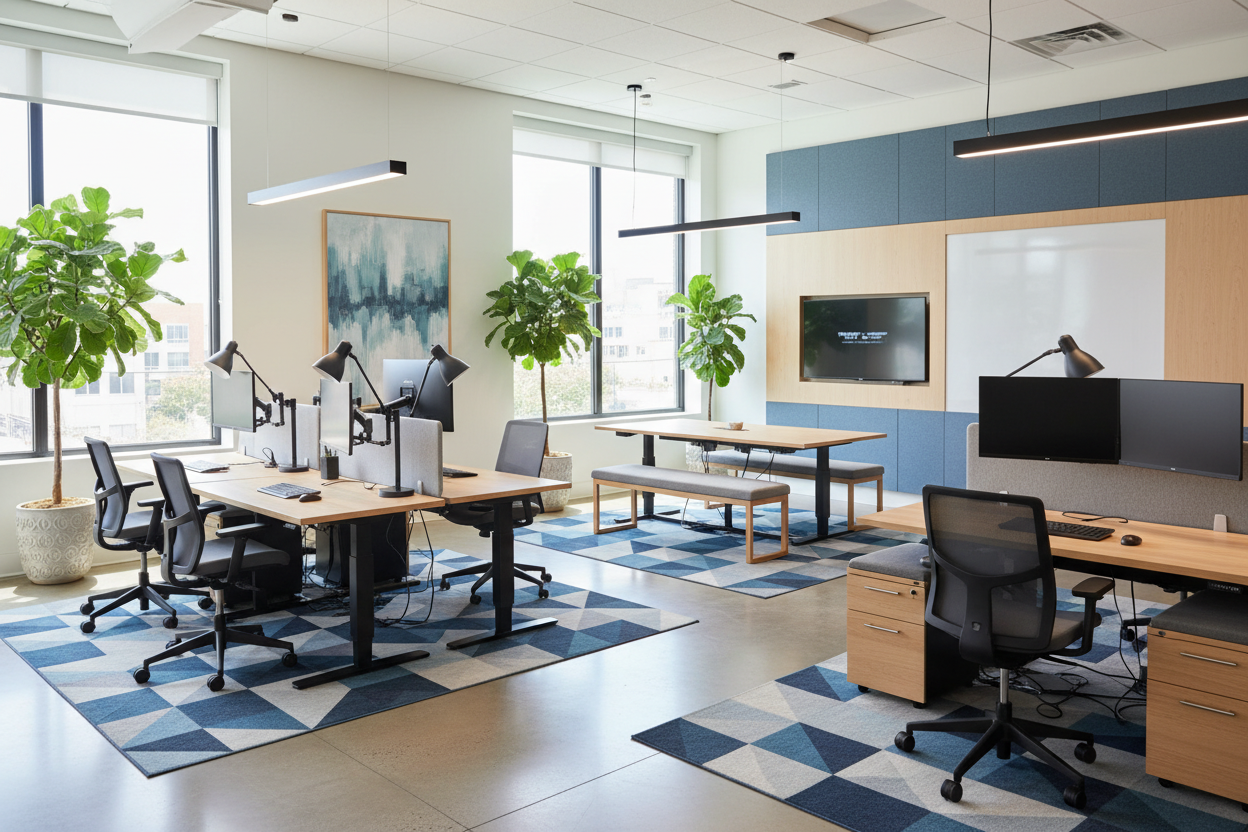
You have likely experienced the specific fatigue that comes from a workspace fighting against you—glare bouncing off monitors, the visual chaos of cables, or a chair that punishes you after four hours of coding. In the world of technology, aesthetics cannot exist without rigorous functionality. A successful it office design bridges the gap between a sterile server room and a warm, inviting creative studio.
Key Features to Look For
Before selecting a single piece of furniture, use this checklist to ensure your design supports high-focus technical work:
- Cable Management: Look for integrated grommets, vertebrae spines, and under-surface trays. Visible wires ruin visual calm.
- Surface Finish: Opt for matte or satin laminates. High-gloss finishes create distracting reflections on screens.
- Ergonomic Rating: Chairs should be rated for 8+ hours of usage with adjustable lumbar support and seat depth.
- Lighting Temperature: Aim for 4000K (cool white) task lighting to reduce eye strain, balanced with warmer ambient light.
- Acoustics: Incorporate PET felt panels or heavy textiles to dampen the echo of mechanical keyboards and calls.
Zoning for Flow and Focus
The layout is the skeleton of your design. Whether you are outfitting a corporate floor or refining a modern private office design at home, zoning is critical. In IT, we often oscillate between deep focus (coding, debugging) and rapid collaboration (scrums, troubleshooting).
Do not push every desk against a wall. Instead, consider a floating layout. Position the primary desk to face the entrance—the "command position"—which reduces subconscious anxiety. For modern office spaces interior design, we often create a secondary zone with lounge seating. This provides a necessary change of posture and scenery for reading documentation or taking breaks away from the blue light of the screens.
Materiality: Durability Meets Aesthetics
Tech equipment is often heavy, warm, and visually stark (black plastic and aluminum). Your furniture needs to counterbalance this.
The Desk Surface
Avoid softwoods like pine, which will dent under the weight of monitor arms and heavy towers. I recommend high-pressure laminate (HPL) with a walnut or oak finish or FENIX NTM materials. These offer the warmth of wood but possess thermal healing properties against micro-scratches—essential for trendy office space design that stays looking new.
Visual Balance and Texture
To prevent the room from feeling like a spaceship, introduce organic textures. A wool rug or a leather desk pad adds tactile softness. If you are looking for modern office design inspiration, notice how top firms pair sleek tech with biophilic elements (plants, wood slats) to reduce stress levels.
Lighting: The Invisible Ergonomic
Lighting is often the biggest failure point in IT offices. Overhead fluorescent lighting is the enemy. Layer your lighting scheme:
- Ambient: Dimmable ceiling fixtures to set the general mood.
- Task: An articulating desk lamp for reviewing hard-copy specs.
- Bias: LED strips behind the monitor to reduce the contrast between the bright screen and the dark room, saving your eyes during late-night deployments.
My Personal Take on IT Office Design
I learned a hard lesson early in my career regarding surface finishes. I once designed a sleek, minimalist office for a lead developer and specified a stunning, high-gloss white lacquer desk. It looked incredible in the photos.
Two weeks later, the client called me. The glare from his triple-monitor setup was bouncing off the glossy white surface directly into his eyes, causing migraines. Furthermore, the pristine white showed every single coffee ring and speck of dust, driving him crazy. We had to replace the custom top with a matte charcoal linoleum. The lesson? In an IT environment, the furniture must disappear so the work can take center stage. Always test your materials against screen glare before buying.
Conclusion
Designing an IT office is about removing friction. When the chair supports you, the lighting protects your eyes, and the cables are hidden, you enter a flow state much faster. Invest in pieces that serve the technology, not just the aesthetic.
Frequently Asked Questions
What is the best desk depth for an IT setup?
Aim for a minimum depth of 30 inches (approx. 76cm). This allows enough distance between your eyes and the monitors, which is crucial for preventing eye strain, while leaving room for a keyboard and oversized mouse pad.
How do I make a small IT office look bigger?
Utilize vertical space. Install floating shelves above the monitors for storage to keep the floor clear. Use legs with a slender profile rather than heavy, blocky desks to maintain visual openness.
Is a standing desk worth the investment?
Absolutely. For IT professionals, the ability to switch between sitting and standing prevents the hip flexor tightness associated with long coding sessions. Look for dual-motor frames for stability when raising heavy equipment.


Leave a comment
This site is protected by hCaptcha and the hCaptcha Privacy Policy and Terms of Service apply.