


















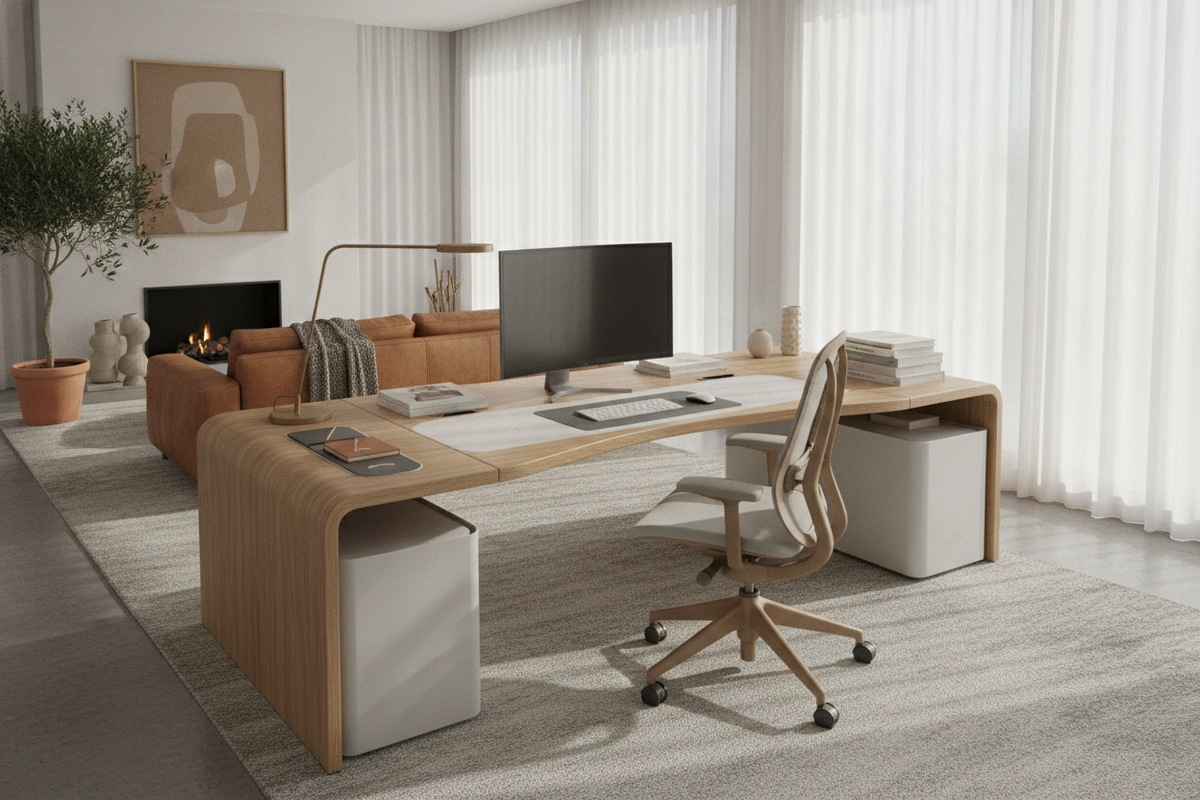
Workstation design frequently centers on overall width and height, yet the front edge perimeter shapes your day-to-day posture and physical interaction with the work surface. A contour desk introduces a gentle, inward-curving front cutout that shifts the relationship between the worker, keyboard input area, and peripheral task zones. Rather than confronting a flat barrier, the user enters a subtle cockpit layout where primary tools rest within a natural arc of movement.
Understanding whether a contoured desktop suits your daily routine involves balancing user entry depth against flat surface utility. By reviewing spatial trade-offs, sit-to-stand transitions, and accessory arrangements, you can determine whether a curved profile enhances your personal work style.
Understanding the Contour Desk: Form, Function, and Ergonomics
A contour desk features an engineered recess along the front edge facing the user. This concave carve-out allows you to pull your office chair closer into the core surface without pressing your midsection or forearms against a sharp, straight border. By bringing the torso forward into the desk envelope, the physical distance between your eyes, hands, and central display decreases naturally.
The concept revolves around reach zones. In human-centered spatial planning, desk surfaces divide into primary, secondary, and tertiary zones. The primary reach zone covers the area accessible with relaxed upper arms and pivoted elbows. A traditional straight front requires the user to push accessories back or lean forward over the edge. In contrast, a contoured desktop brings peripheral surfaces closer to the body, allowing notebooks, input devices, and control decks to sit comfortably within a sweeping forearm arc.
Contour Desk vs Rectangle: Key Surface and Layout Trade-offs
Deciding between a contour desk vs rectangle layout comes down to prioritizing either maximum uniform surface area or body-centric positioning. Both geometries present distinct spatial strengths:
- Front Edge Support: A contoured desktop cradles the forearms along the curved transition, distributing contact pressure when typing or sketching. Rectangular desks provide an uninterrupted straight boundary, which supports edge-to-edge drafting tools, rulers, and edge clamps evenly.
- Usable Center Depth: Because the cutout removes a shallow crescent of material from the front center, the narrowest point of a contour desk has less depth than its outer corners. Users who rely on oversized desk blotters or massive paper blueprints often find traditional rectangular writing desk alternatives simpler to manage.
- Visual Flow: Curved edges soften the architectural footprint of a workstation within an open-concept room, whereas straight profiles align flush with interior walls, modular room dividers, and credenzas.
For individuals who spend long sessions at a centered keyboard and mouse, the loss of a few inches of center material is rarely noticeable. Instead, the curve feels natural, keeping dual displays and side accessories oriented squarely toward the seated point.
Sizing Categories and Room Clearance for Contoured Desktops
When selecting a contour desk, footprint categories reflect both spatial availability and functional equipment loads:
- Compact Profiles: Scaled for secondary bedrooms and tight apartments, compact curved desks offer an inward arc that saves walking clearance in tight floor plans. The cutout permits a task chair to tuck completely inside the boundary when not in use.
- Mid-Size Setups: Standard workstations balance monitor mount spacing with adequate room for side speakers, desk lamps, and writing pads. The curved front keeps these peripheral items within arm reach without excessive chair rolling.
- Expansive Executive Desks: Larger formats, such as generous electric lift desk options, combine deep side wings with an extended center span. On an expansive platform, the contoured profile functions like a cockpit, turning a sprawling surface into a unified command station.
Room planning requires measuring both the outermost desk corners and the central recessed depth. Ensure surrounding walkways retain ample clearance behind your task chair, particularly when sliding backward to exit the curved seating alcove.
Integrating a Contour Standing Desk into Sit-to-Stand Workflows
Pairing an ergonomic cutout with dynamic height adjustment creates a high-performance active workstation. A contour standing desk alters how your body stabilizes when transitioning from sitting to standing throughout the day. When standing, workers naturally shift weight between their feet and lean slightly toward their primary task zone. The inward curve prevents the leading edge from digging into the hips or waist during light forward leans.
When planning an active workspace using versatile standing desk collections, verify that the motorized lift frame accommodates the geometry of the desktop. The underside crossbar and mounting plates must clear the recessed cutout area to ensure structurally sound attachment and vibration dampening. Reviewing common standing desk layout mistakes helps prevent cable snagging and balance issues as the desktop travels through its elevation cycle.
Accessory Fit and Storage Coordination Around Curved Surfaces
Outfitting a contoured workstation requires careful attention to perimeter accessories. Standard home office items are typically manufactured with straight lines in mind, so curved front edges demand thoughtful placement:
- Desk Pads and Mats: Standard wide rectangular desk pads may extend past the inner perimeter of a cutout. Choose contoured mouse pads, circular blotters, or position a medium rectangular pad slightly back from the curved threshold to preserve clean sightlines.
- Monitor Mounts: Because monitor arms clamp along the back edge, check whether the rear perimeter is straight or also contoured. Most contour desks maintain a straight rear edge to simplify clamping single or dual display brackets.
- Under-Desk Pedestals: Fixed under-desk drawers should be pushed toward the outer wings. Placing filing cabinets directly beneath the center curve restricts legroom and defeats the tuck-in advantage of the ergonomic front recess.
When curating an aesthetically balanced standing desk setup, coordinating desktop geometry with matching rounded accessories creates a cohesive modern aesthetic. In my view, the visual softness of a subtle front arc offers a refreshing departure from boxy cubicle profiles, lending the home office an intentional, design-forward presence.

Leave a comment
This site is protected by hCaptcha and the hCaptcha Privacy Policy and Terms of Service apply.