

















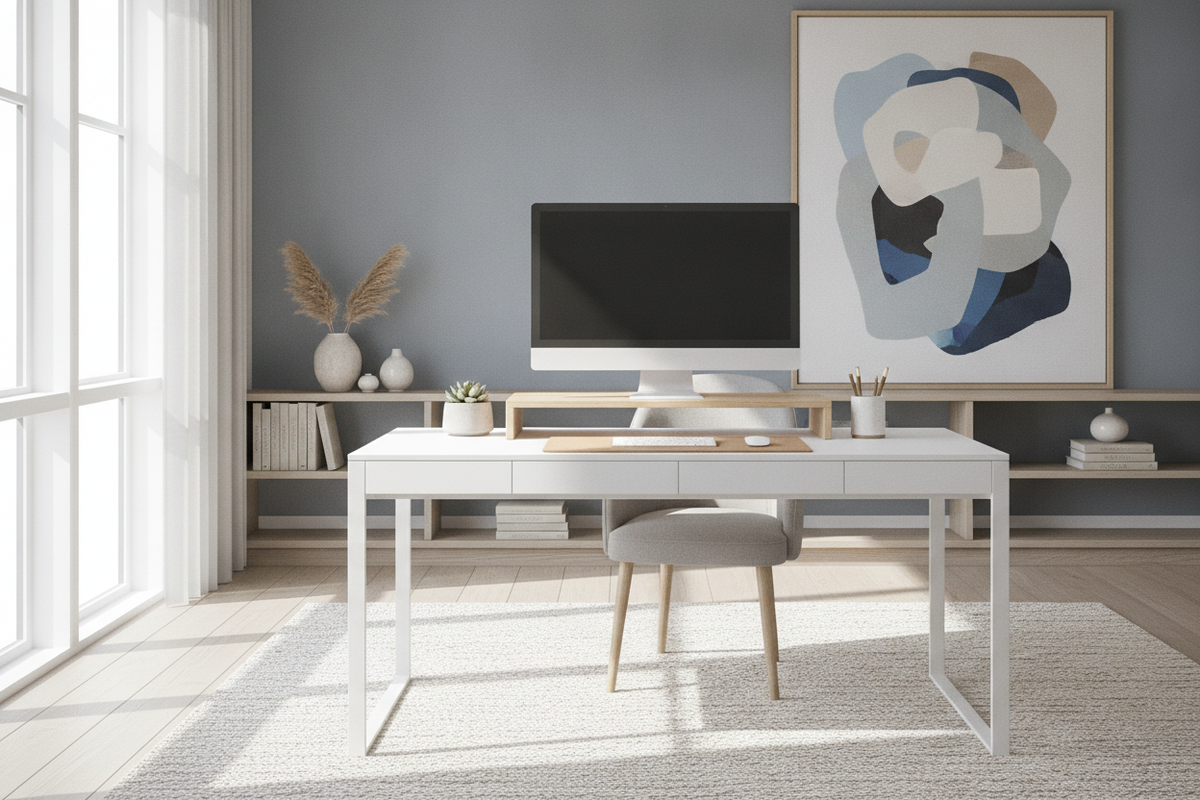
I heard the sound first—a sickening, slow-motion crunch of particle board. My heavy dual-monitor arm, which I had spent forty minutes meticulously clamping to the back of my desk, was slowly sinking into the surface like a spoon into a cheap birthday cake. I realized then that my obsession with 'floating' screens was actually destroying my furniture. I did not need a mechanical arm that looked like it belonged in a radiology lab; I just needed a simple desk riser that would not commit furniture homicide.
We have been told for years that monitor arms are the peak of ergonomic design, but for most of us working from a home office, they are total overkill. They are heavy, they require a death-grip on your table edge, and they often wobble if you do not spend three hundred dollars on a pro-grade steel mount. After my near-disaster, I switched back to the basics, and my workspace has never felt more solid.
Quick Takeaways
- Desk risers distribute weight across a larger surface area, preventing damage to hollow-core or thin wood tops.
- A riser provides 'bonus' storage space underneath for keyboards, notebooks, and stray pens.
- Installation takes thirty seconds, not thirty minutes with an Allen wrench.
- Risers allow you to push your desk flush against the wall, unlike many articulating arms.
The Day My IKEA Desk Almost Snapped
I was using one of those classic hollow-core tables that everyone starts with. It looked great, but it was essentially two thin sheets of veneer held together by a honeycomb of cardboard. When I clamped a heavy monitor mount to the back edge, I was concentrating all that weight—about 25 pounds of tech—onto a four-inch square of pressure. The result? A permanent indentation and a monitor that started to lean forward like it was nodding off during a Zoom call.
That was the moment I started looking for a desk riser for computer setups that prioritized stability over 'adjustability' I never actually used. I eventually upgraded to a more robust writing computer desk made of solid materials, but the lesson stuck: stop putting concentrated pressure on furniture that is not built for it. A riser spreads that load across two feet of space instead of four inches. It is basic physics, and it is a lot cheaper than replacing a snapped tabletop.
If you are working on a piece of furniture you actually care about—maybe a vintage find or a lighter modern table—a riser is the only way to go. You get the height you need for your neck without the risk of structural failure. I have seen too many friends ruin perfectly good desks by trying to make them do things they were never designed for.
Why Monitor Arms Are Often Too Much Trouble
Let's talk about the 'hidden' annoyance of monitor arms: the wall gap. Most articulating arms need space behind the desk to fold. This means you have to pull your desk three to six inches away from the wall, leaving a graveyard for fallen pens and dust bunnies. This is especially frustrating if you are trying to fit a corner office computer desk into a tight guest room. You want that furniture flush, not floating in the middle of the room because a metal arm needs 'elbow room.'
Then there is the cable management. People claim arms make cables disappear, but in reality, you are just threading wires through plastic clips that eventually snap or sag. A small desk riser acts as a natural shield. You can tuck your docking station and messy wires directly behind it, and they are instantly out of sight. No zip ties required.
I also found that I rarely moved my monitors once they were set. The whole selling point of an arm is the ability to swing your screen around, but unless you are showing spreadsheets to a roommate every ten minutes, that screen stays in one spot. A desktop riser gives you that fixed, reliable height without the mechanical complexity or the need for heavy tools. You just set it down and you are done.
The Secret Storage Perk Nobody Talks About
The most underrated part of using a computer desk riser is the 'second floor' it creates on your desk. When your monitor sits directly on the table, that footprint is dead space. When it sits on a riser, you suddenly have a garage for your keyboard. At the end of the day, I slide my keyboard and mouse under the riser, and suddenly my desk is a clean, flat surface for writing or eating lunch. It is a mental reset that a monitor arm just can't provide.
I have found that a computer desk with monitor stand built-in or added on is the easiest way to manage visual clutter. My notebooks, my Kindle, and my coasters all live in that six-inch gap under the screen. It keeps the 'active' part of my desk clear for my actual work. It is the difference between a desk that feels like a cockpit and one that feels like a home office.
For those of us with smaller setups, this verticality is a lifesaver. I have managed to fit a full-sized 27-inch monitor on a tiny 40-inch desk simply because I could reclaim the space beneath the screen. It makes a cramped room feel significantly more organized without requiring you to buy a larger piece of furniture.
Finding a Riser That Doesn't Look Like Corporate Plastic
One reason people avoid the desk top riser for computer setups is that they think of those grey, ventilated plastic stands from 1998. We have all seen them in government buildings. But the market has changed. You can find beautiful risers in solid walnut, matte black steel, or even thick clear acrylic that makes your monitor look like it is floating on air.
I personally prefer a warm wood finish. It softens the 'tech' look of the monitor and makes the whole setup feel like part of the room's decor rather than an alien workstation. I remember when I finally ditched my makeshift solution—I had been using a stack of old textbooks—and upgraded to a dedicated desk with laptop stand and riser combo. The aesthetic shift was immediate. It looked intentional, not like a temporary fix.
When you are shopping, look for something with a weight capacity that exceeds your monitor by at least ten pounds. If you are using a monitor riser standing desk, make sure the feet of the riser have silicone or rubber pads. You do not want your expensive screen sliding around when you transition from sitting to standing. A little bit of texture on the bottom goes a long way in keeping everything secure during the workday.
When to Just Buy a Desk With a Built-In Shelf
Sometimes, a separate riser for desk use is just a bandage on a bigger problem. If you find yourself needing three different risers for your monitor, your laptop, and your speakers, your desk is simply too small or too low. At that point, you are better off looking for a piece of furniture that has the elevation built into the architecture. A dedicated computer desk with hutch or an integrated monitor shelf is much more stable than stacking accessories.
The built-in approach is usually better for heavy-duty setups. If you have a massive 49-inch ultrawide monitor, even the sturdiest third-party riser might feel a little sketchy. A desk with a reinforced shelf can handle that weight without bowing. It also looks much cleaner because the materials match perfectly. No more trying to find a wood grain that 'mostly' matches your desktop.
I usually tell people to start with a riser to see if they like the height. If you find yourself loving the ergonomics but hating the cluttered look of multiple stands, that is your sign to upgrade the whole desk. It is about finding the balance between what you need for your body and what you want for your room's vibe.
FAQ
Will a desk riser work with a curved monitor?
Absolutely. Just make sure the base of your curved monitor fits within the dimensions of the riser's top surface. Most curved monitors have wider 'V' shaped stands, so measure twice before you buy.
Are wooden risers better than metal ones?
It is mostly about aesthetics. Metal is usually thinner and more 'industrial,' while wood offers a warmer look and can be heavier, which helps with stability. Both are vastly superior to cheap plastic.
How high should my desk riser be?
Ideally, the top third of your monitor screen should be at eye level. For most people, a riser between 4 and 6 inches tall does the trick. If you are taller, look for adjustable legs.
Can I use a desk riser on a glass desk?
Yes, and it is actually safer than a monitor arm. A clamp-on arm can easily shatter a glass desk by creating a stress point. A riser spreads the weight out, making it much safer for glass surfaces.


Leave a comment
This site is protected by hCaptcha and the hCaptcha Privacy Policy and Terms of Service apply.