

















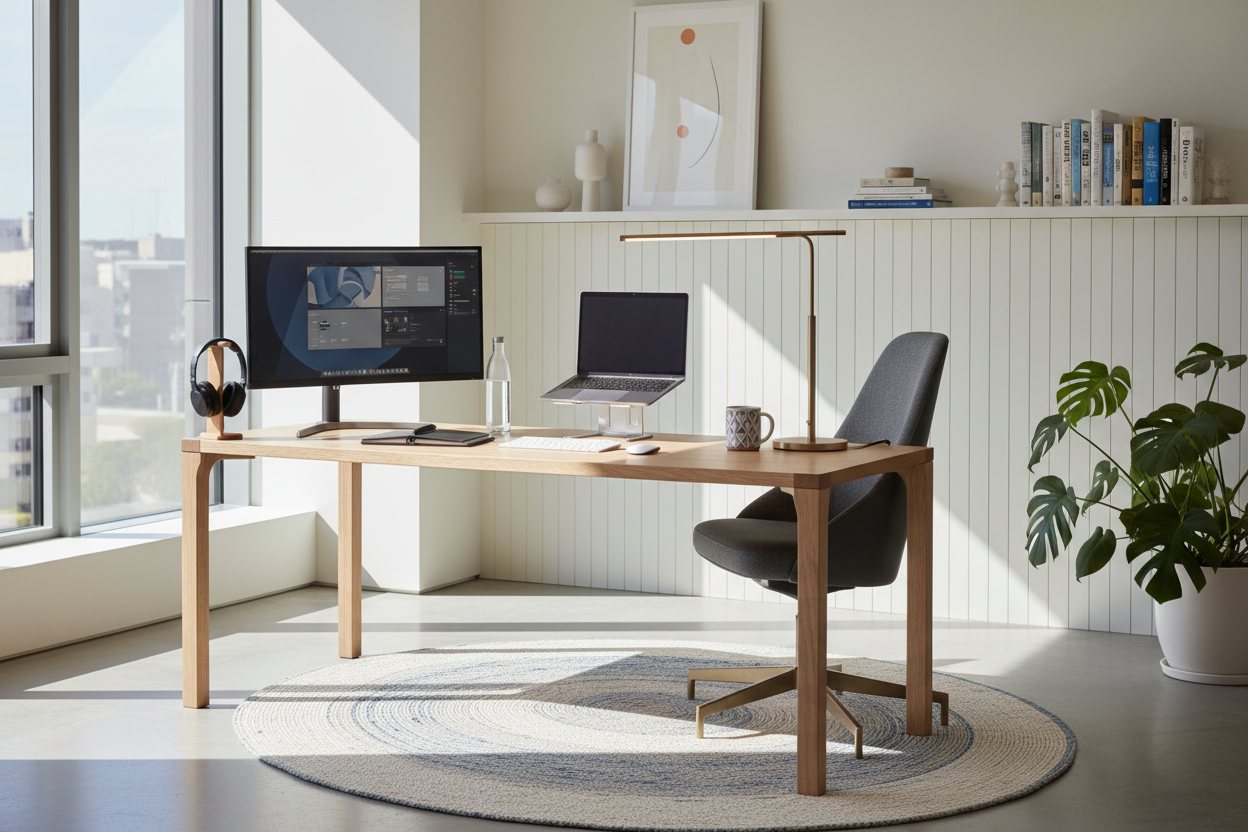
We all remember the makeshift setups of 2020—laptops perched on ironing boards, dining chairs moonlighting as office seating. Now that remote work is a permanent fixture for many North Americans, the tolerance for a chaotic home office has vanished. You want a space that feels curated, not like a corporate cubicle that crashed into your living room.
Finding the right work from home essential is no longer just about getting the job done; it is about protecting your posture while preserving your home's aesthetic. In this guide, I will walk you through how to select pieces that bridge the gap between residential comfort and commercial functionality, ensuring your workspace works for you.
Quick Decision Guide
- Prioritize ergonomics over aesthetics for your primary seating; a beautiful chair is useless if it causes lumbar pain.
- Measure your desk depth carefully; 24 inches is the absolute minimum for a monitor and keyboard setup.
- Layer ambient and task lighting to reduce eye strain and avoid the harsh glare typical of commercial offices.
- Invest in closed storage to hide your work from home supplies at the end of the day, maintaining a clear boundary between work and life.
Comfort and Ergonomics First
The Truth About Office Seating
When clients ask me for a must have for working from home, I always point them straight to their chair. You can compromise on a desk, but skimping on seating is a fast track to physical misery. Look for wfh essentials that offer adjustable seat depth and lumbar support. The challenge is finding working essentials that do not look like they belong in a 1990s IT department. Thankfully, many modern manufacturers are now wrapping high-density memory foam and ergonomic mechanics in residential-friendly fabrics like performance boucle or top-grain leather.
Desk Dimensions and Clearances
Your work from home desk essentials need proper real estate. A common mistake is buying a slim console table because it looks delicate in a living room, only to realize it cannot comfortably hold a laptop, monitor, and keyboard. Aim for a desk depth of at least 24 to 30 inches. If you are carving out a corner in a bedroom, ensure you have at least 36 inches of clearance behind the desk to push your chair back comfortably. These work from home setup essentials dictate how smoothly your day runs.
Style and Coordination
Blending In Without Disappearing
The goal is to select remote work essentials that complement your existing architecture. If your home leans mid-century modern, warm walnut finishes and tapered legs on your desk will feel intentional. For transitional spaces, a painted wood desk with brass hardware can double as a stylish vanity when not in use. Incorporating fun work from home accessories—like a sculptural brass tape dispenser or a leather desk pad—adds personality without creating visual clutter. These work from home accessories help bridge the gap between a sterile workstation and a lived-in home.
Managing the Visual Clutter
Nothing ruins a carefully designed room faster than a tangle of black cords and plastic peripherals. Closed storage is one of those non-negotiable work from home necessities. Whether it is a dedicated filing cabinet disguised as an end table or a desk with deep, built-in drawers, having a place to stash your work from home office supplies at 5 PM is crucial for your mental health. Consider cable management trays a must have work from home item; they screw under the desk and keep the chaos entirely out of sight.
Value and Longevity
Where to Splurge and Where to Save
Not every work from home product needs to be an heirloom piece. Invest heavily in your chair and a sturdy desk—these are the remote working must-haves that bear the brunt of daily use. Solid wood or high-quality veneer desks will resist the inevitable scratches from laptops and coffee mugs much better than cheap paper laminates. Save your budget on secondary wfh office essentials like monitor stands or decorative lighting, which can be easily swapped out as trends or your work from home needs change.
Designer's Honest Take
I learned the hard way that a gorgeous, vintage cane-back dining chair will absolutely destroy your lower back after a month of eight-hour workdays. Early in my remote work journey, I prioritized a minimalist aesthetic, choosing a sleek glass desk and a rigid wooden chair because they looked incredible in my open-concept living room.
By week three, I was visiting a chiropractor. Furthermore, the glass desk showed every single fingerprint and speck of dust, and the glare from my window made my monitor impossible to read. I eventually swapped it out for a solid white-oak desk with a matte finish and invested in a highly adjustable ergonomic chair. It is not quite as ready for a magazine cover, but my posture is saved, and the matte wood finish hides a multitude of sins.
Frequently Asked Questions
What are the absolute must haves for work from home?
The foundational wfh must-haves include a supportive ergonomic chair, a desk with at least 24 inches of depth, reliable task lighting, and a cable management system. Once those are in place, you can focus on secondary remote work accessories like laptop stands or acoustic panels.
How do I hide my work from home office essentials in a small apartment?
Opt for furniture that does double duty. A secretary desk that folds up at the end of the day is perfect for hiding your essentials for working from home. Alternatively, use a stylish woven basket or a decorative credenza to tuck away your laptop and must have work from home accessories when you log off.
Are standing desks really a remote work must-have?
They are fantastic for circulation, but they are not strictly mandatory remote work must-haves if you take regular walking breaks. If you do buy one, pay close attention to the motor quality and cross-support; cheaper models wobble significantly at their highest settings, making typing incredibly frustrating.

Leave a comment
This site is protected by hCaptcha and the hCaptcha Privacy Policy and Terms of Service apply.