

















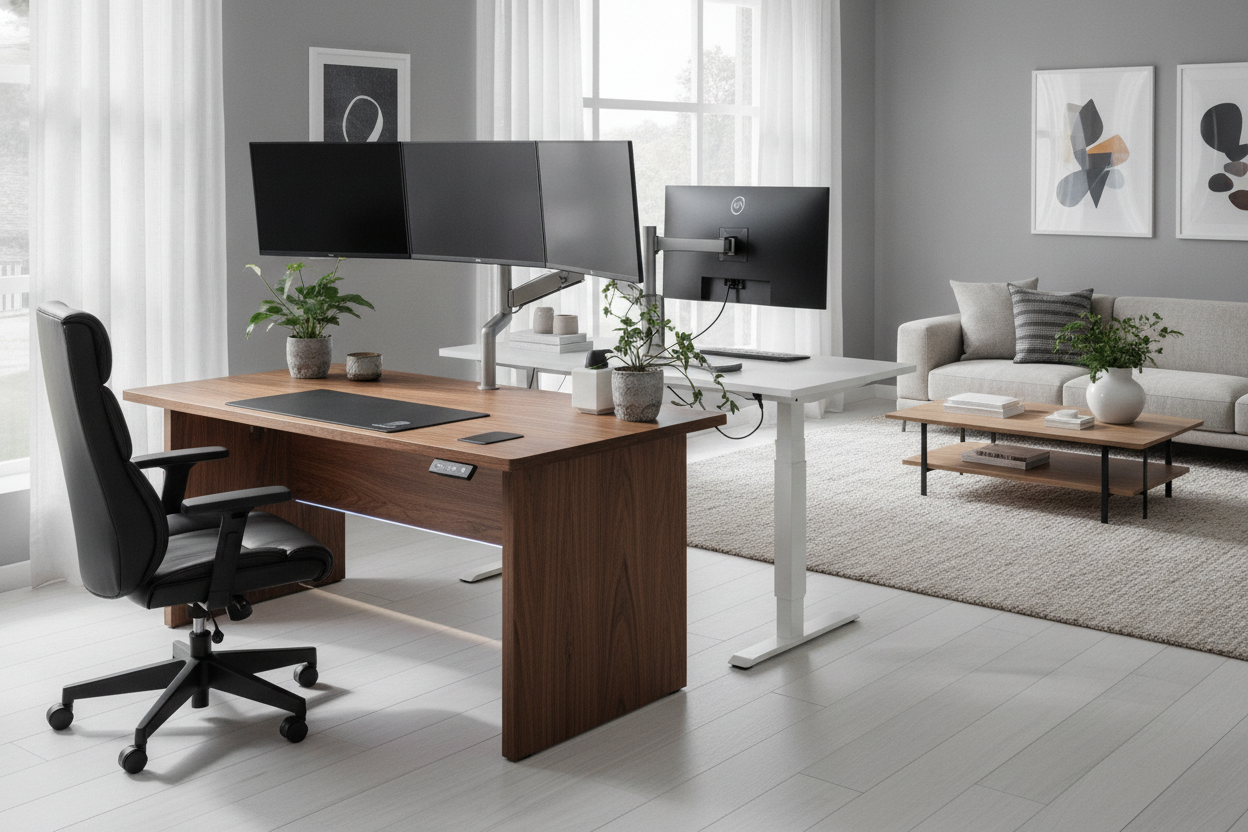
I remember my first budget standing desk. Every time I typed a slightly aggressive email, my dual monitors did a little bobblehead dance that made me feel seasick. I spent three months tightening bolts and shoving cardboard under the feet before I realized the truth: a cheap frame is just a vibrating tuning fork for your work day. If you are tired of your coffee rippling every time you move your mouse, it is time to talk about pro desks.
- Stability: Pro models use 3-stage legs and heavier steel to kill the 'wobble' at full height.
- Dual Motors: One motor per leg means more lift capacity and a significantly longer lifespan.
- Weight Limits: Expect a 275-350 lb capacity versus the 150 lb limit on entry-level models.
- Footprint: Pro setups are designed for triple monitors and heavy gear, often reaching 71 inches or more.
The 'Pro' Label is Mostly Just Marketing Fluff
Let's get one thing straight: the furniture industry loves a buzzword. I've seen 'Pro' slapped on desks that use the exact same flimsy 2-stage legs as the $150 specials you find on Amazon. They change the paint to 'Space Gray,' add a cheap cable tray, and suddenly they are asking for an extra $200. It is a racket.
You have to ignore the name on the box and look at the actual specs. If a desk is marketed as professional but only weighs 60 pounds total, it isn't pro. It's a card table with a motor. A real professional-grade frame is heavy. It uses 11-gauge steel. It feels like it could survive a move without the legs bending. If you see a brand charging a premium without listing the steel thickness or the motor manufacturer, keep walking.
I have built enough of these to know that the 'Pro' label is often just a way to justify a higher profit margin. Real quality is found in the weight of the shipping boxes and the length of the warranty. If a company won't back their 'Pro' desk for at least 5 to 10 years, they don't actually believe it's a professional tool.
What a Real Pro Standing Desk Actually Feels Like
The difference between a basic desk and a high-end setup is physics. When you raise a desk to 45 inches, the center of gravity shifts. On a cheap desk, the legs are thin and the overlap between the telescoping segments is minimal. This creates 'play' in the joints. Every time you touch the desk, that play translates into a wobble.
A Flexispot Pro 3 Stages dual motor frame solves this by using three telescoping sections instead of two. This provides more surface area overlap, which acts like a structural brace. When I use a desk like this, I can hammer away at my mechanical keyboard and my monitors stay dead still. It is a level of rigidity you just can't get from a $200 budget buy.
Then there's the 'thud' factor. When you set a heavy coffee mug down on a pro-grade desktop, it feels solid. There is no hollow ring or vibration. This is usually because pro models use thicker MDF or solid wood tops that weigh 50 pounds on their own. That mass is your friend; it dampens vibration and makes the entire workspace feel like an anchor rather than a temporary workstation.
The Dual-Motor Difference (And Why You Need It)
Single-motor desks are the Achilles' heel of the home office world. They use a single motor to drive one leg, while a hex rod transfers that power to the other side. Over time, that rod slips, the legs get out of sync, and you end up with a lopsided desk that grinds as it moves. It is a mechanical nightmare waiting to happen.
A high-end electric lift system with memory presets uses a dedicated motor in each leg. This allows for a much higher weight capacity—perfect if you have a heavy PC tower or multiple studio monitors. The transition is smoother, quieter, and faster. You aren't sitting there for 20 seconds waiting for the desk to crawl to your standing height.
More importantly, dual motors are built for duty cycles. Cheap motors overheat if you move them twice in ten minutes. Pro motors are designed to be moved all day long. If you are someone who actually switches from sitting to standing every hour, the dual-motor setup isn't a luxury; it's a requirement for the desk to last more than a year.
Do You Actually Need a Massive 71-Inch Workspace?
Most 'pro' models default to a massive footprint. A 71-inch height adjustable standing desk is the gold standard for power users, but it's a lot of furniture. I have one in my current office, and it's basically a landing strip. I can fit two 27-inch monitors, a laptop on a stand, a large Wacom tablet, and still have room for a notebook and a cat.
However, you need to measure your room before you fall in love with the size. These desks don't just take up wall space; they dominate the visual field of a room. If you are working out of a bedroom or a small apartment, a 71-inch desk can make the space feel cramped and claustrophobic. Don't buy more desk than your floor plan can handle just because it looks cool in a YouTube setup tour.
There is also the assembly factor. Moving a 71-inch desktop up a flight of stairs is a two-person job, minimum. Most of these tops are solid, heavy, and awkward to maneuver. If you live alone in a third-floor walk-up, consider whether you'd rather have the extra 10 inches of workspace or a desk you can actually get through your front door without a chiropractor on speed dial.
The Final Verdict: When the Splurge Makes Sense
If you spend eight to ten hours a day at your desk, the 'pro' upgrade is a no-brainer. For engineers, video editors, and heavy typists, the stability alone is worth the price of admission. You are paying for the peace of mind that your expensive equipment isn't sitting on a shaky foundation. If you have more than $2,000 worth of gear on your desk, why would you trust it to a $150 frame?
That said, if you just use your desk for an hour of gaming or checking emails on a laptop, a pro setup is overkill. You are paying for weight capacity and motor durability you will never use. But for the rest of us, upgrading to a standing desk pro is the single best investment you can make for your productivity and your sanity.
Personal Experience: My 'Budget' Disaster
I once bought a single-motor desk because I wanted to save $150. I thought, 'How much different can it really be?' Six months later, the hex rod stripped. The left side of the desk stayed at 42 inches while the right side dropped to 30. I had to catch my monitor before it slid off. I ended up spending more money on the replacement than I would have if I just bought the pro model in the first place. Lesson learned: buy once, cry once.
FAQ
Do pro desks use more electricity?
Not really. The motors only draw significant power when they are actually moving. When idle, the control box uses a negligible amount of 'vampire' power, similar to a microwave clock.
Are they harder to assemble?
The instructions are usually the same, but the components are much heavier. You might need a second person to help flip the desk over once the legs are attached, especially with 71-inch models.
Can I use my own desktop with a pro frame?
Yes, most pro-grade frames are width-adjustable. You can buy the frame separately and bolt it to a solid wood slab or an old dining table top, provided the material is thick enough to hold the screws.

Leave a comment
This site is protected by hCaptcha and the hCaptcha Privacy Policy and Terms of Service apply.