





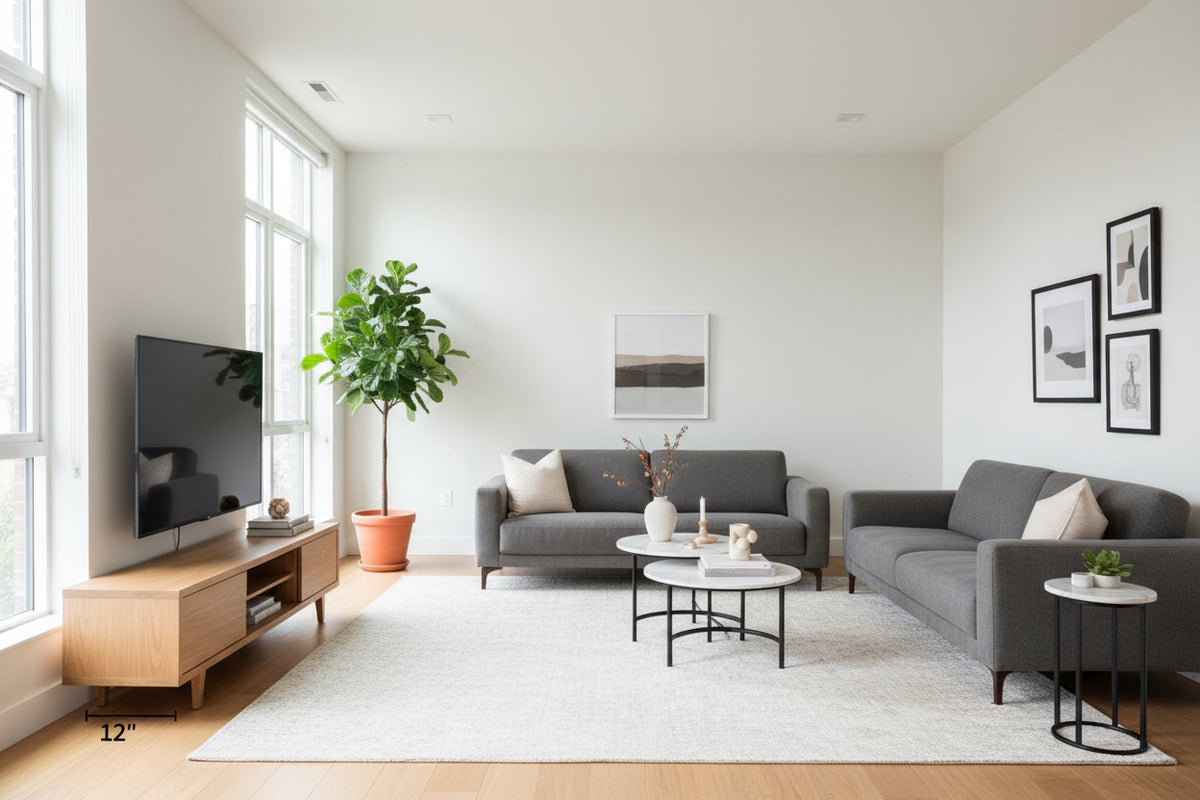
A 12 inch deep TV stand works when the TV hangs on the wall above it, or when the TV's own feet or pedestal fit on a 12-inch top, which you can check in the "set with stand" depth on your TV's spec sheet. In return it gives back floor: 4 inches of walkway compared with a 16-inch stand, 6 inches compared with an 18-inch stand, and a full 12 inches only compared with a 24-inch piece.
Shallow stands suit narrow living rooms, the foot of a bed and pass-through spaces. The catch is what goes inside: streaming boxes and soundbars fit easily, game consoles only just, and a full-size AV receiver may not fit at all. Below: the walkway math, what fits, ventilation, cables, floating stands and tip-over safety, with five picks from the FUFU&GAGA living room collection.
Key takeaways
- Depth saved: a 12-inch stand frees 4 inches against a 16-inch stand, 6 inches against 18 inches and 12 inches against 24 inches.
- TV on top: measure the depth of your TV's feet or pedestal. A 65-inch Samsung Q60D, for example, is 10.8 inches deep on its stand, so it fits a 12-inch top with about an inch to spare.
- Inside: streaming boxes, an Xbox Series X and a slim soundbar fit; a PS5 is tight once you leave Sony's recommended gap to the wall; a 13.3-inch-deep AV receiver such as Denon's AVR-X1300W is too deep.
- Safety: anchor the stand and TV, or wall-mount the TV; fix floating stands into studs.
What is a 12 inch deep TV stand, and when does it work?
A 12 inch deep TV stand (or 12 inch deep media console) measures about 12 inches front to back; listings from about 11 to 13 inches serve the same purpose. It works best in three setups:
- Wall-mounted TV above a shallow console. The stand holds only a soundbar, a streaming box and decor. This is the most forgiving setup.
- TV on its own feet. The feet must fit the stand's depth and width, and the TV's weight must be within its capacity.
- A floating (wall-mounted) stand. The cabinet hangs on the wall, the floor stays open, and the TV usually mounts above it.
A "12 inch wide TV stand" usually means this front-to-back depth; a stand 12 inches wide side to side would only suit a very small screen.
How much walkway does a 12 inch deep TV stand give back?
The gain is the difference in depth. A whole foot of extra walkway only happens when you replace a 24-inch-deep piece; against 16- or 18-inch consoles the gain is smaller, but it can still decide whether a path feels comfortable.
| Replacing a stand this deep | Space gained with a 12-inch stand | Path left if the TV wall is 48 in from the coffee table |
|---|---|---|
| 24 in | 12 in | 36 in (vs 24 in before) |
| 18 in | 6 in | 36 in (vs 30 in before) |
| 16 in | 4 in | 36 in (vs 32 in before) |
| 15.7 in | 3.7 in | 36 in (vs 32.3 in before) |
Why 36 inches? It is the minimum continuous clear width of an accessible route in the ADA Standards, which may narrow to 32 inches at points such as doorways for no more than 24 inches of length, according to the U.S. Access Board's guide to accessible routes. Homes don't have to meet it, but it is a useful published benchmark. A 16-inch stand in the example leaves 32 inches along the whole console, narrower than that benchmark allows beyond 24 inches; a 12-inch stand gets you back to 36.
For your room: measure from the wall to the nearest obstacle (coffee table, sofa arm or bed corner) and subtract the stand's depth.
Will my TV fit on a 12 inch deep stand?
Check two numbers on your TV's spec sheet: the depth "with stand" and the stand footprint. The feet, not the panel, decide whether it fits. Samsung's spec page puts its 65-inch Q60D at about 57.1 inches wide and 10.8 inches deep with its stand (1450.9 x 274.0 mm), with a stand footprint of about 42.4 x 10.8 inches and about 47.0 lb with stand (Samsung). On an 11.8-inch-deep top that leaves 1 inch of spare depth (11.8 - 10.8); on 11.2 inches, 0.4 inch.
So: the feet must sit fully on the top with no overhang, the feet must be narrower than the stand, and the TV plus everything else must stay under the weight capacity (a 47 lb TV on a stand rated for 55 lb leaves 8 lb for the rest).
A shallow top leaves no room in front of the feet: 10.8 inches of feet plus Sonos's recommended 2-inch gap plus a 3.94-inch-deep soundbar comes to 16.7 inches. Wall-mounting the TV solves this and is the steadiest way to use a shallow stand.
What fits inside a shallow media console?
Small streaming and gaming gear is well within 12 inches; amplifiers and receivers often aren't. These depths come from the manufacturers' own pages:
| Device | Depth | On or in a 12-inch stand? |
|---|---|---|
| Apple TV 4K | 3.67 in | Fits easily |
| Sonos Beam (Gen 2) soundbar | 3.94 in | Fits, at the front of a shelf |
| Xbox Series X | 15.1 x 15.1 x 30.1 cm (about 5.9 in deep lying flat, long side across) | Fits on top or on an open shelf |
| PS5 (2023 model) | 216 mm (about 8.5 in) | Fits, but see the ventilation gap below |
| PS5 (launch Digital Edition) | 260 mm (about 10.2 in) | Very tight |
| Denon AVR-X1300W AV receiver | 13.3 in | Too deep |
Sources: Apple, Sonos, Xbox, PlayStation Blog, the PS5 Digital Edition safety guide and Denon. Inside depth is less than overall depth, and plugs and HDMI cables add depth behind each device.
If you run a receiver, a 13.3-inch unit overhangs a 12-inch top before you add a cable: look at the 15.7-inch option below or a separate, deeper cabinet.
Ventilation: why a game console needs more than its own depth
Sony's PS5 safety guide says not to block any vents, to place the console at least 10 cm (about 3.9 inches) from a wall surface, and not to place it in a narrow or cramped space. Do the math for a 12-inch stand against the wall: a launch PS5 at 10.2 inches deep leaves only about 1.8 inches behind it, and even the 8.5-inch 2023 model leaves about 3.5 inches. Both fall short of 3.9 inches, so keep a PS5 on top or in an open bay at the front edge, never shut in a drawer.
Sonos asks for at least 2 inches of clearance on both sides of a Beam on a shelf. Read each device's placement section; the numbers differ by product.
Cable routing behind a shallow or floating stand
A 12-inch stand tight to the wall leaves little room for plugs. A few habits help:
- With a wall-mounted TV over a floating stand, run cords down the wall inside a paintable cord cover to a hole or notch at the back of the stand.
- Moving an outlet or running power inside the wall behind the TV is electrical work. Hire a licensed electrician for it.
- LED strips that plug in need an outlet nearby.
If the stand won't sit on a wall at all, for example in an open-plan room, our guide to putting a TV in the middle of a room covers floor cords and stable stands.
Floating TV stands: fixing them into studs
A floating stand hangs its whole load on the screws in the wall, so what it is screwed into matters most. This Old House says drilling directly into a wall stud is one of the best ways to hang something heavy over drywall, that studs are usually 16 inches on center in older houses and 24 inches in some newer ones, and that drywall alone holds only about 5 to 10 pounds on a simple nail (This Old House). Its guidance is that any anchor you use should be rated for four times the weight you hang.
- Mark the studs first; a long stand should catch several.
- For plaster, brick, concrete, metal studs, or a wall with wiring or pipes where the screws need to go, hire a handyman or contractor.
- Mount the stand at a height that leaves the TV's center comfortable to watch; our guide to mounting a TV in the corner covers mount types and finding studs in more detail.
Is a 12 inch deep TV stand stable? Tip-over safety
A shallow floor stand has a narrow base, so a TV on top is easier to tip forward than on a deep console. The U.S. Consumer Product Safety Commission estimates an average of 17,800 tip-over injuries a year treated in emergency departments (2020 to 2022), and counted 217 tip-over deaths from 2013 to mid-2023, most involving TVs and furniture; 71% of those killed were children aged one to three (CPSC).
CPSC's Anchor It guidance says to place TVs only on furniture designed to hold a TV, to mount flat-screen TVs to the wall or to furniture, and to anchor TVs that are not wall mounted. Where anchoring isn't possible, CPSC advises setting the TV on a stable, low base and sliding it toward the back. On a 12-inch stand that means:
- Anchor the stand, even a low one; buy a kit if the listing says none is included. Our anchoring guide shows the steps.
- Strap the TV to the wall or the stand, or wall-mount it.
12 inch deep TV stand buying checklist
- Measure the walkway: wall to the nearest obstacle, minus stand depth, ideally 36 inches or more.
- TV on the stand: its "with stand" depth and feet width must be under the stand's depth and width.
- Add up the TV, soundbar and devices and keep the total under the stand's weight capacity.
- List every device's depth; anything over about 10 inches needs a deeper stand or an open shelf.
- Check vent gaps in each device's manual, such as the 10 cm Sony gives for the PS5.
- Plan cords: an outlet nearby and a path through or behind the stand.
- Floating stand: confirm studs or a suitable anchor for your wall, and the tools the listing calls for.
- Floor stand: plan an anti-tip kit if the listing says none is included.
Our picks: shallow TV stands from 11.2 to 15.7 inches deep
Dimensions and features come from each listing; depth is overall depth.
94.5" Black Wall-Mounted TV Stand with LED (11.2" deep)
The shallowest pick, at 94.5" W x 11.2" D x 5.9" H. It comes as two separate wall-mounted cabinets, 63 and 31.6 inches wide, that you can install in a straight line, offset or tiered. The listing gives TVs up to 88 inches, 150 lb, five push-to-open drawers, three-color LED lighting and an included tipover restraint. Against an 18-inch console it gives back 6.8 inches of floor (18 - 11.2).
Mounting: wall-mounted; the listing says wall mounting is required.
Best for: a long wall with the TV mounted above, where you want the lowest, slimmest line.
Skip it if: you want to sit the TV on its own feet. At 5.9 inches tall the drawers suit remotes and cables, not consoles, and installing it calls for a power drill, Allen wrench, hammer and pliers.

110" Floating High Gloss TV Stand with LED (11.8" deep)
A single 110" W x 11.8" D x 9.4" H floating console in high-gloss black, listed for TVs up to 88 inches and a 150 lb weight capacity. Handle-free drawers on metal slides hide media and gaming gear, and plug-in LED lights have three color temperature modes. The listing says all tools are included.
Mounting: wall-mounted (floating); the listing says it installs on the wall.
Best for: a large TV wall where you want one long, symmetrical shelf with the floor clear underneath.
Skip it if: your wall is under about 110 inches wide, or there's no outlet nearby for the LEDs. The listing says no tipover restraint is included, so follow its wall-mounting steps closely.

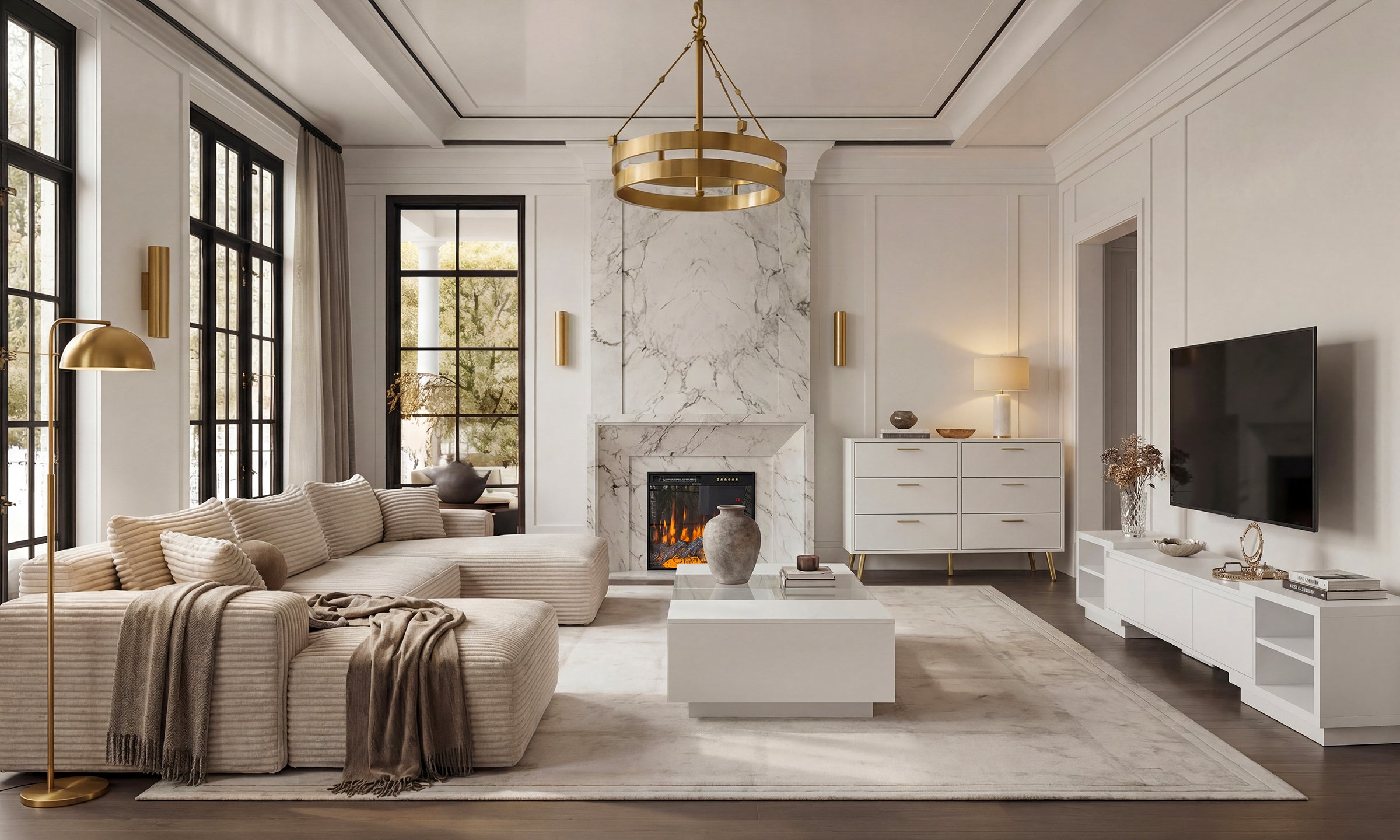
55" White Electric Fireplace TV Stand (11.8" deep)
A floor-standing option at 31.5" H x 55.3" W x 11.8" D, with cabinets on both sides of a center fireplace that the listing describes as a three-sided glass electric fireplace. The listing gives a 226 lb weight capacity for the top, a 1500W heater with high and low settings, a thermostat, a remote and a timer, and 12 flame colors. Its fireplace opening is 29.9 inches wide. A TV whose feet are under 11.8 inches deep, like the Samsung example above, fits on top with about an inch to spare.
Mounting: stands on the floor; the listing calls it freestanding.
Best for: a narrow living room or bedroom that wants a fireplace look in under a foot of depth.
Skip it if: you planned to set the TV straight over the heater: the listing says heated air vents at the top. Check your TV manual's advice on heat sources, or mount the TV on the wall higher up. It doesn't list a maximum TV size or a tipover restraint, so plan to anchor it.

63" Floating TV Stand with LED Lights and 3 Drawers (13.8" deep)
A compact 63" W x 13.8" D x 9.8" H wall-mounted console in white or black, listed for TVs up to 70 inches with a 55 lb weight capacity. Three drawers have safety stops, LED strips switch between warm and cool light by remote, and the listing says a tipover restraint and screws are included. It is about 2 inches deeper than a true 12-inch stand, but still 4.2 inches shallower than an 18-inch console.
Mounting: wall-mounted; the listing says it does not sit on the floor.
Best for: a smaller wall or bedroom where a 94- or 110-inch run is too long.
Skip it if: your TV, soundbar and devices together would exceed 55 lb, or you need every inch of walkway; the two picks above are 2 to 2.6 inches shallower.
106.3" Wide TV Stand with Adjustable Width (15.7" deep, a little deeper)
The pick for anyone who needs a receiver or a PS5 with breathing room. At 106.3" W x 15.7" D x 15.4" H on 2.4-inch legs, it is listed for TVs up to 85 inches with a 300 lb weight capacity, three drawers and two shelves, in black or white, and its width can be adjusted. It costs 3.7 inches of walkway against a 12-inch stand, but a 13.3-inch receiver fits on it with about 2.4 inches behind (15.7 - 13.3), and a launch PS5 at the front edge sits about 5.5 inches from the wall, more than Sony's 10 cm.
Mounting: stands on the floor on legs.
Best for: a large TV standing on its own feet, plus a receiver or console, where you still want something shallower than an 18-inch console.
Skip it if: your wall can't take about 106 inches; the listing doesn't give a minimum width for the adjustable design. It also says no tipover restraint is included, so buy an anti-tip kit.
Compare the picks
| Stand | W x D x H | Floor or wall | Max TV / capacity | Best for |
|---|---|---|---|---|
| 94.5" wall-mounted with LED | 94.5 x 11.2 x 5.9 in | Wall | 88 in / 150 lb | Slimmest line, TV on the wall |
| 110" floating high gloss | 110 x 11.8 x 9.4 in | Wall | 88 in / 150 lb | Long TV wall |
| 55" white fireplace stand | 55.3 x 11.8 x 31.5 in | Floor | Not listed / 226 lb | Fireplace look, narrow room |
| 63" floating with 3 drawers | 63 x 13.8 x 9.8 in | Wall | 70 in / 55 lb | Smaller wall or bedroom |
| 106.3" adjustable width | 106.3 x 15.7 x 15.4 in | Floor | 85 in / 300 lb | Receiver, console, TV on feet |
If the stand will sit at the foot of a bed, a TV lift cabinet hides the screen when it's off, though the 50.4-inch lift stands in our range are 15.7 inches deep; our TV lift cabinet guide explains how to size one. For more consoles, cabinets and seating, browse the living room collection.
FAQ
Is 12 inches deep enough for a TV stand?
Yes, if the TV is wall-mounted above it or the TV's feet are less than 12 inches deep. Check the "with stand" depth on the TV's spec sheet; a 65-inch Samsung Q60D, for example, measures 10.8 inches. It is not deep enough for many full-size AV receivers; Denon's AVR-X1300W, for example, is 13.3 inches deep.
Can I put a 65 inch TV on a 12 inch deep stand?
Often, yes, if the feet fit the stand's depth and width and the TV is within its weight capacity. Anchor both to the wall. If the feet are deeper than the stand, wall-mount the TV.
Will a soundbar fit on a 12 inch deep media console?
Usually. A Sonos Beam (Gen 2) is 3.94 inches deep. It won't fit in front of a TV on 10.8-inch-deep feet on the same 12-inch top, so mount the TV or the soundbar on the wall.
Does a floating TV stand have to go into studs?
Fixing into studs is the safest choice on drywall, because drywall alone holds very little. If studs don't line up with the mounting points, use anchors rated well above the loaded weight and follow the stand's manual. For plaster, masonry or wiring in the wall, hire a professional.


Leave a comment
This site is protected by hCaptcha and the hCaptcha Privacy Policy and Terms of Service apply.