

















Evaluating Mobile Workstations for Compact Living
Urban apartments, shared home offices, and multi-use living rooms increasingly demand furniture that can adapt to changing activities throughout the day. Shoppers searching for a walmart rolling computer desk or general mobile workstations frequently prioritize agility and space efficiency. A portable desk allows a laptop, monitor, and peripherals to migrate from a bedroom corner to a sunlit living area or tuck neatly beside a bookshelf when the workday ends. Whether examining utility carts or consulting an analytical rolling desk guide for multi-functional spaces, understanding how mobility alters daily room flow is the first step toward choosing the right piece.
Unlike traditional executive desks that anchor an entire wall, mobile desks rely on compact engineering to balance equipment capacity against physical footprint. The priority shifts from expansive surface area to vertical organization and effortless transit. Selecting an effective model involves analyzing spatial ratios, caster hardware, lower shelf clearances, and frame materials to ensure the unit remains stable during active typing while still gliding smoothly when repositioned.
Footprint and Tier Dimensions: Finding the Right Spatial Proportion
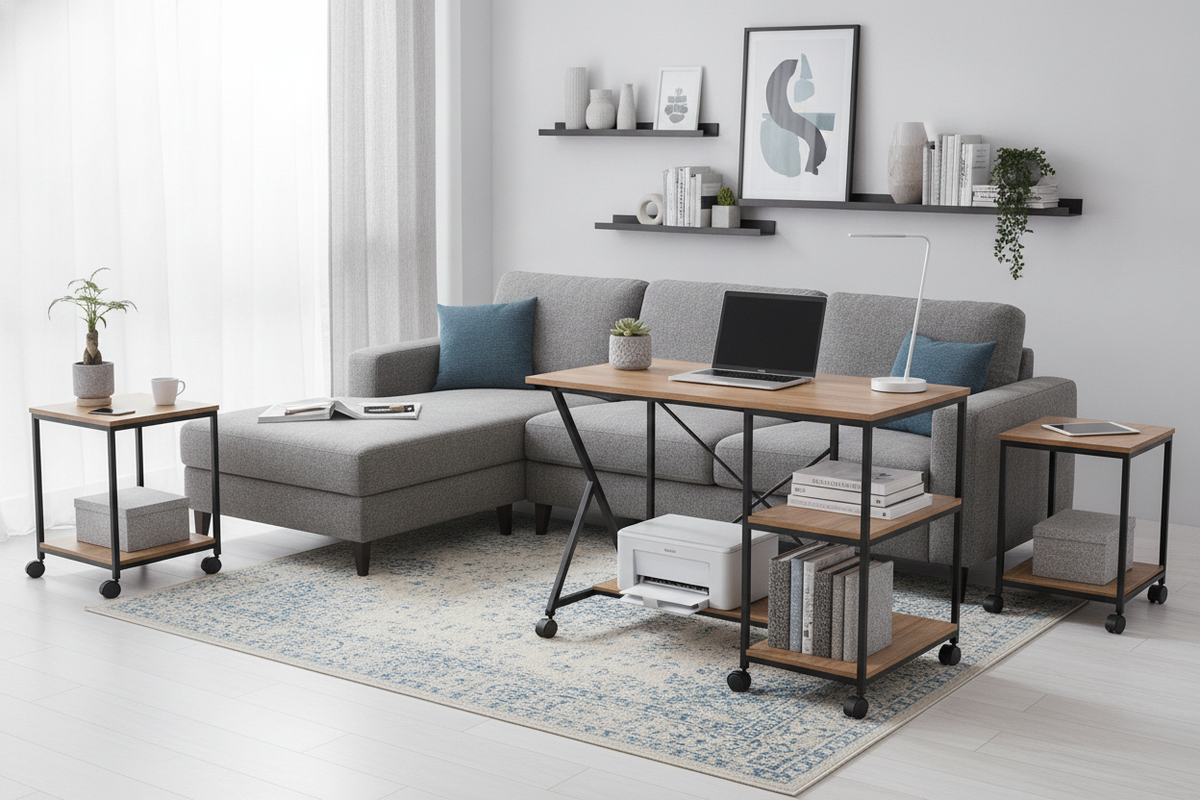
The defining structural trait of a compact rolling workstation is its vertical design hierarchy. When surface width is restricted to maintain easy maneuvering through doorways and hallway corners, storage must expand upward and downward. Tiered platforms typically divide the station into distinct functional zones: a primary surface for a laptop or screen, an elevated riser for eye-level viewing, an under-desk slide-out keyboard tray, and a lower base platform for tower hardware or printing equipment.
When comparing mobile options within a comprehensive computer desk collection, evaluating proportional clearances is vital. If a model features an integrated monitor riser, check whether the clearance beneath accommodates your preferred screen base without forcing your neck into an awkward tilt. Similarly, slide-out keyboard platforms must provide sufficient travel distance so wrists do not crowd against the front lip of the primary surface. Vertically stacked desks conserve horizontal floor area, but they require users to carefully measure the height profile against windowsill heights, wall outlets, and existing seated postures.
Caster Mechanics and Base Stability Across Different Flooring
Mobility is only as dependable as the wheel assemblies anchored beneath the desk frame. Rolling workstations typically incorporate dual-wheel or single-wheel casters, often constructed from molded nylon, hard plastic, or polyurethane-coated composites. The choice of wheel material directly impacts how effortlessly a desk navigates transitions between hard flooring and low-pile carpets.
- Hard Surfaces: Smooth vinyl, tile, and hardwood floors require softer wheel treads or non-marking coatings to prevent scuffing and reduce rolling noise during transit.
- Carpeted Floors: Low-pile carpets and area rugs create rotational resistance. Broader wheel diameters generally roll over fiber piles more smoothly than miniature wheels, which can catch or drag.
- Locking Mechanisms: A minimum of two locking wheel assemblies is essential for stationary stability. Locking tabs should firmly restrict wheel rotation and swivel action so the desk remains immobile under wrist pressure and keystroke vibrations.
A mobile desk with an overly narrow base can become top-heavy when loaded with hardware. Choosing a model with outrigger legs or a widened wheel track helps disperse center-of-gravity forces, mitigating side-to-side wobble during relocation.
Storage Architecture: Multi-Tier Shelving vs. Under-Desk Leg Clearance
One of the most persistent design tensions in compact mobile desks is the compromise between peripheral storage and seated ergonomics. Manufacturers frequently position a wide bottom shelf across the lower frame to hold desktop towers, reams of paper, or power strips. While this provides practical equipment consolidation, it can significantly limit leg extension.
When sitting for extended work sessions, ergonomic comfort relies on having clear space to extend knees and stretch legs beneath the worktop. If a low shelf extends entirely forward into the seated footwell, it forces the user to sit with bent knees or angle their feet awkwardly to the sides. For greater seating flexibility, look for designs that stagger the bottom shelf toward the rear or utilize a half-width platform, leaving dedicated legroom on one side while maintaining storage utility on the other.
Materials and Frame Rigidity: Engineered Surfaces and Metal Support
Frequent movement places mechanical stress on frame fasteners, welding joints, and shelf substrates. Most rolling workstations employ tubular steel or extruded aluminum framing paired with laminated particleboard or medium-density fiberboard (MDF) worktops. The gauge of the metal tubing and the presence of cross-bracing determine whether the desk feels solid or flexes under lateral pressure.
Diagonal support struts or an X-frame back brace dramatically improve horizontal rigidity, reducing the sway that often plagues single-column mobile pedestals. Comparing lightweight metal-and-laminate options against a solid wooden desk computer product highlights the intrinsic trade-off between structural mass and swift maneuverability. While heavier wood frames absorb micro-vibrations better, lighter powder-coated metal builds remain far easier to steer around corners and between rooms without physical strain.
Mobile Carts vs. Dedicated Stationary Desks: Choosing for Your Routine
Determining whether a mobile workstation fits your routine depends heavily on how you balance mobility against daily work equipment. If your workflow revolves around a single laptop, a tablet, and minimal stationary supplies, a rolling desk provides exceptional flexibility, allowing you to reconfigure your living space at a moment's notice.
However, if your daily tasks require multiple widescreen displays, reference binders, drawing tablets, or extensive desktop hardware, the modest footprint of a rolling unit may feel restrictive. In such scenarios, stepping up to a dedicated computer desk product with fixed corner wings or integrated drawer pedestals offers substantially more work surface and heavier load capability. For many small-space dwellers, the ideal solution involves pairing a stationary anchor desk in a quiet room with a secondary rolling cart that serves as a mobile hub for shared tasks.
Assembly, Cable Routing, and Daily Workspace Maintenance
Setting up and maintaining a rolling computer desk requires proactive planning for moving parts and trailing wires. Because the desk moves, standard stationary cord organization techniques can lead to snagged lines or disconnected hardware.
- Mount Power Centrally: Fasten a surge protector or multi-outlet power strip directly beneath the main desktop or on the lower equipment tier. This allows all computer peripherals to plug into the moving unit, requiring only one master cord to tether to the wall.
- Leave Cord Slack: Ensure the master power cable has adequate slack so small desk adjustments do not pull abruptly on wall receptacles.
- Periodic Fastener Tightening: Regular movement over floor thresholds can gradually loosen bolt connections. Check caster thread stems and frame bolts periodically to keep the structure rigid and safe.
- Caster Cleanliness: Keep wheels free from accumulated hair, lint, and floor debris to maintain smooth swiveling action and protect your floor surfaces.

Leave a comment
This site is protected by hCaptcha and the hCaptcha Privacy Policy and Terms of Service apply.