

















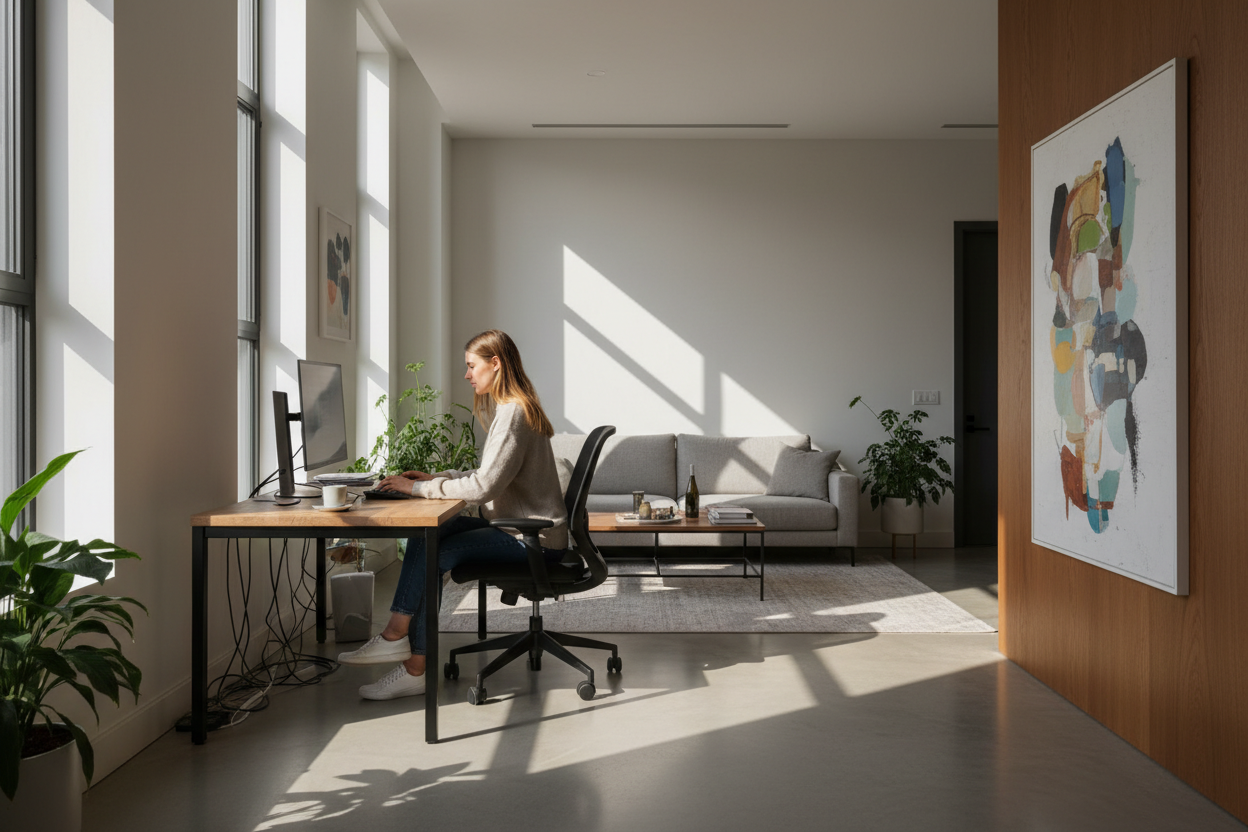
The dining table was never meant to be a permanent desk, yet for many, it became the default command center. As a designer, I see clients struggle daily to balance domestic comfort with professional rigidity. The challenge isn't just buying a desk; it's curating a working home office that respects the architecture of your home while signaling to your brain that it is time to focus. If you are currently working in a home office that feels temporary or chaotic, it is likely a failure of zoning and materiality, not just a lack of square footage.
Key Design Pillars for a Functional Workspace
- Ergonomics First: Prioritize seating with adjustable lumbar support and seat depth over purely aesthetic accent chairs.
- Lighting Layers: Combine ambient overhead light with focused task lighting to reduce eye strain for the home office worker.
- Material Durability: Choose work surfaces (HPL, solid wood, or linoleum) that resist heat from electronics and coffee spills.
- Acoustic Control: Incorporate soft furnishings like rugs or drapery to dampen echo during calls.
Zoning: Defining the Home Office Workplace
One of the most frequent errors in offices working from home is poor orientation. Placing a desk directly against a wall might save space, but it is visually fatiguing. In design terms, we call this the "cubicle effect." Instead, position your desk perpendicular to a window or floating in the center of the room (the "executive command" position). This allows natural light to wash over your workspace without creating direct glare on your monitor, a common complaint for any person working from home.
Materiality and Texture
When selecting furniture for a wfh office, tactile experience is paramount. A glass desk looks sleek but feels cold on the forearms and shows every fingerprint. Solid walnut or oak adds warmth and gravitas, grounding the space. If you are working for home office purposes daily, consider a desktop with a linoleum finish—it provides a soft, matte writing surface that is incredibly forgiving and hides dust better than high-gloss lacquers.
The Seating Silhouette
The chair is the anchor of the room. While we want a piece that complements the home's decor, a standard dining chair will lead to fatigue. Look for a chair with a high-performance mesh or fabric back that offers breathability. Aesthetically, try to match the chair's base metal (chrome, matte black, or brass) with other hardware in the room to maintain visual continuity in your home office working environment.
Lighting: More Than Just a Lamp
Lighting dictates the mood. A single overhead fixture creates harsh shadows that make you look tired on video calls. For a professional home office remote work setup, you need a 'key light' approach. Place a task lamp with a warm temperature (2700K-3000K) to your side. This illuminates your work surface without washing out your face. If space permits, a floor lamp in the corner adds ambient glow, softening the contrast between your screen and the room.
Lessons from My Own Projects
I learned a hard lesson about texture early in my career while designing my own studio. I fell in love with a gorgeous, rough-hewn reclaimed wood desk. It was a stunning focal point. However, three days into using it, I realized I couldn't write on a single piece of paper without the pen punching through due to the uneven grain. I also hadn't accounted for the 'cable spaghetti.'
I ended up having to have a custom piece of tempered glass cut to sit on top, which ruined the matte aesthetic I wanted. Now, when I advise a client on a working home office, I always check the underside of the desk first. If there isn't a dedicated channel or modesty panel to hide the wires, I know the beautiful minimalist look will be ruined the moment we plug in a monitor. It is those unpolished details—the wire management and the surface texture—that determine if you love or hate the room three months later.
Conclusion
Transforming a spare corner into a high-functioning workspace requires looking beyond the catalogue photos. It requires understanding how light, texture, and layout influence your energy levels. Invest in pieces that support your body and layout choices that support your mind.
Frequently Asked Questions
How much space do I really need for a functional setup?
You don't need a massive room. A functional workspace requires a minimum depth of 60 inches (30 for the desk, 30 for the chair push-back). Focus on vertical storage to maximize the footprint.
What is the best desk depth for a multi-monitor setup?
If you use dual monitors, aim for a desk depth of at least 30 inches. Shallow desks (24 inches or less) place the screens too close to your eyes, causing strain over long periods.
How do I hide cables in a floating desk layout?
If your desk floats in the room, run cables down a singular leg using magnetic cable spines or Velcro sleeves that match the leg color. Use a floor outlet if available, or a flat-profile extension cord under a rug to reach the wall safely.

Leave a comment
This site is protected by hCaptcha and the hCaptcha Privacy Policy and Terms of Service apply.