

















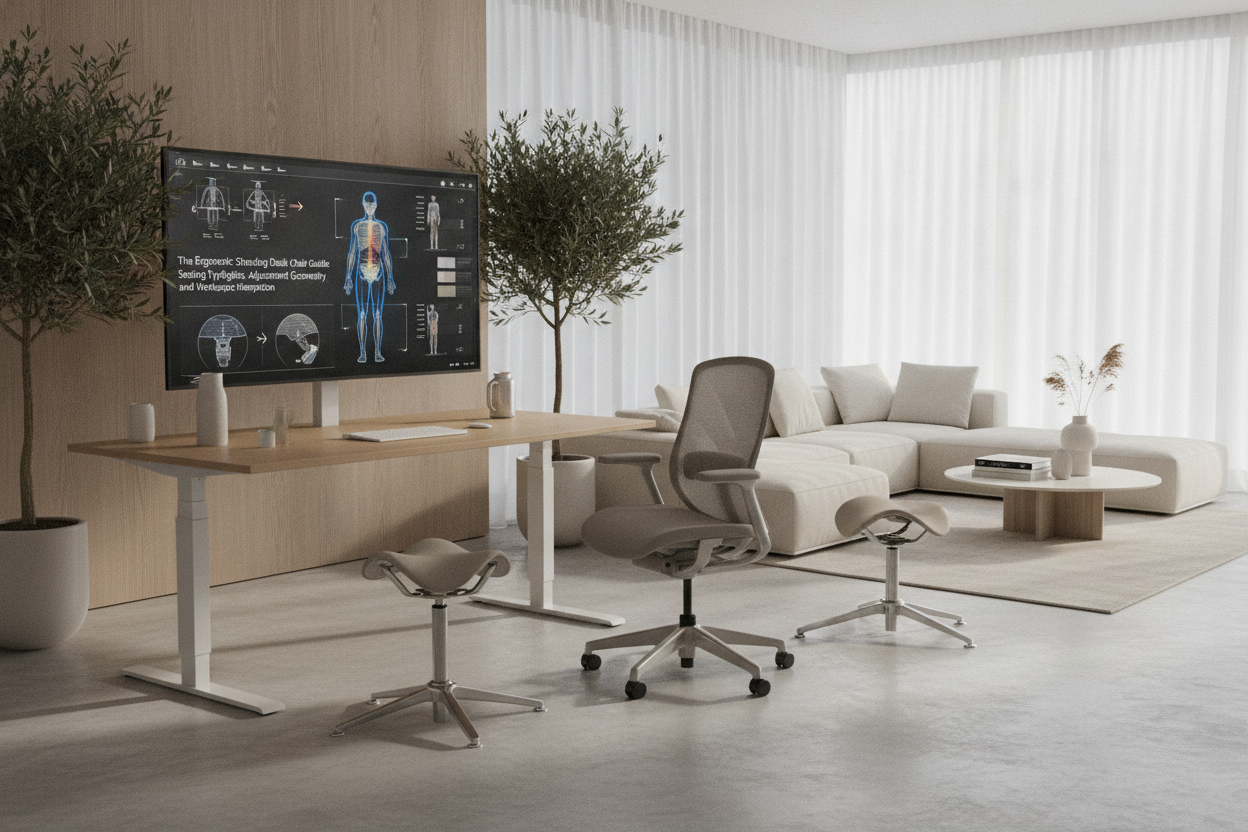
Understanding Elevated Seating: Why Standard Office Chairs Fall Short at Standing Desks
Standard task chairs are engineered for fixed-height work surfaces. When paired with height-adjustable workstations, conventional chairs restrict the user to a binary routine: fully seated or fully standing. Lowering a motorized workstation down to conventional desk height for every seating session creates unnecessary friction during quick transitions. For those exploring fixed-height surfaces in a computer desk collection, a standard chair suffices, but dynamic sit-stand environments call for dedicated elevated seating.
Ergonomic standing desk chairs bridge this gap by offering extended vertical travel and supportive geometries. Elevated seating relieves lower-body fatigue while preserving a semi-upright posture. Instead of collapsing into a static seated slump, the user maintains an open hip angle, which encourages engagement of core stabilizing muscles and makes returning to a full standing stance practically effortless.
Four Primary Typologies of Standing Desk Chairs and Stools
Choosing the best seating solution depends on how much support, mobility, and compact footprint your office layout demands. Four primary design categories dominate modern elevated workspaces.
Tall Drafting Task Chairs with Extended Gas Cylinders
Drafting-style task chairs resemble traditional ergonomic office chairs but incorporate extended pneumatic cylinders and reinforced foot rings. They provide full backrests, adjustable lumbar support, tilt mechanisms, and armrests. These tall task chairs are well suited for users who require comprehensive upper-body support during extended elevated work sessions, though their wider five-star wheel bases require adequate floor space.
Active Leaning Perches and Half-Standing Stools
Leaning perches feature an angled seat pan mounted on a compact, non-slip base. Rather than bearing full body weight, a perch supports the pelvis while the feet remain planted firmly on the floor. This half-standing position distributes weight between the lower limbs and the seat, keeping the spine naturally balanced. In compact spaces or dedicated workstation setups—such as those detailed in this computer desk office guide—the minimal footprint of a leaning stool stores neatly out of the way.
Saddle Stools and Pelvic Alignment Seats
Saddle seats draw inspiration from equestrian design, positioning the thighs downward and outward. This posture naturally rotates the pelvis forward, helping maintain the natural inward curve of the lower back without requiring a bulky backrest. Saddle chairs are popular in creative studios and active technical workspaces where unrestricted arm and torso movement is essential.
Dynamic Wobble Stools and Motion-Based Bases
Dynamic balance stools feature weighted, rounded, or articulating bases that allow multi-directional tilting. As you work at an elevated desk, the stool responds to subtle body shifts. This active engagement prevents joint stiffness and encourages continuous micro-movements throughout the workday.
Critical Adjustment Geometry: Height Ranges, Foot Rings, and Lumbar Alignment
Achieving proper ergonomics with elevated seating requires balancing three critical elements: seat elevation, lower limb support, and desk clearance.
- Seat Height: When using a tall drafting chair, adjust the cylinder so your elbows rest naturally at a relaxed angle relative to the keyboard deck. When using a leaning perch, set the height slightly below hip level so your legs remain extended at a gentle forward angle.
- Foot Support: For drafting task chairs, position the integrated foot ring so your knees rest at a level, supported angle without excess pressure on the underside of your thighs. For leaning stools, keep your feet planted flat on the floor or an angled anti-fatigue footrest.
- Workstation Pairing: Pairing your seat with a programmable surface, such as an adjustable height standing product, enables you to save dedicated height presets for standing, perching, and elevated sitting without manual guesswork.
Pairing Seating with Height-Adjustable and Compact Desk Frames
Before selecting an elevated chair or stool, evaluate your desk frame architecture. Sit-stand desks frequently feature crossbars, motorized lifting columns, and under-desk cable management trays that can interfere with chair travel.
Wide five-star caster bases require unobstructed floor clearance beneath the desk. If your setup includes an ergonomic office sit product, verify that the chair base can glide smoothly between the lifting columns without striking the frame feet. For desks with limited knee clearance or central support crossbars, slender leaning perches and compact saddle stools generally integrate with fewer spatial restrictions.
Material Selection, Base Stability, and Floor Interface
The base construction of your elevated chair determines both safety and ease of repositioning. Drafting chairs generally use locking or weight-activated casters to prevent unwanted rolling while elevated. Leaning perches, on the other hand, rely on weighted cast-metal bases or high-friction rubberized grips to maintain traction on hard surfaces and low-pile carpets.
Upholstery choices should balance breathability and durable support. Molded high-density foam cushions help prevent pressure points during prolonged perching, while mesh backrests promote airflow during warmer seasons. For additional insights on blending ergonomic seating with home aesthetics, explore this comfortable office support guide.
Daily Workflow and Posture Rotation Strategies
No single posture—whether standing, leaning, or sitting—is ideal to maintain all day without variation. Elevated seating acts as a bridge, enabling seamless movement between different working postures.
A balanced daily routine involves cycling through postures in predictable intervals:
- Standing Focus: Begin periods requiring high alertness or short administrative tasks in full standing position.
- Active Perching: Transition to a leaning stool or saddle seat for moderate-length drafting, typing, or video calls. This relieves lower-extremity load while keeping the core active.
- Supported Seating: Utilize a full-backed drafting chair during intensive, deep-focus tasks where complete spinal and arm support is desired.
By integrating versatile standing desk seating into your workspace, you create an adaptable environment that supports natural movement, focused work, and long-term ergonomic comfort.

Leave a comment
This site is protected by hCaptcha and the hCaptcha Privacy Policy and Terms of Service apply.